
Shopify Webhooks Done Right: HMAC, Retries, Idempotency, and Compliance
A production guide to Shopify webhooks: verify HMAC on the raw body, acknowledge within five seconds, deduplicate retries, handle compliance topics, and reconcile when deliveries are missed.
Shopify webhooks look simple until the first production incident: an inventory update never arrives, a subscription is quietly deleted after failed deliveries, or a retry creates a duplicate charge because the handler was not idempotent. The merchant thinks your app is broken. Your logs show a 200 from five minutes ago and nothing since. None of this is exotic. It is the normal cost of treating Shopify webhooks as fire-and-forget HTTP callbacks instead of a delivery contract you have to design for.
This guide is a practical production checklist for Shopify webhooks: how delivery works, how to verify HMAC correctly, how to acknowledge within Shopify's timeout, how to deduplicate retries, what mandatory compliance topics require, and how to recover when a delivery is missed. The patterns apply whether you deliver to HTTPS, Google Cloud Pub/Sub, or Amazon EventBridge. For the broader SaaS-side patterns (signatures, idempotency keys, poison queues) see our companion piece on SaaS webhook reliability patterns.
What Shopify webhooks actually guarantee
A webhook subscription tells Shopify to push an event to your endpoint when something changes in a shop—an order is created, a product is updated, an app is uninstalled. You can configure subscriptions in shopify.app.toml (app-specific) or create them dynamically with the GraphQL Admin API. Destinations are not only HTTPS URLs. Shopify also delivers to Google Cloud Pub/Sub (pubsub://project:topic) and Amazon EventBridge (partner event-source ARN).
Versioning matters. The api_version under [webhooks] in your app config controls how payloads are serialized for app-specific subscriptions. HTTPS deliveries include X-Shopify-API-Version; cloud bus deliveries put the version in the message. Shopify recommends staying on a recent stable Admin API version each quarter so payload shapes do not surprise you after a silent upgrade elsewhere in your stack.
Two optional controls reduce noise without changing topics:
- Delivery filters (
filter) use Shopify search syntax to suppress deliveries when an expression is false (available from API version 2024-07). - Include fields (
include_fields) trim the payload to the fields you need. If you set both, every field referenced by the filter must also appear ininclude_fields.
Filters and field lists are configuration, not a substitute for idempotent handlers. You will still see retries, and you will still see bursts when a popular shop updates many products at once.
Verify HMAC on every HTTPS delivery
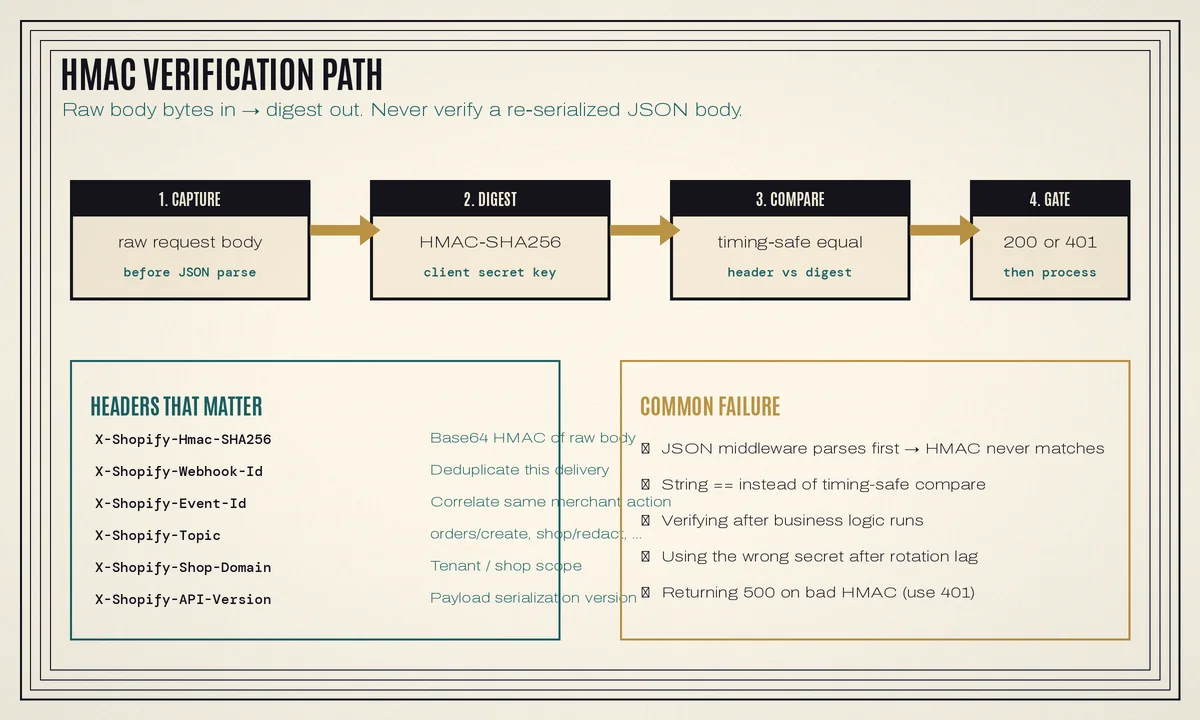
For HTTPS, Shopify signs each body with your app's client secret and sends a Base64 digest in X-Shopify-Hmac-SHA256. Pub/Sub and EventBridge deliveries do not use this HMAC header; trust is established through the cloud identity model instead. Shopify's verify webhook deliveries docs are the source of truth for the HTTPS path.
The verification steps
- Read the raw request body before any JSON parser rewrites it.
- Compute
HMAC-SHA256(raw_body, client_secret)and Base64-encode the digest. - Compare that digest to
X-Shopify-Hmac-SHA256with a timing-safe comparison. - Reject mismatches with 401 Unauthorized before any business logic runs. This is especially important for mandatory compliance webhooks, where Shopify expects 401 on invalid HMAC.
import base64
import hashlib
import hmac
from flask import Flask, request, abort

app = Flask(__name__)
CLIENT_SECRET = b"YOUR_APP_CLIENT_SECRET"

@app.post("/webhooks/shopify")
def shopify_webhook():
    raw = request.get_data()  # raw bytes, not request.json
    header = request.headers.get("X-Shopify-Hmac-SHA256", "")
    digest = base64.b64encode(
        hmac.new(CLIENT_SECRET, raw, hashlib.sha256).digest()
    )
    if not hmac.compare_digest(digest, header.encode("utf-8")):
        abort(401)

    # Persist delivery id, enqueue work, return 200 immediately
    return ("", 200)
If you rotate the client secret, Shopify notes that HMAC digests can take up to an hour to switch to the new secret. Plan dual-secret verification during that window, or expect a burst of 401s.
Why verification fails in real apps
- Express/Django/Flask middleware parses JSON first, so the bytes you hash are not the bytes Shopify signed.
- Someone compares with
==instead of a constant-time helper. - The handler runs business logic, then verifies—attackers get a free probe at your side effects.
- A load balancer or CDN rewrites the body (gzip, charset, trailing newline).
Acknowledge in under five seconds, then process asynchronously
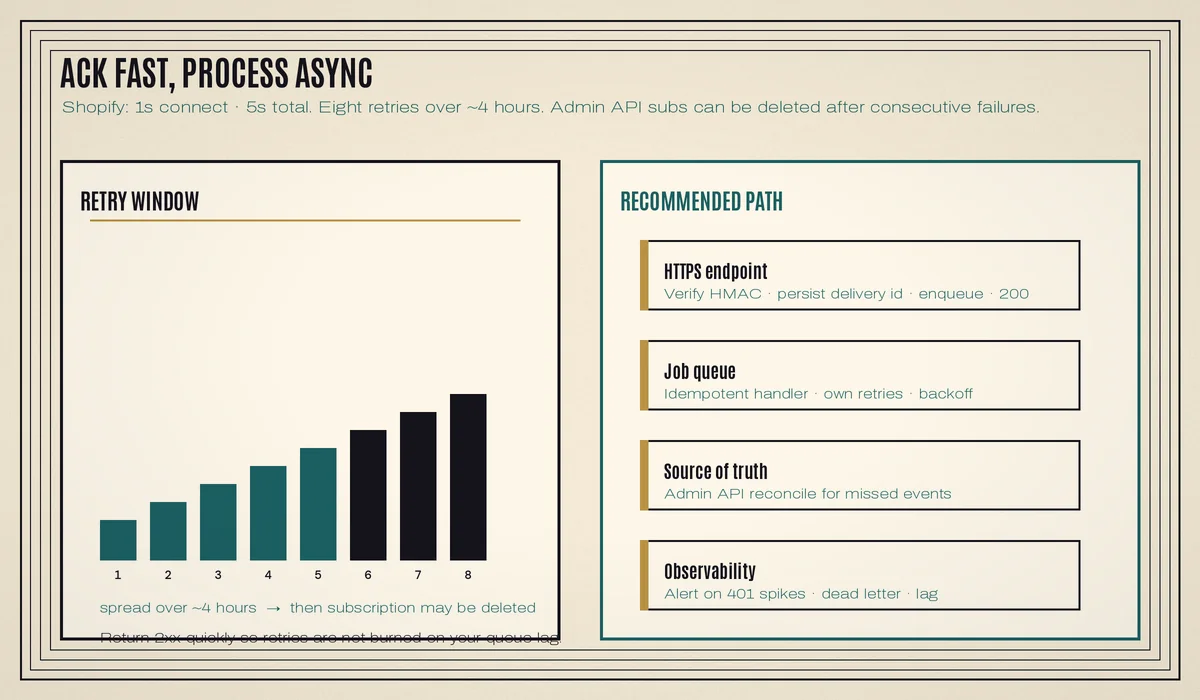
Shopify's HTTPS delivery path uses a one-second connection timeout and a five-second timeout for the whole request. Any status outside the 200 range—including redirects—is treated as failure. If Shopify gets no usable acknowledgment, it retries eight times over about four hours. After eight consecutive failures, subscriptions created through the Admin API can be automatically deleted, with warning mail to the app's emergency developer address.
The durable pattern is the same one we use for other high-volume integrations:
- Verify HMAC.
- Persist enough of the delivery to reprocess later (raw body or parsed payload plus headers).
- Enqueue a background job.
- Return
200immediately. - Let the worker do the slow work with its own retries and dead-letter handling.
If your stack is Django, Celery and Redis are a natural fit; we cover worker design separately in Django Celery and Redis background jobs. Keep-Alive on the HTTPS endpoint also helps: Shopify reuses connections to the same host during bursts.
Cloud destinations change the shape of the problem, not the need for idempotency. Pub/Sub and EventBridge remove the five-second HTTP clock, but your consumer can still see duplicates, out-of-order messages, and poison payloads. Design the handler as if every message might arrive twice.
Idempotency: Webhook-Id vs Event-Id
Shopify minimizes duplicate deliveries, but retries after timeouts mean you will see the same event more than once. Shopify documents two identifiers that people often confuse:
X-Shopify-Webhook-Id— identifies this delivery. Use it to skip a delivery you already accepted.X-Shopify-Event-Id— identifies the underlying merchant action. If you have two subscriptions on the same topic, each delivery gets a different webhook id but the same event id. Use event id to correlate, not as a replacement for per-delivery dedup.
The safest default is both:
- Store
X-Shopify-Webhook-Idin a table with a unique constraint. On conflict, return success and stop. - Make the handler itself idempotent—upserts keyed by Shopify resource id, status transitions that ignore no-ops, and no “increment a counter” side effects without a ledger.
-- delivery ledger (Postgres sketch)
CREATE TABLE shopify_webhook_deliveries (
  webhook_id   text PRIMARY KEY,
  event_id     text,
  shop_domain  text NOT NULL,
  topic        text NOT NULL,
  received_at  timestamptz NOT NULL DEFAULT now(),
  processed_at timestamptz
);

-- handler upsert keyed by Shopify resource
INSERT INTO mirrored_orders (shop_domain, shopify_order_id, payload, updated_at)
VALUES ($1, $2, $3::jsonb, now())
ON CONFLICT (shop_domain, shopify_order_id)
DO UPDATE SET payload = EXCLUDED.payload, updated_at = now();
Order and inventory sync apps feel this most acutely. A second delivery of orders/updated should refresh state, not create a second local row or a second ERP shipment. That is the same discipline we apply when wiring Shopify ERP inventory and order sync.
Mandatory compliance webhooks
Public App Store apps must subscribe to Shopify's mandatory compliance topics and handle them correctly before review. Per Shopify's privacy law compliance requirements:
customers/data_request— provide customer data you hold to the merchant (resource ids in the payload).customers/redact— delete or redact customer data you hold for that shop.shop/redact— 48 hours after uninstall, erase shop data usingshop_id/shop_domain.
Requirements that trip reviews:
- Subscribe in
shopify.app.tomlwithcompliance_topics(or the equivalent Partner configuration). - Accept JSON
POSTbodies. - Return 401 on invalid HMAC.
- Return a 200-series status to acknowledge receipt, then complete the work within 30 days (unless a legal retention duty blocks redaction).
Treat compliance handlers as first-class production paths: verified, logged, idempotent, and covered by automated tests with Shopify CLI webhook trigger for payload shape. Manual triggers do not prove your live subscription is healthy—only that your handler accepts a sample body.
Reconciliation beats hope
Even a correct endpoint will miss events: extended outages longer than the retry window, a deleted Admin API subscription, a bug that returned 500 for a day, or a filter expression that suppressed more than you intended. Webhooks are an accelerant, not a source of truth.
Build a reconciliation job that, on a schedule or after an incident:
- Lists recent Shopify resources you care about (orders, products, fulfillments) via the Admin API.
- Compares them to your local mirror.
- Backfills gaps with the same idempotent upsert path your webhook worker uses.
That shared write path is the difference between “we patched the webhook” and “we restored correctness.” Rate limits apply to reconciliation the same way they apply to any Admin API client—budget bulk operations carefully if you are pulling large catalogs.
A production subscription layout that scales
For most custom apps we recommend:
- App-specific subscriptions in TOML for stable topics tied to the app (including compliance). Shopify keeps these aligned with installs and reduces per-shop Admin API churn.
- Admin API subscriptions only when a topic must be shop-specific or toggled dynamically.
- HTTPS for low-volume or simple apps; Pub/Sub or EventBridge when a shop can emit large bursts or when you already run on that cloud.
- Filters for high-chatter topics (
products/update,orders/updated) once you know which payload conditions matter. Metaobject topics require atype:filter. - One worker code path shared by live webhooks and reconciliation.
If you are still choosing between a custom app, Shopify Functions, and theme extension work, start from the architecture notes in custom Shopify app development with Shopify Functions—webhook design usually sits next to the same auth and tenancy model.
Common mistakes
- Doing real work in the request thread. You will pass load tests and fail the first flash sale.
- No delivery ledger. Retries become duplicate side effects.
- Treating Event-Id as Webhook-Id. Multi-subscription apps will skip valid deliveries or process the wrong unit of work.
- Ignoring subscription deletion. Admin API subscriptions that fail for hours can vanish; monitor warning mail and list subscriptions periodically.
- Compliance as an afterthought. Missing topics or wrong HMAC responses block App Store review.
- No reconciliation. Webhooks alone will eventually drift from Shopify.
- Logging full payloads with PII. Order and customer webhooks contain personal data; redact in logs and restrict retention.
FAQ
Do I need HMAC verification for Pub/Sub or EventBridge?
No. Shopify's HTTPS HMAC header applies to HTTPS deliveries. For cloud buses, follow the platform's authentication and identity guidance, and still make consumers idempotent.
What status code should I return for a bad HMAC?
401 Unauthorized. Especially for mandatory compliance webhooks, Shopify expects 401 on invalid signatures.
How many times does Shopify retry?
On HTTPS failure or timeout, Shopify retries eight times over roughly four hours. Design your own worker retries separately so transient bugs on your side do not depend on Shopify's window alone.
Can filters replace topic choice?
No. Filters narrow deliveries for a topic; they do not create new topics. Invalid filter fields can suppress all deliveries while still leaving the subscription in place—verify with controlled updates after you ship a filter.
Should every topic share one URL?
A single HTTPS path that branches on X-Shopify-Topic is fine for small apps. Split endpoints or queue routing keys when teams, SLAs, or security boundaries differ (for example, compliance vs order sync).
Need help hardening a Shopify app's webhook layer?
CodeSapient builds custom Shopify apps and SaaS backends—auth, webhooks, background jobs, and the Admin API sync underneath. If deliveries are vanishing, HMAC checks are flaky, or you need a reconciliation path before App Store review, look at our custom software and Shopify development services or tell us what you are shipping. We will review the endpoint, queue, and compliance handlers and recommend concrete fixes.