
Django Celery and Redis: Background Jobs That Keep SaaS Responsive
Learn how Django, Celery, and Redis power background jobs so SaaS apps stay responsive—architecture, workers, Beat, retries, and production pitfalls.
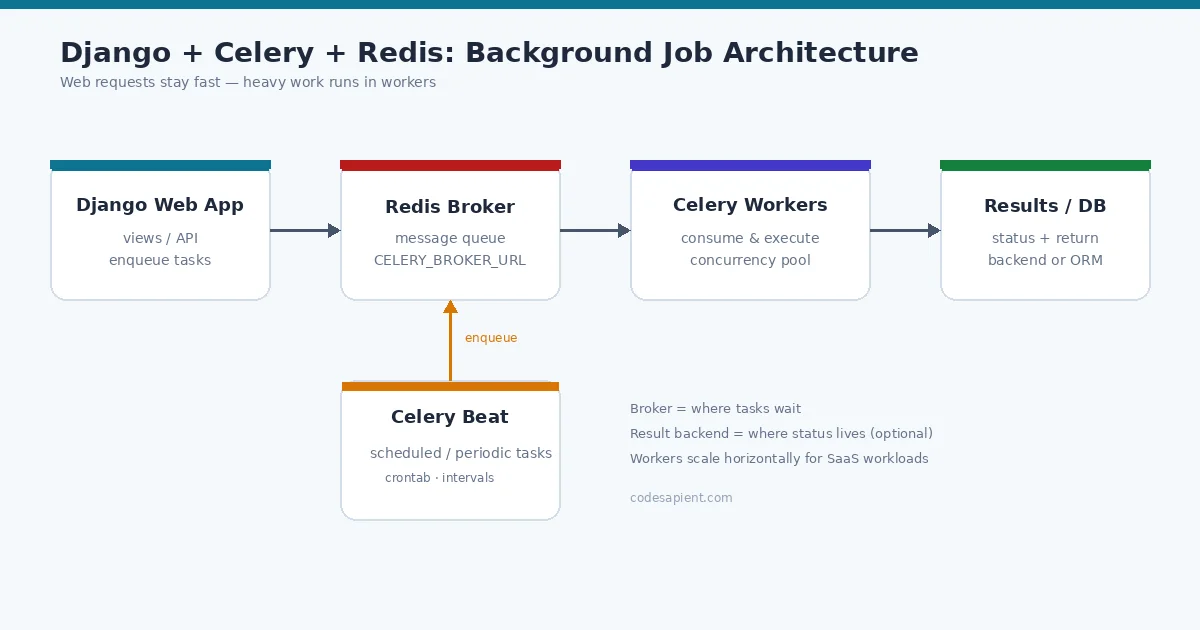
A SaaS product feels slow for one of two reasons: the database is struggling, or the web process is doing work that should not run inside an HTTP request. Generating invoices, calling third-party APIs, sending transactional email, exporting CSVs, and running model inference all belong in the second category. When that work stays in the request path, users hit timeouts, Gunicorn or uWSGI workers pile up, and “the site is down” tickets arrive for what is really a background job problem.
That is why so many production Django stacks pair Celery with Redis. Celery is a distributed task queue; Redis is a fast, operationally familiar message broker (and often a result backend). Together they let the Django web app acknowledge a request quickly, while a Celery worker performs the heavy lifting asynchronously. In other words, Django background tasks move slow work off the request thread without changing your product’s core domain model. This guide explains when to offload work, how the architecture fits together, and the production practices that keep a Django SaaS responsive.
If you are evaluating a custom build, teams like CodeSapient design this layer as part of broader custom SaaS and Django development—not as an afterthought bolted on after launch.
When to offload work from the Django request path
Not every function call needs a queue. Offload when the work is:
- Slow or unbounded — PDF/invoice generation, bulk exports, embeddings, webhook fan-out.
- Externally dependent — email providers, payment gateways, shipping APIs, partner webhooks.
- Retryable — transient network failures should not fail the user’s save action.
- Scheduled — nightly reconciliation, subscription renewals, cleanup jobs.
- Fan-out — one user action triggers many independent side effects.
Keep in the request path what must be correct before you respond: validation, authorization, and the primary database write the UI depends on. A useful rule: if a failure can be retried later without confusing the user, it is a candidate for a Django task queue.
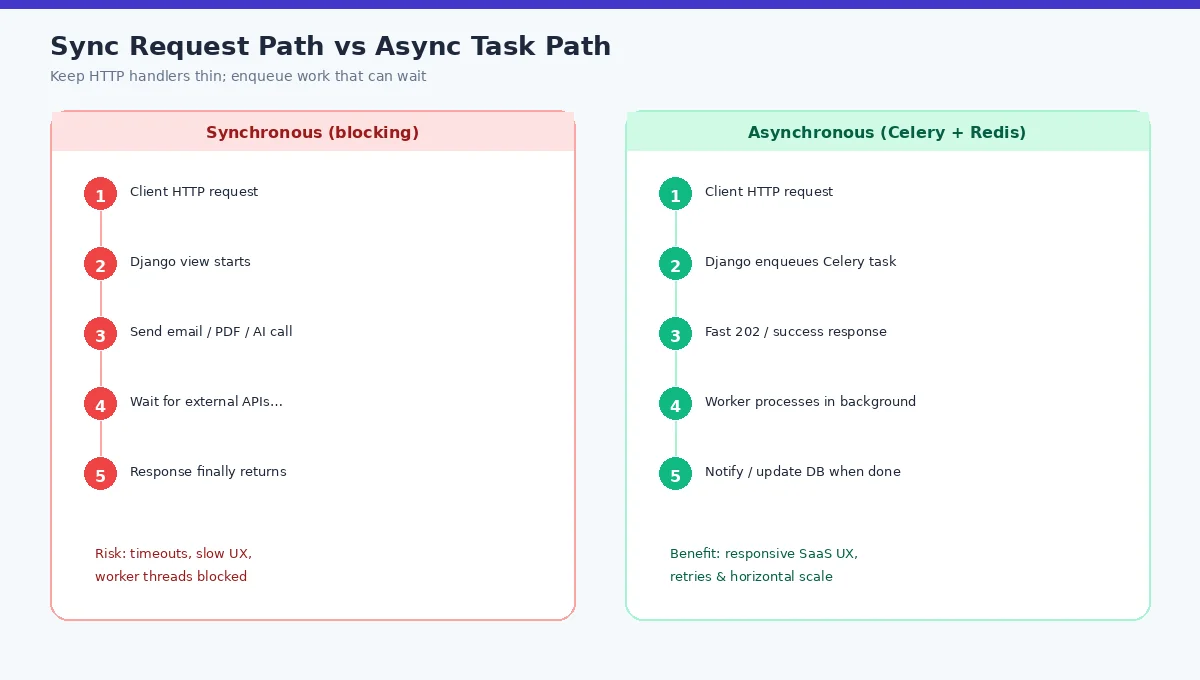
Celery + Redis architecture for Django
At a high level the flow is:
- A Django view or signal creates a task message (for example
send_invoice.delay(order_id)). - Celery publishes that message to the Redis broker.
- One or more Celery workers consume messages, execute the task code, and optionally store a result.
- Your app updates domain state (or notifies the user) when the job finishes—via DB flags, websockets, or polling an AsyncResult.
Official Celery docs cover Django integration in First steps with Django: create a celery.py app, load settings with a CELERY_ namespace, call autodiscover_tasks(), and import the app from your package __init__.py so @shared_task binds correctly.
# settings.py (illustrative)
CELERY_BROKER_URL = "redis://127.0.0.1:6379/0"
CELERY_RESULT_BACKEND = "redis://127.0.0.1:6379/1"
CELERY_TASK_SERIALIZER = "json"
CELERY_ACCEPT_CONTENT = ["json"]
CELERY_RESULT_SERIALIZER = "json"
CELERY_TASK_TRACK_STARTED = True
CELERY_TASK_TIME_LIMIT = 30 * 60
Prefer separate Redis database numbers (or instances) for broker vs results so task traffic and result keys do not collide. Celery’s Using Redis guide warns that broker keys are unprefixed by default—dedicated DB numbers are the safest default.
Broker vs result backend
These roles are easy to conflate:
- Broker — transport for pending task messages. Redis lists/streams hold work until a worker acks it. Configure with
CELERY_BROKER_URL(broker_url). - Result backend — optional store for task state and return values (
SUCCESS,FAILURE, traceback, return payload). Configure withCELERY_RESULT_BACKEND.
Many SaaS jobs are fire-and-forget: enqueue the email, write “queued” on the model, and skip reading AsyncResult later. In that case you can omit a result backend or set ignore_result=True on the task to avoid Redis memory growth. When you need auditability in Django Admin, django-celery-results with CELERY_RESULT_BACKEND = "django-db" is a common choice. Redis remains excellent for short-lived polling UIs—set CELERY_RESULT_EXPIRES aggressively.
Treat Redis as the Redis broker Django apps rely on for speed—not as permanent job history. Persist business outcomes in your application database.
Workers, concurrency, and process topology
Workers are separate OS processes from runserver or your WSGI/ASGI servers:
celery -A proj worker -l INFO
Concurrency (prefork pool by default) controls how many tasks run in parallel per worker. Tune against:
- CPU-bound jobs (PDF, compression) — concurrency near CPU count.
- I/O-bound jobs (HTTP APIs, email) — higher concurrency, careful of connection limits.
- Database connections — each child can open Django DB connections; pool size × concurrency can exhaust Postgres.
For production, run workers under systemd, supervisord, or your orchestrator; scale horizontally by adding worker replicas on the same broker. Separate queues (emails, exports, ai) so a backlog of huge exports cannot starve password-reset emails.
Celery Beat for scheduled tasks
Celery Beat is the scheduler: it periodically enqueues tasks according to crontab or interval schedules. Run exactly one Beat process in the cluster to avoid duplicate schedules (or use a distributed lock / database scheduler).
django-celery-beat stores schedules in the Django database with an Admin UI—useful when product ops need to change cron without redeploying. Typical SaaS uses for Celery Beat scheduled tasks:
- Trial expiration reminders
- Usage metering and invoice generation
- Stale data cleanup and soft-delete sweeps
- Health checks against partner APIs
Retries, timeouts, and idempotency
Background job processing only improves reliability if tasks are designed for failure.
Retries and timeouts
- Set soft/hard time limits so a hung HTTP call cannot pin a worker forever (
CELERY_TASK_TIME_LIMIT,soft_time_limit). - Use
autoretry_for,retry_backoff, andmax_retriesfor transient errors (see Celery’s Django examples with@shared_task). - Do not blindly retry non-idempotent side effects (charging a card twice).
Idempotency
Celery retries idempotency is a design problem, not a config flag. Patterns that work:
- Pass stable business IDs, not large blobs, in task arguments.
- Use a unique job/event key in the database; skip if already processed.
- Make external calls with idempotency keys when the provider supports them.
- Enqueue with Django’s
transaction.on_commit—or Celery 5.4+delay_on_commit()—so workers never see uncommitted rows (a classic race documented in Celery’s Django guide).
from django.db import transaction
from celery import shared_task

@shared_task(bind=True, autoretry_for=(Exception,), retry_backoff=True, max_retries=5)
def send_invoice_email(self, invoice_id):
    # Load from DB; skip if already emailed
    ...

# In the view, after creating the invoice:
transaction.on_commit(lambda: send_invoice_email.delay(invoice.id))
Monitoring and operability
Without visibility, queues become silent failure modes. Minimum bar for Django SaaS architecture:
- Structured logs with task name, args IDs (not secrets), retries, and duration.
- Queue depth alerts on Redis (and per-queue if you split work).
- Worker heartbeats / process supervision restarts.
- Error tracking (Sentry or equivalent) on task exceptions.
- Optional Flower or Prometheus exporters for Celery metrics.
Also monitor Redis memory and eviction policy. If Redis starts evicting keys under pressure, you can lose broker messages or results depending on configuration—treat Redis like critical infra, with persistence and capacity planning appropriate to your durability needs.
Common mistakes with Celery, Redis, and Django
- Running Celery always-eager in production — tasks execute inline; you lose the whole point of async.
- Passing Django model instances as task args — serialize IDs; reload in the worker.
- Enqueueing inside an open transaction — worker races the commit; use
on_commit. - One giant queue for everything — latency-sensitive jobs get stuck behind exports.
- Ignoring result TTL — Redis fills with tombstones you never read.
- Shared Redis DB with cache keys — collisions and accidental
FLUSHDBdisasters. - Non-idempotent retries — duplicate charges, duplicate emails, corrupted counters.
- No poison-pill strategy — permanently failing tasks retry forever and hog workers.
SaaS use cases that fit this stack
Asynchronous tasks Django teams typically implement first:
- Emails and notifications — welcome, receipts, password resets (with bounce handling in a separate task).
- Invoices and PDFs — generate files, store in object storage, email a link.
- Webhooks — outbound partner events with signed payloads and exponential backoff.
- Exports — multi-minute CSV/Excel jobs with progress fields on a Job model.
- AI / LLM jobs — embedding batches, document summarization, RAG indexing pipelines. Long-running retrieval and embedding work should never block the web tier; see our guide on RAG knowledge bases for internal docs for the retrieval side of that architecture. Agent-style workflows that orchestrate tools similarly benefit from queues—related reading: AI agents, MCP, and agentic workflows.
Implementation checklist
- Add Celery app module and
autodiscover_tasksper official Django docs. - Provision Redis; set broker URL; decide result backend (none / Redis / django-db).
- Define task modules per Django app; keep arguments small and explicit.
- Introduce named queues for email vs heavy jobs.
- Wire
on_commitenqueueing for anything tied to ORM writes. - Add retries, time limits, and idempotency keys where side effects exist.
- Run workers + one Beat under process supervision; document how to scale.
- Alert on queue depth, failure rate, and worker liveness before launch.
FAQ
Is Redis required for Celery?
No—RabbitMQ and other brokers are supported—but Redis is a popular, operationally simple choice for many Django SaaS codebases, especially when you already run Redis for cache or sessions (preferably on a separate DB/instance for the broker).
Can I use Django Channels or async views instead?
Async Django helps with concurrent I/O inside the web process; it does not replace a durable task queue for retries, scheduling, and horizontal worker scaling. Many systems use both.
How do users learn a job finished?
Common patterns: poll a Job row, subscribe via websocket, or email/in-app notify when the worker completes. Prefer domain state in Postgres over relying solely on Celery’s result backend.
Conclusion
Celery Redis Django is the workhorse pattern for keeping SaaS UIs snappy while emails, invoices, webhooks, exports, and AI jobs run reliably in the background. Get the boundaries right—broker vs result backend, workers vs Beat, retries with idempotency—and you buy headroom instead of timeout pages.
If you need help designing or hardening a Django SaaS architecture—queues, workers, and the product workflows around them—contact CodeSapient. Explore custom software services or more engineering notes on the blog.