
Custom Shopify App Development with Shopify Functions (2026)
A 2026 guide to custom Shopify app development with Shopify Functions: Wasm architecture, Plus vs public apps, Scripts comparison, and when to build.
Custom Shopify app development in 2026 rarely means “another Admin iframe that calls the REST API.” The purchase path itself is extensible: discounts, delivery options, payment presentation, cart transforms, validation, fulfillment constraints, and order-routing location rules can run as Shopify Functions—small WebAssembly modules Shopify invokes inside checkout and related commerce flows.
This article explains when to build a custom Shopify app, how Functions change the architecture, what Plus vs public-app distribution implies, and how to decide between Scripts-era thinking and modern Function APIs. It is aimed at brands and ops leads evaluating development partners, and at technical buyers who need accurate constraints—not marketing fog.
What “custom Shopify app” means now
A Shopify app is software that extends Admin, Checkout, Storefront, or backend logic using Shopify’s extension surfaces and APIs. “Custom” usually means distributed to one merchant (or a controlled set) rather than listed on the App Store. “Public” means App Store distribution with review and install flows for many shops.
Both can include:
- Admin UI extensions and embedded apps
- Theme app extensions
- Checkout UI extensions (where plan and targets allow)
- Shopify Function APIs compiled to WebAssembly
- Backend services using Admin GraphQL, webhooks, and offline/online access tokens
CodeSapient’s own ShipAssign is an example of a Shopify app focused on a concrete ops problem—automatic shipping-profile assignment from product rules—while custom client work often combines Admin automation with Functions at checkout. See also ShipAssign on CodeSapient and our broader development services.
Shopify Functions in 2026: how they work
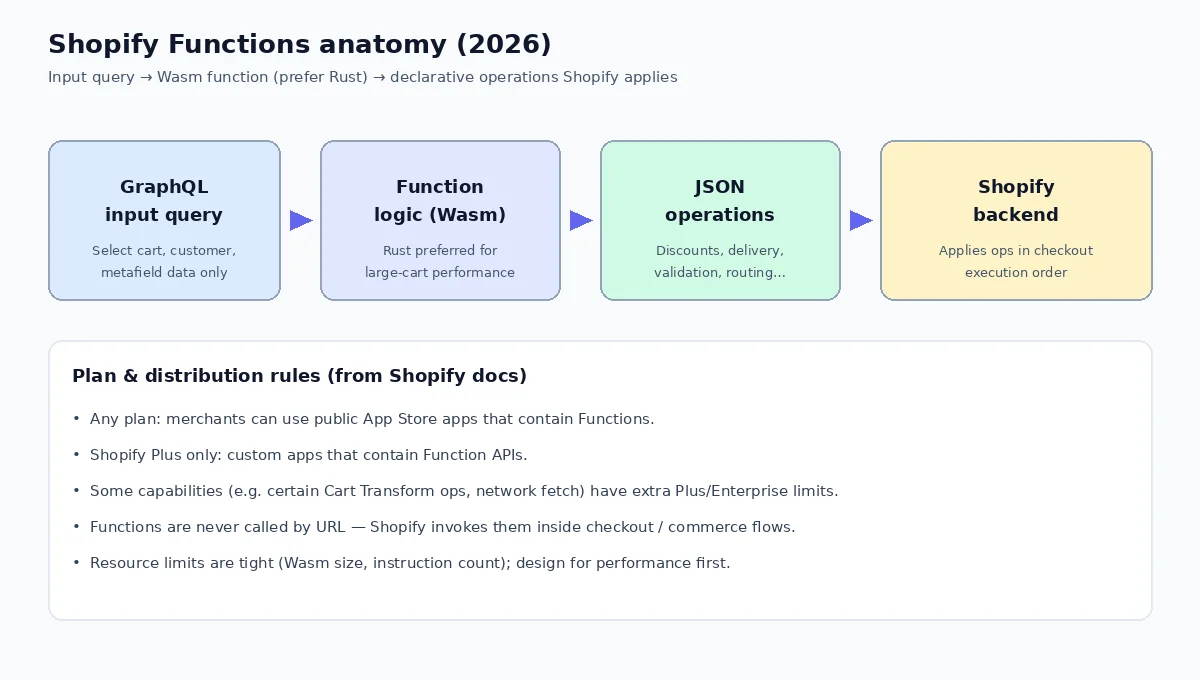
According to Shopify’s developer documentation on Shopify Functions, a Function is not an HTTP endpoint you call. Shopify invokes it when a configured target runs (for example during discount calculation or delivery customization). The shape is consistent:
- Input — JSON produced from a GraphQL input query you define against that Function API’s schema (cart lines, buyer identity, metafields, and so on).
- Logic — your module, compiled to WebAssembly. Templates exist for Rust and JavaScript; Shopify strongly recommends Rust for performance so large carts do not blow instruction or memory limits.
- Output — a declarative JSON document of operations Shopify should apply (hide a payment method, rename a delivery option, emit discount candidates, rank locations, block progress, and similar).
Function APIs are versioned (for example 2026-01 / 2026-04 lines in current docs). You scaffold with Shopify CLI (shopify app generate extension), keep api_version current in shopify.extension.toml, and regenerate schemas when you bump versions.
Where Functions sit in checkout
Shopify documents a defined execution order across cart transform, discounts, fulfillment constraints, order routing, delivery customization, payment customization, and validation. Your Function only sees data appropriate to its stage—and later steps depend on earlier ones. Designing “one mega-function” is usually the wrong model; pick the Function API that matches the business rule.
Common Function families (names evolve; always check the current Function API reference):
- Discount Functions
- Cart Transform
- Delivery / payment customization
- Cart and checkout validation
- Fulfillment constraints
- Order routing location rules
- Local pickup / pickup point generators and charges
Public apps with Functions vs custom apps (Plus)
This is the constraint technical buyers must get right. Shopify’s Functions docs state clearly:
- Stores on any plan can use public App Store apps that contain Functions (except where an individual API page notes otherwise).
- Only Shopify Plus stores can use custom apps that contain Shopify Function APIs.
- Some capabilities are Plus-only even beyond that (examples in current docs include certain Cart Transform
update/lineUpdateoperations, and limited network “fetch” targets—often Enterprise/custom-app constrained). Always verify the specific API page.
Practical reading for a non-Plus merchant who needs checkout logic: prefer a public app that already implements the Function, or budget for Plus if the logic must live in a private custom app. For a Plus merchant, custom Functions are a first-class path to proprietary pricing, delivery, validation, and routing rules without publishing to the App Store.
If a proposal says “we’ll ship a custom Function app” without asking whether the store is Plus, treat that as a discovery failure—not a detail to fix later.
Shopify Functions vs Scripts
Shopify Scripts (Ruby-based checkout customization on older Plus workflows) trained a generation of merchants to expect line-item and shipping tweaks at checkout. Functions are the modern, Wasm-based replacement path with different packaging:
- Language & runtime — Scripts were Ruby in Shopify’s Scripts environment; Functions are Wasm modules (Rust preferred).
- Distribution — Scripts were merchant-configured in a Plus-centric world; Functions ship inside apps, with the public-vs-custom Plus rule above.
- Surface area — Function APIs cover a broader, explicitly versioned set of targets (discounts, transforms, validation, routing, and more).
- Operations model — Functions return declarative operations against a schema rather than mutating an arbitrary script context.
- Performance contract — hard resource limits (compiled size, linear memory, instruction counts that scale with cart size). Oversized JS logic is a common production failure mode.
When you hear “we used to do this with Scripts,” translate the requirement into the matching Function API and confirm plan + distribution before estimating.
When to build a custom Shopify app
Build (or commission) a custom app when at least one of these is true:
- The rule is proprietary — pricing, eligibility, routing, or validation encodes your operating model and should not depend on a generic App Store toggle.
- Native settings are exhausted — Markets, shipping profiles, order routing defaults, and native discounts cannot express the policy.
- Systems integration is the product — ERP, WMS, PIM, or OMS must drive Admin or checkout behavior through webhooks + Functions + metafields.
- You need Admin workflows — bulk tools, approval queues, or merchant UX that theme edits cannot safely provide.
- Compliance or audit — you must own the code path, logs, and change control.
Prefer a public app when the problem is common (example: keeping products on the correct shipping profiles with rule engines—ShipAssign’s domain) and a maintained App Store product already fits. Prefer custom development when the checkout math, routing score, or B2B constraints are unique to the brand.
Architecture patterns that work
- Metafields as configuration — merchants edit structured config; Functions read metafields via input queries (watch query cost limits).
- Precompute offline — heavy joins against ERP happen in your backend; Functions stay tiny and deterministic.
- One concern per Function — compose discount + delivery + validation as separate extensions rather than one brittle module.
- Determinism — Shopify disallows nondeterministic Function behavior (no random/clock-driven logic). Design accordingly.
- Observability — you cannot debug with STDOUT; use Shopify’s Function logging/Dev Dashboard tooling and disciplined input fixtures in CI.
Performance, limits, and language choice
Official limits (treat as documentation snapshots—reconfirm on Function APIs when you build) emphasize that Functions run on the purchase path:
- Compiled binary size on the order of hundreds of kB
- Bounded runtime linear/stack memory
- Instruction-count budgets that scale with cart line counts
- Input query complexity caps (cost budget for selected fields)
That is why Shopify “strongly recommends Rust” for Functions. JavaScript can be fine for modest logic; large carts and chatty input queries are where JS Modules fail first. Budget engineering time for fixture carts that mirror production line counts—not three-line demo carts.
Checkout customization without boiling the ocean
Teams often say they need “checkout customization” when they need one of:
- Hide or rename payment/delivery options (payment/delivery customization Functions)
- Bundle or present cart lines differently (Cart Transform—note Plus constraints on some operations)
- Block checkout on policy violations (validation Functions)
- Change which warehouse is preferred (order routing location rule Functions)
- UI changes in checkout (Checkout UI extensions—separate from Functions, with their own plan rules)
Separate UI extensions from backend Functions in the statement of work. Confusing them produces wrong estimates and wrong Plus assumptions.
How CodeSapient approaches Shopify app work
As a development partner, CodeSapient typically:
- Maps the business rule to native settings vs app vs Function API targets.
- Confirms plan (Plus or not) and distribution (custom vs public) before scaffolding.
- Designs metafield/metaobject config merchants can operate without redeploys.
- Implements Wasm Functions (Rust when performance risk is real) plus Admin UX.
- Tests against large-cart fixtures and failure modes (missing metafields, empty markets, split fulfillments).
ShipAssign illustrates the “focused public app” path for shipping-profile automation. Custom Functions work covers Plus merchants who need proprietary checkout and routing logic. For portfolio context, see our portfolio; to start a build discussion, use contact.
Buyer checklist before you sign an SOW
- Which exact Function API targets are in scope?
- Is the store Plus if the app must be custom and contain Functions?
- Could a public App Store app already solve 80% of the need?
- What is the maximum realistic cart size in peak season?
- Who owns metafield taxonomy and merchant training?
- How will we version Function API upgrades quarterly?
- What happens when Shopify changes checkout execution order or deprecates a target?
FAQ
Can non-Plus stores use Shopify Functions at all?
Yes—by installing public App Store apps that contain Functions, subject to each API’s documented exceptions. Custom apps that contain Function APIs require Plus.
Do we still need a backend server if we use Functions?
Often yes. Functions are deliberately small and deterministic. ERP sync, auth, long-running jobs, and Admin UX usually live in your app backend; Functions consume prepared metafields or cart data at request time. Network-enabled Function fetch targets exist but are tightly limited (commonly Enterprise/custom-app constrained)—do not assume arbitrary HTTP from every Function.
Are Shopify Functions the same as Checkout UI extensions?
No. Functions customize backend logic and return operations. Checkout UI extensions customize interface. Many projects need both; they are different extension types with different constraints.
Conclusion
Custom Shopify app development in 2026 is as much about choosing the right extension surface—and respecting Plus vs public Function distribution—as it is about writing GraphQL. Shopify Functions give you precise, versioned hooks into checkout and fulfillment logic via WebAssembly, with Rust as the performance default and hard resource limits you must design for.
If you are evaluating a build—discounts, delivery rules, validation, cart transforms, or routing—contact CodeSapient to scope Function targets against your plan. Explore Shopify development services, see how we ship productized apps like ShipAssign, or read our related guide on AI agents for eCommerce when agentic tooling sits beside your Shopify stack.