
Shopify ERP Integration: Sync Orders and Inventory Without Drift
Plan a Shopify ERP integration that stays in sync: one owner per field, queued webhooks, idempotent inventory writes for API 2026-04, bulk reconciliation, and when a connector beats custom code.
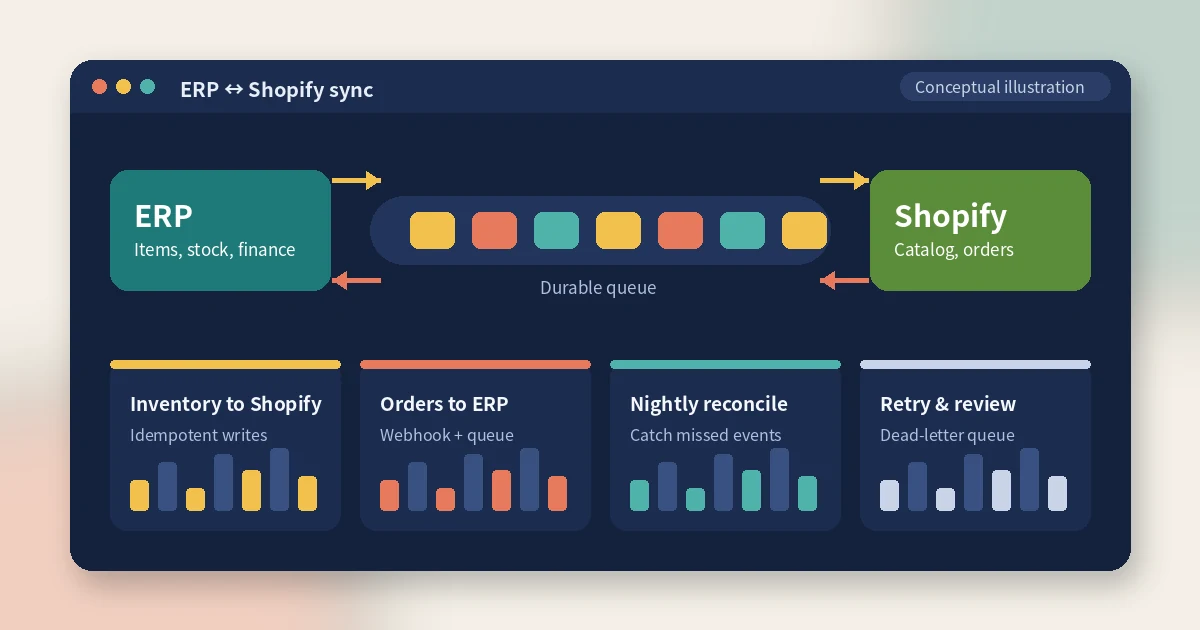
The ERP says you have 40 units. Shopify says 12. The warehouse swears it shipped yesterday's orders, finance cannot close the month because three refunds never reached the ledger, and nobody can say which system is wrong. That is what an unplanned Shopify ERP integration looks like six months after go-live: not a single dramatic outage, but steady drift between two systems that each think they are in charge.
This guide is for founders, operations leads, and engineering teams deciding how to connect Shopify to an ERP such as NetSuite, Microsoft Dynamics 365 Business Central, SAP Business One, or Odoo. It covers who should own which data, when an off-the-shelf connector is enough, how a reliable order and inventory sync is structured, and the Shopify Admin API changes in 2026 that break older integrations. The patterns are the same ones we use when CodeSapient builds or repairs commerce integrations.
What a Shopify ERP integration actually has to sync
Most projects start with "sync orders and stock" and discover the real scope later. A complete integration usually touches five flows:
- Catalog: items, variants, SKUs, cost, pricing, and sometimes product content. Usually flows from the ERP (or a PIM) into Shopify.
- Inventory: sellable quantity per location. Usually flows from the ERP or WMS into Shopify.
- Orders: line items, discounts, taxes, shipping charges, payment status, and customer details. Flows from Shopify into the ERP as sales orders or invoices.
- Fulfillment: shipment confirmation and tracking numbers. Flows from the WMS, 3PL, or ERP back into Shopify so customers get notified.
- Refunds and returns: credit notes, restocks, and payment reversals. Flows from Shopify into the ERP so revenue and stock stay correct.
Customers, B2B price lists, gift cards, and payouts can join the list, but these five decide whether the integration is trusted or quietly worked around with spreadsheets.
Decide the system of record before you write any code
The most expensive integration bug is not a coding error. It is two systems writing the same field. If staff edit prices in Shopify while the ERP pushes prices every hour, one of them silently loses. Write down a single owner for every field and enforce it in code: the owner writes, every other system reads.
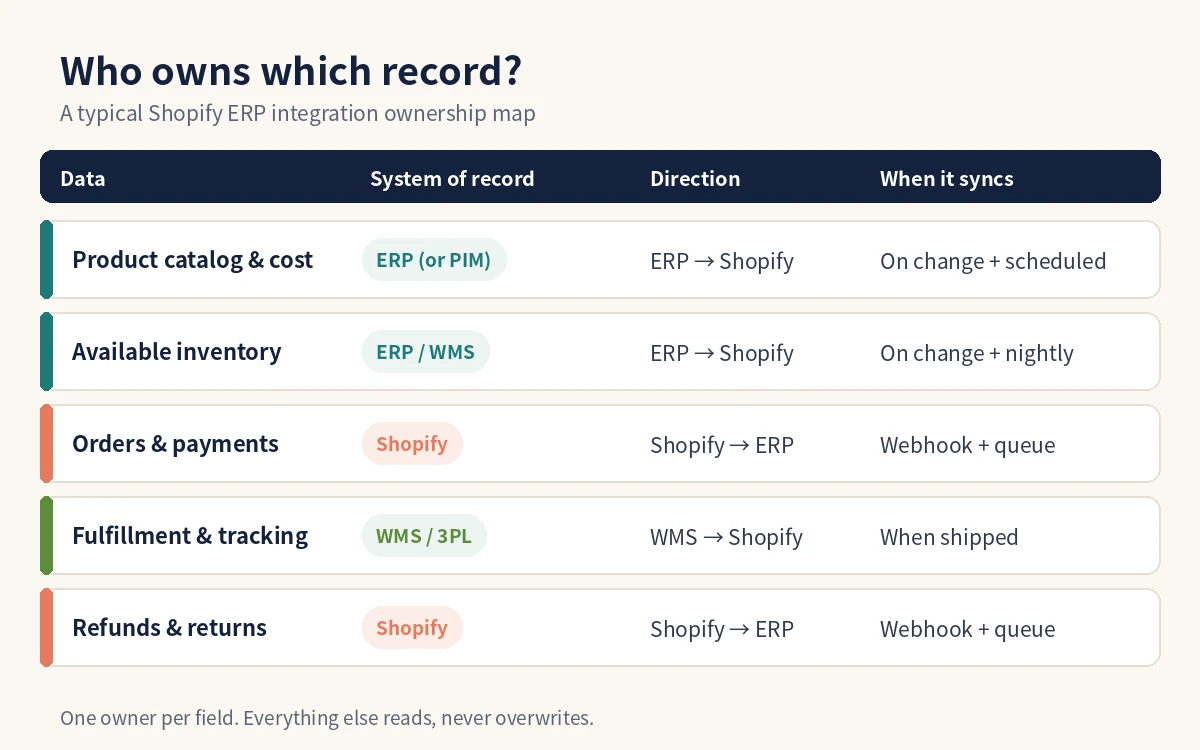
A common split for ERP-led businesses:
- The ERP or WMS owns physical inventory and the available-to-sell figure per warehouse.
- Shopify owns orders and payments, because checkout happens there.
- The ERP or PIM owns SKUs, cost, and base pricing; Shopify may own merchandising content such as descriptions, images, and collections.
- The fulfilling system owns tracking, and posts it back to Shopify once.
Map Shopify locations to ERP warehouses explicitly as part of this step. If your store already runs several fulfillment locations, our guide to managing multiple warehouses in Shopify explains how locations, inventory, and fulfillment priority interact before an ERP enters the picture.
Connector, iPaaS, or custom integration?
This is the commercial decision, and there is no universal answer. A rough way to choose:
- Prebuilt connector app: fits when your ERP has a maintained Shopify connector, your data model is close to the default, and you can accept its field mappings. Fastest to launch. The risk is customisation: once you need bundles, multi-entity accounting, or unusual tax handling, connectors can become hard to bend.
- iPaaS or middleware (Celigo, Boomi, MuleSoft, and similar): fits when you integrate more than two systems, want visual mapping, and have someone to own the flows. You still need to design idempotency, retries, and reconciliation; the platform does not decide those for you.
- Custom integration service or custom Shopify app: fits when the business logic is the differentiator (complex allocation, B2B pricing, manufacturing lead times), volumes are high, or connectors have failed you. You own the code and the on-call. Our article on custom Shopify app development with Shopify Functions covers when a custom app is justified.
Whatever you pick, ask the vendor or team the same questions: How are duplicate webhooks handled? What happens when the ERP is down for two hours? How do we find and replay a failed order? Is there a scheduled reconciliation? Vague answers here predict the drift described at the top of this article.
Reference architecture for a reliable sync
The shape that survives production is boring on purpose: events go into a durable queue, workers process them idempotently, and a reconciliation job catches whatever the events missed.
- Receive: subscribe to Shopify webhook topics such as
orders/create,orders/paid,orders/updated,refunds/create, andfulfillments/create. Verify the HMAC signature, store the payload, and respond quickly. Shopify can also deliver webhooks to Google Cloud Pub/Sub or Amazon EventBridge instead of your own HTTPS endpoint. - Queue: put each event in a durable queue so an ERP outage delays work instead of losing it.
- Process: workers map the payload to ERP documents, using stable IDs (Shopify order GID, ERP document number) to detect duplicates.
- Write back: ERP-side events (stock changes, shipments) call the GraphQL Admin API through a rate-aware client.
- Reconcile: a scheduled job compares both systems and repairs or flags differences.
- Review: anything that fails repeatedly lands in a dead-letter queue with enough context for a human to fix and replay it.
Shopify is explicit that apps should not rely on webhooks alone. Its webhook guidance notes that delivery is not always guaranteed, ordering is not guaranteed within or across topics, and apps should run reconciliation jobs that fetch objects updated since the last run. Deduplicate on the X-Shopify-Webhook-Id header and order events using X-Shopify-Triggered-At or the payload's updated_at. Our deeper write-up on webhook reliability patterns covers signatures, idempotency tables, and retry queues in detail.
Order sync from Shopify to the ERP
Decide which event creates the ERP document. Many businesses create the sales order on orders/paid rather than orders/create, so unpaid or pending-payment orders do not reach the ledger. Store the Shopify order ID on the ERP document and check it before inserting; that one unique constraint prevents most duplicate-order incidents. Then handle the edits that happen after the first sync: address changes, cancellations, partial refunds, and line-item edits. Each needs a defined behaviour in the ERP, even if that behaviour is "flag for manual review".
Inventory sync from the ERP to Shopify
Push changes when stock moves in the ERP, and run a periodic full comparison as a safety net. Two design choices matter most:
- Set
availableoron_hand? Shopify tracks several inventory states. Per Shopify's inventory states guide,on_handis the sum ofavailable,committed,reserved,damaged,safety_stock, andquality_control, and thecommittedstate is managed by Shopify itself as orders are created and fulfilled. If your ERP already subtracts open Shopify orders, settingavailableis straightforward. If the ERP only knows physical stock, settingon_handlets Shopify keep deducting committed units, but you must align when the WMS and Shopify each consider a unit shipped. - Absolute or relative updates?
inventorySetQuantitieswrites an absolute value and Shopify recommends it only for the system that is the source of truth.inventoryAdjustQuantitiesapplies deltas, which suits event-by-event changes such as a receipt or a damaged unit.
The 2026-04 Admin API changes every ERP integration must handle
If your integration was written before 2026, check it against Shopify's 2026-04 API version. Shopify made two inventory safety features mandatory, and both are breaking changes for older code.
Idempotency is required. According to the Shopify changelog, from 2026-04 mutations including inventorySetQuantities, inventoryAdjustQuantities, inventoryMoveQuantities, inventoryActivate, and refundCreate must include an @idempotent directive with a unique key. Shopify notes that the schema does not mark it as required, but calls without it fail at runtime. When a request times out and you retry with the same key, Shopify returns the original result instead of applying the change twice. Generate the key from your own job or event ID so a retried worker reuses it. In bulk mutations, each JSONL row needs its own key.
Compare-and-swap is required. Inventory mutations now take a changeFromQuantity: the quantity you expect to be there before your change. If someone else changed it first, Shopify rejects the write with a CHANGE_FROM_QUANTITY_STALE error, and your worker should re-read and recompute instead of overwriting. You can opt out by passing null explicitly, which Shopify suggests only when your system is the definitive source of truth. The older compareQuantity and ignoreCompareQuantity inputs were removed in 2026-04.
mutation SetStock($input: InventorySetQuantitiesInput!, $key: String!) {
  inventorySetQuantities(input: $input) @idempotent(key: $key) {
    inventoryAdjustmentGroup { id changes { name delta } }
    userErrors { code field message }
  }
}

# variables
{
  "key": "erp-stock-sync-7f3c2a90-0b1e-4c55-9a41-2d6f1e8b3c07",
  "input": {
    "name": "available",
    "reason": "correction",
    "referenceDocumentUri": "gid://erp-connector/SyncJob/SYNC-2026-10-05-001",
    "quantities": [{
      "inventoryItemId": "gid://shopify/InventoryItem/123",
      "locationId": "gid://shopify/Location/456",
      "quantity": 38,
      "changeFromQuantity": 40
    }]
  }
}
The referenceDocumentUri is worth filling in. It appears in Shopify's inventory adjustment history, so when a merchant asks why stock changed, the answer points to a specific ERP sync job instead of an anonymous app. See the inventorySetQuantities reference for the current input shape.
One more 2026-04 behaviour change: quantity mutations no longer fail when an item is not stocked at a location. Shopify can create an inactive inventory level that stores the quantity but is not sellable or fulfillable there until you activate it with inventoryActivate or inventoryBulkToggleActivation. An integration that used to rely on that error to detect unmapped locations needs an explicit check now.
Catalog sync, bulk operations, and rate limits
Build new integrations on the GraphQL Admin API; Shopify labels the REST Admin API as legacy and publishes a migration guide. GraphQL is rate-limited by calculated query cost rather than request count, and every response reports the remaining budget in extensions.cost.throttleStatus. A sync client should read that value and slow down before it gets throttled, rather than retrying blindly after errors. Shopify's API limits page also caps input arrays at 250 items and pagination at 25,000 objects, which matters when you batch inventory updates or page through large catalogs.
For initial loads and nightly reconciliation, use bulk operations instead of paging through products and inventory levels. You submit a query, Shopify runs it asynchronously, and you download a JSONL file when the bulk_operations/finish webhook arrives or polling shows completion. The bulk query's execution does not count against your normal rate limit, and from API version 2026-01 an app can run up to five bulk queries per shop at the same time. Stream the file line by line; large catalogs produce files you should not load into memory.
A catalog detail that ERP teams often miss: products created through the API land in Shopify's general shipping profile unless something assigns them elsewhere. If your ERP creates oversized, hazardous, or region-restricted items, decide how they reach the correct shipping profile. You can set that in the integration itself, or use a rule-based app such as ShipAssign, which assigns products and variants to shipping profiles based on attributes like tags, vendor, product type, SKU, or weight, and can keep evaluating new and updated products.
Mapping details that cause most production incidents
- SKU uniqueness: Shopify does not force unique SKUs, while most ERPs key items on them. Validate before sync and store the Shopify variant and inventory item IDs against the ERP item so you never match on SKU text alone.
- Bundles and kits: a bundle sold as one Shopify product may be several ERP items. Decide where explosion into components happens and how bundle availability is calculated.
- Taxes, discounts, and shipping lines: agree how order-level discounts are allocated to lines and which tax amounts the ERP recalculates versus accepts from Shopify. Finance should sign off on sample orders before launch.
- Partial fulfillments and refunds: one order can ship in three parcels and be refunded twice. Model these as separate documents, each with its own idempotency check.
- Time zones and currencies: Shopify timestamps are UTC. Convert deliberately for ERP posting dates, especially near month-end, and store both shop and presentment currency where multi-currency is enabled.
How to tell your integration is healthy
Track a small set of numbers and alert on them:
- Order sync success rate: share of orders that reach the ERP without manual intervention.
- Sync latency: time from Shopify event to ERP document, and from ERP stock change to Shopify update.
- Inventory variance: SKUs and locations where Shopify and the source of truth disagree after reconciliation.
- Dead-letter queue size and age: how many events wait for a human, and for how long.
- Throttle and stale-quantity errors: rising counts usually mean concurrency or batching problems.
Give operations staff a simple screen to search an order, see where it is in the pipeline, and replay it. That one screen saves more support time than any amount of logging that only engineers can read.
FAQ
How long does a Shopify ERP integration take?
It depends on scope more than on the ERP. A connector with default mappings can go live quickly; a custom integration covering orders, inventory, fulfillment, refunds, and bundles needs time for mapping workshops, testing with real orders, and a parallel run before cutover. Budget explicitly for finance sign-off and reconciliation testing, which teams routinely underestimate.
Should inventory sync in real time?
Near real time for stock changes, plus a scheduled reconciliation. Pure real-time sync without reconciliation drifts when events are missed; pure batch sync oversells during busy periods.
Do I need to update an existing integration for API version 2026-04?
If it calls inventory or refund mutations, yes. Add an @idempotent key to each call, pass changeFromQuantity (or an explicit null), remove compareQuantity and ignoreCompareQuantity, and handle inactive inventory levels.
Can the ERP and Shopify both edit prices?
They can, but they should not both own the same price field. Pick one owner; if merchandisers need promotional pricing in Shopify, keep it in a separate field or price list the ERP never overwrites.
Is a custom integration always better than a connector?
No. A maintained connector that fits your data model is cheaper to run. Custom work pays off when your processes are unusual, volumes are high, or the connector cannot express your rules.
Conclusion
A dependable Shopify ERP integration comes down to a few decisions made early: one owner per field, events through a durable queue, idempotent writes with compare-and-swap, bulk reconciliation that catches missed events, and a review screen that lets people fix exceptions without engineers. Shopify's 2026-04 API changes make idempotency and concurrency checks mandatory for inventory and refunds, so this is a good moment to audit older connectors as well as plan new ones.
If you are choosing between a connector and a custom build, or untangling an integration that has started to drift, talk to CodeSapient about a review of your data ownership, sync design, and 2026-04 readiness.