
Shopify Metafields and Metaobjects: Custom Store Data That Scales
A practical guide to Shopify metafields and metaobjects: definitions, app-owned vs merchant-owned namespaces, Liquid and Admin GraphQL usage, metaobject types, and how to avoid N+1 reads and schema drift.
Every Shopify store eventually outgrows title, description, tags, and variants. You need care instructions on products, size charts that are not buried in HTML, B2B account tiers on customers, or content blocks that marketing can edit without a theme deploy. That is what Shopify metafields and metaobjects are for: typed custom data attached to Shopify resources, plus standalone structured entries you can reference, publish, and render.
This guide is for merchants and developers who want definitions that survive app installs, Liquid that does not break on missing keys, Admin GraphQL that batches writes cleanly, and ownership choices that will not fight the next integration. Facts below follow Shopify’s current custom-data model (definitions, app-owned vs merchant-owned namespaces, metaobject types, and access settings)—not folklore from old “private metafield” tutorials.
The problem: custom data without a schema
Unstructured custom fields feel fast on day one. An app writes namespace=specs, key=voltage as a string. A theme reads it. Six months later another app reuses specs.voltage as a number, a merchant edits the value in admin into free text, and a Storefront query expects a list reference. Nothing crashed at write time—Shopify accepted the key-value pair—so the bug shows up as blank PDP sections, broken filters, or silent sync drift into an ERP.
Metafield definitions fix that by declaring type, owner, validations, and access before values land. Metaobjects go further when the data is not “a field on a product” but “an object with several fields” that many products should share (authors, lookbooks, size charts, warranty plans).
- Metafields — key-value custom fields on a resource (product, variant, customer, order, shop, and more).
- Metaobjects — standalone entries with a definition (type + field definitions), optionally referenced from metafields.
- Definitions — the schema layer for both: types, validation, admin/storefront access, and ownership.
Shopify’s own framing is clear: use metafields to extend built-in models; use metaobjects when you need reusable structured objects. See the official overview of metafields and metaobjects on Shopify.dev.
Metafield anatomy: namespace, key, type, owner
A metafield identity is namespace + key on a given owner. The type tells Shopify how to store and interpret the value (single-line text, multi-line text, integer, decimal, boolean, date, JSON, file reference, product/variant/collection/metaobject references, lists of those types, and others). The definition also sets who can read or write the field in Admin and whether the Storefront API may expose it.
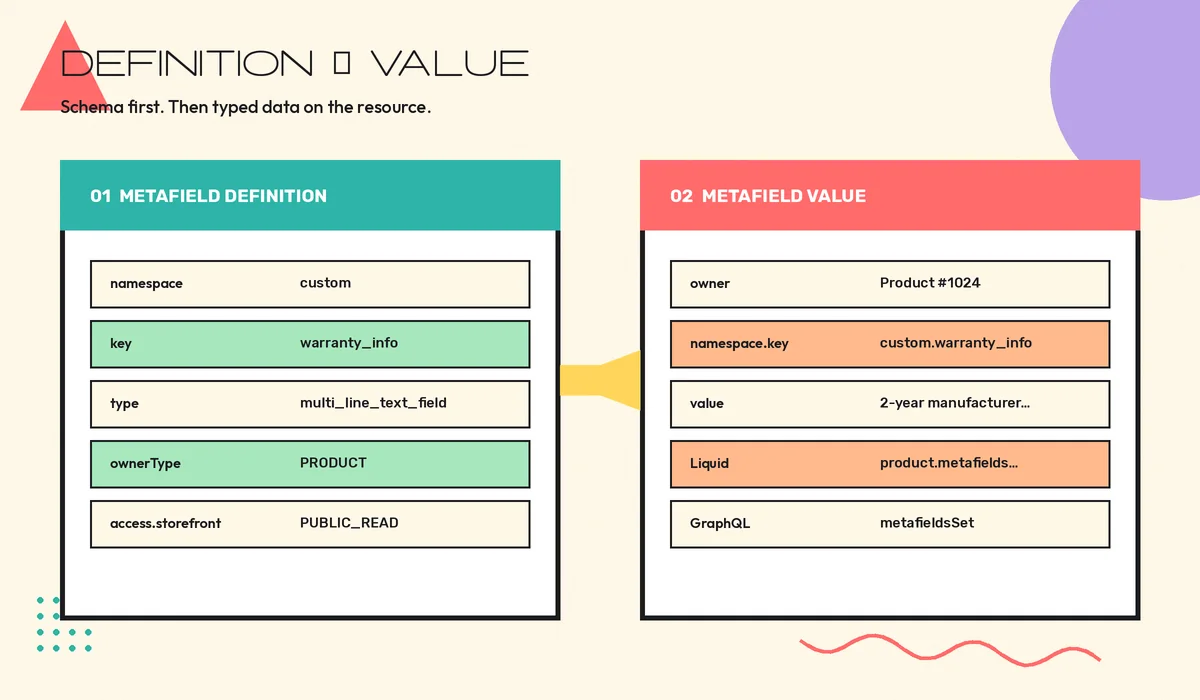
Practical rules that prevent most support tickets:
- Pick a stable
namespace.keyand treat it as an API contract. - Prefer a definition before bulk-writing values; when you create a definition, Shopify validates existing unstructured metafields that match the same owner/namespace/key and upgrades valid ones to the definition’s type.
- Use standard definitions when they fit (ISBN, care instructions, and similar) so apps and channels agree on meaning.
- Remember Liquid can read metafields regardless of Storefront API access; Storefront
accessmainly gates headless/Hydrogen clients.
Liquid access that does not surprise you
In Online Store themes, the usual path is resource.metafields.namespace.key. For product warranty text in the merchant-owned custom namespace:
{{ product.metafields.custom.warranty_info.value }}If the key is size, first, or last, use bracket notation so Liquid does not treat the name as a filter:
{{ product.metafields.custom["size"].value }}Always null-check before printing. Missing metafields are normal during migrations and partial catalog syncs.
Ownership: app-owned vs merchant-owned
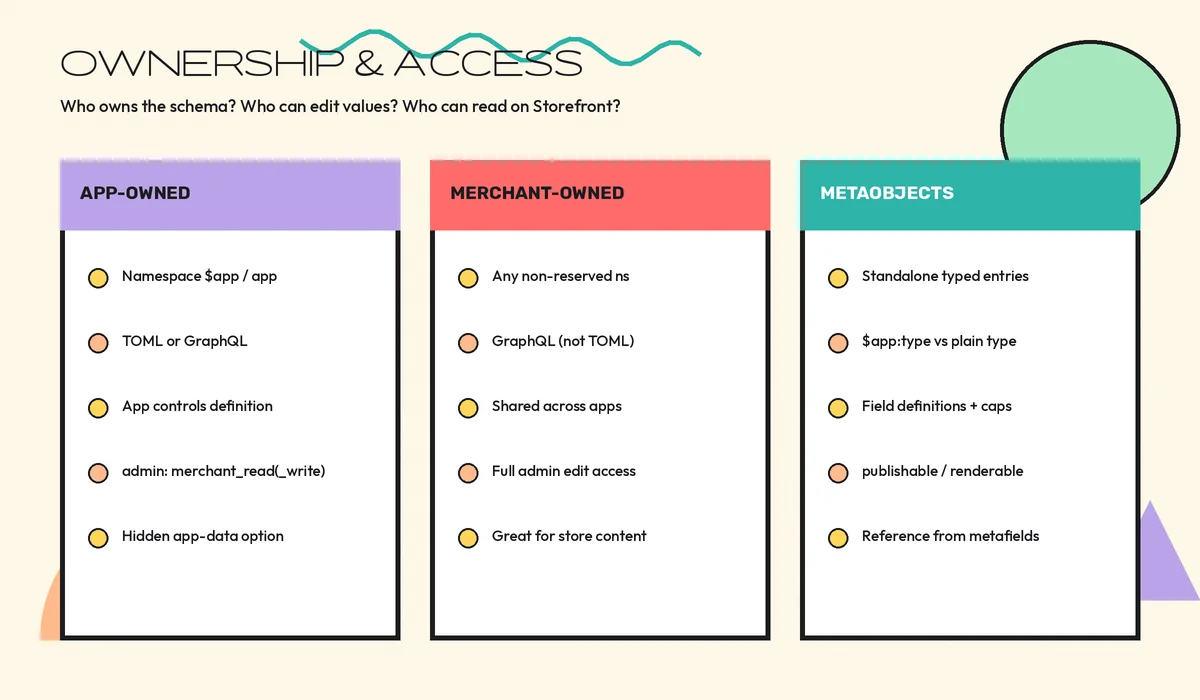
Ownership decides who controls the schema and who can edit values. Getting this wrong is how apps fight each other—and how merchants lose control of fields they thought were “theirs.”
App-owned metafields
Use the reserved namespace $app in GraphQL (or app in shopify.app.toml). Your app owns the definition. Merchants typically see values as read-only unless you grant merchant_read_write. Declarative TOML definitions deploy consistently across every install—ideal for internal SKUs, sync cursors that must stay typed, or configuration the theme should not casually overwrite.
[product.metafields.app.internal_sku]
name = "Internal SKU"
type = "single_line_text_field"
There is also a stricter variant: app-data metafields on the AppInstallation resource, hidden from admin, suitable for per-install config—not for secrets (keep credentials in env/secret storage).
Merchant-owned metafields
Use any non-reserved namespace such as custom, specs, or inventory. Merchants and installed apps with scopes can edit structure and values. Create these with Admin GraphQL (metafieldDefinitionCreate), not TOML. They are the right default for storefront content merchants will maintain—warranty copy, material notes, badge labels.
mutation {
  metafieldDefinitionCreate(definition: {
    name: "Warranty Information"
    namespace: "custom"
    key: "warranty_info"
    type: "multi_line_text_field"
    ownerType: PRODUCT
    access: { storefront: PUBLIC_READ }
  }) {
    createdDefinition { namespace key type { name } }
    userErrors { field message }
  }
}
Metaobjects: when a field is not enough
A size chart with size, chest, and waist is a poor fit for three disconnected metafields duplicated on every product. A metaobject definition declares a type and field definitions; entries hold the data; products reference the entry via a metafield of type metaobject_reference (or list).
Ownership mirrors metafields:
- Merchant-owned type — plain type string like
size_chart; editable in admin; other apps can participate. - App-owned type — prefix
$app:(for example$app:warranty_info); the app controls the definition; setaccess.adminif merchants should edit entries.
TOML keeps app-owned definitions versioned with the app. GraphQL is better when merchants invent types through your UI (CMS-like builders). Shopify documents both paths under manage metaobject definitions.
mutation {
  metaobjectDefinitionCreate(definition: {
    type: "size_chart"
    name: "Size Chart"
    access: { storefront: PUBLIC_READ }
    fieldDefinitions: [
      { key: "size" name: "Size" type: "single_line_text_field" required: true }
      { key: "chest_inches" name: "Chest (inches)" type: "number_decimal" }
      { key: "waist_inches" name: "Waist (inches)" type: "number_decimal" }
    ]
  }) {
    metaobjectDefinition { id type }
    userErrors { field message }
  }
}
Capabilities matter for content workflows: publishable adds draft/active status; translatable enables translation; renderable supports SEO-oriented Liquid/Storefront use. Plan type identifiers carefully—type strings are not casually renameable after creation.
Writing values with Admin GraphQL
After definitions exist, set values with resource updates or the dedicated metafieldsSet mutation. Match namespace, key, and type to the definition. Batch related keys in one call when you are mapping ERP attributes onto a product—fewer round trips, clearer failure surfaces. For rate-limit and cost budgeting on large catalogs, pair this with the patterns in our guide to Shopify GraphQL API rate limits.
mutation SetWarranty($metafields: [MetafieldsSetInput!]!) {
  metafieldsSet(metafields: $metafields) {
    metafields { id namespace key value }
    userErrors { field message code }
  }
}
Custom apps that own definitions often ship them in TOML and only mutate values at runtime—the same discipline used in serious custom Shopify app development. ERP and inventory connectors should treat metafields as part of the sync contract, not as an afterthought alongside SKUs—see Shopify ERP integration for orders and inventory.
Performance: stop N+1 metafield reads
Metafields are cheap individually and expensive in naive loops. Classic failure modes:
- Theme sections that call
product.metafields.ns.keyfor twenty keys inside a collection grid without considering what the section actually renders. - Admin scripts that fetch a product, then issue a separate metafield query per key instead of requesting needed metafields in one GraphQL selection.
- Storefront clients that request entire metafield namespaces “just in case,” inflating query cost and payload size.
Prefer explicit key selections. Cache derived presentation (badge text, combined spec rows) at the edge or in your app when values change rarely. Heavy metafield-driven layouts can also hurt interaction readiness—keep critical PDP above-the-fold data lean, consistent with Shopify Core Web Vitals guidance.
Common mistakes (and better defaults)
- No definition — unstructured values invite type drift. Define first.
- Wrong ownership — putting merchant content in
$applocks them out; putting app-critical sync fields incustomlets other apps overwrite them. - Overloaded namespaces — one mega-namespace for every integration. Split by concern (
erp,shipping,content). - HTML stuffed into single-line fields — use the right type (multi-line, rich text, or a metaobject) instead of encoding structure into strings.
- Deleting definitions casually — metaobject definition deletes cascade asynchronously to related entries and linked metafield definitions. Treat deletion as a migration with backups.
- Assuming Storefront access equals Liquid access — Liquid availability is separate; set Storefront access explicitly for headless.
- Ignoring uninstall retention — app-owned definitions go away on uninstall; retained entry data is temporary. Do not design reinstall recovery around GIDs—look up by type.
Practical use cases
- PDP enrichment — materials, fit notes, sustainability scores as merchant-owned metafields with Storefront read.
- Shared content — authors, lookbooks, and size charts as metaobjects referenced from products.
- Ops sync — app-owned metafields for external IDs, last-sync timestamps, and checksums used by connectors.
- B2B context — customer or company metafields for tier, payment terms, or approval flags that feed draft-order flows (related reading: AI purchase order processing for Shopify B2B).
- Theme-driven merchandising — badge metafields that marketing edits without theme releases.
Migration checklist for messy catalogs
- Inventory current namespaces/keys and which apps write them.
- Decide ownership per field: app-owned for app logic, merchant-owned for store content.
- Create definitions with the intended types and validations.
- Fix or quarantine invalid legacy values before relying on admin UI editing.
- Update themes and Storefront queries to explicit keys; remove speculative namespace dumps.
- Document the contract for ERP/sync jobs; reject writes that violate type.
- Add monitoring for
userErrorsonmetafieldsSetand definition deploys.
If you need a clean custom-data model for a Shopify store or app—definitions, metaobjects, sync-safe ownership, and theme/Storefront wiring—CodeSapient designs and builds that layer as part of custom Shopify development. Explore our services or contact the team.
FAQ
Should I use metafields or metaobjects?
Use a metafield when the data belongs to one resource as a typed attribute. Use a metaobject when you need a reusable structured record with multiple fields, especially when many products share the same entry.
Can merchants edit app-owned metafields?
By default they are view-oriented in admin. Grant merchant_read_write on the definition if merchants should edit values while your app still owns the schema.
Do Storefront access settings affect Liquid?
No. Metafields remain accessible in Liquid templates regardless of Storefront API access. Configure Storefront access for headless clients separately.
What happens to metaobjects when an app uninstalls?
App-owned definitions are removed; related data retention is temporary and not something to depend on. Prefer looking up definitions by type after reinstall, not by old GIDs.
Key takeaways
- Shopify metafields and metaobjects are the supported way to model custom store data with types, access, and ownership—not ad-hoc key dumps.
- Definitions first; values second. Match Liquid and GraphQL to the same namespace/key/type contract.
- App-owned (
$app/$app:) for app-controlled schemas; merchant-owned for shared store content. - Metaobjects shine for reusable multi-field content; reference them from metafields instead of duplicating strings.
- Design for explicit reads, batched writes, and uninstall/migration reality—not for “we’ll fix the schema later.”