
Shopify GraphQL API Rate Limits: Query Cost, Throttling, and Bulk Operations
How Shopify GraphQL API rate limits really work: calculated query cost, the leaky bucket, reading throttleStatus, building a backoff-aware client, and when to switch to bulk operations and webhooks so your app scales with large merchants.
A Shopify sync job that runs cleanly on a development store has a habit of falling over the first time it meets a real merchant catalog. The logs fill with Throttled errors, inventory updates land for some products and not others, and someone adds a sleep(2) to make the problem go away. It comes back the next time the catalog grows.
The root cause is usually a misunderstanding of how Shopify GraphQL API rate limits work. The GraphQL Admin API does not count requests. It counts query cost, and a single badly shaped query can use more of your budget than a hundred small ones. Once you understand that model, throttling stops being a mystery and becomes something you can design around.
This guide covers how query cost and the leaky bucket work, how to read the throttle data in every response, how to back off correctly, and when to switch to bulk operations. Every limit quoted comes from Shopify's developer documentation, linked so you can check current figures.
How Shopify GraphQL API rate limits actually work
Limits are per app and per store
Shopify applies GraphQL Admin API rate limits to each combination of app and store. Calls your app makes to one store do not affect your limit on another store, and another app installed on the same store has its own separate budget. The store's plan sets how quickly that budget refills:
- Standard plans: 100 points per second
- Advanced Shopify: 200 points per second
- Shopify Plus: 1,000 points per second
- Shopify for enterprise (Commerce Components): 2,000 points per second
That plan dependency matters for app builders. A sync that is comfortably fast on a Plus store can take ten times as long on a Standard store, so throughput planning has to start from the slowest plan you support, not the one you test on.
The leaky bucket
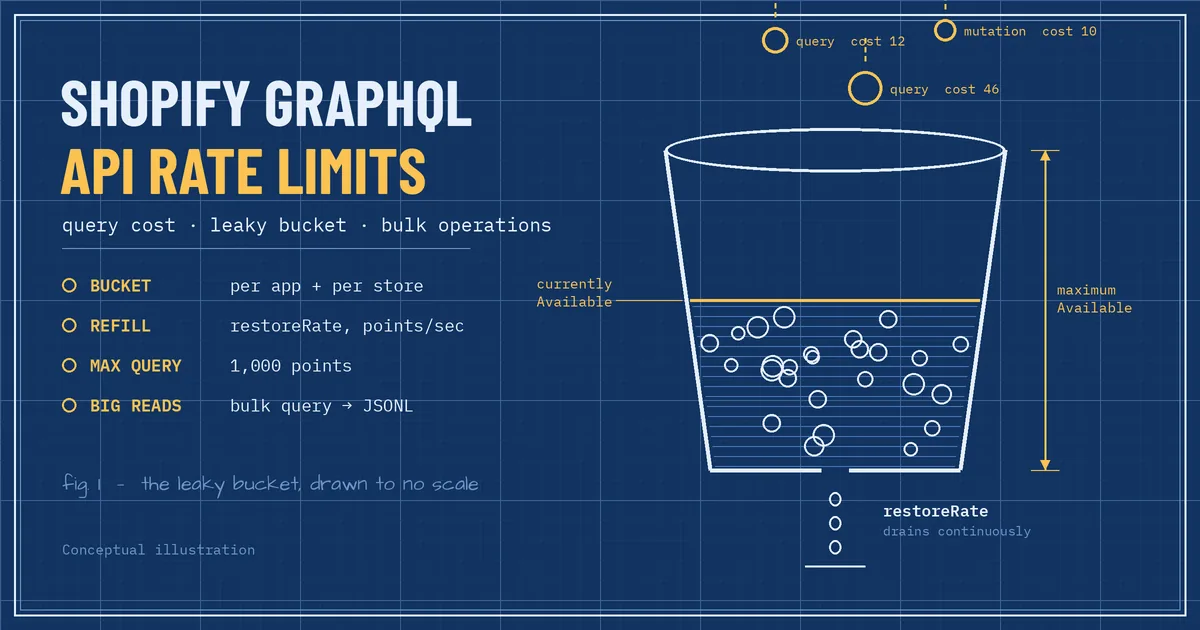
Shopify enforces these limits with a leaky bucket algorithm. Each app has a bucket of capacity. Every request drops some points into it, and the bucket drains continuously at the restore rate for the store's plan. If a request would overflow the bucket, it is throttled and you have to wait for capacity to drain back.
The practical consequence is that short bursts are fine. As long as your average cost per second stays under the restore rate, you can fire off a quick run of queries without being throttled. Problems start when a job sustains a cost rate above the restore rate for long enough to empty the headroom.
Requested cost versus actual cost
Every field in the schema has a cost. Scalars and enums cost nothing, objects cost one point, mutations cost ten, and connections are sized by the first or last argument you pass. Shopify calculates cost twice:
- Requested cost is calculated before execution from the fields and page sizes you asked for. Your bucket must have at least this much capacity available or the query will not run.
- Actual cost is calculated after execution from what was really returned. If a connection returned fewer items than you asked for, the difference is refunded to your bucket.
This is why nested connections are expensive even when the data is small. If you request 250 products and 100 variants per product, the requested cost is sized for the worst case, not for the one variant most of those products actually have.
Hard limits that throttling cannot fix
Some limits are not about pacing at all, and retrying will never get a request through them:
- A single query cannot exceed a requested cost of 1,000 points, regardless of plan.
- Input arguments that accept an array are capped at 250 items.
- A connection returns at most 250 resources per page, and Shopify documents a pagination cap of 25,000 objects, which also applies to count queries.
- On stores with 500,000 or more product variants, non-Plus stores can create at most 10,000 new variants per day, on any API.
If your design depends on breaking one of these, the answer is a different approach, usually bulk operations, not a smarter retry loop.
Reading the throttle status Shopify sends back
Every GraphQL Admin API response carries cost information under the extensions key. Shopify's documentation shows a response shaped like this:
"extensions": {
  "cost": {
    "requestedQueryCost": 101,
    "actualQueryCost": 46,
    "throttleStatus": {
      "maximumAvailable": 1000,
      "currentlyAvailable": 954,
      "restoreRate": 50
    }
  }
}
Those three throttle fields are everything a client needs to pace itself. currentlyAvailable tells you how much room is left, restoreRate tells you how fast it comes back, and maximumAvailable tells you the size of the bucket. If you send the header Shopify-GraphQL-Cost-Debug=1 during development, the response also breaks the requested cost down field by field, which is the quickest way to find the connection that is inflating a query.
A well-behaved app logs requestedQueryCost and actualQueryCost for every named operation. After a week of data you will know which queries are heavy, and whether the gap between requested and actual cost means your page sizes are far larger than the data you really get back.
Why Shopify apps get throttled
Throttling almost always traces back to a handful of patterns:
- Oversized nested connections. Asking for
first: 250on an outer connection and a large page on an inner one inflates the requested cost and can exceed the 1,000-point single-query ceiling before anything runs. - Selecting fields nobody uses. Queries copied from a GraphQL explorer tend to carry every field that looked interesting. Each object field and connection adds cost.
- Several workers sharing one bucket without coordinating. Five parallel workers hitting the same store all draw from the same app-and-store budget. Each one looks polite on its own, but together they drain it.
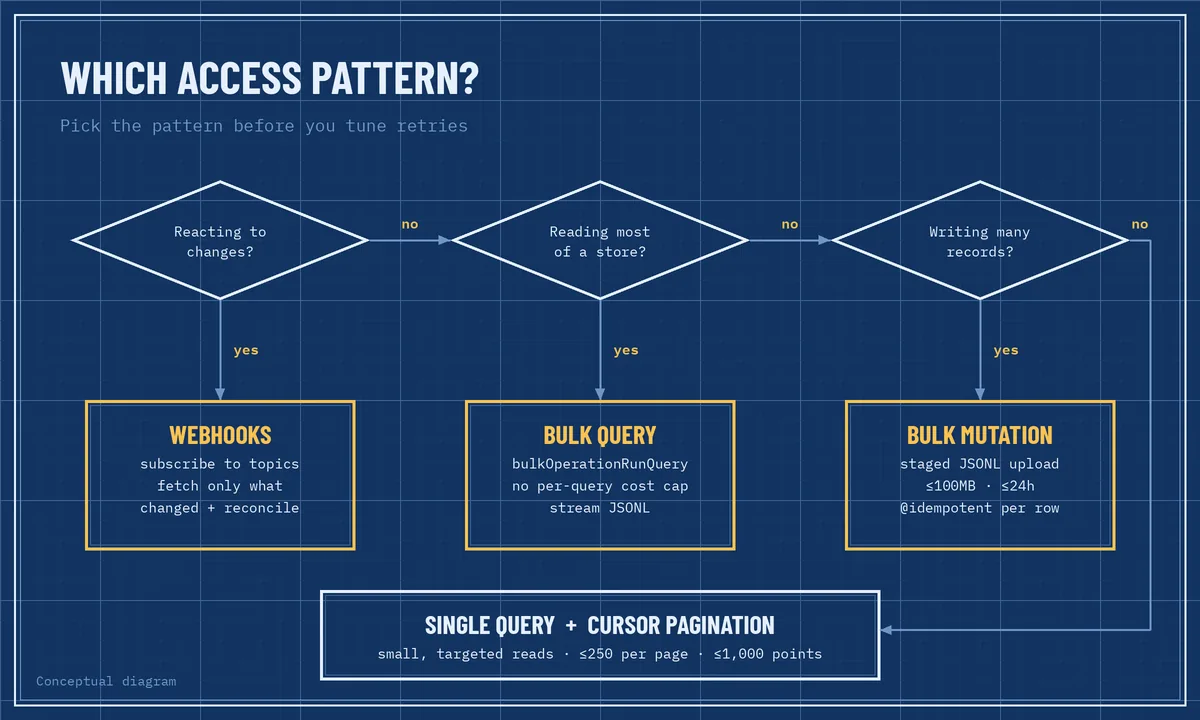
- Polling for changes. Re-reading orders or products every few minutes to look for changes spends budget on data that has not changed. Webhooks exist so you do not have to.
- Retry storms. A client that retries immediately after a throttle error keeps the bucket full and makes the problem worse.
- Using paginated queries for full exports. Walking an entire catalog 250 items at a time is the slowest and most expensive way to read it.
Building a throttle-aware GraphQL client
Shopify's general guidance is to regulate the rate of requests, catch throttle errors rather than ignore them, use the usage metadata returned with each response, and stop making requests until enough time has passed to retry, with one second as the recommended backoff. A production client turns that into a few concrete behaviours:
- Treat throttling as a normal response. A throttled GraphQL query usually comes back as an error with the extension code
THROTTLED, not as an exception from your HTTP library. Check for it explicitly. - Wait for the capacity you actually need. If a query needs 300 points, 120 are available, and the restore rate is 100 per second, waiting about two seconds is enough. Waiting a fixed ten seconds wastes time, and retrying immediately wastes budget.
- Add jitter. A little randomness stops parallel workers from waking up and colliding at the same instant.
- Cap retries and surface failures. After a few attempts, fail the job loudly so it can be retried from a queue, instead of looping forever inside one request.
Here is a minimal Python version of that loop for read queries:
import random
import time
import requests

API_VERSION = "2026-01"

def shopify_graphql(shop_domain, token, query, variables=None, max_retries=5):
    url = f"https://{shop_domain}/admin/api/{API_VERSION}/graphql.json"
    headers = {"X-Shopify-Access-Token": token, "Content-Type": "application/json"}

    for attempt in range(max_retries):
        resp = requests.post(url, json={"query": query, "variables": variables or {}},
                             headers=headers, timeout=30)
        if resp.status_code in (429, 502, 503):
            time.sleep(min(2 ** attempt, 30) + random.random())
            continue
        resp.raise_for_status()
        body = resp.json()

        cost = body.get("extensions", {}).get("cost", {})
        status = cost.get("throttleStatus", {})
        throttled = any(err.get("extensions", {}).get("code") == "THROTTLED"
                        for err in body.get("errors", []))
        if throttled:
            needed = cost.get("requestedQueryCost", 100)
            available = status.get("currentlyAvailable", 0)
            rate = status.get("restoreRate") or 50
            time.sleep(max(1.0, (needed - available) / rate) + random.random())
            continue
        return body

    raise RuntimeError("Shopify GraphQL request still throttled after retries")
This is deliberately simple. A real app would also share throttle state across workers and keep the API version in configuration.
Coordinating workers per store
Because the budget belongs to the app-and-store pair, the unit of coordination is the store. A common pattern is to route all work for a given shop through a per-shop queue or a shared limiter in Redis that records the last known currentlyAvailable and restoreRate. Workers ask the limiter for capacity before sending a query instead of discovering the limit by hitting it. If you run background jobs with Celery, the queue design in our guide to Celery and Redis background jobs in Django applies directly here.
Per-shop queues also give you fairness. One merchant with a huge catalog should not delay syncs for every other store using your app.
When to stop paginating and use bulk operations
If a job needs to read most of a store's products, orders, or customers, cursor pagination is the wrong tool. Shopify's own rate limit documentation points large reads to bulk query operations, which are not subject to the single-query cost limit or the normal rate limits.
How bulk queries work
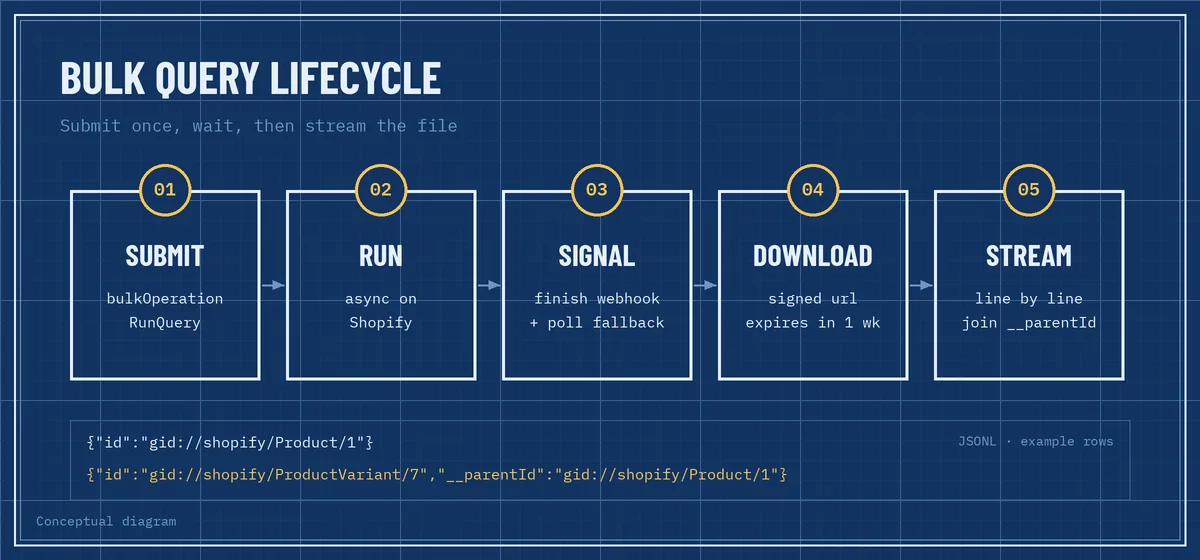
You submit a query with bulkOperationRunQuery, Shopify runs it asynchronously, and when it finishes you download the results as a JSONL file, with one JSON object per line. Nested connections are flattened. Each child row carries a __parentId field pointing to its parent, so a product line is followed by its variant lines. Details worth knowing before you design around them:
- From API version
2026-01, each app can run up to five bulk query operations per shop at the same time. Earlier versions allow one bulk operation of each type per shop. - A bulk query must finish within 10 days, or it is stopped and marked as failed.
- A bulk query can contain at most five connections, nested at most two levels deep.
- Download URLs are signed and expire after one week, so store the file yourself if you need it later.
- If an operation fails partway, a partial file may still be available through
partialDataUrl.
To know when an operation is finished, subscribe to the bulk_operations/finish webhook topic. Shopify notes that webhook delivery is not guaranteed, so keep a fallback that polls the operation's status, using bulkOperation(id:) from version 2026-01 or currentBulkOperation on older versions. Parse the JSONL file line by line instead of loading it into memory, because full-catalog exports get large.
One tip from Shopify's documentation that saves a lot of debugging: run the query as a normal query first. Bulk operations fail with terse error codes such as ACCESS_DENIED or TIMEOUT, while a normal query tells you exactly which field is the problem.
Bulk mutations for large writes
For large imports, bulk mutation operations follow the same idea in reverse. You write one line of mutation variables per record into a JSONL file, reserve an upload target with stagedUploadsCreate, upload the file, and start the job with bulkOperationRunMutation. The file can be up to 100MB, the operation must complete within 24 hours, and the mutation is limited to one connection field. Creating, polling, and cancelling bulk operations are low-cost requests, so this is far gentler on your budget than thousands of individual mutations.
Replace polling with webhooks
The cheapest query is the one you never send. Instead of re-reading orders or inventory on a timer, subscribe to the webhook topics for the events you care about and fetch only the records that changed. Pair that with a periodic reconciliation job, such as a nightly bulk query that catches anything a missed webhook left behind, and you get both freshness and correctness.
Webhooks bring their own reliability work: signature verification, fast acknowledgement, deduplication, and replay. We cover those patterns in SaaS webhook reliability: signatures, idempotency, and retries.
Retry writes safely with idempotency
The retry loop above is safe for reads. Writes need more care. If a mutation times out, you do not know whether Shopify applied it, and a blind retry can create a duplicate or double-adjust inventory.
Shopify supports idempotent requests for this case. Some mutations accept an idempotency key as an argument, and others accept an @idempotent(key: "...") directive. Repeated requests with the same key and parameters are executed only once. Mutations that support the directive say so in their reference documentation, and Shopify recommends a randomly generated UUID as the key. With bulk mutations, the key goes into each JSONL row, so idempotency applies per record rather than to the whole file.
Generate the key when the job is created, store it with the job, and reuse it on every retry. A key generated fresh inside the retry loop protects nothing.
Common mistakes to avoid
- Hard-coding plan figures. Read
restoreRateandmaximumAvailablefrom responses instead of assuming a number. Shopify notes it may temporarily reduce limits to protect platform stability. - Testing only on a Plus or development store. Load-test against the restore rate of the smallest plan you support.
- Using a fixed sleep as rate limiting. It is either too slow or not slow enough, and it never adapts.
- Treating every error as retryable. A query over 1,000 points or an input array over 250 items will fail forever. Fix the query.
- Ignoring the version in examples. Bulk operation concurrency and the status query changed in
2026-01. Check behaviour against the API version your app actually calls. - No observability. Without per-operation cost logs, you cannot tell which query to optimise when a large merchant installs your app.
A practical checklist
- Name every GraphQL operation and log its requested and actual cost.
- Trim fields and right-size page sizes using the cost debug header.
- Route work per store through a queue or shared limiter that reads
throttleStatus. - Back off for the capacity you need, with jitter and a retry cap.
- Use bulk queries for full reads and bulk mutations for large writes.
- Use webhooks for change detection, plus a reconciliation job.
- Attach idempotency keys to any write you might retry.
The same principles hold for any integration that moves data between Shopify and another system. If you are connecting Shopify to an ERP or warehouse system, our guide to Shopify ERP integration and inventory sync covers the data ownership side of that design.
Frequently asked questions
What is the Shopify GraphQL Admin API rate limit?
It depends on the store's plan: 100 points per second on Standard plans, 200 on Advanced, 1,000 on Shopify Plus, and 2,000 on Shopify for enterprise. Limits apply per app and per store, and a single query cannot exceed 1,000 points.
How do I know my app was throttled?
The response contains an error with the extension code THROTTLED, and the extensions.cost.throttleStatus object shows how much capacity is available and how fast it restores. Use those values to decide how long to wait.
Are bulk operations rate limited?
Bulk operations are not subject to the single-query cost limit or the normal rate limits that apply to single queries. They have their own limits, including concurrency per shop, a 10-day limit for queries, a 24-hour limit for mutations, and a 100MB input file size for bulk mutations.
Build Shopify integrations that scale with your merchants
Rate limits are not an obstacle to work around at the end of a project. They are a design input, like database indexes or queue capacity. Apps that read their throttle status, coordinate per store, and use bulk operations and webhooks for the heavy lifting stay fast as merchants grow, while apps built on fixed sleeps and polling slow down with every new install.
CodeSapient builds custom Shopify apps, integrations, and back-office automation, including the sync pipelines and queue infrastructure behind them. If your app is hitting throttle errors or you are planning an integration that has to handle large catalogs, take a look at our development services or read how we approach custom Shopify app development. When you are ready to talk through your use case, get in touch with our team.