
Shopify Fulfillment Orders API: Move, Hold, Split and Reroute Orders Safely
A developer guide to the Shopify Fulfillment Orders API: when to move, reroute, hold, split or merge fulfillment orders, how to avoid releasing other apps' holds, and a routing loop that is safe to retry.
Shopify has already picked a location for the order, and it's the wrong one. Maybe the store that got it is closed for a stocktake, or a fraud check hasn't finished, or a supplier ships one SKU directly. Order routing runs before your code sees anything, so the fix has to happen afterwards, on the fulfillment orders Shopify created. That's what the Shopify Fulfillment Orders API is for. It's also easy to misuse: an app moves work that a 3PL has already accepted, or releases a hold that belongs to another app, and the order ships early or ships twice.
This guide is for developers building order management, routing or warehouse integrations on the GraphQL Admin API. We cover the data model, which mutation to use for which job (move, reroute, hold, split, merge), an event-driven loop that doesn't fight other apps, and the mistakes we watch for in code review. Field names and behaviour are taken from Shopify's documentation for API version 2026-10.
The model: orders, fulfillment orders and fulfillments
Three objects matter, and confusing them causes most bugs:
- Order: what the customer bought.
- FulfillmentOrder: a group of line items that one location is expected to fulfill. After checkout, a background routing step decides which locations are responsible and creates one or more fulfillment orders. One order can have several, and more than one can point at the same location.
- Fulfillment: the work actually done (picked, packed, label, tracking). You create these against fulfillment orders.
The key point: you can't create fulfillment orders yourself. Shopify creates them when the order is routed. You can only change them by moving, holding, splitting, merging, rerouting, rescheduling or closing them. The FulfillmentOrder reference documents the full lifecycle.
Fields you will read on every decision
status:OPEN,SCHEDULED,ON_HOLD,IN_PROGRESS,INCOMPLETE,CLOSEDorCANCELLED.requestStatus: where the fulfillment order stands with a fulfillment service (for exampleUNSUBMITTED,SUBMITTED,ACCEPTED).supportedActions: the actions allowed in the current state, such asMOVE,HOLD,RELEASE_HOLD,SPLITorMERGE. Shopify computes this list, so check it instead of reimplementing the state machine.assignedLocation,fulfillmentHoldsandlocationsForMove: where the work sits now, who is blocking it, and where it could go.
Access scopes decide what you can even see
Fulfillment orders are filtered by scope. Without the right scopes, a query returns only some of an order's fulfillment orders, with no error to tell you the rest exist. Order management apps usually request write_merchant_managed_fulfillment_orders and write_third_party_fulfillment_orders. Fulfillment service apps usually hold write_assigned_fulfillment_orders, which only covers locations they registered. If your router ignores some orders, check scopes before you debug your logic.
Which tool for which routing problem
Shopify gives you three layers, and choosing the wrong one is an expensive design mistake:
- Order routing rules in the admin. These are the merchant's ranked rules for picking a location. Start here; many "we need a custom router" requests turn out to be a missing rule or a location that shouldn't be fulfilling online orders. Shopify's order routing setup guide covers the options.
- Order Routing Location Rule Functions. Custom ranking logic that runs inside routing. The documentation still describes it as a beta, available by request to Shopify Plus merchants. Don't plan a project around it until access is confirmed.
- Post-routing changes through the Fulfillment Orders API. Your app reacts after routing and changes the assignment. This works on any plan your app supports, and it's the layer the rest of this article covers.
Shopify's own enterprise order management guide describes the same post-routing pattern. An external routing layer listens for fulfillment_orders/order_routing_complete, overrides Shopify's choice with fulfillmentOrderMove when its rules disagree, and uses holds with reason notes while a decision is pending.
Move: reassign to a location you choose
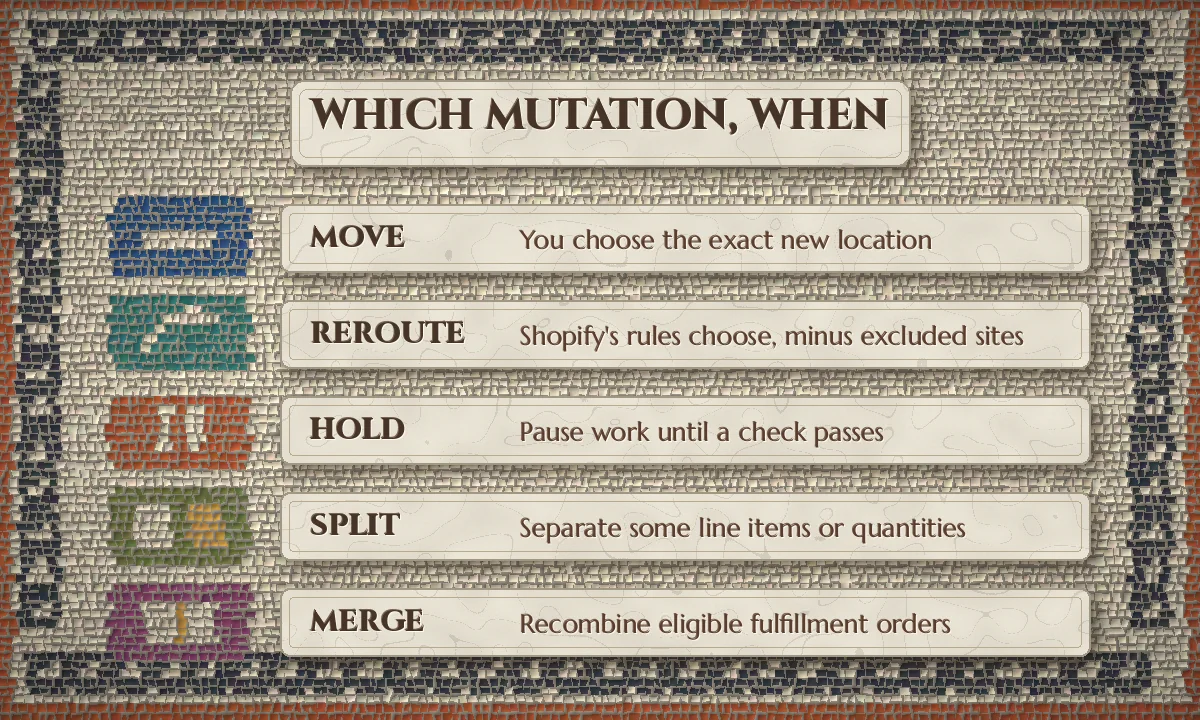
fulfillmentOrderMove changes the assigned location for unfulfilled line items. Pass fulfillmentOrderLineItems to move only some items. Leave it out to move everything that's still unfulfilled. According to the docs, a move fails when:
- the fulfillment order is closed;
- progress has been reported manually (mark it open first);
- the destination location doesn't stock the inventory item;
- the request status is
SUBMITTED,ACCEPTED,CANCELLATION_REQUESTEDorCANCELLATION_REJECTED, because a fulfillment service owns the work until it accepts a cancellation; - the app lacks the scope or the staff permission (
fulfill_and_ship_orders).
Already-fulfilled line items always stay at the original location. The response has movedFulfillmentOrder (which now holds the moved items at the new location) and originalFulfillmentOrder (the final state of the source). remainingFulfillmentOrder is deprecated. If nothing had been fulfilled, the original fulfillment order is simply reassigned. Otherwise you get a different ID, so store the IDs from the response and don't assume the one you sent survived.
Check locationsForMove before you move. For each candidate location it returns movable, a human-readable message explaining why not, and the available and unavailable line items. That gives you the reason in your logs instead of a failed mutation.
query FulfillmentOrderForRouting($id: ID!, $candidates: [ID!]) {
  fulfillmentOrder(id: $id) {
    id
    status
    requestStatus
    supportedActions { action }
    assignedLocation { location { id } }
    fulfillmentHolds { id handle heldByRequestingApp reason }
    locationsForMove(first: 10, locationIds: $candidates) {
      nodes {
        movable
        message
        location { id name }
        unavailableLineItemsCount { count }
      }
    }
  }
}
mutation MoveFulfillmentOrder($id: ID!, $locationId: ID!) {
fulfillmentOrderMove(id: $id, newLocationId: $locationId) {
movedFulfillmentOrder { id status assignedLocation { location { id } } }
originalFulfillmentOrder { id status }
userErrors { field message }
}
}Reroute: let Shopify's rules choose again
fulfillmentOrdersReroute sends fulfillment orders to an alternative location according to the shop's order routing settings. You can pass includedLocationIds and excludedLocationIds. Exclusions win over inclusions. It returns movedFulfillmentOrders.
Use reroute when the question is "anywhere except here" rather than "exactly there". A store closed for a stocktake is a good example. Excluding it and rerouting keeps the merchant's priority rules in charge, so your app doesn't need its own copy of the location ranking. Use move only when your app knows the right destination, for example a drop-ship vendor location for a given SKU.
Hold: pause work without losing track of who paused it
fulfillmentOrderHold puts a fulfillment order ON_HOLD, which stops fulfillment from starting. The input takes a reason (such as HIGH_RISK_OF_FRAUD, INCORRECT_ADDRESS, INVENTORY_OUT_OF_STOCK, AWAITING_PAYMENT or OTHER), optional reasonNotes, notifyMerchant and a handle.
The handle matters most. Since API version 2025-01, several holds can sit on one fulfillment order. Each app can place up to 10 active holds per fulfillment order, and a handle (up to 64 characters) must be unique among one app's holds on that fulfillment order. Placing the same handle twice returns a duplicate-hold error, which also gives you free idempotency when a webhook is delivered twice.
mutation HoldForAddressCheck($id: ID!) {
  fulfillmentOrderHold(
    id: $id
    fulfillmentHold: {
      reason: INCORRECT_ADDRESS
      reasonNotes: "Address validation pending"
      handle: "codesapient-router"
    }
  ) {
    fulfillmentHold { id handle }
    remainingFulfillmentOrder { id }
    userErrors { field message }
  }
}
Releasing is where the real damage happens. fulfillmentOrderReleaseHold accepts holdIds. If you leave it out, every hold on the fulfillment order is released, including a fraud app's hold. Shopify's docs warn that this releases orders too early. Always pass the IDs of your own holds, which you can find with heldByRequestingApp plus your handle.
Two more details. When you hold only some line items, Shopify splits the fulfillment order and returns the unheld part as remainingFulfillmentOrder. Holding specific line items on a fulfillment order that is already on hold isn't supported and returns a user error.
Split and merge
fulfillmentOrderSplit moves specific line items and quantities into a new fulfillment order. If the original can't be split in its current state, Shopify creates a replacement fulfillment order instead, so read the IDs from fulfillmentOrderSplits. Splitting is useful before a partial move (two of five units ship from a second warehouse) or when one SKU needs a hold and the rest can ship.
fulfillmentOrderMerge does the opposite. It takes mergeIntents listing fulfillment orders and optional line item quantities. To find valid merge candidates, read fulfillmentOrdersForMerge on a fulfillment order. Merging after a hold is released can stop one parcel turning into two. Our guide to Shopify split shipping covers why orders split in the first place.
A routing loop that plays well with other apps
The pattern we use for post-routing logic has six steps. Each step is safe to retry, and each one checks the current state rather than trusting the webhook payload.
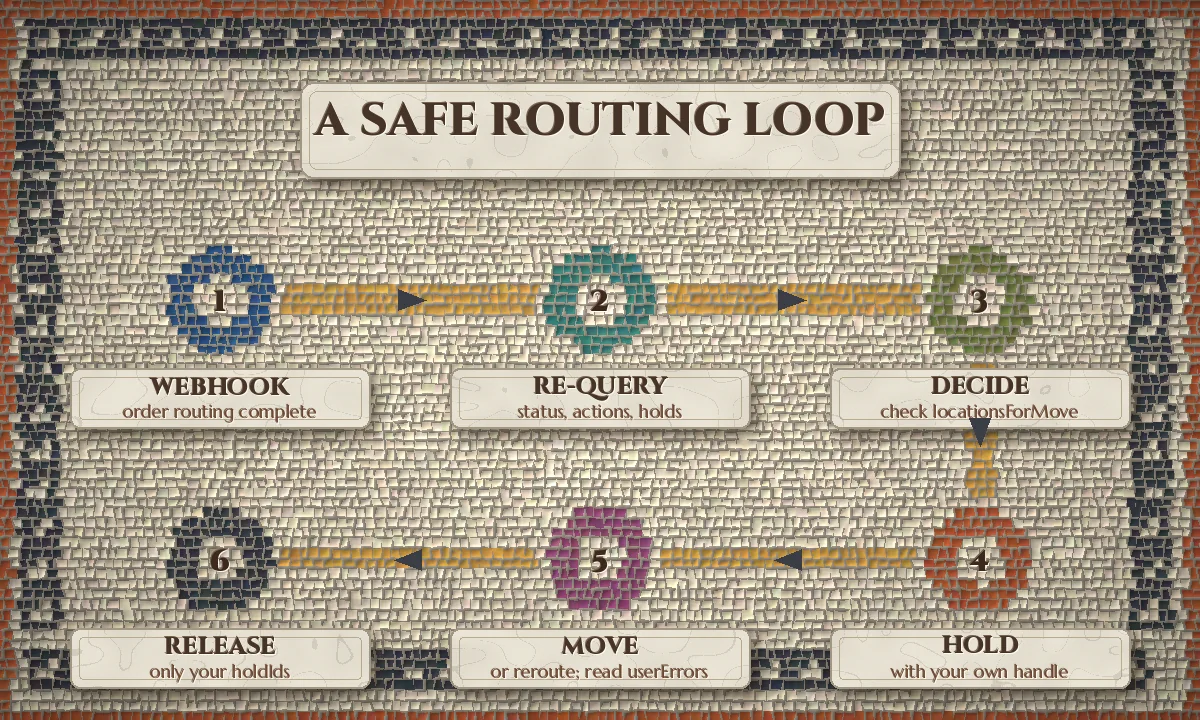
- Subscribe to
fulfillment_orders/order_routing_complete. Other useful topics includefulfillment_orders/moved,fulfillment_orders/split,fulfillment_orders/merged,fulfillment_orders/placed_on_hold,fulfillment_orders/hold_releasedandfulfillment_orders/cancelled. Verify HMAC and dedupe deliveries as described in our Shopify webhooks guide. - Re-query the fulfillment order. Webhooks can arrive late or twice; the current
status,requestStatus,supportedActionsand holds are the only truth. - Decide with a pure function (below). Keep it free of API calls so you can unit-test it.
- Hold with your handle if the decision needs more time, such as an external stock check or address validation.
- Move or reroute, then treat
userErrorsas data. A non-empty list means nothing changed. - Release only your hold by ID once you're done.
This is the decision function from our reference implementation. We tested it locally against nine fixture payloads that follow the documented field shapes: move, not movable, own hold already placed, submitted to a fulfillment service, closed, release own hold, another app's hold, move unsupported, and unknown location. All nine passed. It hasn't been run against a live store, so treat it as a starting point rather than a finished router.
BLOCKING_REQUEST = {"SUBMITTED", "ACCEPTED", "CANCELLATION_REQUESTED", "CANCELLATION_REJECTED"}
HOLD_HANDLE = "codesapient-router"

def decide(fo: dict, preferred_location_id: str) -> dict:
    """Return the single next action for one fulfillment order."""
    actions = {a["action"] for a in fo["supportedActions"]}
    if fo["status"] in {"CLOSED", "CANCELLED", "INCOMPLETE"}:
        return {"action": "skip", "why": f"status {fo['status']}"}
    if fo["requestStatus"] in BLOCKING_REQUEST:
        return {"action": "skip", "why": "fulfillment service owns it; send a cancellation request first"}
    if fo["assignedLocation"]["location"]["id"] == preferred_location_id:
        return {"action": "release_own_hold" if _own_hold(fo) else "none"}
    target = next((l for l in fo["locationsForMove"]["nodes"]
                   if l["location"]["id"] == preferred_location_id), None)
    if target is None or not target["movable"]:
        reason = target["message"] if target else "location not offered by locationsForMove"
        if "HOLD" in actions and not _own_hold(fo):
            return {"action": "hold", "why": reason}
        return {"action": "skip", "why": reason}
    if "MOVE" not in actions:
        return {"action": "skip", "why": "MOVE not in supportedActions"}
    return {"action": "move", "to": preferred_location_id, "then_release_own_hold": _own_hold(fo)}

def _own_hold(fo):
    return any(h.get("heldByRequestingApp") and h.get("handle") == HOLD_HANDLE
               for h in fo.get("fulfillmentHolds", []))
The function does just one thing per call. After a hold or move, the next webhook (or a scheduled re-check) runs it again against fresh state. This is slower than chaining mutations, but it means an interrupted run never leaves an order half-processed.
Real business use cases
- Temporary location closures. Reroute with the closed store in
excludedLocationIdsfor the duration, and let the merchant's rules pick the next best location. - Drop-ship vendors. Split out the vendor's SKUs and move them to the vendor's location, then send them as a fulfillment request if that location is a fulfillment service.
- Risk and address checks. Hold with
HIGH_RISK_OF_FRAUDorINCORRECT_ADDRESSwhile an external check runs. Release only your hold when it passes. - Backorders. Hold the out-of-stock line items with
INVENTORY_OUT_OF_STOCKso the rest ships, then merge or move when stock lands. - Capacity balancing. When a warehouse reaches its daily pick limit, move new fulfillment orders to a second site that
locationsForMovereports as movable.
Common mistakes
- Releasing without
holdIds. This releases every app's holds on that fulfillment order. It's the most dangerous one-line bug in this API. - Moving work a 3PL has accepted. Check
requestStatus. To take work back you have to submit a cancellation request and wait for the fulfillment service to accept it. - Caching fulfillment order IDs. Moves, splits and merges can close a fulfillment order and create a new one. Read IDs from each mutation's response.
- Ignoring
userErrors. GraphQL returns HTTP 200 even when a mutation is rejected, so log and alert onuserErrors. - Holds without handles. Without a handle you can't tell your own holds apart, and retries can't be deduplicated.
- Rebuilding routing rules in your app. If the merchant's admin rules can express it, use them or reroute. A second, private copy of the ranking will drift.
- Missing scopes. An app without
*_third_party_fulfillment_orderswon't see fulfillment orders assigned to other fulfillment services, and nothing will tell you.
Limitations to plan for
- Rate limits. Each mutation spends query cost. A backlog re-check over thousands of orders needs throttling; see our Shopify GraphQL rate limits guide.
- Timing. Your app reacts after routing, so for a short window the fulfillment order sits at Shopify's chosen location and staff could start on it. Keep that window short: handle
order_routing_completequickly and place your hold first, before any slow external call. - Customer-facing rates. Moving a fulfillment order after checkout doesn't change what the customer paid for shipping.
- Version differences. Behaviour changes between API versions. For example, from 2026-01,
fulfillmentOrderOpenalso reopens merchant-managed fulfillment orders that had progress reported. Pin your version and read the changelog when you upgrade.
Some "routing" problems start in the catalog. Shipping profiles control which locations ship a product and what rates customers see at checkout. If a product is in the wrong profile, moving fulfillment orders afterwards won't fix the rate the customer paid. Our comparison of shipping profiles and order routing explains the difference. If the cause is products landing in the wrong profile, ShipAssign, an app from our team, assigns products and variants to shipping profiles using rules and lets you preview changes before applying them. It doesn't move fulfillment orders; that still belongs in code like the code above.
Recommendations
- Exhaust admin routing rules first. Use reroute with exclusions before writing a custom location chooser.
- Read
supportedActionsandlocationsForMovebefore every mutation, and log themessagewhen a location isn't movable. - Give every hold a stable handle and release by
holdIdsonly. - Make the decision a pure, unit-tested function and run one action per invocation.
- Treat
fulfillment_orders/*webhooks as triggers to re-query, not as state. - Never touch fulfillment orders with an active fulfillment request; use the cancellation request flow.
FAQ
Can I create a fulfillment order with the API?
No. Shopify creates fulfillment orders when routing completes. You can move, split, merge, hold, reroute, reschedule or close them, but you can't create them from scratch.
Why does fulfillmentOrderMove return a user error?
The usual causes are a closed fulfillment order, manually reported progress, a destination that doesn't stock the item, an active fulfillment request with a fulfillment service, or a missing scope or permission. Query locationsForMove for that location; its message usually tells you which one.
What's the difference between move and reroute?
Move sends items to the exact location you name. Reroute asks Shopify to choose again using the shop's routing settings, optionally limited by included or excluded locations.
How do I avoid releasing another app's hold?
Place holds with a unique handle, find your holds through heldByRequestingApp and the handle, and pass their IDs as holdIds to fulfillmentOrderReleaseHold.
Do I need Shopify Plus for custom order routing?
For custom location rules that run inside routing (the Order Routing Location Rule Function API), yes. Shopify documents it as a beta available by request to Plus merchants. Post-routing changes with the Fulfillment Orders API don't carry that restriction.
Conclusion
The Shopify Fulfillment Orders API gives you precise control after routing: move for a known destination, reroute for "anywhere but here", holds to pause work, and split or merge to reshape it. Robust integrations re-read state on every event, check supportedActions and locationsForMove before acting, and only release the holds they own. Get those habits right and post-routing logic becomes a dependable part of your fulfillment pipeline rather than a source of double shipments.
If you're planning a routing layer, a drop-ship integration or an order management app on Shopify and want a second pair of eyes on the design, talk to our team. We're happy to review your approach before you write the first mutation.