
Shopify Shipping Profiles vs Order Routing: Locations Explained
Learn how Shopify shipping profiles, fulfillment locations, and order routing differ—and when to automate profile assignment versus ZIP-based routing.
Ask three Shopify merchants how multi-warehouse shipping works and you will often hear the same three words used interchangeably: shipping profiles, locations, and order routing. They are related—but they solve different problems. Mixing them up leads to wrong checkout rates, split packages nobody planned for, or apps installed for the wrong job.
This guide clarifies Shopify shipping profiles vs order routing, where fulfillment locations fit, and when you need automation for each layer. It is written for merchants with multi-location or complex shipping setups who need a clear decision frame—not another glossary dump.
The short answer
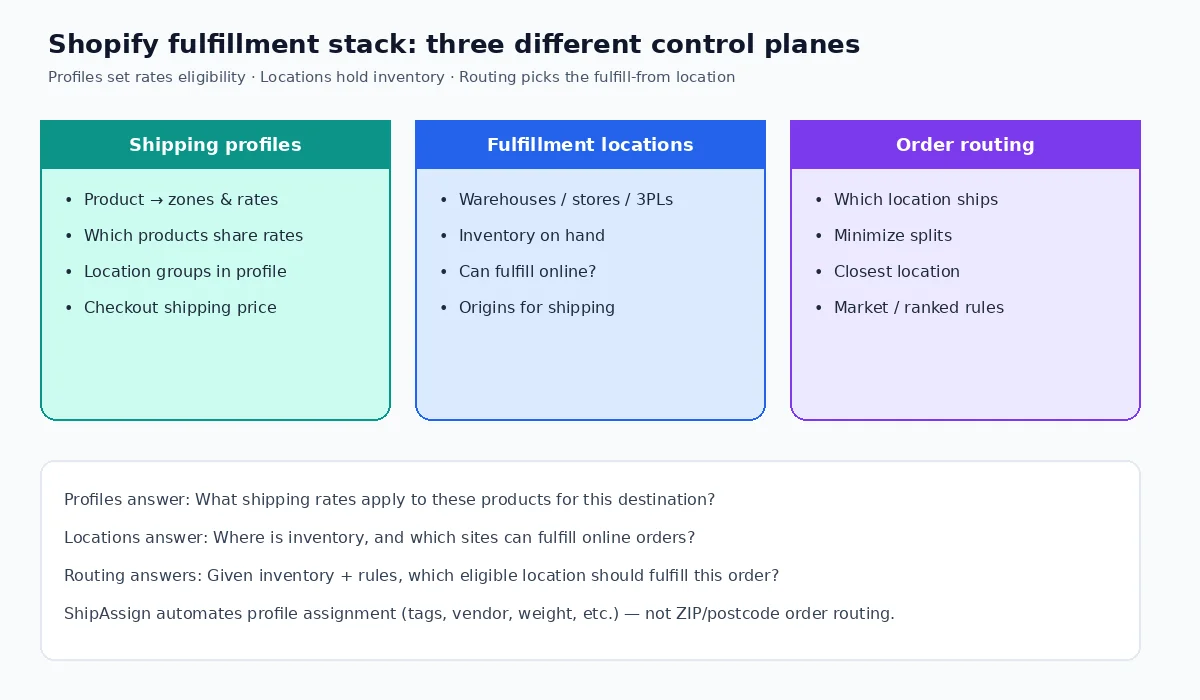
- Shipping profiles (delivery profiles) decide which products share which shipping zones and rates—and which locations are allowed to ship those products under those rates.
- Fulfillment locations are the places that hold inventory (warehouses, retail stores, apps acting as locations). They are origins, not rate cards.
- Order routing decides, for a given order, which eligible location should fulfill each item—using inventory and a sequence of rules (minimize splits, stay in market, closest location, ranked locations, and optionally custom Functions).
Profiles answer “what does shipping cost / which origins are allowed for these products?” Routing answers “given inventory and policy, which location ships this order?” Locations are the inventory nodes both systems reference.
What Shopify shipping profiles actually control
A shipping profile is a set of shipping rules for specific products and locations. Every store has a general profile; you can add custom profiles when different products need different zones and rates (fragile goods, oversized items, dropship SKUs, regional catalogs, and so on).
Inside a profile you organize location groups: collections of fulfillment locations that share the same zones and rates. You can charge different rates depending on which location group fulfills, remove a location so it does not offer rates for those products, or keep locations in a “not shipping from” state until you activate them. Shopify’s help center documents how rates combine when an order spans profiles or location groups.
Critical implication: profiles are product-driven. If a variant sits on the wrong profile, buyers see the wrong options—even when inventory and routing are perfect. That is why catalog ops (imports, POD apps, multi-vendor feeds) so often break shipping: the product was created correctly, but it never left the general profile.
Difference between Shopify shipping profiles and locations
Locations are physical or virtual inventory sites. Profiles decide how products ship from locations that fulfill online. A location can exist without being useful at checkout if it cannot fulfill online or is not included in the relevant profile’s location groups. Conversely, putting every SKU on one profile does not invent warehouses—you still need locations, inventory, and (with two or more active locations) routing rules.
When you need different locations to fulfill specific products or product types, Shopify’s own fulfillment guidance points you back to shipping profiles to assign products to locations—not to order routing alone.
How Shopify order routing works
Order routing requires two or more active locations. Shopify applies a sequence of rules to prioritize locations and assign fulfillment. The default strategy typically includes:
- Minimize split fulfillments — prefer locations that can fulfill all items (or the fewest packages).
- Stay within the destination market — keep fulfillment inside the customer’s market when possible.
- Ship from the closest location — straight-line distance to the shipping address as a tie-breaker; Shopify recommends applying this last.
You can also rank locations explicitly or prioritize using location metafields (capacity, speed, and similar operational signals). For advanced logic—capacity caps, product-specific preferences beyond native rules—developers can implement custom prioritization with Shopify’s Order Routing Location Rule Function API, or other custom apps/Functions where plan and distribution rules allow.
Routing does not define shipping prices. It selects among locations that are already eligible for the order’s items. Eligibility still depends on inventory, location fulfillment settings, and the shipping profile configuration that ties products to location groups and rates.
Shopify multi-location fulfillment in practice
A common healthy setup looks like this:
- Create locations for each warehouse/store/3PL that should fulfill online.
- Build shipping profiles so product groups have correct zones/rates and location groups.
- Configure order routing so inventory + policy pick the right origin after checkout.
- Keep catalog attributes clean so products stay on the correct profiles as the catalog changes.
Skip step 2 and buyers see wrong rates. Skip step 3 and you over-rely on a single default location or suffer unnecessary splits. Skip step 4 and every import undoes your profile work.
When you need each layer (decision guide)
You mainly need shipping profiles when…
- Different products need different rates or carrier methods.
- Only certain warehouses may ship certain SKUs (product ↔ location eligibility).
- Dropship or multi-vendor SKUs must not share the general profile’s rates.
- Checkout shows wrong or missing rates for specific products despite inventory being available.
You mainly need fulfillment locations when…
- You stock inventory in more than one place (or use apps that act as locations).
- You need accurate available-to-sell by site, POS + online overlap, or 3PL handoff.
- You must turn online fulfillment on/off per site.
You mainly need order routing when…
- Two or more locations can fulfill the same items and you care which one wins.
- You want fewer split shipments, market-local fulfillment, or proximity-based assignment.
- You need ranked warehouses or metafield-driven prioritization.
- You are thinking about ZIP/postcode or address-driven fulfill-from logic—that is routing (native rules, custom Functions, or specialized routing apps), not shipping-profile automation.
If the symptom is “wrong rate at checkout,” start with profiles. If the symptom is “wrong warehouse got the pick,” start with locations + routing. If both are messy, fix profiles first so eligibility is correct, then tune routing.
Where automation fits—without mixing concerns
Automating shipping profile assignment
Profile membership is a catalog operations problem. Rules based on tags, vendor, product type, category, title, collections, weight, SKU, inventory quantity, shipping requirements, and variant options can keep new and updated products on the right delivery profiles. Preview and conflict review matter because silent moves across profiles change checkout economics.
ShipAssign, built by CodeSapient, automates assigning Shopify products and variants to shipping profiles using those kinds of rules, with preview, conflict handling, and ongoing evaluation of new and updated products. It does not perform ZIP/postcode order routing to warehouses—that remains native Shopify order routing or a dedicated routing/Functions solution.
If your pain is “every import dumps SKUs onto the general profile,” profile automation is the lever. For a related deep dive on keeping new products aligned, see our article on AI agents for eCommerce and agentic workflows when you are connecting catalog ops to broader automation—and explore ShipAssign on CodeSapient for product context.
When to automate shipping profile assignment
- Catalog velocity is high (imports, POD, wholesale feeds, frequent vendor changes).
- You maintain reliable attributes (tags/vendor/weight) that already encode shipping intent.
- Manual Admin moves cannot keep up after bulk edits.
- You need a repeatable preview before changing live profile membership.
Automating or customizing order routing
Native Shopify order routing covers minimize-splits, market, closest location, ranked locations, and metafield-based rules for many merchants. When you need logic beyond that—complex capacity, product-family preferences, or custom scoring—you typically look at:
- Shopify’s Order Routing Location Rule Function API (custom ranking during routing), and/or
- Public App Store apps that expose routing/fulfillment behavior, and/or
- Custom Shopify app development (plan rules apply for Functions in custom apps—see Shopify’s Functions docs; Plus is required for custom apps containing Function APIs).
CodeSapient builds custom Shopify apps and integrations when native settings are not enough—start from our services or contact with your routing constraints.
Common mistakes that mix the three layers
- Installing a “routing” app to fix wrong rates — rates live in profiles; routing only chooses among eligible locations.
- Expecting locations alone to change checkout prices — without profile location groups and rates, locations mainly affect inventory assignment.
- Assuming profile automation routes by ZIP — profile tools assign products to rate cards; ZIP/address routing is a different system.
- Tuning closest-location first — Shopify’s guidance favors minimizing splits (and often market) before proximity so you do not optimize distance into more packages.
- Leaving new products on the general profile — the silent failure mode for growing catalogs.
Practical checklist
- Map products that need distinct rates → custom shipping profiles.
- Confirm each online-fulfilling location is in the correct location groups (or intentionally excluded).
- Verify inventory is stocked where you expect fulfillment to happen.
- With 2+ locations, review Settings → Shipping and delivery → Order routing rule order.
- Define catalog attributes that encode shipping intent; automate profile assignment where volume justifies it.
- Only then evaluate custom Functions or apps for routing edge cases.
FAQ
Is a delivery profile the same as a shipping profile?
In merchant Admin language you will usually see “shipping profiles.” In the Admin GraphQL API the object is often named DeliveryProfile. Same idea: product/variant associations with location groups, zones, and rates.
Does order routing change what customers pay for shipping?
Not directly. Customers pay based on profile rates (and how Shopify combines rates across profiles/location groups). Routing chooses which location fulfills after eligibility and inventory are considered.
Can ShipAssign replace Shopify order routing?
No. ShipAssign focuses on automatic shipping-profile assignment from product/variant rules. Use native order routing—or a routing-focused Function/app—for fulfill-from location selection by address, proximity, or capacity.
Conclusion
Shopify shipping profiles vs order routing is not a branding difference—it is two layers of the fulfillment stack. Profiles govern product-based rates and location eligibility; locations hold inventory; routing picks the fulfill-from site. Get the diagnosis right before you buy another app.
If your catalog keeps slipping off the correct shipping profiles, try ShipAssign on the Shopify App Store. If you need custom routing logic, checkout Functions, or broader Shopify development, contact CodeSapient—we build apps like ShipAssign and custom Shopify work for multi-location merchants.