
Shopify Bulk Operations: Export and Import Large Catalogs Without Throttling
How Shopify bulk operations work after API 2026-01: bulk queries, bulk mutations, five concurrent jobs, finish webhooks, JSONL parsing that stays flat on memory, and per-line import errors.
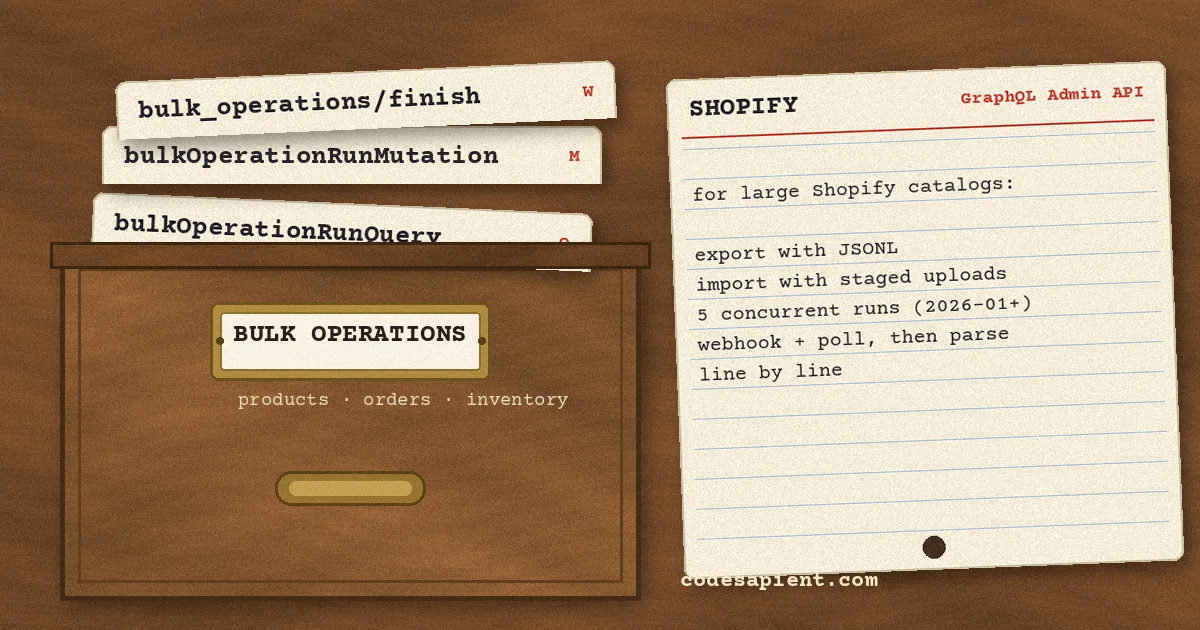
Most Shopify integrations start with a paginated GraphQL loop: fetch 250 products, read the cursor, fetch the next page, sleep when the throttle bucket runs low. That works for a few thousand records. At a catalog of 80,000 variants, or an order history going back years, the loop turns into a slow, fragile job that eats your rate limit, and one network blip halfway through means restarting from a cursor you hopefully saved.
Shopify bulk operations exist for exactly this case. You hand Shopify one query (or one mutation plus a file of inputs), Shopify runs it in the background, and you download a single JSONL file when it finishes. The API changed in meaningful ways with version 2026-01, so a lot of older tutorials now describe limits that no longer apply. This guide covers how bulk queries and bulk mutations work today, the production details that bite teams, and a parsing pattern we tested on a 224,838-line file.
What Shopify bulk operations actually are
Bulk operations are an asynchronous feature of the GraphQL Admin API. There are two kinds:
- Bulk queries (
bulkOperationRunQuery): export data. You pass a normal GraphQL query string; Shopify paginates it for you and writes every node to a JSONL file. - Bulk mutations (
bulkOperationRunMutation): import or update data. You upload a JSONL file where each line is the variables for one mutation call, and Shopify runs the mutation once per line.
The important cost detail: the mutation that starts a bulk operation is a normal, rate-limited API call, but the work Shopify does inside the operation is not charged against your query cost bucket. Starting a job, polling it, and cancelling it are all cheap requests. If you have already fought the throttle (we covered the mechanics in our guide to Shopify GraphQL API rate limits), this is the main reason to move large reads and writes off the paginated path.
Bulk operations are only available in the GraphQL Admin API. The Storefront API does not support them, and admin UI extensions using direct API access cannot start them either; Shopify's guidance is to call your app backend and run the operation from there.
What changed in API version 2026-01
If you last looked at bulk operations in 2024 or early 2025, these changes matter. Shopify announced them in the December 15, 2025 changelog and the 2026-01 release notes:
- Five concurrent operations. In 2026-01 and later, an app can run up to five bulk query operations and up to five bulk mutation operations per shop at the same time. Earlier versions allow only one of each type per shop.
- Any mutation can run in bulk. Bulk mutations used to support a limited set of mutations. Now any Admin API mutation works, except the two bulk mutations themselves.
- 100 MB input files. The JSONL file for a bulk mutation can be up to 100 MB, up from 20 MB.
- New management queries.
bulkOperation(id:)andbulkOperationslet you fetch a specific operation or list and filter them.currentBulkOperationstill works but is deprecated, and it does not make sense once several operations can run at once. - Grouping is off by default (action required).
bulkOperationRunQueryno longer groups child objects under their parents in the output unless you passgroupObjects: true. If your parser assumed children appear immediately after their parent, read the parsing section below before you upgrade.
Shopify also published a June 2026 update saying bulk queries now run up to 4x faster, and the Shopify CLI gained shopify app bulk execute, status, and cancel commands, which are useful for one-off exports and for testing a query before you put it in code.
Before you start: enable bulk access
This catches people because the failure looks like a permissions bug. Public apps and Partner-created custom apps must enable bulk operations in the Partner Dashboard (Apps, your app, API access requests, then "Allow bulk queries" and/or "Allow bulk mutations"). Without it, the request returns access denied.
Two details worth writing on a sticky note:
- If your app has not started a bulk query or bulk mutation in the last 31 days, that type has to be enabled again. A quarterly reconciliation job will hit this.
- Apps a merchant creates in the Dev Dashboard or the Shopify admin do not need this step at the moment.
Running a bulk query, step by step
1. Test the query as a normal query first
Run your query with first: 10 in GraphiQL against a development store. A bulk query needs the same access scopes as the normal query, and a normal query gives much clearer error messages. When it works, remove first, cursor, and pageInfo; inside a bulk operation they are ignored.
2. Wrap it in bulkOperationRunQuery
mutation {
  bulkOperationRunQuery(
    query: """
    {
      products(query: "updated_at:>=2026-11-01") {
        edges {
          node {
            id
            title
            handle
            variants {
              edges { node { id sku price inventoryQuantity } }
            }
          }
        }
      }
    }
    """
  ) {
    bulkOperation { id status }
    userErrors { field message }
  }
}
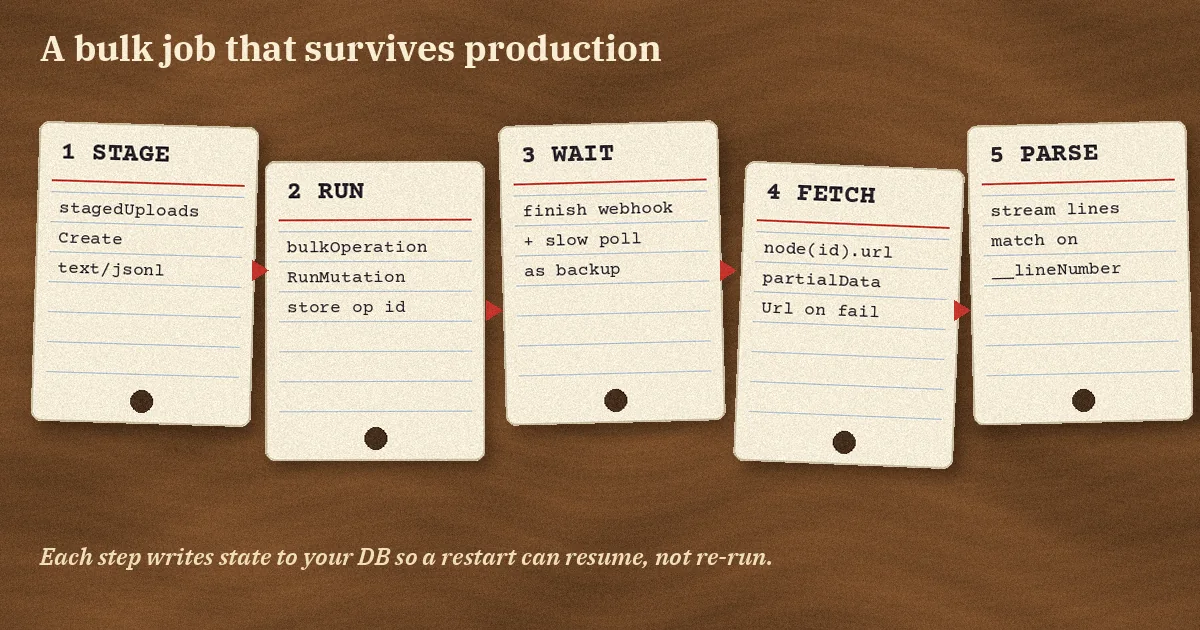
Store the returned operation ID in your database right away, together with what the job is for. With five operations allowed at once, the ID is the only reliable way to match a finished file back to the job that asked for it.
3. Know the query shape limits
The query must contain at least one connection field. It supports up to five connections, with nesting at most two levels deep, so products, then variants, then something under variants is fine, but a third nested connection is rejected in userErrors. A bulk query also has to finish within 10 days or it is marked FAILED; if you get close to that, reduce fields and depth or split the export by date range.
4. Wait with a webhook, and poll as backup
Subscribe to the bulk_operations/finish topic with webhookSubscriptionCreate. Shopify sends it when any bulk operation on the shop completes, fails, or is cancelled. The payload has admin_graphql_api_id, status, error_code, and type. Two gotchas:
- In the webhook payload,
statusanderror_codeare lowercase (completed,failed), while the GraphQL API returns uppercase enums. Normalise before you compare. - The webhook does not include the download URL. Query
node(id:)orbulkOperation(id:)with the ID to geturlandpartialDataUrl.
Shopify notes that webhook delivery is not guaranteed, so keep a slow poll for any operation that has been running longer than you expect. The same HMAC verification and idempotent handling you use for other topics applies here; our post on Shopify webhooks, HMAC, retries and idempotency covers that pattern. Polling objectCount is also a cheap sanity check: if an export that should contain one month of orders is already past your total order count, the filter is wrong and you should cancel with bulkOperationCancel.
5. Download the file promptly
When the status is COMPLETED, url points to the JSONL file. If the query matched nothing, url is null, which is a valid result rather than an error. Results stay available for seven days after completion, but the URL itself is a signed link, so fetch it when you get the finish event instead of storing the link for later.
Parsing JSONL output without running out of memory
A bulk query file is JSON Lines: one JSON object per line. Nested connections are flattened. Each child node gets its own line and a __parentId field pointing at its parent's ID. A product with three variants becomes four lines.
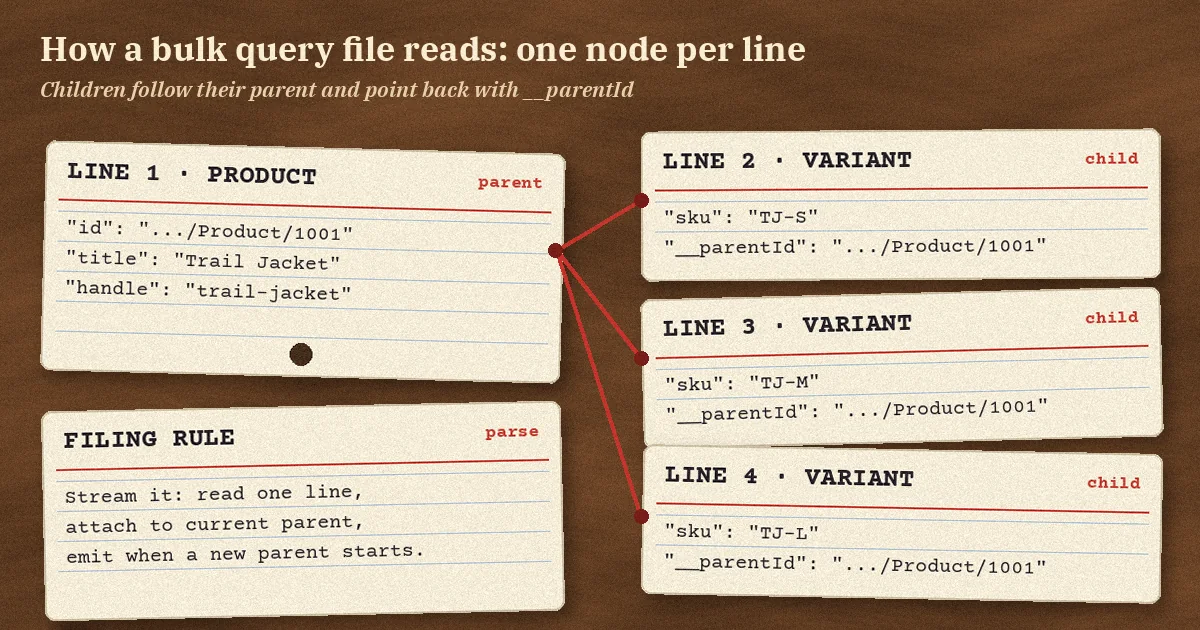
The mistake we see most is reading the whole file into memory and then building a dictionary of every product before writing anything. To put numbers on it, we generated a synthetic file shaped like Shopify's documented output: 50,000 products with one to six variants each, 224,838 lines, 27.8 MB. Then we parsed it two ways in Python 3.13 and measured peak memory with tracemalloc:
- Read everything, then build a dict: about 172 MB peak, 2.7 seconds.
- Stream line by line, emitting each product once its children are done: under 0.1 MB peak, 1.2 seconds.
Treat those as one run on our box, not a benchmark, but the shape of the result holds: memory for the read-all approach grows with the file, and streaming stays flat. Shopify's documentation makes the same point and lists the line-reading tool for each language (Python's file iterator, Node's readline, PHP's fgets).
import json

def iter_products(path):
    """Yield (product, variants) from a bulk query JSONL file."""
    current = None
    with open(path, encoding="utf-8") as f:
        for line in f:
            obj = json.loads(line)
            parent = obj.get("__parentId")
            if parent is None:
                if current:
                    yield current
                current = {"product": obj, "variants": []}
            elif current and parent == current["product"]["id"]:
                current["variants"].append(obj)
            else:
                # Child arrived out of order: park it instead of guessing.
                handle_orphan(obj)
    if current:
        yield current
Shopify documents that nested connections appear after their parents in the file, which is what makes this single-pass approach work. The else branch is there because grouping became opt-in in 2026-01: if you cannot rule out a child landing away from its parent in your data, write those rows to a staging table keyed by __parentId and join them in the database rather than holding the whole file in RAM. If you truly depend on grouped output, pass groupObjects: true, and accept Shopify's warning that it slows operations and makes timeouts more likely.
Running bulk mutations for imports and updates
Bulk mutations follow a three-step flow documented in Shopify's bulk import guide.
1. Build the JSONL input
Each line is the variables object for one call of your mutation:
{"product": {"title": "Trail Jacket", "productType": "Outerwear", "vendor": "Northline"}}
{"product": {"title": "Trail Pants", "productType": "Outerwear", "vendor": "Northline"}}
2. Stage the upload
Call stagedUploadsCreate with resource: BULK_MUTATION_VARIABLES, mimeType: "text/jsonl", and httpMethod: POST. Shopify returns an upload URL and form parameters. Post the file as multipart form data with every returned parameter, and put the file field last; any other order fails. Do not touch the uploaded file while the operation runs, because Shopify checks it against a checksum and a modified file fails the job with INTERNAL_SERVER_ERROR.
3. Run the mutation
mutation {
  bulkOperationRunMutation(
    mutation: "mutation call($product: ProductCreateInput!) { productCreate(product: $product) { product { id } userErrors { field message } } }",
    stagedUploadPath: "tmp/.../bulk_op_vars"
  ) {
    bulkOperation { id status }
    userErrors { field message }
  }
}
Limits to plan around: the mutation can contain one connection field, the input file can be up to 100 MB, and the operation has to finish within 24 hours (much shorter than the 10 days for bulk queries). For very large imports, split the input into several files and use the new concurrency instead of one huge job.
4. Read results by line number, not by position
The result file is also JSONL, and each line answers the corresponding line of your input. Result lines carry a __lineNumber field (zero-based in Shopify's example), and Shopify's guide says each error includes the input line number, so join on that field rather than trusting file position. Errors are reported per line: invalid JSON, validation failures, userErrors, and missing scopes all show up in the output next to the successful rows. The whole operation only ends as FAILED for system-level problems such as INTERNAL_SERVER_ERROR.
That means "status COMPLETED" does not mean "every row worked". Your import job has to read the result file, collect the lines with errors or non-empty userErrors, and match them to input rows with __lineNumber. Write the failed rows to a retry file and decide whether they need a human or an automatic resubmission.
Common mistakes we see in bulk operation code
- Using
currentBulkOperationwith concurrency. It is deprecated and was designed for a one-job world. Track jobs by ID withbulkOperation(id:). - Treating COMPLETED as success for imports. Per-line errors live inside the result file.
- Forgetting
partialDataUrl. When an operation fails after retrieving some data, Shopify can provide a partial file. For exports, that can save a re-run; just mark the dataset as incomplete. - Retrying everything on any failure.
ACCESS_DENIEDmeans a missing scope, so retrying will fail the same way.TIMEOUTandINTERNAL_SERVER_ERRORcan be intermittent and are worth a retry with backoff, ideally with fewer fields for timeouts.CANCELEDcan come from Shopify if an operation stalls, and resubmitting is fine. - Range filters on a field that is not the sort key. Shopify warns that range searches can time out on large collections when the filter field differs from the connection's sort key. If an export by
updated_atkeeps timing out, try sorting by that field or narrowing the window. - Comparing webhook status case-sensitively.
completedversusCOMPLETEDhas broken more than one job queue. - Losing the 31-day enablement. Rarely run jobs need a monitoring check, not a surprise in production.
Where bulk operations fit in a real integration
Bulk operations are not a replacement for webhooks or small, targeted queries. A healthy integration usually combines them:
- Initial sync and nightly reconciliation with bulk queries: export products, inventory levels, or orders since the last checkpoint, and compare with your ERP, PIM, or warehouse system. This is the backbone of the sync designs in our Shopify ERP integration guide.
- Real-time changes through webhooks, so you are not waiting for the next export.
- Mass updates with bulk mutations: price changes across a catalog, metafield backfills, or tagging thousands of products. If you are backfilling custom data, our post on Shopify metafields and metaobjects helps with modelling it first.
- Small interactive reads in the app UI stay as normal paginated queries.
Run the bulk side from a background worker (Celery, Sidekiq, a Laravel queue, or a Node job runner), not from a web request. Give each job a row in a table with the operation ID, type, status, input file, result file location, and the counts you parsed. With up to five operations per type per shop, a simple per-shop semaphore in that table stops your app from hitting the concurrency limit and getting userErrors back.
Recommendations
- Pin your app to API version 2026-01 or later before relying on concurrency or the new management queries, and audit any parser that assumed grouped output.
- Use the
bulk_operations/finishwebhook as the primary signal and a slow poll as a safety net. - Stream JSONL files from disk or object storage. Never load the full file into memory.
- For imports, treat the result file as the source of truth and reconcile by
__lineNumber. - Split large jobs by date range or input chunk and run them in parallel within the five-operation limit.
- Test new queries with
shopify app bulk execute --watchon a development store before shipping them.
FAQ
Do Shopify bulk operations count against rate limits?
The requests you send to start, poll, or cancel a bulk operation are normal API calls with normal costs. The query or mutations Shopify executes inside the operation are not charged against your rate limit bucket.
How many bulk operations can run at once?
In API version 2026-01 and later, up to five bulk queries and up to five bulk mutations per app per shop. In earlier versions, one of each type.
How long are results available?
Shopify keeps bulk query results for seven days after the operation completes.
Can I run bulk operations with the Storefront API?
No. They are only available in the GraphQL Admin API.
Conclusion
Shopify bulk operations turn a slow, throttled pagination loop into one background job and one file, and the 2026-01 changes (five concurrent jobs, any mutation, 100 MB inputs) make them a better fit for real catalog and order workloads than they used to be. Most production problems come from the parts around the API call: tracking jobs by ID, handling lowercase webhook statuses, streaming the file, and reading per-line errors after a "completed" import.
If you are building a Shopify app or a sync between Shopify and your ERP, warehouse, or internal tools and want a team that has dealt with these edge cases, take a look at our development services or get in touch to talk through your integration.