
PostgreSQL Connection Pooling for SaaS APIs: PgBouncer That Scales
Stop hitting max_connections: use PgBouncer transaction pooling, size backend pools to CPU, keep a direct URL for migrations, and protect SaaS APIs with timeouts.
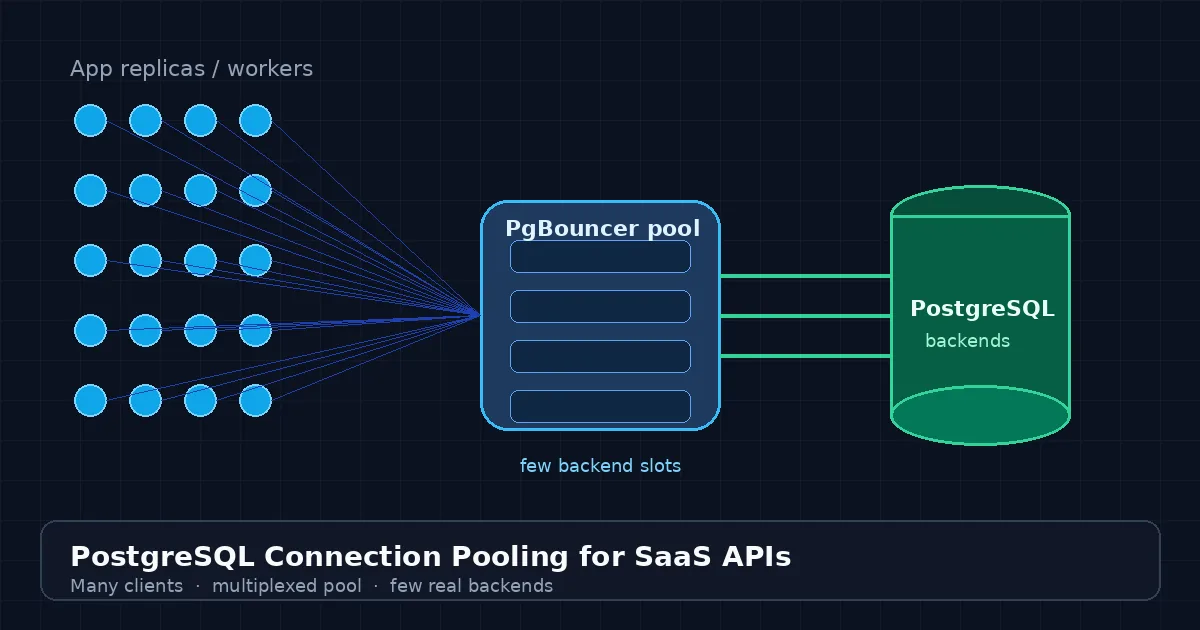
Your SaaS API feels fine at ten replicas. At thirty, deploys start failing with FATAL: sorry, too many clients already. Idle workers still hold Postgres backends. Serverless spikes open fresh connections that never warm. Query latency looks fine in APM, but the database is spending memory on processes instead of cache. The missing piece is usually not a bigger instance—it is PostgreSQL connection pooling.
This guide is a practical blueprint for SaaS APIs: why Postgres connections are expensive, how PgBouncer (and similar proxies) multiplex clients onto few backends, when to use transaction vs session mode, how to size pools, and what to change in Django, Node, and Laravel apps so pooling does not break session-scoped features. Teams that ship custom backends through CodeSapient treat pooling as infrastructure, not a last-minute Heroku checkbox.
Why PostgreSQL connections do not scale like HTTP
Every Postgres client connection forks a backend process. That process costs memory and scheduler time whether it is running a query or sitting idle between API requests. max_connections is a hard ceiling; once you hit it, new clients fail hard. Horizontal scaling multiplies the problem: ten app pods with a pool of twenty each is two hundred possible backends before any query runs.
Common SaaS triggers:
- Replica math — web and worker fleets each open their own pools.
- ORM defaults — some stacks hold a connection for the request (or longer) even when idle.
- Serverless / short-lived workers — cold starts create connection churn under traffic spikes.
- Migrations and admin tools — competing with app traffic on the same connection budget.
Pooling puts a proxy between apps and Postgres. Thousands of cheap client connections share a small, fixed set of real server connections. Clients queue briefly for a free backend instead of failing—or instead of forcing you to raise max_connections until memory collapses.
If your “fix” for connection errors is raising
max_connectionsagain, you are buying temporary headroom with permanent memory pressure.
Where the pool sits
For most SaaS APIs the topology is:
- Application processes (API pods, workers, cron) open many client connections.
- A pooler—commonly PgBouncer—accepts those clients and multiplexes them.
- PostgreSQL sees only the pooler’s small backend set (plus a reserved direct URL for ops).
Managed providers often expose PgBouncer as a second connection string (DigitalOcean, Railway, Heroku, Akamai/Aiven, and others). You can also run PgBouncer as a sidecar or shared service. Either way, keep a direct (unpooled) URL for migrations, pg_dump, LISTEN/NOTIFY, and other session-sensitive work.
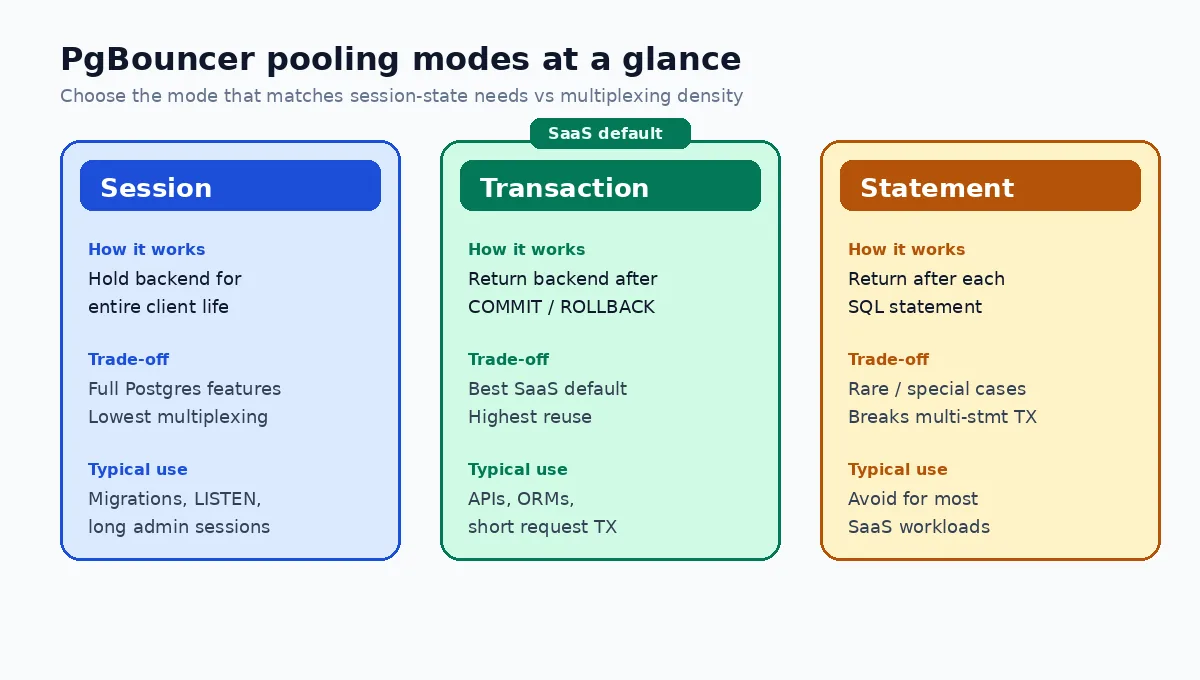
Pooling modes: session, transaction, statement
PgBouncer’s mode decides when a backend returns to the free pool.
Session mode
A client keeps its backend until disconnect. You get nearly all Postgres features (temp tables, session GUCs, session advisory locks, prepared statements as clients expect them). Multiplexing is weak: idle clients still pin backends. Use session mode for admin tooling, long-lived jobs that need session state, or as a temporary bridge while you refactor.
Transaction mode (SaaS default)
The backend returns after COMMIT or ROLLBACK. Many concurrent API clients share few backends. This is the right default for request/response SaaS workloads with short transactions. The trade-off: anything that depends on session state across transactions is unsafe unless redesigned.
Statement mode
The backend returns after each statement. Maximum churn, breaks multi-statement transactions, rarely appropriate for ORMs. Skip it unless you have a measured, specialized case.
Authoritative operator notes (Heroku’s PgBouncer guidance and managed-provider docs) converge on the same advice: start in transaction mode, audit session features, keep a direct URL for the exceptions.
What breaks in transaction mode—and how to fix it
Transaction pooling reassigns backends between transactions. Session leftovers from tenant A must not leak to tenant B.
- Session
SET/ search_path / RLS GUCs — useSET LOCAL(orset_config(..., true)) inside an open transaction so values reset at commit. Critical for multi-tenant RLS patterns. - Server-side cursors — frameworks that stream large results via named cursors need them disabled or routed to a session-mode pool (Django:
DISABLE_SERVER_SIDE_CURSORS = True). - Session advisory locks — prefer transaction-scoped locks, Redis locks, or a dedicated session-mode pool.
- Temp tables and prepared statements — assume they do not survive across transactions; redesign or use session mode for those code paths.
- LISTEN / NOTIFY — needs a sticky session connection; do not send it through the transaction pool.
For multi-tenant products that set app.tenant_id for row-level security, transaction mode plus SET LOCAL is the combination that keeps density high without cross-tenant GUC leakage.
Application pool vs proxy pool
You usually want both, sized so they do not fight:
- In-process pool (psycopg, JDBC, Prisma, Laravel, etc.) — small per process; reuse clients across requests; never open a connection per request from scratch without a pool.
- PgBouncer — caps real Postgres backends for the whole fleet.
Rough sizing starting points (tune with metrics, not folklore):
- Backend pool size near a small multiple of DB CPU cores (often on the order of tens, not hundreds).
- Sum of (app instances × app max pool) can be large on the client side of PgBouncer;
DEFAULT_POOL_SIZE(or provider equivalent) must stay undermax_connectionswith headroom for the direct URL. - For Django behind transaction-mode PgBouncer,
CONN_MAX_AGE=0is a common pairing so the app does not hold idle client sockets forever while the proxy already returned the backend.
Background job systems multiply connections the same way web fleets do. If workers process queues with Celery or similar, give them an explicit, smaller budget and the same pooled URL discipline—see our notes on Django Celery and Redis background jobs.
Operational timeouts that protect the pool
Pooling hides connection count; it does not fix stuck transactions. Datadog’s State of Postgres research highlights how often backends sit idle in transaction, blocking autovacuum and holding pool slots. Pair pooling with:
statement_timeout— kill runaway queries.idle_in_transaction_session_timeout— release backends abandoned mid-transaction.idle_session_timeout(where available) — reclaim idle sessions.
Short transactions are a product of application design: do not hold a DB transaction open while calling Stripe, Shopify, or an LLM API. That pattern is how pools queue and APIs time out even when CPU looks idle.
The same “ack fast, work async” instinct that keeps webhook reliability healthy also keeps connection pools healthy: durable accept, then worker-side side effects.
Framework sketches
Django
# settings.py — illustrative; match your provider’s pooled URL
DATABASES = {
    "default": {
        "ENGINE": "django.db.backends.postgresql",
        "NAME": env("PGDATABASE"),
        "USER": env("PGUSER"),
        "PASSWORD": env("PGPASSWORD"),
        "HOST": env("PGBOUNCER_HOST"),  # pooled host
        "PORT": env("PGBOUNCER_PORT"),
        "CONN_MAX_AGE": 0,  # typical with transaction-mode PgBouncer
        "DISABLE_SERVER_SIDE_CURSORS": True,
    }
}
# Keep DATABASE_URL_DIRECT for migrations / manage.py
Node (pg / Prisma-style)
Create one pool per process (module scope), not per request. Cap max modestly. Point application traffic at the pooled URL; point migration CLIs at the direct URL. Disable features that assume session stickiness unless you use session mode.
Laravel
Configure pgsql with the pooled host for HTTP/Octane workers. Use a separate connection name for migrations and long reports. Keep transactions tight around DB work only.
Observability: know when the pool is the bottleneck
Minimum signals:
- PgBouncer: client wait time, wait queue depth, server connection utilization, login failures.
- Postgres: active vs idle vs idle-in-transaction, connection count vs
max_connections, wait events. - App: acquire latency for a DB connection, transaction duration percentiles, errors mentioning too many clients.
If clients wait long for a server connection, fix slow queries and long transactions first. Raising pool size only helps when the database still has spare CPU and IO.
Direct URL checklist (do not put these on the transaction pool)
- Schema migrations and expand/contract DDL tooling
pg_dump/ logical replication setup sessionsLISTEN/NOTIFYsubscribers- Session advisory lock managers
- Heavy analytical cursors that need server-side cursors
- One-off admin sessions and break-glass access
SaaS patterns that need pooling early
- Multi-tenant B2B APIs — high connection fan-out per tenant traffic spikes.
- Marketplace and Shopify apps — bursty Admin API sync jobs alongside storefront traffic; custom app backends still need a sane Postgres budget—related reading: custom Shopify app development with Functions.
- AI / RAG sidecars — embedding and retrieval workers that must not starve the primary API pool; see RAG for internal knowledge bases.
- Webhook and integration fleets — many short writes that should share backends rather than pin them.
Implementation checklist
- Measure current connection count by app role (web, worker, cron, admin).
- Introduce PgBouncer (or provider pooling) in transaction mode for API traffic.
- Publish a separate direct database URL for migrations and session features.
- Audit
SET, temp tables, advisory locks, cursors, LISTEN/NOTIFY; switch toSET LOCALor a session pool where needed. - Right-size app pools downward; right-size PgBouncer backend pool to CPU reality.
- Enable statement and idle-in-transaction timeouts.
- Dashboards + alerts on pool wait, idle-in-transaction, and connection errors.
- Load-test a deploy (rolling restart) so connection storms are rehearsed, not discovered on Friday night.
FAQ
Is an in-process pool enough without PgBouncer?
For a single small instance, maybe. As soon as you run multiple replicas, workers, or serverless instances, only a shared proxy (or a managed equivalent) caps total backends. In-process pools alone multiply with the fleet.
Will pooling fix slow queries?
No. Pooling protects connection capacity and connection setup cost. Slow queries still need indexes, better plans, and shorter transactions. Pooling can make saturation look like “wait for connection” instead of “too many clients”—investigate both.
Should every environment use pooling?
Production and staging that mirror production topology should. Local single-process dev can skip it for simplicity, but CI that spins many workers against a shared Postgres should still limit connections.
Conclusion
PostgreSQL connection pooling turns an expensive per-process backend into a shared resource your SaaS API can scale across replicas without burning RAM on idle sockets. Use transaction-mode PgBouncer for request traffic, keep a direct URL for session-sensitive ops, set timeouts that free abandoned transactions, and watch pool wait—not only query latency.
If you are sizing pools, adopting RLS-safe tenancy, or hardening a Django/Laravel/Node SaaS before the next traffic step-change, contact CodeSapient. Explore custom software services or more engineering writing on the blog.