RAG for Business Knowledge Bases: Internal Docs That Cite Sources
A practical guide to building a RAG knowledge base over internal docs: chunking, hybrid retrieval, permissions, evaluation, and when to buy vs build.
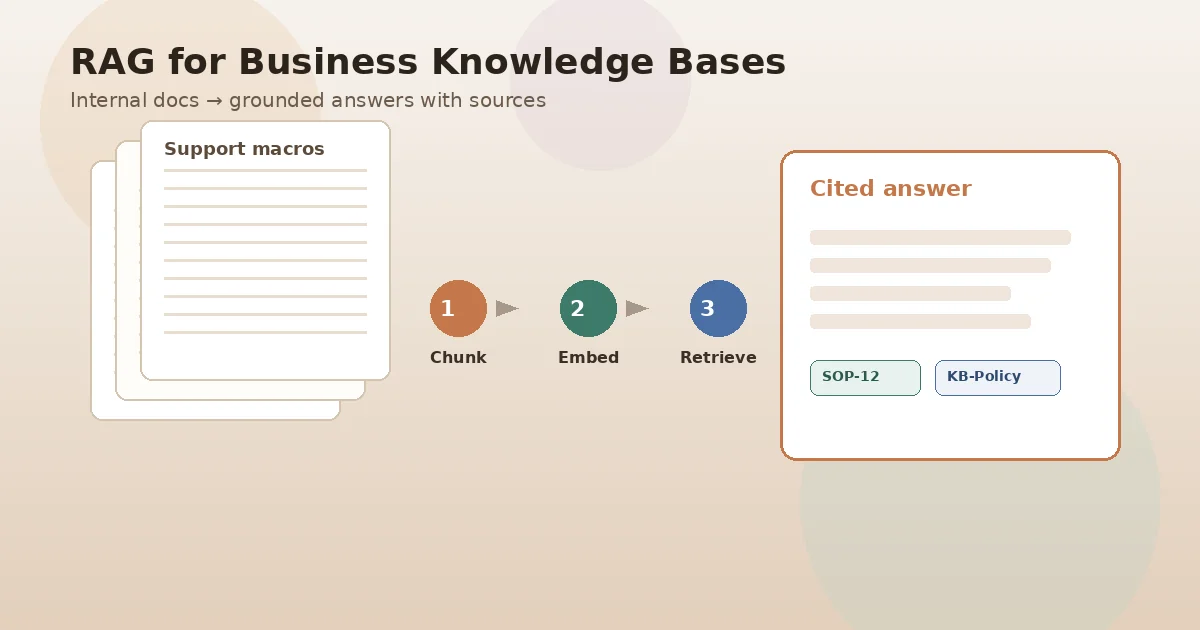
Most companies already have the answers. They live in SOPs, product specs, Confluence pages, ticket macros, and shared drives. What they lack is a reliable way to ask those sources in plain language and get a response that points back to the original document—not a fluent guess from a public model.
That is what a production RAG knowledge base is for. Retrieval-augmented generation (RAG) searches your approved content at question time, then asks a large language model to answer using only what was retrieved. Done well, employees and support teams get grounded answers with citations. Done poorly, you get a chatbot that sounds confident while citing the wrong policy version.
This guide is for technical buyers and engineering leads evaluating a custom RAG system over internal docs—not a generic “AI agents” overview. We cover architecture choices that matter in production, where buy-vs-build decisions land, and how teams like CodeSapient scope these builds under custom software and AI services.
What a RAG knowledge base actually does
RAG separates two jobs that public chat models blur together:
- Retrieve — find passages from your corpus that are relevant to the question (and that the user is allowed to see).
- Generate — compose an answer constrained to those passages, with links or IDs back to sources.
Amazon Bedrock’s documentation on Knowledge Bases describes the same pattern: search proprietary data, improve response relevancy, and include citations so accuracy can be checked. Managed platforms and custom pipelines both follow this shape; they differ in how much control you keep over chunking, indexes, ACLs, and evaluation.
If the answer cannot show which document (and ideally which section) it used, treat it as a prototype—not a knowledge system you can put in front of compliance, support, or sales.
RAG is the right default when knowledge changes often, must stay private, and needs source attribution. Fine-tuning a model on your docs is a different project with different failure modes; most internal Q&A problems do not need it first.
Why internal search fails—and where RAG helps
Keyword search returns links. Employees still open five tabs, reconcile conflicting versions, and ask a colleague who “knows where things live.” Classic enterprise search also struggles with intent: “What’s our refund window for annual plans?” may never use the word “refund” in the policy title.
A RAG knowledge base improves that loop when:
- Answers must reflect today’s approved docs, not a training cutoff.
- Users need a synthesized answer plus clickable sources.
- The same question spans multiple systems (wiki + CRM notes + PDF handbook).
- You need permission filtering so finance content never surfaces to the wrong role.
It does not fix messy ownership. Stale PDFs, duplicate policies, and undocumented tribal knowledge remain data problems. Retrieval quality tracks source quality. Upstream governance—who owns a doc, when it expires, what “approved” means—is part of the product, not an afterthought.
Reference architecture for a business RAG system
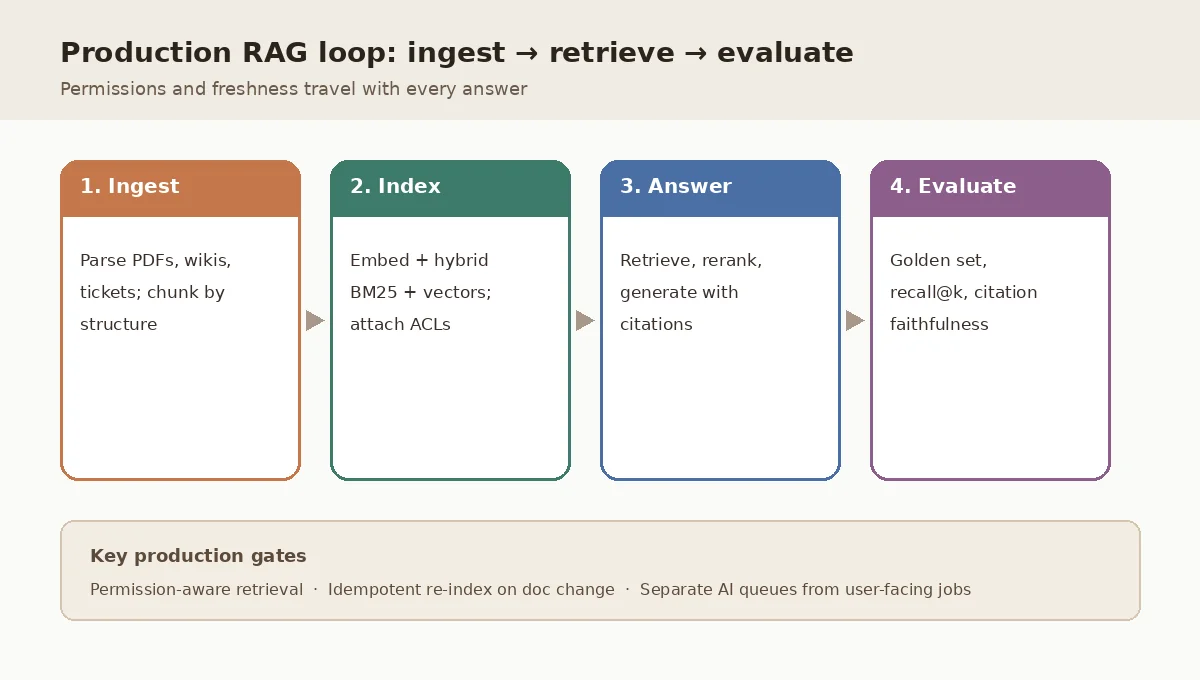
Production systems split into an offline ingestion path and an online query path.
Offline: ingest, chunk, embed, index
- Connectors — SharePoint, Google Drive, Confluence, Notion, S3, Zendesk macros, exported PDFs. Prefer APIs that preserve last-modified times and ACLs.
- Parsing — Extract text (and structure) from PDFs, DOCX, HTML. Tables and scanned pages need explicit handling; “dump to plain text” loses headings that chunkers rely on.
- Chunking — Split into retrieval units that match how people ask questions. Prefer structure-aware splits (headings, sections, FAQ items) over naive fixed character windows. Modest overlap (often ~10–20% for narrative prose) can help; rigid schemas (API reference tables) often need little or no overlap.
- Embeddings — Encode each chunk with a chosen embedding model. Store the model version with every vector. Changing models means re-embedding the corpus; mixed versions silently degrade retrieval.
- Metadata — Source URL/ID, title, section, tenant/org, language, doc type, ACL groups, content hash, embedding version, ingested_at.
- Index — Vector store (pgvector on PostgreSQL is a common start if you already run Postgres; dedicated engines such as OpenSearch, Qdrant, or Weaviate when scale or latency demands it) plus a lexical index for hybrid search.
Re-ingestion should be idempotent: on document change, delete old chunks for that source ID and insert the new set atomically. Partial updates create zombie passages that outlive the policy they came from.
Online: query, retrieve, rerank, generate
- Authenticate the user; resolve their permission scope.
- Optional query rewrite (expand acronyms, detect language)—keep this conservative.
- Hybrid retrieval — dense vectors for semantic match + BM25/keyword for exact IDs, SKUs, and policy codes.
- Metadata filters (tenant, product line, language, ACL).
- Optional reranker (cross-encoder) on the top candidates—adds latency, often improves precision.
- Assemble a bounded context window with citations.
- Generate with instructions to refuse when evidence is thin, and to quote or cite sources.
- Log query, retrieved IDs, answer, latency, and user feedback for evaluation.
Chunking and hybrid search: where most accuracy is won
Model choice gets the attention; chunking and retrieval design usually move the needle more for internal knowledge bases.
- Align chunk size to question granularity. “Step 3 of onboarding” needs checklist-item chunks, not four-page PDF blobs.
- Keep headings with body text. Orphans like “Exceptions apply in EU markets” without the policy name retrieve poorly.
- Separate collections when domains differ. Policies, engineering runbooks, and marketing FAQs often deserve distinct indexes (or strong metadata partitions) so a support query does not pull a draft campaign brief.
- Hybrid beats pure vector for ops language. Ticket IDs, error codes, and SKU strings are lexical; intent phrases are semantic. Production systems typically blend both, then rerank.
Long context windows in frontier models do not eliminate retrieval. They do not solve permissions, freshness, cost at scale, or the need to cite a specific approved source. Stuffing an entire drive into the prompt is neither safe nor affordable as a default architecture.
Permissions, tenancy, and unsafe answers
Enterprise RAG fails loudly when a well-written answer exposes content the user could not open in the source system. Design requirements:
- Filter at retrieval time using ACL metadata mirrored from the source—not only in the UI after generation.
- Deny by default when ACL sync is stale or unknown.
- Isolate tenants in multi-tenant SaaS (separate indexes or mandatory tenant predicates on every query).
- Redact or exclude secrets, credentials, and personal data from the index entirely when possible.
Managed offerings increasingly advertise document-level permission filtering; custom builds must implement the same invariant. Treat “permission-aware RAG” as a launch criterion, not a phase-two enhancement.
Evaluation: the difference between a demo and a system
Without a golden set, you are tuning on vibes. Build a small, living suite of real questions from support, ops, and HR—each with expected source documents (and ideally acceptable answer notes). Measure at least:
- Retrieval recall@k — did the right passage appear in the top results?
- Citation faithfulness — does the answer stick to retrieved text?
- Refusal quality — does the system say “I don’t know” when evidence is missing?
- Latency and cost — p95 end-to-end, embedding and generation spend per query.
Run the suite on every change to chunking, embeddings, prompts, or rerankers. Frameworks in the RAG evaluation ecosystem (for example RAGAS-style metrics) can help, but the golden set of your questions matters more than any generic benchmark.
Buy a platform vs build a custom RAG pipeline
Choose based on control, compliance, and how unique your sources are—not on hype.
Buy / managed when connectors, ACL sync, and a standard chat UX cover 80% of the need, and your security team accepts the vendor’s data path. AWS Bedrock Knowledge Bases, enterprise search + RAG products, and similar platforms accelerate time-to-value for common repositories.
Build / custom when you need:
- Unusual source systems or heavy PDF/table parsing
- Strict data residency or on-prem vector stores
- Deep embedding into existing products (in-app assistants with your auth model)
- Domain-specific retrieval (hybrid rules, multi-hop over structured + unstructured data)
- Evaluation and human review workflows owned by your ops team
Many programs start managed for a pilot, then carve out a custom retrieval layer where the vendor cannot express the policy. CodeSapient’s portfolio and about pages reflect that mix of productized Shopify work and custom AI/SaaS engineering—RAG projects usually sit on the custom side.
Implementation checklist before you write a prompt
- Name the primary user jobs (support deflection, employee handbook Q&A, sales enablement) and success metrics.
- Inventory sources; mark systems of record vs shadow copies.
- Define “approved” and owners; schedule freshness SLAs.
- Design ACL sync and tenant isolation before the first embedding job.
- Pick chunking rules per doc type; write them down.
- Choose embedding + vector + lexical stack; version everything.
- Build a 30–100 question golden set from real tickets and Slack asks.
- Ship citations and feedback buttons on day one.
- Separate long-running ingestion and embedding workers from the web request path (queue them; do not block HTTP).
- Plan re-index on model upgrade and on every source change.
Related reading on our blog: when agent-style tooling sits beside retrieval, see AI agents for eCommerce, MCP, and agentic workflows—agents and RAG compose, but they are not the same architecture.
FAQ
Is a RAG knowledge base the same as fine-tuning?
No. Fine-tuning changes model weights (or adapters) using training data. RAG leaves the model mostly unchanged and injects retrieved evidence at inference time. For internal policies and product docs that change weekly, RAG is usually the first production path; fine-tuning may help tone or specialized extraction later.
Do we need a vector database?
You need a way to store and search embeddings—often a vector extension (pgvector) or a dedicated vector engine—plus usually a lexical index for hybrid search. “Vector database” is the storage/search layer, not the whole product.
How do we stop hallucinations?
You reduce them with tight retrieval, citation requirements, refusal when scores are low, and evaluation—not with a longer system prompt alone. Hallucinations that cite invented sources are a retrieval and grounding failure.
Where should we start for a pilot?
One high-pain corpus (for example support macros + help center), one user group, permission filters on, citations on, and a golden set before a company-wide rollout. Expand sources only after recall and faithfulness clear your bar.
Conclusion
A RAG knowledge base turns scattered internal documentation into permission-aware, cited answers. The durable work is unglamorous: clean sources, structure-aware chunking, hybrid retrieval, ACL-safe indexes, and a golden evaluation set that blocks silent regressions.
If you are scoping a custom RAG or LLM knowledge system—connectors, evaluation harness, or an in-product assistant—contact CodeSapient to map sources, permissions, and success metrics before prompts. Explore AI and custom development services or browse the blog for related engineering guides.