
Django Docker Production Setup: uv, Gunicorn and a Dockerfile That Holds Up
A production Django Docker setup with a multi-stage uv Dockerfile, Gunicorn, WhiteNoise and env-based settings, plus four failures we reproduced, including Django 6.1's new MAILERS check.
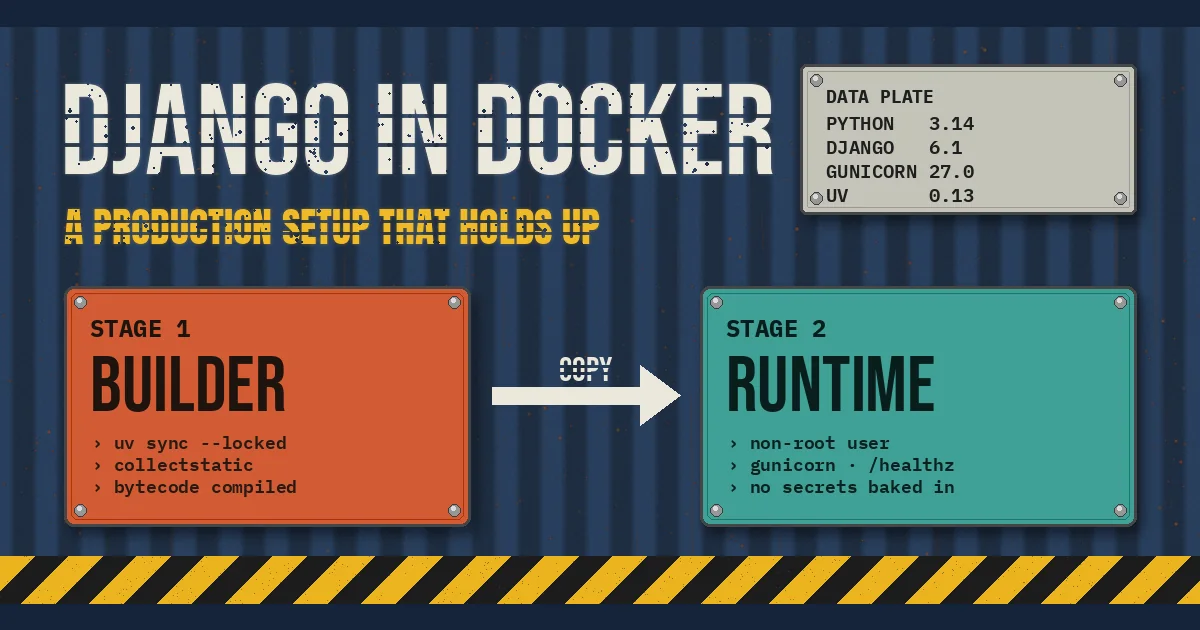
Getting Django to run in a container takes ten minutes. Getting a Django container that survives production takes longer, because the failures show up after the image builds: a health check that returns 400 and gets every task killed, an HTTPS redirect loop behind the load balancer, static files that disappear on the second deploy, or a 900 MB image that takes four minutes to push from CI.
This guide walks through a Django Docker production setup that avoids those traps. It uses a multi-stage Dockerfile, uv for locked dependency installs, Gunicorn as the application server, WhiteNoise for static files, and environment-driven settings. We tested the settings, the build commands and the health check on the box we write these articles from, using Django 6.1.3, Gunicorn 27.0.0, uv 0.13.7 and Python 3.14.10. Where we only read documentation rather than run something, we say so.
What a production Django image actually needs to do
A development container and a production container solve different problems. In development you want a bind mount, auto-reload and every debug tool. In production the image is an artifact: it gets built once in CI, scanned, promoted through environments and started by an orchestrator that knows nothing about Django. That gives the image a short list of jobs:
- Reproducible dependencies. The same lockfile produces the same packages on every build.
- No secrets baked in. Configuration comes from the environment at runtime, so one image runs in staging and production.
- A small runtime surface. No compilers, no package caches, no
.gitdirectory, and a non-root user. - A real WSGI or ASGI server. Django's deployment checklist is blunt about it:
runserveris not designed for production. - A health check the platform can trust. One cheap endpoint that answers 200 when the process can serve requests.
- Logs on stdout. Containers are disposable; log files written inside them disappear with them.
Everything below maps to one of those jobs.
The multi-stage Dockerfile
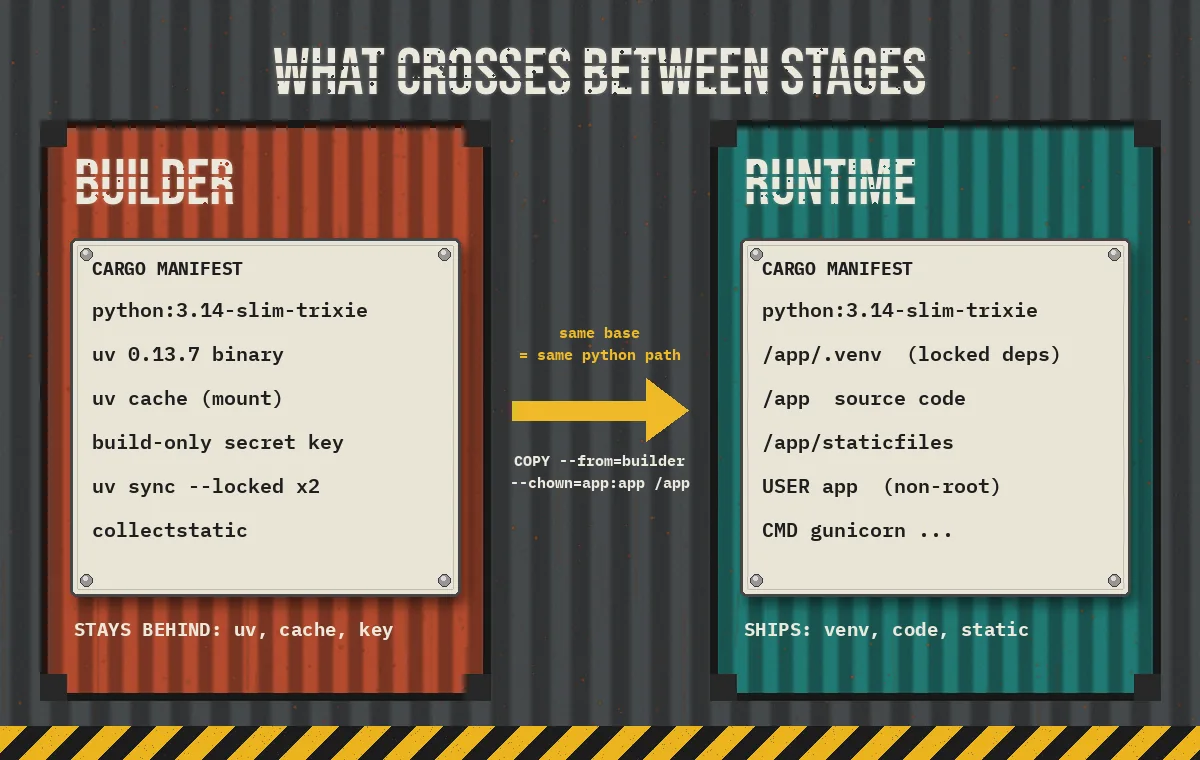
A multi-stage build splits the work into a builder stage that installs packages and collects static files, and a runtime stage that only receives the finished result. Here is the full file, assuming a project created with uv init, a Django project package called config, and a committed uv.lock.
# syntax=docker/dockerfile:1

# ---------- builder ----------
FROM python:3.14-slim-trixie AS builder
COPY --from=ghcr.io/astral-sh/uv:0.13.7 /uv /uvx /bin/

ENV UV_COMPILE_BYTECODE=1 \
    UV_LINK_MODE=copy \
    UV_NO_DEV=1 \
    UV_PYTHON_DOWNLOADS=0

WORKDIR /app

# 1. Dependencies only: this layer is cached until uv.lock changes
RUN --mount=type=cache,target=/root/.cache/uv \
    --mount=type=bind,source=uv.lock,target=uv.lock \
    --mount=type=bind,source=pyproject.toml,target=pyproject.toml \
    uv sync --locked --no-install-project

# 2. Application code
COPY . /app
RUN --mount=type=cache,target=/root/.cache/uv \
    uv sync --locked

# 3. Static files, with a throwaway key that never reaches runtime
RUN DJANGO_SECRET_KEY=build-only-not-secret \
    /app/.venv/bin/python manage.py collectstatic --noinput

# ---------- runtime ----------
FROM python:3.14-slim-trixie

RUN groupadd --system app \
 && useradd --system --gid app --home-dir /app --no-create-home app

WORKDIR /app
COPY --from=builder --chown=app:app /app /app

ENV PATH="/app/.venv/bin:$PATH" \
    PYTHONUNBUFFERED=1

USER app
EXPOSE 8000

HEALTHCHECK --interval=30s --timeout=3s --start-period=20s --retries=3 \
  CMD ["python", "-c", "import urllib.request,sys; sys.exit(0 if urllib.request.urlopen('http://127.0.0.1:8000/healthz', timeout=2).status == 200 else 1)"]

CMD ["gunicorn", "config.wsgi:application", \
     "--bind", "0.0.0.0:8000", \
     "--workers", "3", \
     "--access-logfile", "-"]
Pair it with a .dockerignore so local artifacts never enter the build context:
.venv/
__pycache__/
*.pyc
.git/
.env
staticfiles/
media/
node_modules/
Excluding .venv matters more than it looks. uv's Docker guide calls it out explicitly: a virtual environment is platform specific, so a macOS .venv copied into a Linux image is broken in ways that only appear at import time.
Why each line is there
Pinned uv image. Copying the binary from ghcr.io/astral-sh/uv:0.13.7 instead of :latest keeps builds repeatable. For stricter supply-chain control you can pin the image digest instead of the tag, which uv's documentation recommends for reproducible builds.
Two uv sync calls. The first installs only third-party dependencies, using bind mounts so the lockfile is read without being copied into a layer. Because your code changes far more often than your dependencies, this layer stays cached and most rebuilds skip the install entirely. The second sync runs after COPY . /app and installs the project itself. --locked makes the build fail if uv.lock is out of date with pyproject.toml, which is exactly what you want in CI.
UV_NO_DEV=1. Test runners, linters and debug toolbars stay out of the production image.
UV_COMPILE_BYTECODE=1. Pre-compiling .pyc files moves work from container start to build time. uv's docs describe the trade-off as faster startup in exchange for longer installs and a slightly larger image. In our local run of the same sync commands, uv reported compiling 1,107 files in under 70 ms for a Django + Gunicorn + WhiteNoise + psycopg dependency set, so the build-time cost is small for a typical app.
The same base image in both stages. This one bites people who try to shrink images further. A virtual environment's python is a symlink to an absolute interpreter path; on our box, .venv/bin/python pointed straight at the interpreter that created it. If the runtime stage uses a different base with Python in a different location, the copied venv will not start. Keep the builder and runtime on the same python:3.14-slim-trixie tag (or digest) and the paths line up.
Non-root user. The runtime stage creates a system user and copies files with --chown. If an attacker finds a remote code execution bug, they land as an unprivileged user inside a filesystem they do not own.
Settings that read the environment
The image should be identical across environments, so every value that differs between staging and production belongs in an environment variable. A minimal pattern in settings.py looks like this:
import os

SECRET_KEY = os.environ["DJANGO_SECRET_KEY"]
DEBUG = os.environ.get("DJANGO_DEBUG", "0") == "1"
ALLOWED_HOSTS = [h for h in os.environ.get("DJANGO_ALLOWED_HOSTS", "").split(",") if h]
CSRF_TRUSTED_ORIGINS = [
    o for o in os.environ.get("DJANGO_CSRF_TRUSTED_ORIGINS", "").split(",") if o
]

STATIC_ROOT = BASE_DIR / "staticfiles"
STORAGES = {
    "default": {"BACKEND": "django.core.files.storage.FileSystemStorage"},
    "staticfiles": {
        "BACKEND": "whitenoise.storage.CompressedManifestStaticFilesStorage"
    },
}

# TLS ends at the load balancer
SECURE_PROXY_SSL_HEADER = ("HTTP_X_FORWARDED_PROTO", "https")
SECURE_SSL_REDIRECT = True
SECURE_REDIRECT_EXEMPT = [r"^healthz$"]
SESSION_COOKIE_SECURE = True
CSRF_COOKIE_SECURE = True
SECURE_HSTS_SECONDS = int(os.environ.get("DJANGO_HSTS_SECONDS", "0"))

LOGGING = {
    "version": 1,
    "disable_existing_loggers": False,
    "handlers": {"console": {"class": "logging.StreamHandler"}},
    "root": {"handlers": ["console"], "level": "INFO"},
}
Using os.environ["DJANGO_SECRET_KEY"] with square brackets is deliberate: a container started without a key should crash immediately rather than boot with a default. That is also why the Dockerfile passes a throwaway key only to the collectstatic step. It exists for one command in the builder stage and is not present in the runtime image's environment.
Add whitenoise.middleware.WhiteNoiseMiddleware directly after SecurityMiddleware, as the WhiteNoise Django guide describes. In our test, WhiteNoise served the hashed copy of an admin stylesheet with Cache-Control: max-age=315360000, public, immutable and the unhashed name with a 60-second cache, which is the behaviour you want: fingerprinted files can be cached forever by a CDN, and a new deploy produces new file names.
Django 6.1 adds one new deploy-time trap: MAILERS
If you start a new project on Django 6.1, startproject now writes a MAILERS setting that uses the console email backend. The Django 6.1 release notes introduce MAILERS as the replacement for EMAIL_BACKEND and the other EMAIL_* settings, along with a new deployment-only check, mail.E001, that rejects development backends in the default entry.
We hit it on our first run of manage.py check --deploy against a fresh 6.1.3 project. It is an error, not a warning, so a CI step that runs the deploy check fails until you configure a real mailer:
MAILERS = {
    "default": {
        "BACKEND": "django.core.mail.backends.smtp.EmailBackend",
        "OPTIONS": {
            "host": os.environ.get("SMTP_HOST", "localhost"),
            "port": int(os.environ.get("SMTP_PORT", "587")),
            "username": os.environ.get("SMTP_USER", ""),
            "password": os.environ.get("SMTP_PASSWORD", ""),
            "use_tls": True,
        },
    },
}
With that in place, the error disappeared and only the HSTS-related warnings remained, which you resolve once you are sure every subdomain is HTTPS-only. Existing projects that still use EMAIL_BACKEND keep working on 6.1 but get deprecation warnings, so this is a good moment to migrate.
Gunicorn in a container
Gunicorn is still the default choice for synchronous Django apps. A few container-specific points:
- Use the exec form of
CMD(the JSON array). Gunicorn then runs as PID 1 and receives the orchestrator'sSIGTERMdirectly, so it can finish in-flight requests before the container is stopped. The shell form wraps it in/bin/sh, which may not forward the signal. - Size workers to the container, not the host. A common starting point is a small fixed number per container (we use 3 above) and horizontal scaling by adding containers. Formulas based on CPU count can read the host's cores rather than your container's limit, so set the number explicitly.
- Send access logs to stdout with
--access-logfile -, and let the platform collect them. - Check the Gunicorn 27 change before upgrading. Gunicorn 27.0.0, released on 10 November 2026, now rejects with 400 any request whose
Transfer-Encodingdoes not end withchunked. Normal browser and API traffic is unaffected, but if you have an internal client that sendsTransfer-Encoding: identity, it must stop.
If your app is async-heavy (WebSockets, streaming, many concurrent outbound calls), run an ASGI server instead and point it at config.asgi:application. The rest of the Dockerfile stays the same.
The four failures we reproduced, and how to avoid them
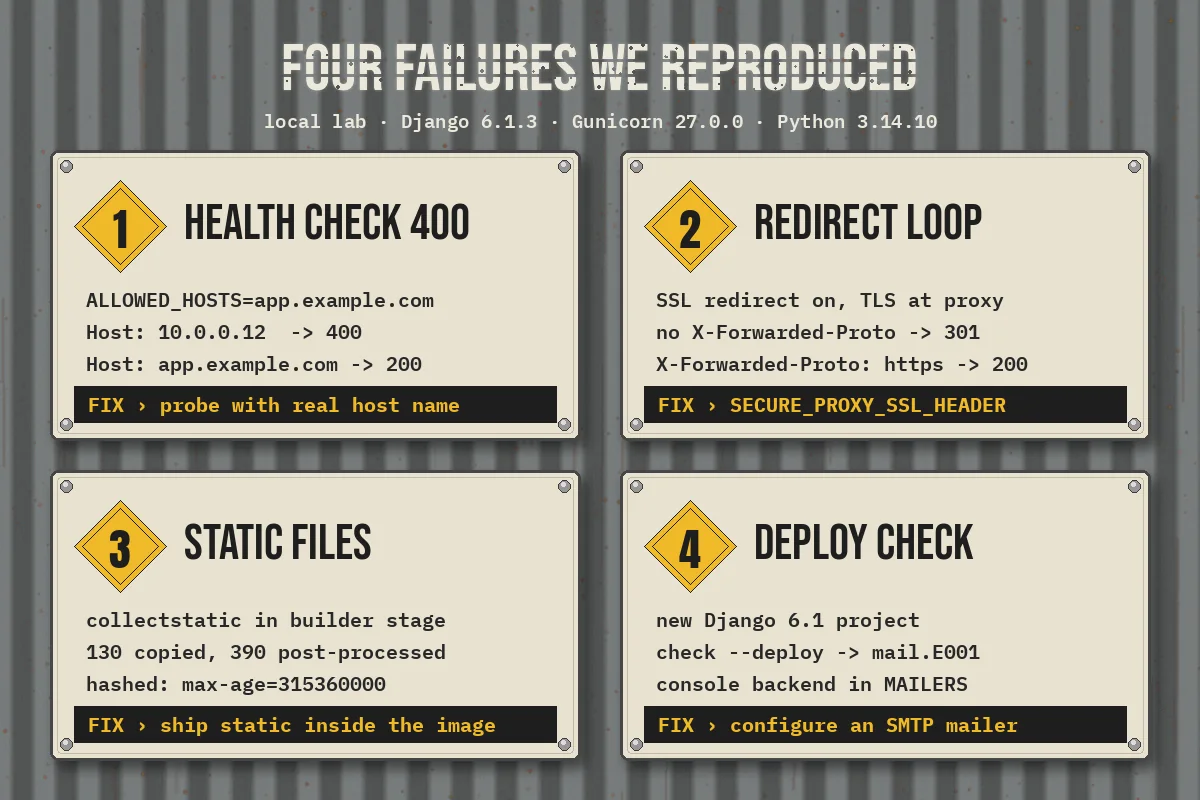
These are the problems that make a "working" image fail in production. We reproduced each one locally against Gunicorn with the settings above.
1. The health check returns 400
Django validates the Host header against ALLOWED_HOSTS. Load balancers and container health checks often call the container by IP. With ALLOWED_HOSTS=app.example.com, our /healthz request returned 400 when sent with Host: 10.0.0.12, and 200 with the real host name. The orchestrator sees 400, marks the task unhealthy and restarts it, in a loop.
Fixes, in order of preference: configure the platform's health check to send your real host name; add the specific internal address your probe uses (the Dockerfile's HEALTHCHECK calls 127.0.0.1, so include it); or answer health checks in a tiny middleware placed first in MIDDLEWARE, before anything that calls request.get_host(). Avoid ALLOWED_HOSTS = ["*"]; it switches off a protection against host-header attacks.
2. HTTPS redirect loops behind the proxy
When TLS ends at the load balancer, Django sees plain HTTP. With SECURE_SSL_REDIRECT = True and no proxy header configured, every request is redirected to HTTPS, arrives at Django as HTTP again, and loops. In our test, a request without X-Forwarded-Proto to /admin/login/ returned 301, and the same request with X-Forwarded-Proto: https returned 200.
SECURE_PROXY_SSL_HEADER tells Django to trust that header. Only set it when your proxy always sets the header and strips any copy sent by the client; otherwise a client can claim to be on HTTPS. We also exempt /healthz from the redirect so probes that speak plain HTTP inside the network get a straight 200, which our health check script confirmed.
3. Static files vanish or go stale
Running collectstatic at container start, or relying on a shared volume, creates race conditions when several containers start at once. Run it in the builder stage instead, as above. The files ship inside the image, every container has an identical copy, and the manifest storage guarantees templates reference file names that exist. In our build, collectstatic copied 130 admin files and post-processed 390 outputs including compressed variants, all before the runtime stage existed.
User uploads are different: never store media/ inside the container. Use object storage such as S3 through the default storage backend.
4. The deploy check fails in CI
Run python manage.py check --deploy against production settings in CI, inside the built image, before you push it. On Django 6.1 this is where mail.E001 appears for new projects, and it is also where you catch DEBUG = True or a missing SECURE_SSL_REDIRECT before they reach users. Treat errors as build failures and review warnings explicitly.
Migrations: run them once, not per container
The tempting shortcut is an entrypoint script that runs migrate and then starts Gunicorn. With one container that works. With five replicas starting together, five processes race to apply the same migrations, and a slow migration delays every container's health check.
Run migrations as a separate one-off task from the same image instead: a release phase, a Kubernetes Job, an ECS run-task, or a dedicated Compose service with command: python manage.py migrate that the web service waits on. Then make sure each migration is backward compatible with the code that is still running during the rollout. Our guide to zero-downtime database migrations for Django and PostgreSQL covers the expand-and-contract pattern in detail.
Workers, the database and Compose
The same image can run more than one role. Celery workers, Django Tasks workers and scheduled jobs use identical code with a different command, so build once and override CMD per service:
services:
  web:
    image: registry.example.com/myapp:${GIT_SHA}
    env_file: .env.production
    ports: ["8000:8000"]
    depends_on:
      migrate:
        condition: service_completed_successfully

  migrate:
    image: registry.example.com/myapp:${GIT_SHA}
    env_file: .env.production
    command: ["python", "manage.py", "migrate", "--noinput"]

  worker:
    image: registry.example.com/myapp:${GIT_SHA}
    env_file: .env.production
    command: ["celery", "-A", "config", "worker", "--loglevel=info"]
If you are choosing a background job approach, see our posts on Django Celery and Redis and the Django Tasks framework. Once you run several web containers with several Gunicorn workers each, database connections multiply fast; PostgreSQL connection pooling with PgBouncer explains how to keep that under control.
Common mistakes to avoid
- Copying the whole project before installing dependencies. Every code change invalidates the dependency layer and reinstalls everything.
- Using
uv syncwithout--lockedin CI. The build quietly resolves new versions instead of failing on a stale lockfile. - Baking
.envinto the image. Anyone who can pull the image can read the secrets. Inject them at runtime from your platform's secret store. - Mixing base images between stages. The copied virtual environment points to an interpreter path that may not exist in the runtime image.
- Running as root because it "just works" with file permissions. Fix the ownership with
--chowninstead. - Unpinned tags like
python:latestanduv:latest, which change underneath you between builds. - Turning on HSTS preload casually. Django's own check warns that careless HSTS can cause serious, hard-to-reverse problems. Start with a short
SECURE_HSTS_SECONDSand increase it.
A short production checklist
- Multi-stage build on a pinned Python base, with a pinned uv version.
uv sync --lockedin two layers: dependencies first, project second..dockerignoreexcludes.venv,.git,.envand local static or media output.- Secrets and hosts come from environment variables; the app fails fast without a secret key.
collectstaticruns at build time with manifest storage and WhiteNoise or a CDN.- Gunicorn (or an ASGI server) via exec-form
CMD, explicit worker count, logs to stdout. - A non-root user in the runtime stage.
- A
/healthzendpoint that works with yourALLOWED_HOSTSand proxy settings. check --deploypasses in CI, including the Django 6.1MAILERScheck.- Migrations run once per release, as a separate task.
FAQ
Should I use Alpine for a Django image?
You can, but many Python packages publish wheels built for glibc-based Linux first, and musl-based Alpine sometimes means compiling from source or using different wheels. A slim Debian base is the lower-friction default. If image size is the main concern, measure both with your real dependency set before switching.
Do I still need Nginx in front of Gunicorn?
Not necessarily. If a managed load balancer or ingress terminates TLS and WhiteNoise or a CDN serves static files, many teams run Gunicorn directly behind it. A reverse proxy still earns its place when you need request buffering for slow clients, custom caching or serving large uploads.
Can I use pip instead of uv?
Yes. The structure stays the same: install from a lock or hashed requirements file in a builder stage and copy the environment into the runtime stage. We use uv here because its lockfile check and cache mounts make the two-layer pattern simple.
Conclusion
A production-ready Django image is less about clever Dockerfile tricks and more about removing surprises: locked dependencies, no secrets in layers, static files built once, an honest health check, correct proxy settings and migrations that run exactly once. Get those right and the container becomes boring, which is the goal.
If your team is moving a Django or Python application to containers, or untangling a deployment that keeps failing health checks, CodeSapient can help with the Dockerfile, CI pipeline and the infrastructure around it. Take a look at our software development services or get in touch to talk through your setup.