
Django Tasks Framework: A Production Guide to Background Jobs in Django 6
Django 6 ships a built-in Tasks framework for background jobs, but no worker. Learn how to define and enqueue tasks, pick a production backend, enqueue safely after commit, and decide when to keep Celery.
Almost every Django product ends up with work that should not happen inside the request: sending a receipt email, generating a PDF, calling a slow third-party API, resizing an upload, syncing an order to an ERP. For years the answer was "install Celery" (or RQ, or Huey) and learn that library's own decorator, settings and result API.
Since Django 6.0, there is a standard layer for this. The Django Tasks framework (django.tasks) gives you one way to define a background task, enqueue it, and read its result, while the actual queue and worker come from a pluggable backend. This guide explains what the framework does and does not do, how to configure a production backend, the patterns that keep tasks correct (transactions, JSON arguments, idempotency), and when you should keep Celery instead.
Everything below is based on the official Django 6.0 and 6.1 documentation and on a small project we ran locally with Django 6.1.2 and django-tasks-db 0.13.0 while writing this article.
What the Django Tasks framework is (and is not)
The Django 6.0 release notes describe it as a built-in framework "for running code outside the HTTP request–response cycle". Django provides task definition, validation, queuing and result handling. What it deliberately does not provide is a worker. In the words of the Tasks topic guide, execution "must be handled by infrastructure outside Django, such as a separate process or service".
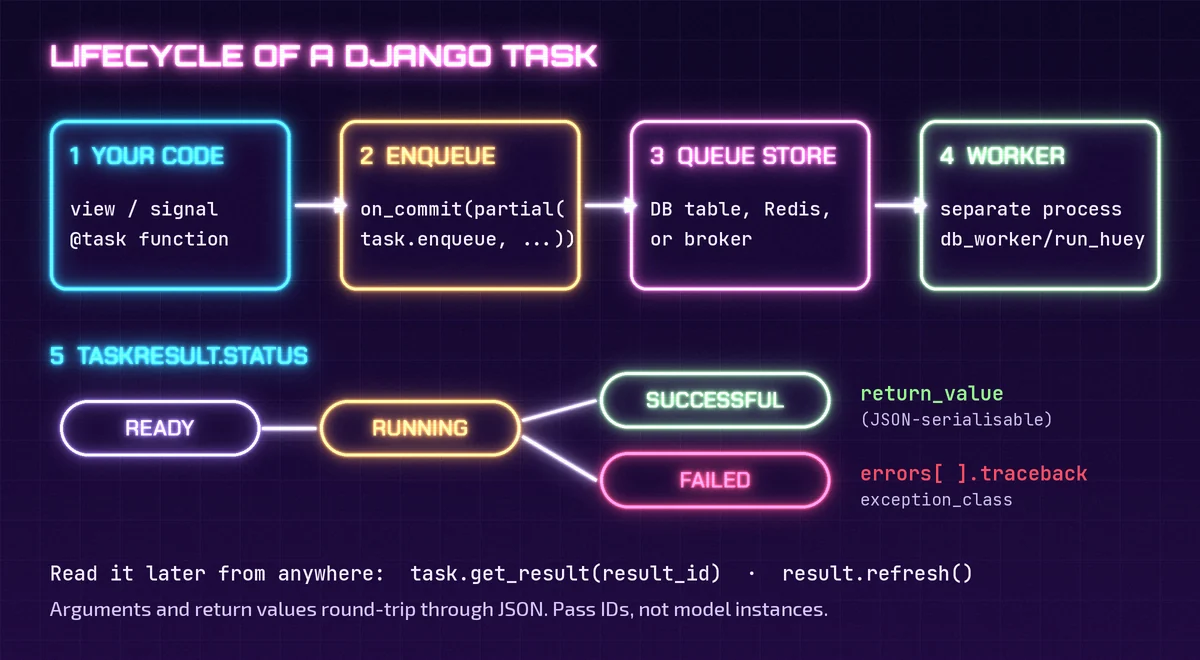
That split is the key idea. Think of it like the CACHES or STORAGES settings: your application code talks to a stable Django API, and a backend decides where the data actually lives. For tasks, the moving parts are:
- Task: a module-level function decorated with
@task. - Queue store: where enqueued tasks wait (a database table, Redis, and so on), owned by the backend.
- Worker: a separate process that claims a task, runs it, and writes the status and result back.
- TaskResult: the handle you get back from
enqueue(), with anidyou can use to look the result up later.
Defining and enqueueing your first task
By convention tasks live in a tasks.py module, although Django does not enforce it. A task must be a module-level function, and the decorator accepts priority, queue_name, backend and takes_context:
# orders/tasks.py
from django.tasks import task
from .models import Order

@task(queue_name="emails", priority=10, takes_context=True)
def send_receipt(context, order_id):
    order = Order.objects.get(pk=order_id)
    if order.receipt_sent:          # safe to run twice
        return {"skipped": True}
    # ... send the email here ...
    order.receipt_sent = True
    order.save(update_fields=["receipt_sent"])
    return {"order": order.number, "attempt": context.attempt}
Calling send_receipt.enqueue(order_id=order.pk) hands the task to the configured backend and returns a TaskResult immediately. In an async view, use await send_receipt.aenqueue(...). With takes_context=True, the first argument is a TaskContext, which exposes the current attempt number (starting at 1) and the running task_result.
Tasks are immutable. To change the queue, priority, backend or start time for one call, create a modified copy with using():
from datetime import timedelta
from django.utils import timezone

send_receipt.using(priority=50).enqueue(order_id=order.pk)
send_receipt.using(
    run_after=timezone.now() + timedelta(minutes=10)
).enqueue(order_id=order.pk)
Priorities run from -100 to 100, larger numbers run sooner, and both priority and run_after only work if the backend says it supports them (otherwise Django raises InvalidTask). The 6.1 reference says run_after can also be a timedelta; in our test on Django 6.1.2, using() only accepted a timezone-aware datetime, so that is the form we recommend.
Choosing a backend: development vs production
Backends are configured in the TASKS setting. If you do not configure anything, Django uses the ImmediateBackend, which runs the task straight away in the same process. That is a deliberate on-ramp: you can write code against the Tasks API today and add a real worker later. Django also ships a DummyBackend, which never runs tasks and simply records them, which is handy in tests. The docs are explicit that both built-ins are for development and testing only.
For production you need a third-party backend that supplies a durable queue and a worker. Django's Community Ecosystem page currently lists these under Background Tasks:
- django-tasks-db: stores tasks in your database through the ORM and runs them with a
db_workermanagement command. - django-tasks-rq: an RQ-based backend, so tasks live in Redis and run on RQ workers.
- Huey: Huey's Django integration includes a backend for
django.tasks(Redis, SQLite or Postgres storage), run withmanage.py run_huey. - django-tasks: a backport of the framework for projects still on Django versions older than 6.0.
Backends declare what they support through four feature flags: supports_defer, supports_priority, supports_get_result and supports_async_task. Here is what each one declared when we checked:
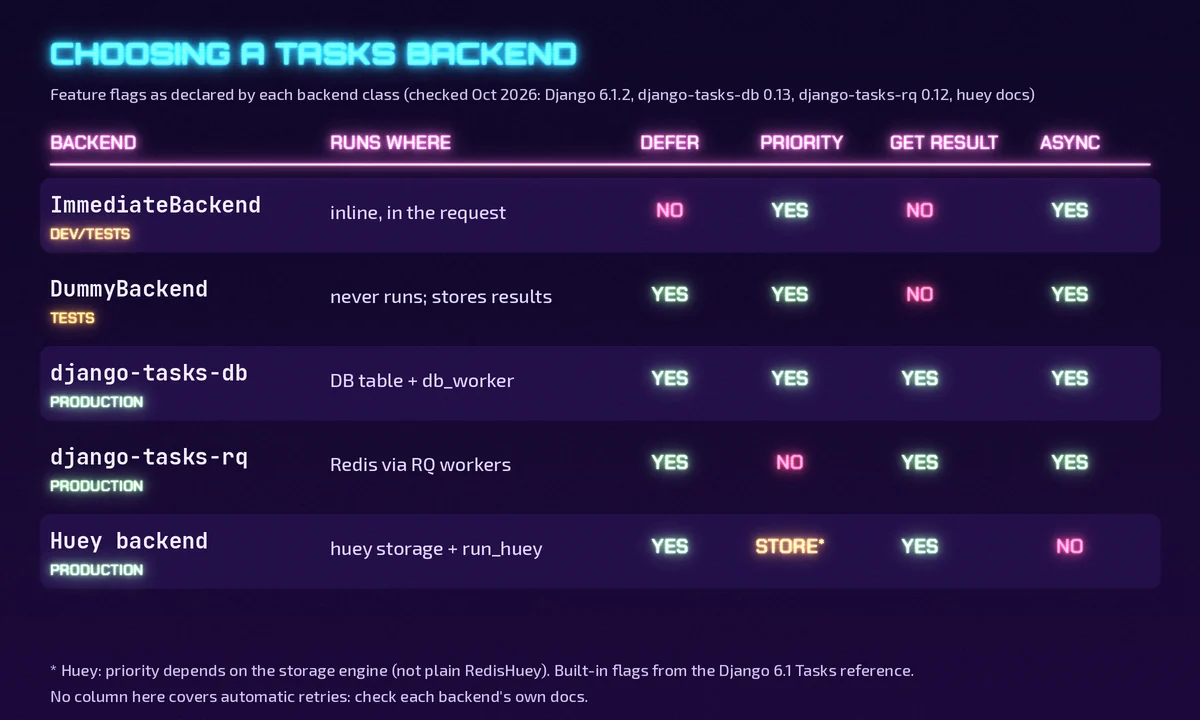
Two details are worth knowing before you choose. First, get_result() only works on backends that store results somewhere another process can read; the built-ins raise NotImplementedError. Second, according to the Huey documentation, its backend does not support async def tasks, and priority depends on the storage engine (plain RedisHuey rejects non-zero priorities).
A production setup with django-tasks-db
If you already run PostgreSQL and your background volume is modest, a database-backed queue is the simplest thing that can work: no new infrastructure, and tasks are stored next to the data they act on. Setup from the django-tasks-db README:
# settings.py
INSTALLED_APPS = [
    # ...
    "django_tasks_db",
]

TASKS = {
    "default": {
        "BACKEND": "django_tasks_db.DatabaseBackend",
        "QUEUES": ["default", "emails"],
    }
}
Run python manage.py migrate, then start one or more workers as separate processes (a systemd unit, a second container, or a separate service on your platform):
python manage.py db_worker --queue-name default,emailsUseful options from db_worker --help: --queue-name '*' processes every queue, --batch drains outstanding tasks and exits (good for cron-style jobs or CI), --max-tasks recycles a worker after N tasks, and --worker-id must be unique across your worker pool if you set it. Auto-reload is on when DEBUG is true and is not recommended in production because tasks may not stop cleanly. Workers claim rows with SELECT ... FOR UPDATE SKIP LOCKED, so several workers can share a queue without picking up the same task.
Finished results accumulate, so schedule python manage.py prune_db_task_results. By default it removes finished results older than 14 days; --failed-min-age-days lets you keep failures longer for debugging, and --dry-run shows what would be deleted.
A database queue adds load to your primary database: every enqueue is an insert and every idle worker polls (once a second by default, configurable with --interval). If you are already near your connection limits, read our guide to PostgreSQL connection pooling for SaaS APIs before adding workers, and keep high-volume or latency-sensitive queues on Redis.
Five rules that keep background tasks correct
1. Enqueue after the transaction commits
Most backends run tasks in another process with another database connection. If you enqueue inside transaction.atomic(), a fast worker can start before your transaction commits and fail to find the row you just created. The topic guide recommends binding the call with functools.partial and registering it with transaction.on_commit():
from functools import partial
from django.db import transaction

with transaction.atomic():
    order = Order.objects.create(number="A-1001")
    transaction.on_commit(partial(send_receipt.enqueue, order_id=order.pk))
If the transaction rolls back, nothing is enqueued. Huey's backend also offers an ENQUEUE_ON_COMMIT option that does this for you. Note that on_commit still leaves a small gap: if the process dies between the commit and the enqueue, the task is lost. When that matters (payments, inventory, outbound webhooks), use the transactional outbox pattern, or a database-backed queue in the same database so the task row commits with your data.
2. Pass IDs and plain JSON, never model instances
Task arguments and return values go through a json.dumps()/json.loads() round trip and must keep their type. In our test, enqueueing a datetime argument failed immediately with a TypeError, and the docs' own example shows a tuple silently becoming a list and breaking a dictionary key. Pass primary keys, ISO-8601 strings and plain dicts, and reload fresh data inside the task. This also keeps a task from acting on a stale copy of a model.
3. Make every task idempotent
Workers crash, deploys restart processes, and some backends retry. Design each task so running it twice is harmless: check a flag or status before doing the side effect (as send_receipt does above), use unique constraints, and pass idempotency keys to payment or email providers. context.attempt and TaskResult.attempts tell you how many times a task has run, but the @task decorator itself has no retry-policy argument. Whether failed tasks are retried, and how, depends on your backend, so check its documentation rather than assuming.
4. Read results by ID, and refresh them
Store result.id (a string under 64 characters) if a later request needs to show progress. Retrieve it with send_receipt.get_result(result_id) or default_task_backend.get_result(result_id). A TaskResult is a snapshot, so call refresh() (or arefresh()) to see new state. Status moves from READY to RUNNING to SUCCESSFUL or FAILED; on failure, errors holds each exception_class and a traceback string, and reading return_value raises ValueError.
5. Test with the built-in backends
Point TASKS at ImmediateBackend in tests to run tasks synchronously and assert on their side effects, or at DummyBackend to assert that a view enqueued the right task without running it (default_task_backend.results holds what was enqueued, and clear() resets it). You can define several aliases in TASKS and pick one per call with using(backend="...").
Django Tasks vs Celery: should you migrate?
The Tasks framework standardises the interface. It does not try to match everything a mature task system offers. Celery brings workflow primitives (chains, groups, chords), periodic scheduling through Celery Beat, rate limits, routing and a large operations ecosystem. None of those are part of django.tasks itself.
A practical way to decide:
- New project, simple jobs (emails, webhooks out, report generation): start with
django.tasksand a database or Redis backend. You can switch backends later by changing settings, not task code. - Reusable apps and libraries: target
django.tasksso that whoever installs your app can choose their own backend. This is one of the main reasons the API exists. - Existing Celery project that works: there is no need to rewrite it. Consider using
django.tasksfor new, simple tasks only if your team wants the standard API, and keep Celery where you rely on canvas workflows, Beat schedules or fine-grained routing. Our Celery and Redis background jobs guide covers that production setup. - Heavy throughput or strict latency: prefer a Redis-backed worker over a database queue, and load-test the backend you pick.
Also check your versions. The Django 6.1 release notes (August 2026) add **kwargs pass-through on @task for backend-specific options and make Task and TaskResult picklable, and 6.1 drops support for PostgreSQL 14 and MySQL below 8.4. If you are upgrading at the same time, our guide to zero-downtime database migrations in Django and PostgreSQL helps you ship the new task tables without an outage.
A rollout checklist
- Upgrade to Django 6.0 or newer, or install the
django-tasksbackport. - Move one slow, non-critical operation into a
@taskwith ID-only arguments and an idempotency check. - Ship it with the default
ImmediateBackendso behaviour is unchanged. - Add a production backend, run its migrations, and deploy workers as a separate process with their own health checks and logs.
- Wrap enqueues in
transaction.on_commit()and alert onFAILEDresults. - Schedule result pruning and watch queue depth and database load.
- Move the next task, and keep a clear rule for which jobs stay on Celery (if any).
FAQ
Does Django 6 include a background worker?
No. Django 6.0 and 6.1 include the Tasks API plus two development and testing backends. A production worker comes from a third-party backend such as django-tasks-db, django-tasks-rq or Huey.
Can I use the Tasks framework on Django 5.x?
Yes, through the django-tasks backport mentioned in the Django docs. Moving to the built-in django.tasks later is then mostly an import change.
Can tasks be async functions?
Only if the backend sets supports_async_task. The built-ins, django-tasks-db and django-tasks-rq declare support; Huey's backend documents that coroutine tasks are not supported.
Is a database-backed queue good enough for production?
For many products, yes: it is durable, transactional and needs no extra service. Watch database load and polling, prune old results, and move high-volume queues to Redis when the numbers justify it.
Moving background work out of your request path is one of the quickest ways to make a Django product feel faster and fail less. If you want a second pair of eyes on your task design, a Celery-to-django.tasks migration, or the worker infrastructure behind it, CodeSapient builds and maintains Django, PostgreSQL and Redis systems for SaaS and eCommerce teams. Have a look at our development services or tell us about your project.