
Zero-Downtime Database Migrations for Django and PostgreSQL
How to run zero-downtime database migrations on Django and PostgreSQL: which schema changes take blocking locks, the expand and contract pattern, lock_timeout, concurrent indexes, NOT VALID constraints, and batched backfills.
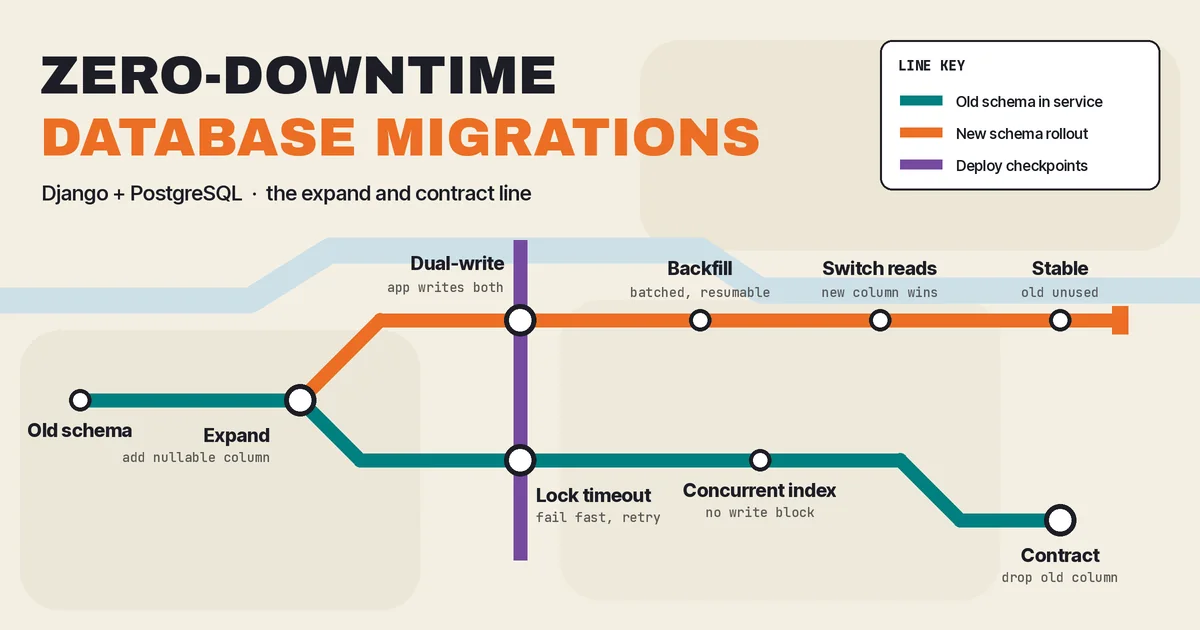
Most production outages caused by schema changes do not come from bad SQL. They come from perfectly valid SQL that grabbed the wrong lock at the wrong moment, or from new code and old code disagreeing about what the database looks like during a rolling deploy. The migration "worked" in staging in 40 milliseconds. In production, on a table with real traffic, it sat in a lock queue, every request touching that table piled up behind it, and the API went dark until someone killed the session.
Zero-downtime database migrations are less about clever tooling and more about discipline: knowing which operations are dangerous on PostgreSQL, splitting risky changes into small compatible steps, and running them in an order that never leaves live code pointing at a schema it does not understand. This guide walks through that discipline for Django and PostgreSQL, with patterns you can apply to Laravel, Rails, or any other stack on the same database.
Why "safe" migrations still take production down
There are two separate failure modes, and teams usually only plan for one of them.
1. Lock contention
Many ALTER TABLE forms in PostgreSQL take an ACCESS EXCLUSIVE lock, which conflicts with everything, including plain SELECT queries. The PostgreSQL ALTER TABLE documentation states that this lock is acquired unless a subform explicitly notes otherwise. Even when the change itself is instant, the statement has to wait for that lock.
That wait is the trap. If a long-running report query or an idle-in-transaction session holds a weaker lock on the table, your migration queues behind it. Every new query that arrives after your migration then queues behind the migration, because PostgreSQL grants conflicting locks in order. A one-line metadata change ends up blocking all traffic to the table for as long as that original slow query runs.
2. Code and schema mismatch
During a rolling deploy, old and new application versions run at the same time. If a migration renames a column, drops one, or adds a NOT NULL column without a database default, the old version of the code starts failing the moment the migration lands. Django selects every model field by name, so dropping a column that old pods still know about turns into errors on ordinary reads, not just writes.
A migration is only zero-downtime if it is safe on both axes: it does not hold a blocking lock for long, and it is compatible with the code versions running before, during, and after it.
The expand and contract pattern
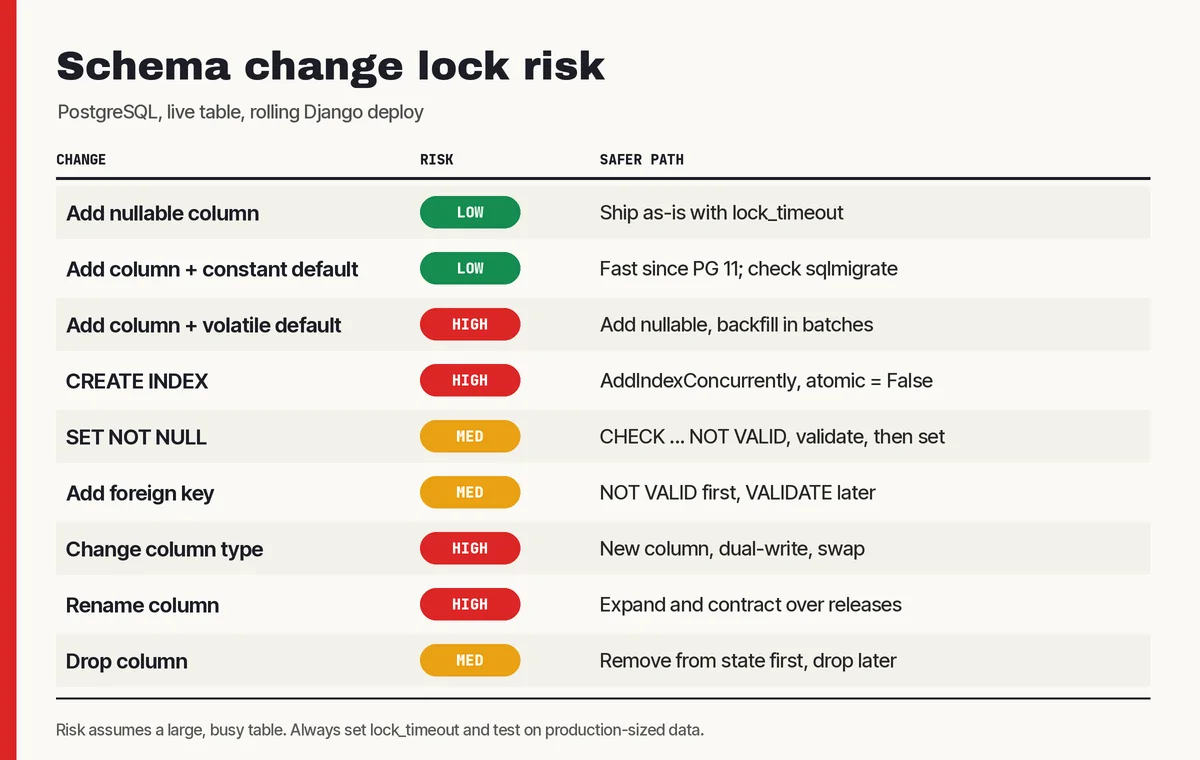
The core technique behind zero-downtime schema changes is expand and contract (also called parallel change). Instead of changing a structure in place, you:
- Expand: add the new structure alongside the old one. Nothing existing breaks.
- Migrate: deploy code that writes to both, backfill historical data, then switch reads to the new structure.
- Contract: once no running code depends on the old structure, remove it.
Each step ships as its own deploy. It feels slower than one migration that does everything, but each step is small, reversible, and boring. That is exactly what you want from a change to a table that every request touches.
Example: renaming a column safely
Django's RenameField produces a single ALTER TABLE ... RENAME COLUMN. The rename itself is fast, but any old code still running will query the old column name and fail. The zero-downtime version of renaming orders.ref to orders.external_ref looks like this:
- Add a nullable
external_refcolumn. Deploy. - Deploy code that writes to both
refandexternal_refon every save. - Backfill
external_reffromreffor existing rows, in batches. - Deploy code that reads from
external_refand stops writingref. - Remove
reffrom the Django model without dropping the column (see below). Deploy. - Drop the old column in a later release.
Six steps for a rename is the honest cost. For tables with little traffic, a short maintenance window may be the better trade, and that is a legitimate decision. The point is to make it a decision rather than a surprise.
Operation by operation: what is safe on PostgreSQL
Adding a column
Adding a nullable column with no default is a metadata-only change and is fast. Since PostgreSQL 11, adding a column with a non-volatile default is also fast: the documentation explains that the default is evaluated once and stored in the table's metadata rather than written to every row. A volatile default such as clock_timestamp() or a random UUID still forces a full table rewrite under an exclusive lock.
In Django, check what SQL a migration actually produces before trusting it:
python manage.py sqlmigrate orders 0042If old code will insert rows without the new column, the column must be nullable or have a database-level default. Django's default= is applied by Python, not the database, so old pods inserting rows will not set it. Since Django 5.0, db_default lets you declare a real database default, which keeps inserts from old code valid.
Making a column NOT NULL
ALTER COLUMN ... SET NOT NULL normally scans the whole table while holding an exclusive lock. PostgreSQL skips that scan if a valid CHECK constraint already proves the column has no nulls, so the safe sequence is:
-- 1. Add the check without scanning existing rows (brief lock)
ALTER TABLE orders
  ADD CONSTRAINT orders_channel_not_null
  CHECK (channel IS NOT NULL) NOT VALID;

-- 2. Validate in a separate migration (scans, but with a weaker lock)
ALTER TABLE orders VALIDATE CONSTRAINT orders_channel_not_null;

-- 3. Now SET NOT NULL can skip the table scan
ALTER TABLE orders ALTER COLUMN channel SET NOT NULL;
ALTER TABLE orders DROP CONSTRAINT orders_channel_not_null;
Django ships AddConstraintNotValid and ValidateConstraint in django.contrib.postgres.operations for check constraints, and the docs recommend running them in two separate migrations. Recent PostgreSQL releases can also create a not-null constraint directly as NOT VALID; check the documentation for the version you actually run before relying on it.
Adding an index
A plain CREATE INDEX blocks writes to the table for the entire build. On a large table that can be minutes. CREATE INDEX CONCURRENTLY builds the index without blocking reads or writes, at the cost of taking longer and not being allowed inside a transaction.
Because Django wraps each PostgreSQL migration in a transaction by default, you need a non-atomic migration:
from django.contrib.postgres.operations import AddIndexConcurrently
from django.db import migrations, models


class Migration(migrations.Migration):
    atomic = False

    dependencies = [("orders", "0042_order_external_ref")]

    operations = [
        AddIndexConcurrently(
            "order",
            models.Index(fields=["external_ref"], name="order_external_ref_idx"),
        ),
    ]
If a concurrent build fails, PostgreSQL leaves behind an index marked INVALID that still adds write overhead. The CREATE INDEX documentation recommends dropping it and retrying. Add a check for invalid indexes to your post-deploy routine so these do not linger.
Adding a foreign key
Adding a foreign key validates every existing row, and the PostgreSQL docs note it takes a SHARE ROW EXCLUSIVE lock on both the table and the referenced table, which blocks writes to both while the check runs. Split it the same way as a check constraint: add the constraint with NOT VALID, which only checks new writes, then run VALIDATE CONSTRAINT in a later migration. Validation scans the table but uses a lock that does not block normal reads and writes. Django has no built-in operation for this on foreign keys, so most teams use RunSQL wrapped in SeparateDatabaseAndState so Django's model state stays accurate.
Changing a column type
Many type changes, such as integer to bigint, rewrite the entire table and its indexes under an exclusive lock. There is no flag that makes this cheap. Treat it as an expand and contract change: add a new column of the target type, dual-write, backfill in batches, swap reads, then drop the old column. For primary keys this gets involved (sequences, foreign keys pointing at the column), and it is worth planning as a project rather than a ticket.
Dropping a column or table
The drop itself is fast. The danger is code that still references it. In Django, first remove the field from the model using SeparateDatabaseAndState, so Django stops selecting the column while the database keeps it:
migrations.SeparateDatabaseAndState(
    state_operations=[migrations.RemoveField("order", "ref")],
    database_operations=[],
)
Deploy that, wait until no old version of the application is running anywhere (including Celery workers and cron containers), and only then ship the real DROP COLUMN. The Django migration operations reference covers SeparateDatabaseAndState in detail.
Set a lock timeout on every migration
The single highest-value habit for zero-downtime migrations is refusing to wait for locks indefinitely. PostgreSQL's lock_timeout aborts any statement that waits longer than the limit to acquire a lock. A migration that fails fast and retries is far better than one that silently queues every request behind it.
operations = [
    migrations.RunSQL("SET LOCAL lock_timeout = '3s';", migrations.RunSQL.noop),
    migrations.AddField(
        "order",
        "channel",
        models.CharField(max_length=32, null=True),
    ),
]
SET LOCAL only lasts for the current transaction, which suits atomic migrations. For non-atomic ones, use a session-level SET. Pair it with a sensible statement_timeout and a deploy step that retries a few times with a pause, and lock contention becomes a failed deploy step you can rerun instead of an outage.
One practical note: if your app connects through PgBouncer in transaction mode, run migrations over a direct database connection. Session settings and CONCURRENTLY operations do not mix well with a transaction-pooled connection. We covered the trade-offs in our guide to PostgreSQL connection pooling for SaaS APIs.
Backfills belong outside the migration
A RunPython that updates every row in one transaction is one of the most common causes of migration incidents. It holds row locks for the entire run, generates a burst of WAL that can lag replicas, and if it fails halfway, it rolls everything back and you start over.
Run large backfills as a separate, resumable job in small batches:
import time
from django.db import transaction
from django.db.models import F
from orders.models import Order

BATCH = 2000

def backfill_external_ref():
    last_id = 0
    while True:
        ids = list(
            Order.objects.filter(id__gt=last_id, external_ref__isnull=True)
            .order_by("id")
            .values_list("id", flat=True)[:BATCH]
        )
        if not ids:
            break
        with transaction.atomic():
            Order.objects.filter(id__in=ids).update(external_ref=F("ref"))
        last_id = ids[-1]
        time.sleep(0.1)  # give replicas and other queries room
Each batch is a short transaction, so a failure only loses one batch and the job can resume from where it stopped. Running this from a management command or a background worker lets you pause, resume, and monitor it. If you already use Celery, a chained task per batch works well; see our walkthrough of Django Celery and Redis background jobs.
Order of operations in your deploy pipeline
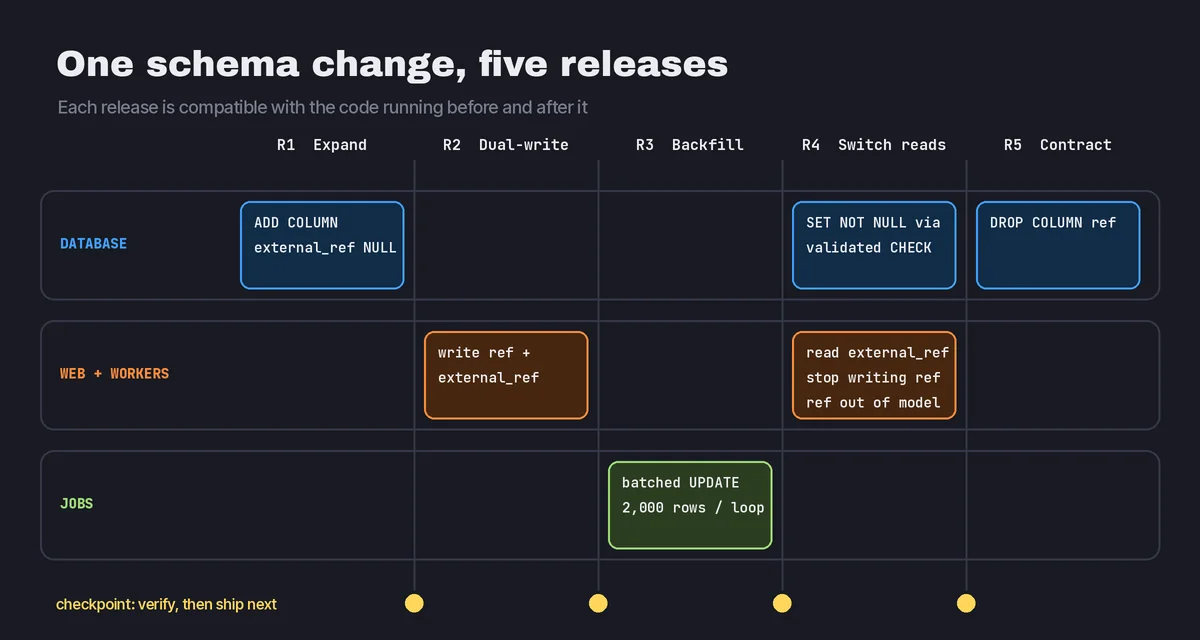
Zero-downtime migrations depend on the deploy order as much as the SQL. A workable rule set:
- Expand migrations run before the new code. The schema is always ahead of or equal to what the code expects. Old code tolerates the extra column; new code finds what it needs.
- Contract migrations run only after every old instance is gone. That includes web pods, workers, schedulers, and any long-lived scripts.
- Never mix expand and contract in one release. If a single pull request both adds and drops structures, split it.
- Keep rollback in mind. After an expand step you can roll the application back freely. After a contract step you cannot, so leave a release or two between switching reads and dropping data.
Multi-tenant platforms raise the stakes, because one migration touches every customer at once. If you run schema-per-tenant or database-per-tenant, the same rules apply but the rollout becomes a fleet operation; our article on multi-tenant SaaS architecture discusses how isolation models affect operations like this.
Catch dangerous migrations before review
Humans miss lock-heavy operations in code review, especially when the migration file was autogenerated. Automate the obvious checks:
- Run
sqlmigratefor every new migration in CI and attach the SQL to the pull request. - Use a linter. django-migration-linter flags backward-incompatible Django migrations, and Squawk lints raw PostgreSQL migration SQL for operations that take heavy locks.
- Test migrations against a copy of production-sized data, not an empty test database. Timing on ten rows tells you nothing.
- Fail CI if a migration on a known large table uses a plain
AddIndex, adds a non-null column without a database default, or includes aRunPythonover the whole table.
Common mistakes
- Trusting staging timings. Lock waits depend on concurrent traffic, which staging rarely has.
- Forgetting background workers. Celery workers often deploy on a different schedule from web pods and keep old code alive longer than you expect.
- Dropping columns in the same release that stops using them. Old instances will still query them during the rollout.
- Using Python defaults for new non-null columns. Old code does not know about the default and its inserts fail.
- Leaving invalid indexes behind after a failed concurrent build.
- Running migrations through a transaction-mode pooler and getting confusing failures from session settings.
Recommendations by team size
Small teams with modest tables can often accept short maintenance windows for rare risky changes. Still adopt lock_timeout and concurrent indexes; they cost almost nothing.
Growing SaaS products with continuous deploys should make expand and contract the default for renames, type changes, and drops, move backfills out of migrations, and add a migration linter to CI.
Platforms with large tables or strict uptime commitments benefit from a written migration playbook, rehearsals on production-sized snapshots, and dashboards for lock waits and replication lag during each rollout.
FAQ
Does Django support zero-downtime migrations out of the box?
Django gives you the building blocks, including non-atomic migrations, AddIndexConcurrently, AddConstraintNotValid, SeparateDatabaseAndState, and db_default. It does not automatically split risky changes or sequence deploys for you. That part is process.
Can I rename a column without downtime?
Yes, but not with a single rename. Add the new column, dual-write, backfill, switch reads, stop using the old column, and drop it in a later release.
Is adding a column with a default safe on PostgreSQL?
Since PostgreSQL 11, a non-volatile default is stored as metadata and does not rewrite the table. Volatile defaults still rewrite it. Always check the generated SQL.
Should migrations run before or after deploying new code?
Expand migrations should run before the new code goes live. Contract migrations should run only after all old code is retired.
Ship schema changes without holding your breath
Zero-downtime database migrations come down to a handful of habits: know which PostgreSQL operations lock, set a lock timeout, build indexes concurrently, validate constraints separately, keep backfills out of migrations, and split structural changes into expand and contract steps that every running version of your code can tolerate.
If your team is planning a large schema change, untangling a fragile deploy pipeline, or scaling a Django and PostgreSQL product that has started to feel risky to change, CodeSapient builds and modernizes SaaS backends for exactly this kind of work. Take a look at our software development services or get in touch to talk through your migration plan.