
Shopify Next Gen Events: How to Migrate From Classic Webhooks
Shopify Next Gen Events went GA with API 2026-10. Learn how triggers, query and query_filter work, the rules that break subscriptions, a safe handler, and a step-by-step migration from classic webhooks.
If your Shopify app subscribes to products/update, you already know the pattern. A merchant edits a product description and your endpoint gets a full product payload. An inventory sync touches a variant and you get another one. Your handler compares the payload with what it stored last time, discards most of it, and then often makes a follow-up GraphQL call anyway because the field it actually needs, a metafield or a collection membership, was not in the webhook body.
On October 1, 2026, alongside API version 2026-10, Shopify made Next Gen Events generally available. Shopify describes Events as the successor to classic webhooks: you declare which field changes matter, which GraphQL data should ride along with the delivery, and which current values must hold before anything is sent. This guide covers how Shopify Next Gen Events work, the configuration rules that catch teams out, a handler that is safe to put in production, and a practical migration plan from classic webhooks.
What Shopify Next Gen Events change
A classic webhook is a topic plus a fixed payload. You can trim it with include_fields and filter it, but the shape of the delivery is still decided by the topic. An Events subscription is declared in shopify.app.toml and has three parts that you control:
triggers: field paths on the topic that qualify anupdate, such asproduct.variants.priceorproduct.tags. Edits to other fields never produce a delivery.query: a GraphQL Admin API operation that Shopify runs after a qualifying change. Its result arrives in the payload asdata, so the follow-up API call disappears.query_filter: an expression evaluated against that query result. If it is false, the delivery is suppressed.
Every delivery also carries fields_changed (arrays of added, updated and removed paths with embedded GIDs) and query_variables (the IDs involved, in a flat shape you can pass straight to GraphQL). Deliveries can go to an HTTPS endpoint, Amazon EventBridge or Google Cloud Pub/Sub.
At general availability, Events covers 18 topics: Product, Collection, Customer, Company, Order, FulfillmentOrder, Refund, Return, InventoryItem, InventoryShipment, InventoryTransfer, Location, Article, Blog, Page, MetafieldDefinition, Metaobject and MetaobjectDefinition. Child objects do not get their own topic. Variant changes, for example, arrive on Product.
Two things stay the same, which makes adoption less risky than it sounds. Shopify says Events uses the same delivery infrastructure as classic webhooks, and your existing webhook subscriptions keep working. You can run both in the same app and move one workflow at a time.
How an Events delivery is decided
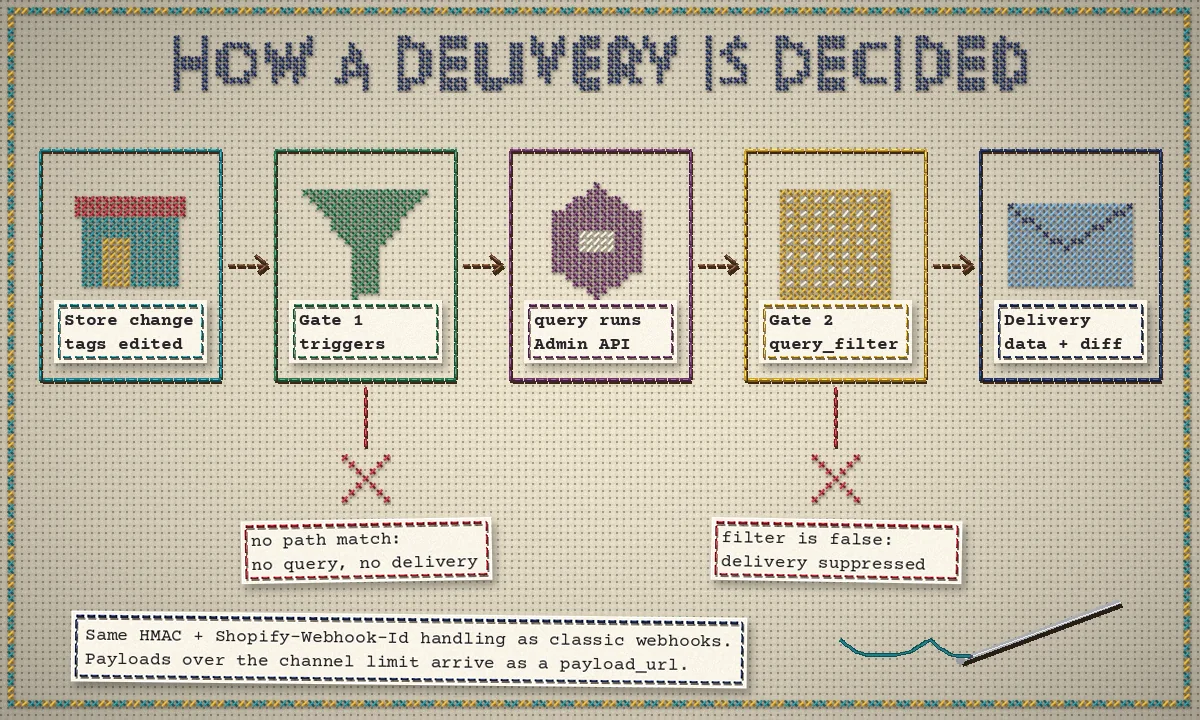
The order matters. According to the delivery filtering docs, triggers is checked first, at the change level, before any query runs. If the changed field is not in your list, nothing happens. If it matches, Shopify runs your query, evaluates query_filter against the result, and only then sends the delivery. A delivery that does arrive looks like this:
{
  "topic": "Product",
  "action": "update",
  "handle": "product-shipping-attrs",
  "data": {
    "product": {
      "id": "gid://shopify/Product/123",
      "status": "ACTIVE",
      "tags": ["fragile"],
      "vendor": "Acme",
      "productType": "Glassware"
    }
  },
  "fields_changed": {
    "added": [],
    "updated": ["product[id: 'gid://shopify/Product/123'].tags"],
    "removed": []
  },
  "query_variables": { "productId": "gid://shopify/Product/123" }
}
Two details from the delivery structure docs are easy to miss. First, data reflects the state when the query runs, not the moment of the change, so use fields_changed to learn what changed and data for current context. Second, if the query fails, for example because the resource was deleted, the payload carries a GraphQL errors array instead of usable data.
Your first subscription: react only to the fields you use
Take a common job: an app needs to re-evaluate a product whenever the attributes it uses for rules change, in this case tags, vendor and product type. With classic webhooks that means listening to every products/update. With Events it is one block of configuration:
[events]
api_version = "2026-10"

[[events.subscription]]
handle = "product-shipping-attrs"
topic = "Product"
actions = ["create", "update"]
triggers = ["product.tags", "product.vendor", "product.productType"]
uri = "/api/events/products"

query = """
  query shipping_attrs($productId: ID!) {
    product(id: $productId) {
      id
      status
      tags
      vendor
      productType
    }
  }
"""
A price change, a new image or a description edit no longer reaches your endpoint. When one of the three fields does change, the delivery already contains everything the rule engine needs. Run shopify app dev against a dev store, edit a product tag, and the payload prints in your terminal.
Product weight is a good example of why you should read the topic reference before you design anything. Weight is not a Product trigger. It lives on the inventory item, so you need a second subscription on the InventoryItem topic, which also needs the read_inventory scope:
[[events.subscription]]
handle = "variant-weight"
topic = "InventoryItem"
actions = ["update"]
triggers = ["inventoryItem.measurement.weight.value", "inventoryItem.measurement.weight.unit"]
uri = "/api/events/inventory"

query = """
  query weight_changed($inventoryItemId: ID!) {
    inventoryItem(id: $inventoryItemId) {
      id
      measurement { weight { value unit } }
      variants(first: 5) { nodes { id product { id } } }
    }
  }
"""
Note the variants connection: in 2026-10 the singular InventoryItem.variant field is deprecated. Small details like this are why Shopify validates every trigger path and query against the API version set in [events] when you deploy.
The rules that trip teams up
Most Events problems are configuration problems, and most show up at deploy time rather than in production. These are the ones worth knowing before you write the first subscription.
1. Every query variable must exist for every trigger
Each trigger exposes specific variables. product.title provides productId; product.variants.price provides productId and variantsId. If one subscription lists both triggers and its query requires $variantsId, the subscription is invalid. Split triggers that need different IDs or different query roots into separate subscriptions, and route them by handle.
2. query_filter sees current values, not transitions
A filter such as product.status:'ACTIVE' says the product is active now. It cannot say the status just changed from draft to active, and it cannot compare old and new values. This creates a quiet bug: if your app maintains a set of active products and filters on ACTIVE, the delivery for a product becoming inactive is suppressed, and your app never removes it. Shopify's own guidance is to use filters only for eligibility and to test both directions of every state transition.
The same applies to business events. To replace orders/paid, trigger on order.displayFinancialStatus, query the order, and filter on order.displayFinancialStatus:'PAID'. Keep your handler idempotent on the order ID anyway, because the filter only tells you the order is paid right now. Also note the syntax: no space after the colon. product.status: 'ACTIVE' fails validation.
3. Queries have a 100-point complexity limit
Every subscription query is checked against a 100-point complexity budget when you deploy an app version, without executing it. Copying a full REST payload into a GraphQL query with variants(first: 100) is the fastest way to fail with Query complexity of 101 exceeds the maximum of 100. The cost rules are the same ones described in our guide to Shopify GraphQL API rate limits and query cost. Run shopify app deploy --no-release to validate a configuration without releasing it to merchants.
4. Broad triggers and connections hide real costs
product.* is convenient, but child entities bubble up to the parent topic, so a product with many variants can generate high delivery volume. Connections are a separate trap: variants(first: 20) returns up to 20 siblings and can still miss the variant that changed. The optimization guide recommends querying the changed node directly using the deepest available ID, splitting subscriptions by changed entity, and treating any capped connection as partial data rather than a snapshot.
Metafields deserve the same care. A namespace-level trigger such as product.metafield(namespace: 'custom').value catches every key in that namespace; a namespace-and-key trigger narrows it to one. If you are still deciding how to model that data, our guide to Shopify metafields and metaobjects covers the trade-offs.
5. Deletes have nothing to query
For a delete action the resource no longer exists, so a query on it returns null or errors. Use query_variables and fields_changed to identify what to remove locally. The same is true when a relationship is removed, such as a product leaving a collection.
A handler that is safe in production
The receiving side looks familiar if you have built reliable webhook consumers before, and our Shopify webhooks guide covers the background. The Events verification docs add a few specifics:
- HTTPS deliveries are signed with
Shopify-Hmac-Sha256, a base64 HMAC-SHA256 of the raw body using your app's client secret. EventBridge and Pub/Sub deliveries do not need HMAC checks. Shopify-Webhook-Idis unique per delivery. Retries reuse it, so store it and skip repeats. Two subscriptions matching the same change produce two deliveries with two different IDs.- When a payload exceeds the channel limit (5 MB for HTTPS, 10 MB for Pub/Sub, 256 KB for EventBridge), you receive a small payload with
payload_url,payload_size_bytesandexpires_atinstead. Verify the HMAC on that small payload, then download the full content before it expires. Shopify-Topic,Shopify-ActionandShopify-Handleare also sent as headers, so you can route before parsing the body.- Only a 2xx response counts as success, and a response slower than five seconds fails. Shopify retries failed deliveries, and if an endpoint keeps failing, deliveries for that subscription stop being attempted.
A minimal Node.js receiver that follows those rules:
import http from 'node:http';
import crypto from 'node:crypto';

const SECRET = process.env.SHOPIFY_API_SECRET;

function validHmac(raw, header) {
  if (!header) return false;
  const digest = crypto.createHmac('sha256', SECRET).update(raw).digest();
  const given = Buffer.from(header, 'base64');
  return given.length === digest.length && crypto.timingSafeEqual(digest, given);
}

http.createServer((req, res) => {
  const chunks = [];
  req.on('data', (c) => chunks.push(c));
  req.on('end', async () => {
    const raw = Buffer.concat(chunks);
    if (!validHmac(raw, req.headers['shopify-hmac-sha256'])) {
      return res.writeHead(401).end();
    }
    const id = req.headers['shopify-webhook-id'];
    if (await alreadySeen(id)) return res.writeHead(200).end(); // retry: ack, do nothing

    const body = JSON.parse(raw);
    await enqueue({
      id,
      handle: body.handle,                  // route by subscription, not only by topic
      payloadUrl: body.payload_url ?? null, // worker downloads oversized payloads
      body,
    });
    await markSeen(id);
    res.writeHead(200).end();              // ack fast; process in a worker
  });
}).listen(3000);alreadySeen, markSeen and enqueue stand in for your own store and queue, typically Redis or Postgres plus a job runner. If you use the Shopify React Router app template, authenticate.webhook(request) performs the HMAC check for you. We ran this pattern locally against synthetic deliveries signed with a test secret: a valid delivery was queued, a repeat with the same Shopify-Webhook-Id was acknowledged without being queued again, a delivery with a mismatched signature got a 401, and an overflow payload was queued with its payload_url for the worker. That is a correctness check of the handler logic, not a load test or a test against a live store.
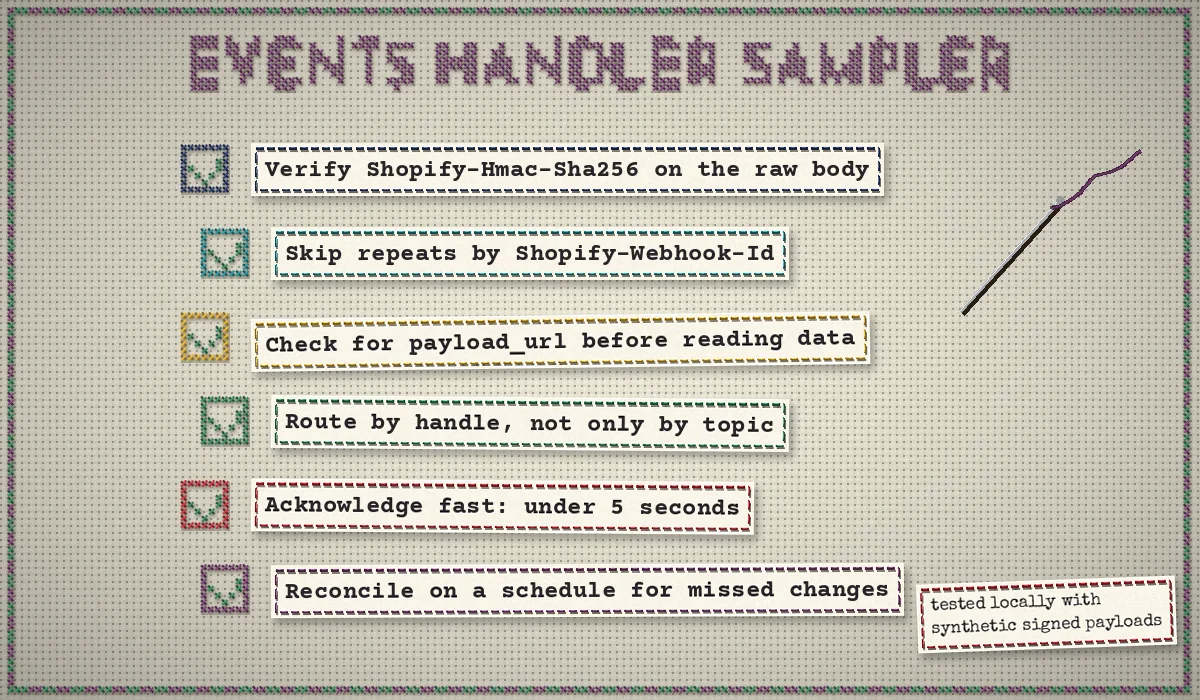
One more point from Shopify's troubleshooting guide: deliveries can be delayed, and if a delivery that arrives up to a day late would cause problems, compare its timestamp (the Shopify-Triggered-At header) with the current time and with the updatedAt you already stored. Deliveries can also arrive out of order, so a scheduled reconciliation job, using targeted queries or bulk operations, is still needed to repair anything that was missed.
Migrating from classic webhooks, step by step
Shopify publishes a webhook-to-Events migration guide with starter queries for each classic topic. In practice we would run the migration in this order:
- Pick the noisiest workflow first. Look for a webhook where the handler discards most deliveries, or makes a GraphQL call on every delivery. Those gain the most.
- Write down what the handler really reads. List the fields it uses and the changes it reacts to. If you use
include_fields, that list is your starting point. REST fields generally move fromsnake_casetocamelCase, and some have no direct GraphQL equivalent. - Map changes to triggers. Check every path in the Events reference for your API version. Derived fields such as
compareAtPriceRangeare not valid triggers. - Write the smallest query that serves the handler, query changed nodes directly, and confirm every variable is available to every trigger in that subscription.
- Add a query_filter only for eligibility, and test both directions of each transition.
- Validate with
shopify app deploy --no-release, then test create, update, delete and relationship removal on a dev store. - Run old and new side by side for a short period. They are separate deliveries with separate IDs, so make processing idempotent on your own business keys rather than relying on
Shopify-Webhook-Idto collapse them. - Measure, then cut over. Shopify suggests tracking delivery count, payload size and follow-up API calls before and after. Remove the classic subscription once the numbers and the data agree.
If you were on the Events developer preview, the change is smaller: update api_version from unstable to 2026-10, including any subscription-level overrides, and redeploy. Shopify's docs list Shopify CLI 3.92 as the minimum for Events configuration; the GA announcement points new projects to 4.83 or later.
When to stay on classic webhooks
Events does not cover everything yet. Topics outside the 18 listed above, such as app lifecycle topics like app/uninstalled and the mandatory privacy compliance topics, stay on classic webhooks for now. The same applies to any trigger your workflow needs that the reference does not list. Shopify's own advice is to keep using classic webhooks where Events has no equivalent and to report the blocking topic or trigger in the developer community. A mixed setup is normal and supported.
It is also worth being honest about scope. If a workflow already receives only the deliveries it needs and never makes a follow-up call, migrating it adds risk without much return. Start where the waste is.
Where this fits for shipping and catalog automation
The product example above is the core of any catalog rule engine: re-check a product when the attributes the rules depend on change, and ignore everything else. That is the same job ShipAssign does for shipping: it is our own CodeSapient app, and it assigns products and variants to shipping profiles using rules based on tags, vendor, product type, collections, weight, SKU and variant options, with a preview before changes are applied. If keeping shipping profiles correct is the problem you are solving, ShipAssign on the Shopify App Store may save you from building it yourself. For anything else, the subscriptions in this guide are a solid starting point.
Key takeaways
- Shopify Next Gen Events became generally available with API version 2026-10 on October 1, 2026, covering 18 topics, and Shopify positions it as the successor to classic webhooks.
triggersdecides which changes count,querydecides what data arrives, andquery_filterdecides whether a delivery is sent based on current values.- Design per changed entity: matching variables, the deepest available ID, and queries under the 100-point complexity limit.
- Keep HMAC verification,
Shopify-Webhook-Iddeduplication,payload_urlhandling, fast acknowledgement and scheduled reconciliation. - Migrate the noisiest workflow first, measure, and keep classic webhooks for topics Events does not support yet.
CodeSapient builds and maintains custom Shopify apps, integrations and event-driven backends. If you want a second pair of eyes on an Events migration or help redesigning a webhook-heavy app, see our development services or contact us to talk it through.