
S3 Presigned URLs: Secure Direct Uploads and Downloads for SaaS
S3 presigned URLs move uploads off your servers, but a bare presigned PUT accepts any type, size and reuse. Our lab results, a safe upload flow and the bucket guardrails to add.
A customer drags a 300 MB product video into your SaaS dashboard. The browser streams it to your API, your API holds a worker and a chunk of memory for the whole transfer, then re-uploads the same bytes to Amazon S3. On a slow connection that worker is busy for minutes. If the API runs on AWS Lambda, a synchronous invocation cannot even accept a request body that large. Uploads that should be boring become a scaling problem.
S3 presigned URLs are the standard fix: your backend signs a short-lived URL, and the browser sends the file straight to S3. The catch is that the copy-paste examples hand out more power than most teams realise. A plain presigned PUT will accept any file type, any size and any number of uploads until it expires. This guide covers how presigned URLs actually behave, what we saw when we tested every restriction in a small lab, and an upload flow we would put in front of paying tenants.
What an S3 presigned URL is, and what it is not
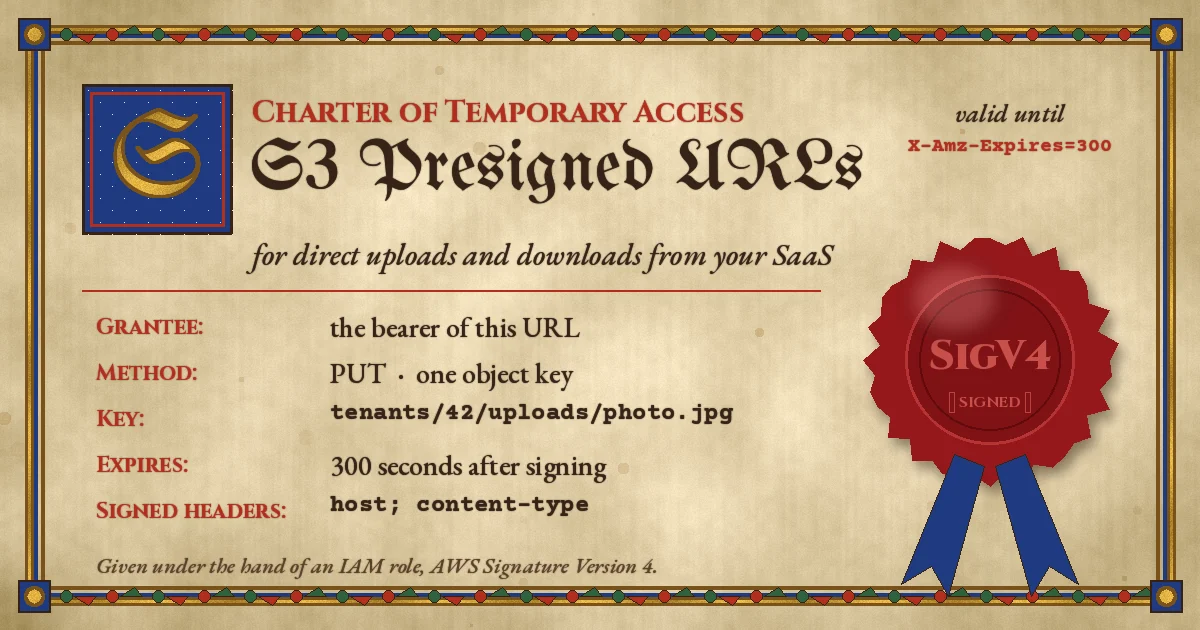
A presigned URL is an ordinary S3 request (a method, a bucket, a key and some headers) that has been signed in advance with the credentials of an IAM principal. The signature, expiry and signing details travel in the query string (X-Amz-Algorithm, X-Amz-Credential, X-Amz-Expires, X-Amz-SignedHeaders, X-Amz-Signature). Whoever holds the URL can make that one request. AWS describes them plainly as bearer tokens (Amazon S3 user guide).
Four properties matter when you design around them:
- They are reusable until expiry. S3 does not burn a URL after the first use. A leaked upload URL can overwrite the same key again and again until it expires.
- They inherit, and are capped by, the signer's permissions. If the role that signed the URL cannot
s3:PutObjecton that key, the URL fails when used. Signing happens locally, so nothing warns you at signing time. - Expiry has two clocks. With SigV4 the maximum is seven days, but a URL signed with temporary credentials (an ECS task role, a Lambda execution role, an STS session) dies when those credentials expire, whichever comes first.
- S3 checks expiry when the request starts. A download that begins one second before expiry finishes; a retry after expiry fails.
Everything else, such as file type, size and which tenant the file belongs to, is only enforced if you put it into the signature or the policy. That is where most implementations fall short.
Presigned PUT vs presigned POST for uploads
S3 offers two ways to let a browser upload without credentials:
- Presigned PUT (
generate_presigned_url('put_object', ...)) signs a singlePutObjectrequest. You can sign extra headers such asContent-Type,Content-Lengthor a checksum, and the client must then send exactly those values. - Presigned POST (
generate_presigned_post(...)) signs a policy document, a list of conditions the browser's HTML form upload must satisfy. Conditions can be ranges and prefixes, not only exact values:content-length-range,starts-with $key, an exactContent-Typeand so on (POST policy reference).
The practical difference is size control. A PUT can only pin an exact Content-Length, which works when the client tells you the file size first. A POST policy can say "between 1 byte and 10 MB", which is what most upload forms actually need. Both are limited to 5 GB per request; anything larger needs multipart upload.
What we tested in the lab
We wanted to see the real behaviour, not just the documentation, so we ran a short test suite. Lab setup (our own, 20 November 2026): boto3/botocore 1.44.7 for signing, and RustFS 1.0.6, an S3-compatible server, running locally as the target. RustFS is not Amazon S3, so we only report results that match documented S3 behaviour, and error codes or messages may differ on AWS, so re-test your client's error handling against a real bucket.
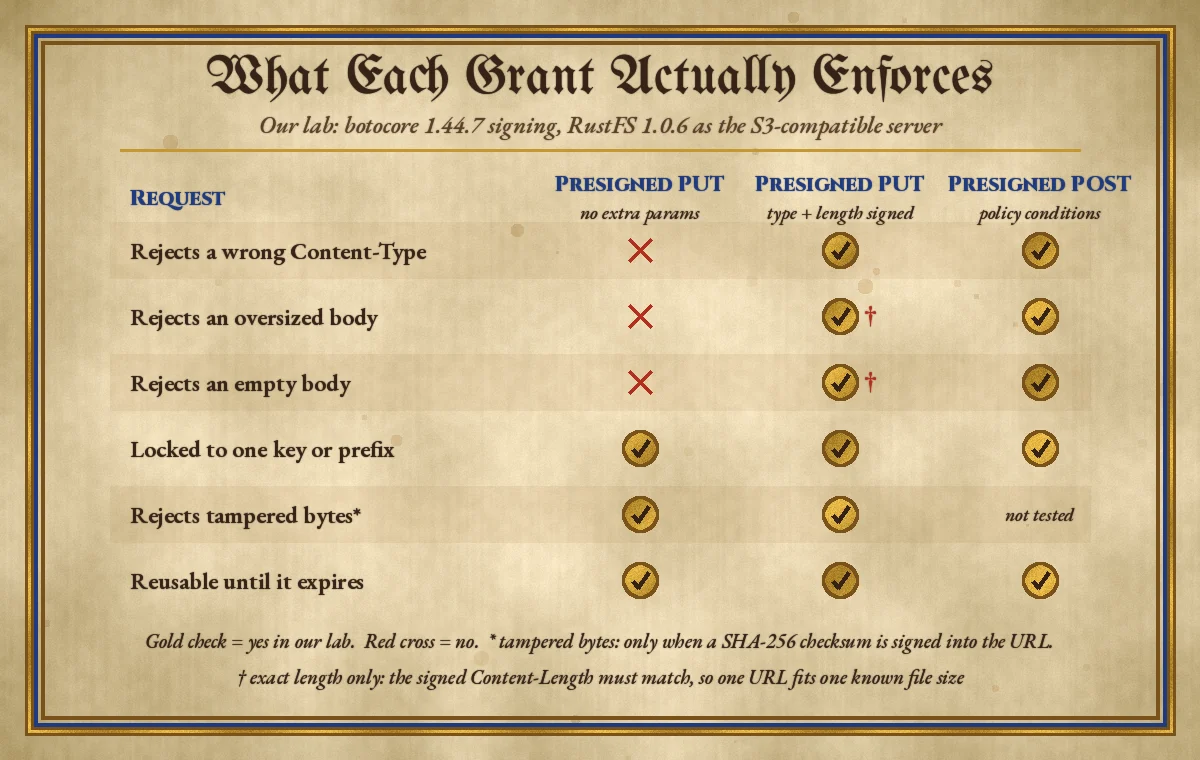
What happened:
- Plain presigned PUT: a URL meant for an image accepted a 50 MB random file sent as
text/html(HTTP 200). The same URL then worked a second time and overwrote the object with an 11-byte body. - PUT with
ContentTypesigned:X-Amz-SignedHeadersbecamecontent-type;host. A matching upload returned 200; sendingtext/htmlreturned 403SignatureDoesNotMatch. - PUT with
ContentLengthsigned: the exact size succeeded; a 5,000-byte body against a signed 1,000 returned 403. - PUT with
ChecksumSHA256signed: the correct bytes succeeded, altered bytes returned 400BadDigest, and leaving the checksum header off returned 403 (missing signed header). - Presigned POST with a policy (
starts-with $key t/42/,Content-Type=image/jpeg,content-length-range1 to 1,048,576): 500 KB succeeded (204); 2 MB returnedEntityTooLarge; an empty file returnedEntityTooSmall; a key under another tenant's prefix and atext/htmlcontent type were both rejected as policy violations. - Tampering: editing the key or
X-Amz-Expiresin a signed URL returned 403. A GET URL with a 2-second expiry worked, then returned 403 "Request has expired" four seconds later. An 8-day expiry was rejected outright. - Cost of signing: 10,000 presigned GET URLs took 1.62 s on one 8-vCPU box, about 0.16 ms each, with no network calls. Signing is cheap; it also means nothing checks permissions until the URL is used.
The SigV2 surprise in boto3
The most useful finding came from signing offline. With a default boto3 client and no Config, a presigned GET for us-east-1 or eu-west-1 came out as a Signature Version 2 URL (AWSAccessKeyId and Signature parameters) on the legacy global host bucket.s3.amazonaws.com. Only ap-south-1, a newer region, got SigV4. SigV2 is being turned off in S3 (AWS signature version notice), does not work in newer regions, and cannot be limited by the s3:signatureAge condition described below (S3 reports its age as 0). The boto3 presigned URL guide now tells you to opt in explicitly:
import boto3
from botocore.config import Config

s3 = boto3.client(
    "s3",
    region_name="eu-west-1",          # the bucket's region
    config=Config(
        signature_version="s3v4",
        s3={"addressing_style": "virtual"},
    ),
)
A secure direct-upload flow, step by step
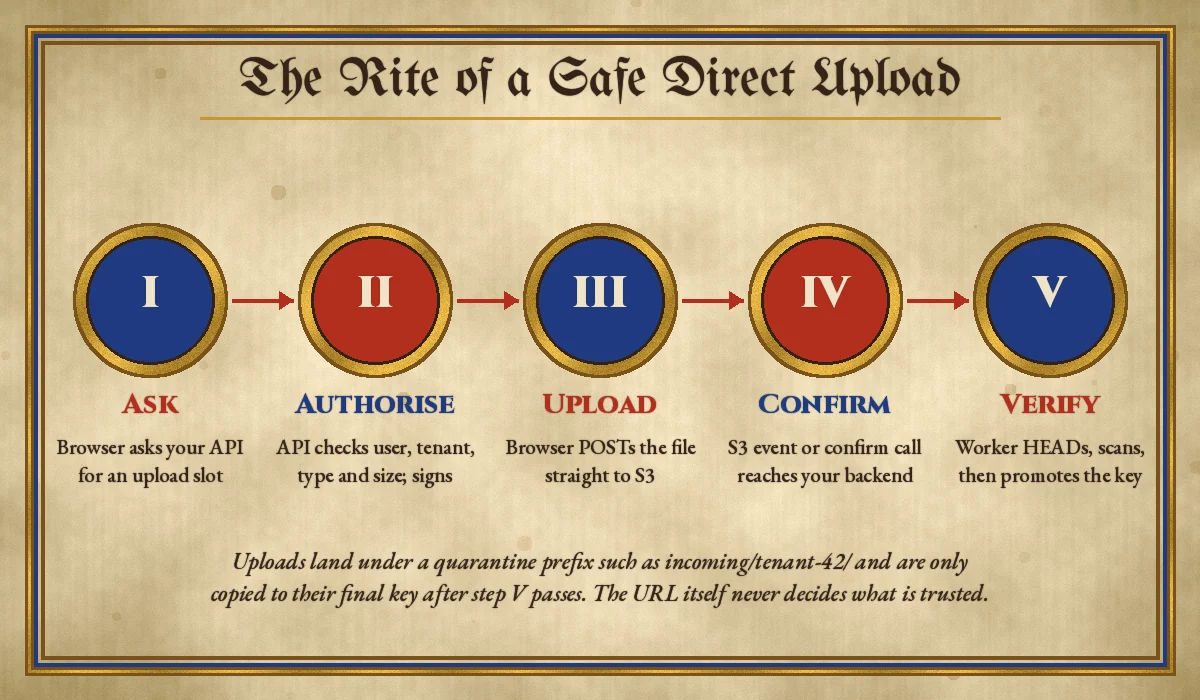
1. The API decides the key, type and size
Never let the browser choose the object key. Your endpoint authenticates the user, resolves their tenant, checks the declared type against an allow-list and returns a POST policy for a key it generated:
import uuid

ALLOWED = {"image/jpeg": 10 * 1024 * 1024, "image/png": 10 * 1024 * 1024,
           "application/pdf": 25 * 1024 * 1024}

def create_upload_slot(user, content_type):
    max_bytes = ALLOWED.get(content_type)
    if max_bytes is None:
        raise ValueError("file type not allowed")
    key = f"incoming/{user.tenant_id}/{uuid.uuid4()}"
    post = s3.generate_presigned_post(
        Bucket="acme-uploads",
        Key=key,
        Fields={"Content-Type": content_type},
        Conditions=[
            {"Content-Type": content_type},
            ["content-length-range", 1, max_bytes],
        ],
        ExpiresIn=300,
    )
    save_pending_upload(user.tenant_id, key, content_type)  # your DB row
    return {"key": key, "url": post["url"], "fields": post["fields"]}
boto3 adds the bucket and exact-key conditions to the policy for you. The incoming/ prefix is a quarantine area: nothing reads from it except the verification worker. Tenant IDs in the key make S3 access and lifecycle rules easier to reason about, but they are not your isolation boundary on their own; see our guide to tenant isolation in multi-tenant SaaS for the rest.
2. The browser posts the form fields and file
async function uploadFile(file) {
  const slot = await fetch("/api/uploads", {
    method: "POST",
    headers: { "Content-Type": "application/json" },
    body: JSON.stringify({ contentType: file.type, size: file.size }),
  }).then((r) => r.json());

  const form = new FormData();
  Object.entries(slot.fields).forEach(([k, v]) => form.append(k, v));
  form.append("file", file); // must be the last field

  const res = await fetch(slot.url, { method: "POST", body: form });
  if (!res.ok) throw new Error(`S3 rejected upload: ${res.status}`);
  await fetch(`/api/uploads/${encodeURIComponent(slot.key)}/complete`, { method: "POST" });
}
The file field must come after the policy fields, as the POST policy reference requires. The bucket also needs a CORS rule that allows your app's origin (S3 CORS guide):
[
  {
    "AllowedOrigins": ["https://app.example.com"],
    "AllowedMethods": ["POST", "PUT"],
    "AllowedHeaders": ["*"],
    "ExposeHeaders": ["ETag"],
    "MaxAgeSeconds": 3000
  }
]
Expose ETag only if you use multipart uploads, where the client must collect each part's ETag.
3. Verify before you trust
The policy limits what can be uploaded; it does not tell you the bytes are what they claim to be. A file labelled image/png can contain anything. When the browser calls /complete, or an S3 event notification fires, a worker should:
- Look up the pending row and confirm the key belongs to that tenant.
- Call
head_objectand compare size and content type with what you signed. - Read the first bytes and check the real file signature, then run malware scanning or image re-encoding if your product needs it.
- Copy the object to its final key (for example
files/42/...), mark the row ready and delete the quarantine copy.
Event notifications can arrive late or more than once, so make this worker idempotent and key it on the object key and version. The same patterns we use for reliable webhooks apply here. A lifecycle rule that expires anything left in incoming/ after a day cleans up abandoned uploads.
4. Large files: presign each multipart part
Above a few hundred megabytes, or anywhere over 5 GB, use multipart upload: the backend calls CreateMultipartUpload, presigns one UploadPart URL per part, the browser uploads parts in parallel and returns the ETags, and the backend calls CompleteMultipartUpload (multipart upload overview). Add a lifecycle rule to abort incomplete multipart uploads, or orphaned parts will keep costing storage.
Presigned downloads without surprises
For private files, a presigned GET is the simplest way to let a browser fetch an object without proxying it through your API. Three details matter:
- Short expiry, signed on demand. Sign when the user clicks, not when you render a page that might be cached or shared. Five to fifteen minutes is enough for most downloads.
- Force a download for user content. Pass
ResponseContentDisposition='attachment; filename="report.pdf"'and a safeResponseContentTypeso an uploaded HTML or SVG file is saved, not rendered in the browser. - Use CloudFront for hot, cacheable files. Every presigned URL is unique, so they cache poorly. For media served to many users, CloudFront signed URLs or signed cookies are a better fit (CloudFront private content).
Guardrails at the bucket level
Application code can have bugs, so add limits that S3 enforces regardless of what your code signs. S3 supports SigV4-specific condition keys in bucket policies (SigV4 policy keys):
{
  "Version": "2012-10-17",
  "Statement": [
    {
      "Sid": "DenyOldPresignedSignatures",
      "Effect": "Deny",
      "Principal": "*",
      "Action": "s3:*",
      "Resource": "arn:aws:s3:::acme-uploads/*",
      "Condition": { "NumericGreaterThan": { "s3:signatureAge": "900000" } }
    },
    {
      "Sid": "RequireSigV4",
      "Effect": "Deny",
      "Principal": "*",
      "Action": "s3:*",
      "Resource": "arn:aws:s3:::acme-uploads/*",
      "Condition": { "StringNotEquals": { "s3:signatureversion": "AWS4-HMAC-SHA256" } }
    }
  ]
}
The first statement rejects any signature older than 15 minutes, even if a developer signs a URL for seven days. The second blocks SigV2, which catches the boto3 default described above. On buckets that should never accept presigned requests, deny s3:authType values REST-QUERY-STRING and POST, as AWS suggests in its presigned URL guardrails. Keep Block Public Access on: presigned URLs work without any public access.
Finally, sign with a dedicated role that can only s3:PutObject on incoming/* and s3:GetObject on the prefixes users may download. If the bucket uses SSE-KMS, that role also needs the matching KMS permissions, or uploads fail with an access error that looks like an S3 problem.
Common mistakes
- Signing a bare PUT. As our lab showed, it accepts any type and size. Sign
ContentTypeat minimum, or use a POST policy. - Letting the client pick the key. A browser-supplied key like
../other-tenant/avatar.pngor a guessable name lets one user overwrite another's file. Generate keys server-side. - Using the default boto3 client. In older regions it can still produce SigV2 URLs on the global endpoint. Set
signature_version='s3v4'and the bucket region. - Long expiries "to be safe". A seven-day URL in a log file or a support ticket is seven days of access. Prefer minutes.
- Surprise early expiry. URLs signed by a Lambda or ECS role expire when the role session does. If users report links dying early, this is usually why.
- Treating a successful upload as a valid file. The policy checks declared metadata, not content. Verify, scan and promote out of quarantine.
- Logging full URLs. The signature is the credential. Log the key and an expiry time, not the query string.
Recommendations
- Use presigned POST for browser uploads where you need size ranges; use presigned PUT with signed Content-Type, Content-Length and a SHA-256 checksum when the client sends file metadata first.
- Keep expiry at 5 to 15 minutes, and enforce a ceiling with
s3:signatureAgein the bucket policy. - Generate keys server-side under a tenant-scoped quarantine prefix, record a pending upload row and verify before promoting.
- Sign with a narrowly scoped role and require SigV4 in the bucket policy.
- Rate-limit the endpoint that issues upload slots; it is cheap to call and each slot can be used repeatedly until expiry.
- Add lifecycle rules for abandoned quarantine objects and incomplete multipart uploads.
If your API runs on Lambda, this pattern also keeps large bodies off your functions entirely; our notes on running Node.js APIs on AWS Lambda cover the rest of that setup.
FAQ
How long can an S3 presigned URL last?
Up to seven days with SigV4 and long-term IAM user credentials. With temporary credentials it lasts only as long as those credentials, and the S3 console caps it at 12 hours.
Can a presigned URL be used only once?
Not natively. S3 accepts it until it expires. To get one-time behaviour, use a short expiry, a unique server-generated key per upload, and reject or ignore anything your pending-upload record does not expect.
Can I limit upload size with a presigned PUT?
Only to an exact size, by signing Content-Length. For a range such as "up to 10 MB", use a presigned POST with content-length-range.
Why do I get SignatureDoesNotMatch?
The request differs from what was signed: a different Content-Type, a missing signed header, a changed key, a proxy rewriting headers, or a wrong region or signature version on the client that signed it. Clock drift on the signing server can also cause failures.
Are presigned URLs safe to send to the browser?
Yes, if they are scoped to one key, expire quickly and travel over HTTPS. Treat them like short-lived passwords: do not log them or put them in URLs that end up in analytics or referrer headers.
Building file uploads, document handling or media features into a SaaS product? CodeSapient designs and reviews AWS upload pipelines, from presigned flows and multipart uploads to verification workers and bucket policies. See our development services or get in touch to talk through your setup.