
AWS Lambda Web Functions: Run Node.js APIs Without Adapters
What AWS Lambda Web Functions change for Node.js APIs and SSR apps: the HTTP programming model, concurrency, active-CPU billing, limits, costs and a migration checklist, with lab results.
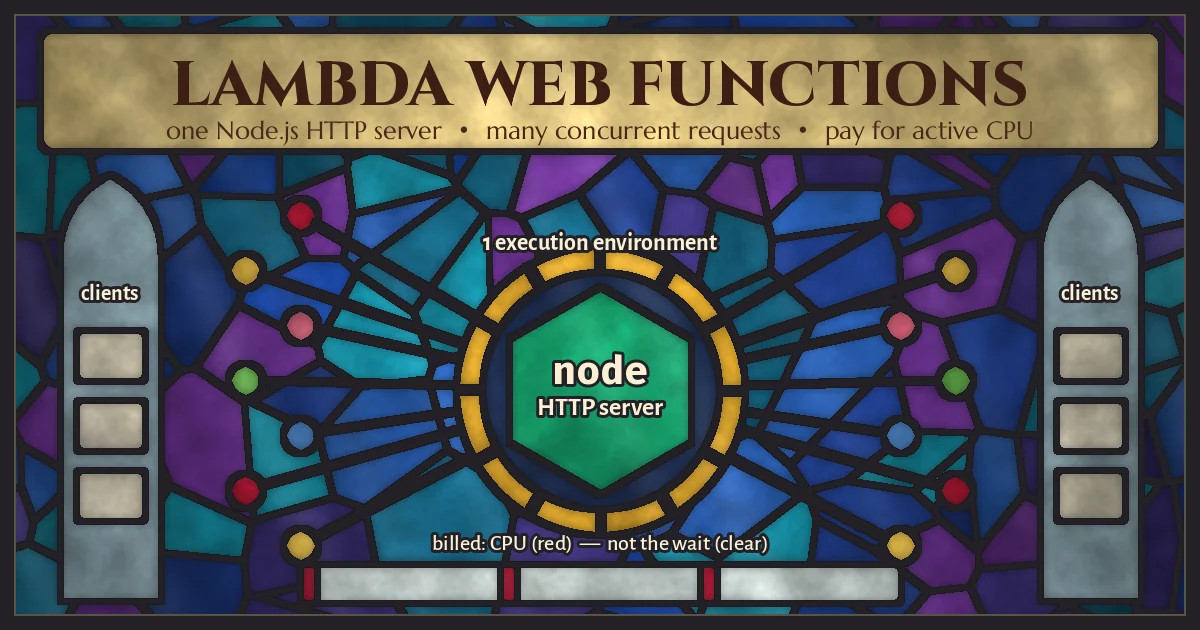
Most Node.js teams that put an API on AWS Lambda end up with two versions of the same app. One is the Express or Fastify server they run locally with node index.js. The other is the same app squeezed through an adapter that turns API Gateway events into fake HTTP requests, plus a pile of configuration that only exists because Lambda historically spoke events, not HTTP. Each request also gets an execution environment to itself, so a route that waits 180 ms on Postgres is billed for all 180 ms.
On October 12, 2026, AWS announced Lambda Web Functions, a new Lambda form factor built for exactly this case: your code is a normal HTTP server listening on a port, one environment serves many requests at once, and you pay for active CPU time rather than wall-clock time. This guide explains what changes, what the limits are, how the billing actually compares, and what we saw when we ran a Web Function-style Express app under load on our own machines.
What AWS Lambda Web Functions are
With this launch Lambda now has three form factors. The functions you already know are renamed Event Functions (a naming change only; existing code and ARNs are untouched). Web Functions are the new HTTP-native model. MicroVMs are long-lived, stateful sandboxes for running untrusted code. The Web Functions developer guide describes the new model in a few sentences: your code listens on a network port, you deploy it as a .zip, and Lambda gives you an HTTPS endpoint, scales execution environments with traffic (including to zero), and can replicate the app across Regions behind one URL.
The pieces you will work with:
- Revision: an immutable snapshot of your code and configuration, including the request timeout and
maxConcurrencyPerEnvironment. - Endpoint: an HTTPS URL that routes traffic to one revision or splits it between two, which is how canary releases work.
- Execution environment: an isolated Firecracker microVM running your server process, with 2 vCPUs and 2 GB of memory, serving many requests concurrently.
At launch the only runtime is Node.js 24 (nodejs24.x) on Arm64, in five Regions: US East (N. Virginia), US East (Ohio), US West (Oregon), Asia Pacific (Tokyo) and Europe (Ireland). If your backend is Python, PHP, Java or .NET, Web Functions are not an option yet; Event Functions or containers remain the path.
How a Web Function differs from a classic Lambda function
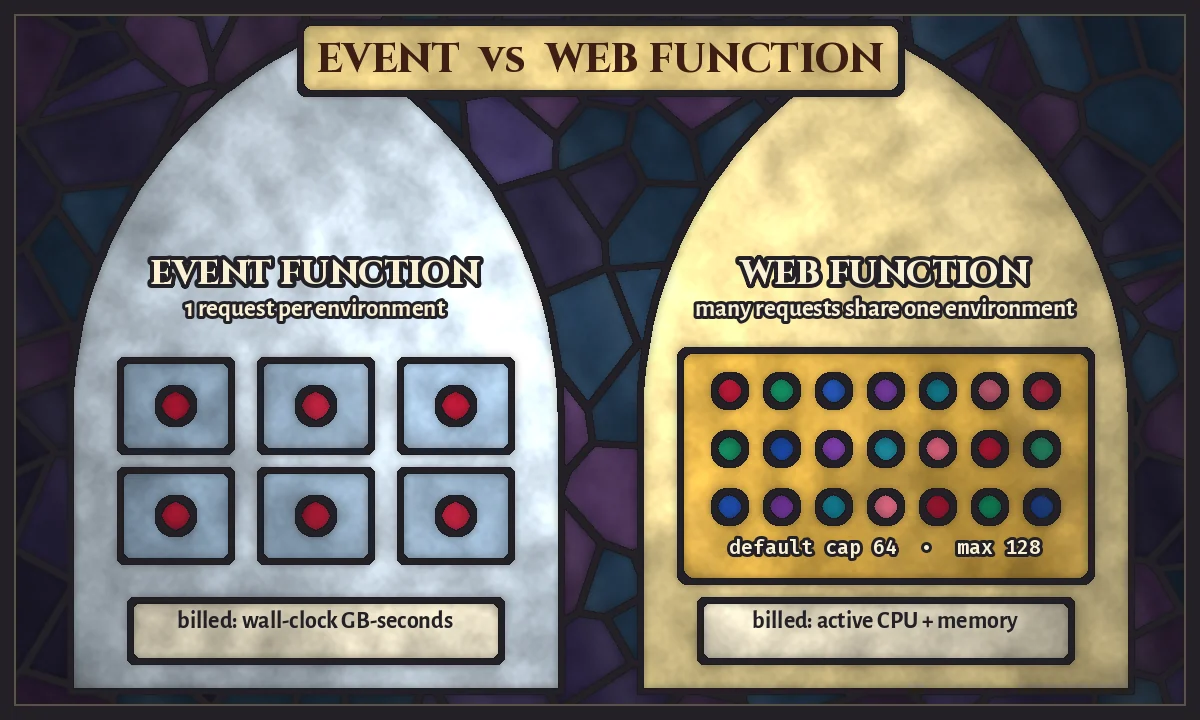
Three differences matter in practice.
1. The programming model is just HTTP
There is no handler signature and no event object. Lambda sets an environment variable, AWS_LAMBDA_HTTP_ENDPOINT, in host:port form, and your server must listen on exactly that address within 10 seconds of starting. Locally you set it yourself or fall back to a default:
import express from 'express';

const [host, port] = (process.env.AWS_LAMBDA_HTTP_ENDPOINT || '127.0.0.1:3000').split(':');
const app = express();

app.get('/health', (req, res) => res.json({ ok: true }));

app.listen(Number(port), host);
The runtime documentation lists Express, Next.js, Fastify and Koa as examples and states plainly that the Lambda Web Adapter is not needed. Frameworks that read their own listen variables, such as Next.js in standalone mode, need a small index.js that maps AWS_LAMBDA_HTTP_ENDPOINT onto them before starting the server.
2. One environment serves many requests
An Event Function environment handles one request at a time. A Web Function environment handles up to maxConcurrencyPerEnvironment requests at once (default 64, range 1 to 128). According to the scaling documentation, Lambda manages a dynamic per-environment limit below that cap based on your resource usage, starts it conservatively for a new function, and keeps some warm headroom so that small traffic increases do not wait for a cold start. There is no provisioned or minimum-environment setting; an idle endpoint scales to zero and the next request cold-starts.
3. You pay for active CPU, plus memory while an environment exists
Event Functions bill GB-seconds of wall-clock duration. Web Functions bill requests, active vCPU-seconds, and memory GB-seconds for the whole life of each environment, including idle time between requests. On the Lambda pricing page the US East (N. Virginia) Arm prices used in AWS's worked examples are $0.30 per million requests, $0.0000276944 per active vCPU-second and $0.0000036667 per GB-second. For comparison, Event Functions on Arm in the same Region are $0.20 per million requests and $0.0000133334 per GB-second.
Deploying your first Web Function
The AWS CLI has a new lambda-web command group. A single deploy bundles the folder, creates the function, publishes a revision and returns an HTTPS URL:
aws lambda-web deploy --name orders-api --code ./orders-apiRunning the same command again uploads a new revision and points the endpoint at it. Adding --regions us-east-1,eu-west-1,ap-northeast-1 replicates the code to three Regions behind one global hostname with latency-based routing. For production, AWS recommends turning off automatic deployment and shifting traffic with explicit revision weights:
aws lambda-web update-web-function-endpoint \
  --function-name orders-api \
  --endpoint-name prod \
  --auto-deployment-mode Disabled \
  --revision-weights '[{"revisionId": "<current>", "weight": 90}, {"revisionId": "<new>", "weight": 10}]'
Set two scaling limits on day one:
aws lambda-web update-web-function-endpoint \
  --function-name orders-api \
  --endpoint-name prod \
  --scaling-config '{"maxEnvironments": 20}' \
  --throttle-config '{"rateLimit": 500}'
maxEnvironments caps horizontal scale (and cost) per Region. rateLimit caps requests per second per Region and returns HTTP 429 above it. Together they stop a burst from opening more database connections than Postgres can take.
What we measured: CPU time vs wall time on a real Express app
The billing model only pays off if your requests really spend most of their time waiting. To check, we built a small Express 5 app exactly as the docs describe (listening on AWS_LAMBDA_HTTP_ENDPOINT, no adapter) and load-tested it locally on Node.js 24.22 with autocannon, with the server pinned to two CPU cores to mirror the 2 vCPU environment. It had four routes:
/io: waits 150 ms on a simulated downstream call, then returns a small JSON body./render: waits 50 ms, then builds a 300-row HTML table, a rough stand-in for server-side rendering./block: runs a synchronous 60,000-iteration PBKDF2 hash, which blocks the event loop./cpu: reportsprocess.cpuUsage()so we could compute CPU time per request.
Results:
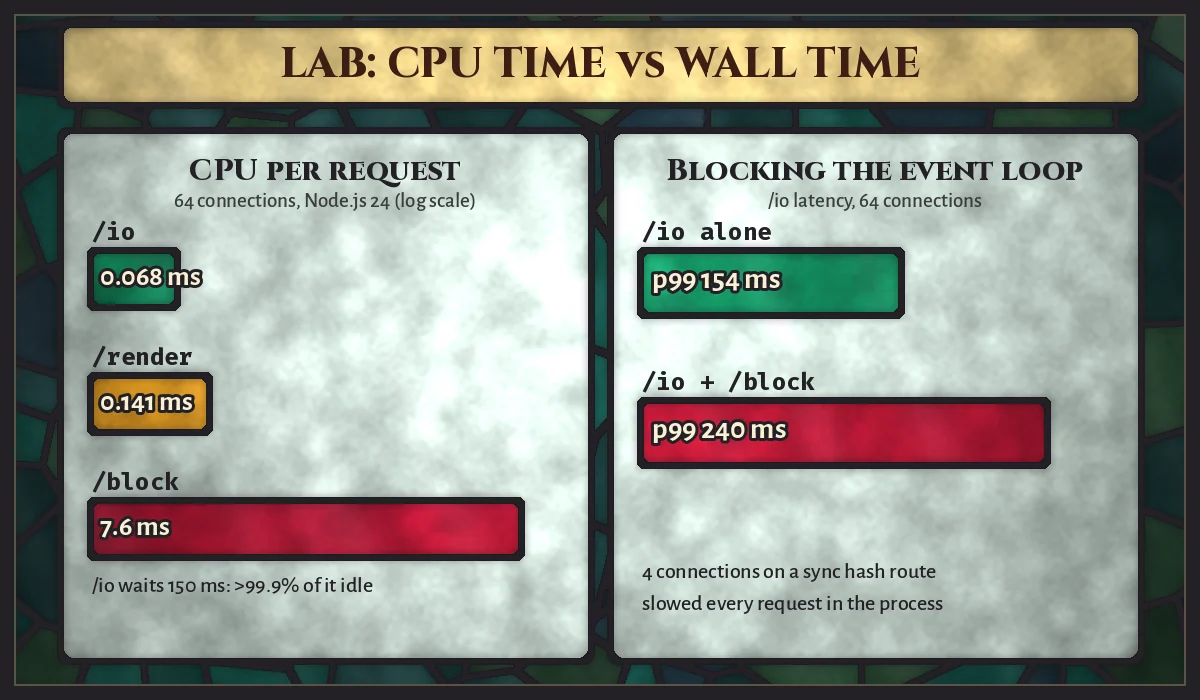
- I/O-bound route, 64 connections: 8,448 requests in 20 seconds, p50 151 ms, p99 154 ms, and about 0.07 ms of CPU per request. More than 99.9% of each request's wall time was waiting.
- Render route, 64 connections: 24,646 requests, p50 51 ms, p99 63 ms, about 0.14 ms of CPU per request.
- Blocking route: about 7.6 ms of CPU per request, all of it on the main thread.
- Mixed load: when four connections hit
/blockwhile 64 connections hit/io, the I/O route's p50 rose from 151 ms to 207 ms and its p99 from 154 ms to 240 ms, and it completed 27% fewer requests, even though nothing about/iohad changed.
Two lessons follow. First, a real app will use far more CPU than our toy: database drivers, TLS, JSON serialisation, logging and auth middleware all cost something, which is why AWS's own pricing examples assume 12 to 50 ms of active CPU per request for API and SSR workloads (and 200 ms for an LLM streaming endpoint). Measure yours before you trust any cost estimate. Second, the mixed test is the risk that comes with shared environments. On Event Functions, a slow synchronous route only hurts the request that triggered it. On a Web Function, it delays every other request in the same environment. AWS's {ext(D+"web-functions-best-practices.html","best practices")} say the same thing: move CPU-heavy work to worker_threads, or lower maxConcurrencyPerEnvironment.
When Web Functions are cheaper, and when they are not
Ignoring data transfer and the free tier, the per-request compute cost in US East (N. Virginia) on Arm comes down to two formulas:
- Event Function: $0.20 per million + duration (s) × memory (GB) × $0.0000133334
- Web Function: $0.30 per million + active CPU (s) × $0.0000276944 + that request's share of environment memory time
Plugging in our I/O route (150 ms wall time, 0.07 ms CPU) and a 512 MB Event Function: one million requests cost about $1.20 as Event Functions (75,000 GB-seconds plus requests), against roughly $0.30 as a Web Function, where the request fee is almost the entire bill. That is the best case.
Now take the I/O-heavy API from AWS's own pricing examples: 10 million requests a month, 200 ms each, 50 ms of active CPU, one environment using about 0.29 GB for the whole month. AWS prices that at $19.61. The same traffic on a 512 MB Event Function works out to about $15.33 (1,000,000 GB-seconds plus $2.00 of requests); at 1,024 MB it is about $28.67. So with 50 ms of CPU per request, Web Functions are not automatically cheaper; the answer depends on how much memory your Event Function needs and how CPU-heavy your requests really are.
A practical rule: the bigger the share of each request spent waiting on databases, third-party APIs or LLM responses, the more Web Functions save. CPU-heavy handlers, low-traffic endpoints and functions that already run happily at 128 to 256 MB may cost the same or more. And because memory is billed while an environment exists, an endpoint with steady trickle traffic keeps paying for idle memory between requests.
Limits and gotchas to check before migrating
These come from the Lambda quotas page and the HTTP requests and responses reference:
- Request timeout: default 30 seconds, configurable from 3 to 900. A non-streaming request that exceeds it gets HTTP 504; a streaming response is cut off with whatever status was already sent.
- Environment size is fixed: 2 vCPUs and 2 GB per environment, with a default V8 heap of 1,024 MB. If you raise the heap with
NODE_OPTIONS=--max-old-space-size, leave room for buffers and concurrent requests. - No WebSockets through the endpoint: Lambda strips the
UpgradeandConnectionheaders, and onlyGET,HEAD,POST,PUT,PATCH,OPTIONSandDELETEare accepted, over HTTP/1.1. Response streaming works, so server-sent events and streamed LLM output are fine. - Shutdown is short: on scale-down Lambda drains in-flight requests on a best-effort basis, sends
SIGTERM, and gives the process up to 1 second. Do not rely on it to persist anything. - Endpoints are public: every endpoint is reachable from the internet. With
ApplicationManagedauth, Lambda does no authentication at all. For a custom domain or AWS WAF you put CloudFront in front, ideally with anIamAuthendpoint and origin access control so clients cannot bypass it. - Do not trust
X-Forwarded-Host: Lambda forwards it unvalidated, so do not build redirects or absolute URLs from it unless a front door you control sets it. - Native modules must be built for Arm64. An x86_64 build of
sharporbcryptwill not load. - Account-level ceilings: 10,000 requests per second per endpoint, 100,000 per account per Region, and 2,000 Arm64 vCPUs per Region (1,000 environments) unless raised.
Shared environments change how you write the app
If your code was written for classic Lambda, it probably assumed one request per process. That assumption hides bugs that only appear once requests share memory:
- No per-request state in module scope. A global
currentUseror tenant ID that was harmless on Event Functions now leaks between concurrent requests. Keep it onreq, or useAsyncLocalStorage. - Size connection pools for concurrency, not for one request. One environment might hold 64 requests in flight, and Lambda might run dozens of environments. Multiply pool size by your environment cap and compare it with your database's connection limit, or put a pooler in front.
/tmpis shared. All requests in an environment share its 512 MB/tmp, so use unique file names and clean up.- Writes should be idempotent. AWS recommends clients retry HTTP 429 and unlabelled 503 responses with backoff and jitter, which means the same
POSTcan arrive twice.
We have covered two of these in depth before: sizing pools for many concurrent workers in PostgreSQL connection pooling for SaaS APIs, and handling retried deliveries safely in webhook reliability patterns for SaaS. Both apply directly to Web Functions.
Web Functions vs Event Functions vs containers
- Choose Web Functions for Node.js APIs, server-side rendered apps and streaming endpoints that spend most of their time waiting on I/O, have spiky or uneven traffic, and benefit from scaling to zero or serving several Regions from one URL.
- Stay on Event Functions for queue consumers, S3 and EventBridge triggers, scheduled jobs and anything that is naturally an event. They also remain the choice for other languages.
- Use containers on ECS or EKS when you need WebSockets, long-lived connections, more than 2 GB of memory per process, a runtime other than Node.js 24, or steady high traffic where always-on capacity is cheaper per request.
For server-rendered React, Web Functions are a natural home for a framework's production server. If you are on Next.js, pair this with the caching model in our guide to Next.js Cache Components so that most requests never need fresh server work.
A migration checklist for an existing Node.js API
- Confirm the app runs on Node.js 24 and that every native dependency has an Arm64 build.
- Remove the Lambda adapter and handler export; listen on
AWS_LAMBDA_HTTP_ENDPOINTwith a local fallback. - Audit module-level variables for per-request data, and move it to request scope.
- Resize database and HTTP client pools for concurrent requests, and keep keep-alive on.
- Move CPU-heavy work (image processing, PDF generation, large JSON transforms) to
worker_threadsor to an Event Function behind a queue. - Set the request timeout,
maxEnvironmentsandrateLimitfrom load tests, not guesses, and run the load test more than once because the dynamic concurrency limit starts conservatively. - Choose the endpoint auth type, and put CloudFront with origin access control in front if you need a custom domain or WAF.
- Disable automatic deployment for production and ship with weighted canaries; log the revision ID, because built-in metrics have no revision dimension.
Frequently asked questions
Do I still need API Gateway with Lambda Web Functions?
No. Every endpoint gets its own HTTPS domain. You may still put CloudFront or API Gateway in front for a custom domain, WAF, caching or centralised edge controls.
Can I run Python or PHP as a Web Function?
Not at launch. Web Functions support Node.js only (nodejs24.x on Arm64). Other languages use Event Functions or containers.
Do Web Functions have cold starts?
Yes. There is no minimum-environment setting, and an idle endpoint scales to zero. Warm headroom absorbs small traffic increases, but the first request after an idle period cold-starts.
Should you move your API?
If you run a Node.js API or SSR app on Lambda through an adapter, or on an always-on container that is idle most of the day, Web Functions are worth a proof of concept: the code changes are small and the billing rewards I/O-heavy traffic. Measure active CPU per request, check the limits above, and fix shared-state bugs before moving production traffic.
If you want a second pair of eyes on the migration or a cost model built from your own traffic, our team designs and runs AWS backends for SaaS and eCommerce products. See our services or get in touch.