
React Compiler in Next.js 16: What It Changes and How to Roll It Out
How React Compiler works in Next.js 16: what the reactCompiler option accepts, what changed in a product grid we compiled both ways, a script to list skipped components, and a safe rollout plan.

Turning on the React Compiler in a Next.js app is one line of config. The build passes, the app looks the same, and then nobody can answer three basic questions. Which components did the compiler actually optimize? Which ones did it quietly skip? And did anything change behavior, such as an effect that used to fire on every render and now does not, or a list that stops updating?
This guide answers those questions for React Compiler in Next.js as of November 2026: React Compiler 1.0, Next.js 16.4 and React 19.3. It covers what the reactCompiler option really accepts, what changed in a small product grid we compiled both ways, a script that lists the components the compiler skips, the code patterns that compile but still break, and a rollout plan for an existing app.
What React Compiler does in a Next.js app
React Compiler is a build-time Babel plugin (babel-plugin-react-compiler) that adds memoization to your components and hooks. Without it, React re-runs a component's function when its parent renders. You prevent that by hand with React.memo, useMemo and useCallback. The compiler analyzes data flow and mutation in each component and caches JSX, derived values and callbacks for you, including after early returns where hooks like useMemo cannot go.
The timeline matters if you are reading older tutorials:
- React Compiler 1.0 shipped on 7 October 2025 (React blog). It works with React 17 and later; React 17 and 18 need the
react-compiler-runtimepackage and atargetsetting. - Next.js 16 promoted the option from
experimental.reactCompilerto a top-level, stablereactCompileroption. The upgrade guide says it is not enabled by default while Vercel gathers build-performance data, and that compile times will be higher because the compiler relies on Babel. - Next.js runs a SWC pre-pass that sends only relevant files, those with JSX or hooks, through the Babel plugin, which keeps that cost lower than running Babel on everything (Next.js docs).
React's team reports that on the Meta Quest Store, initial loads and cross-page navigations improved by up to 12% and some interactions became more than 2.5× faster, with neutral memory use. Those are Meta's numbers for Meta's app. Your gains depend on how much unnecessary re-rendering your client components were doing in the first place.
That last point is important for App Router projects. Memoization prevents re-renders, and re-renders happen in client components, the trees under 'use client', when state, context or props change in the browser. If your pages are mostly Server Components plus a few small interactive islands, the compiler has little to improve. Interactive screens such as product grids with filters, carts, dashboards, editors and admin tables are where it pays off.
Enable it in Next.js 16
Install the plugin with an exact version. The React team recommends pinning, because a future compiler version may memoize differently, and that can expose code that relies on memoization for correctness:
npm install --save-dev --save-exact babel-plugin-react-compiler@latest// next.config.ts
import type { NextConfig } from 'next'
const nextConfig: NextConfig = {
reactCompiler: true,
}
export default nextConfigThe object form takes only a few options. We read the config schema shipped in next@16.4.6, and it validates exactly three:
compilationMode:'infer'(default),'annotation'or'all'. Annotation mode compiles only functions that start with the'use memo'directive.panicThreshold:'none','critical_errors'or'all_errors'. Keep the default'none'for production. The compiler then skips a component it cannot prove safe instead of failing the build (React docs).environment.enablePreserveExistingMemoizationGuarantees: whether the compiler keeps the guarantees of your existinguseMemo,useCallbackandReact.memo. The Next.js docs advise setting it explicitly, because defaults can differ between compiler versions.
The Babel plugin's logger and gating options cannot be passed through next.config; a Next.js GitHub issue discusses exactly this limitation. That rules out directory-level Babel overrides and runtime feature-flag gating, two of the three approaches in React's incremental adoption guide, unless you run your own Babel setup. Inside Next.js, your controls are annotation mode, the 'use no memo' directive, and the external audit script shown below. The 16.4 types also include an experimental turbopackRustReactCompiler flag for a Rust port of the compiler; treat it as experimental.
Check that it is actually on
In development, React DevTools shows a Memo ✨ badge next to compiled components. For a production build you can check the output directly. Compiled components call a cache helper and compare against a react.memo_cache_sentinel symbol. We built a one-page Next.js 16.4.6 app four times with the option off and four times with it on: the client chunk containing our product grid had the sentinel only in the compiled builds.
# after `next build`
grep -l "memo_cache_sentinel" .next/static/chunks/*.js
On that tiny app, builds took 2.6–2.9 s without the compiler and 3.0–3.4 s with it. One page tells you nothing about a large codebase, so time your own next build both ways before and after enabling it.
What changed in our lab: a product grid compiled both ways
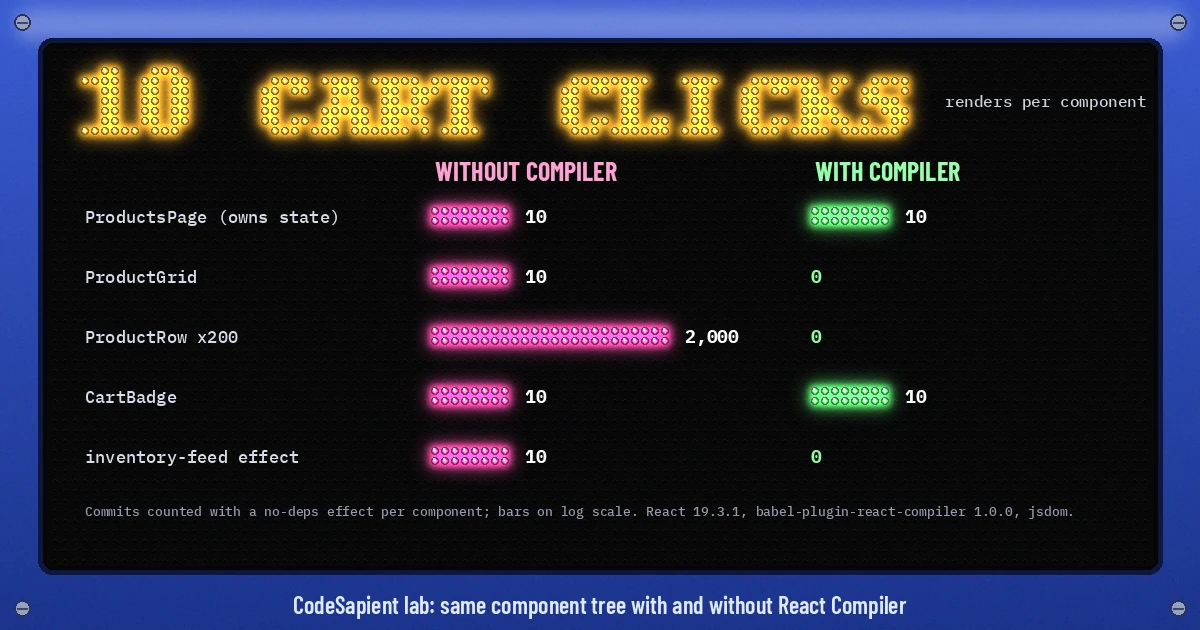
To see real behavior rather than a toy counter, we wrote a typical commerce screen: a ProductsPage that owns a search query and a cart count, a ProductGrid that filters 200 products, a ProductRow per product with an Add button, a CartBadge, and a custom hook that opens an inventory subscription in an effect keyed on an options object. We transformed the same file with and without babel-plugin-react-compiler 1.0.0, rendered it with React 19.3.1 in jsdom on Node 24, and counted each component's commits with a dependency-free effect. The run is deterministic; repeating it produced identical numbers.
Unrelated state stops cascading
Clicking Add ten times only changes the cart count. Without the compiler, every click re-rendered the page, the grid and all 200 rows: 2,000 row renders. With the compiler, the page and the badge rendered 10 times each, as they must, and the grid and rows rendered 0 times. The inline onAdd handler and the filtered list were cached, so the grid's props never changed. No React.memo or useCallback was written.
Effects keyed on objects stop re-firing
The inventory hook received { region: 'eu', products: 'all' } as a fresh object literal. Without the compiler that effect re-ran on all 10 cart clicks; in a real app that means closing and reopening a subscription each time. Compiled, it ran 0 times after mount, because the literal was memoized. That is an improvement, but it is also a behavior change. If any code depended on that effect firing, it now does not. That is why the React team asks for end-to-end tests around compiler upgrades.
Lists that really change still re-render
Typing five search values, which narrows 200 products down to 1, produced 511 row renders without the compiler and 511 with it. The filtered array is new whenever the query changes, so every visible row is created again. The compiler does not turn your list into a virtualized or keyed-diffing engine. It only removes renders whose inputs did not change. The badge, whose count did not change, dropped from 5 renders to 0.
What the compiler skips, and what it lets through
The compiler only optimizes code it can prove follows the Rules of React. When it cannot, it skips that function, and with panicThreshold: 'none' it does so silently. We ran eight common patterns through the compiler with a logger attached, and through eslint-plugin-react-hooks 7.1.1 using its recommended-latest preset:
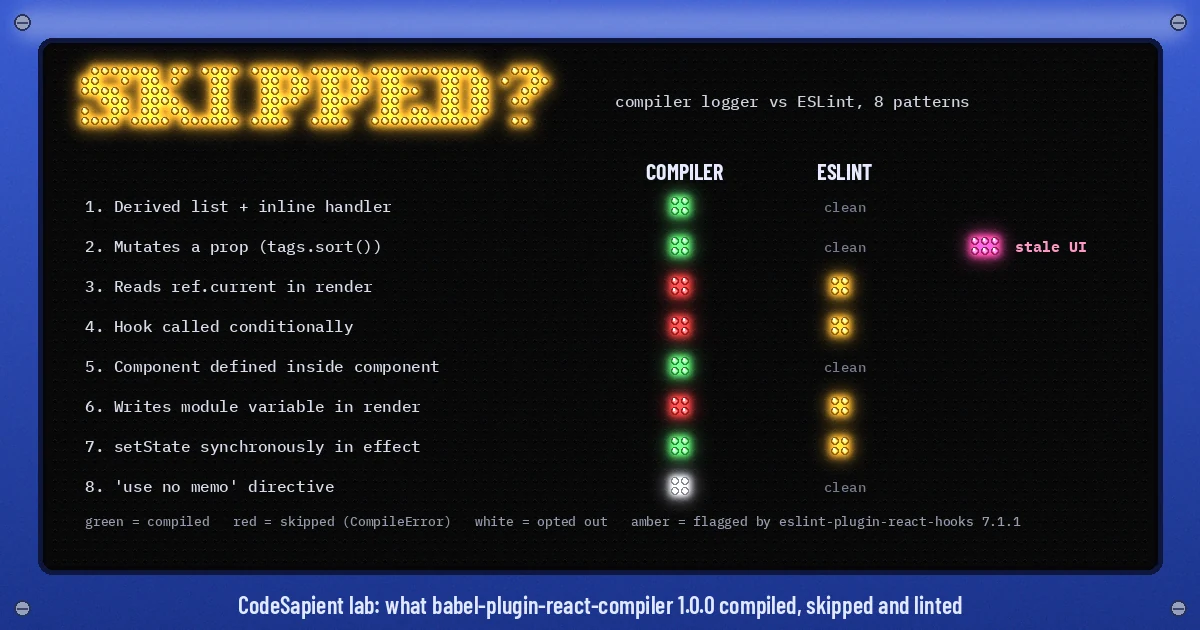
- Skipped and flagged: reading or writing
ref.currentduring render, calling a hook conditionally, and reassigning a module-level variable during render. Each produced aCompileErrorevent, and ESLint reported the matchingrefs,rules-of-hooksandglobalsrules. These components still work. They are just not optimized. - Compiled but flagged: calling
setStatesynchronously inside an effect. The compiler optimized the component, and ESLint'sset-state-in-effectrule warned about the extra render pass. - Opted out: a component starting with
'use no memo'produced a skip event, as expected. - Not considered at all: a function named
useCartTotalthat calls no hooks. In the defaultinfermode, the compiler only treats PascalCase functions that return JSX or call hooks, anduse-prefixed functions that call hooks, as components and hooks (compilationMode).
The dangerous case: compiled, lint-clean and wrong
One pattern was compiled, passed ESLint, and then rendered stale UI:
function SortedTags({ tags }) {
  tags.sort();                       // mutates the parent's array
  return <p>{tags.join(',')}</p>;
}
The parent then pushed a new tag into the same array and rendered again. Without the compiler, the output updated to 0,a,b. With the compiler it stayed a,b, because the prop reference had not changed and the cached JSX was reused. Mutating props and state breaks React's rules either way. The compiler simply turns a latent bug into a visible one. The fix is to sort a copy with tags.toSorted() or [...tags].sort(), and to stop mutating arrays you pass down as props.
This is what React's debugging guide means by runtime issues: code that breaks the rules in a way static analysis did not catch, which the compiler then optimized anyway. Search for in-place sort(), reverse(), splice() and direct property writes on props before you switch the compiler on. One more surprise: a component declared inside another component compiled and was not flagged in our test, even though static-components is in the preset. Do not rely on lint alone for that pattern either.
List skipped components before you ship
Because Next.js does not forward a logger, run the Babel plugin yourself over your source tree. This Node script has no Next.js dependency. It needs @babel/core and the compiler, and prints every component and hook the compiler declined, with the reason:
// node compiler-report.mjs src  ->  which components/hooks React Compiler skips, and why
import { transformFileSync } from '@babel/core';
import { readdirSync, statSync } from 'node:fs';
import { join } from 'node:path';

const files = [];
(function walk(dir) {
  for (const name of readdirSync(dir)) {
    const p = join(dir, name);
    if (name === 'node_modules' || name.startsWith('.')) continue;
    if (statSync(p).isDirectory()) walk(p);
    else if (/\.(jsx|tsx)$/.test(name)) files.push(p);
  }
})(process.argv[2] ?? 'src');

let ok = 0;
const skipped = [];
for (const file of files) {
  transformFileSync(file, {
    babelrc: false, configFile: false,
    parserOpts: { plugins: ['jsx', 'typescript'] },
    plugins: [['babel-plugin-react-compiler', {
      panicThreshold: 'none',
      logger: {
        logEvent(filename, e) {
          if (e.kind === 'CompileSuccess') ok++;
          if (e.kind === 'CompileError') {
            const line = e.detail.loc?.start?.line ?? e.fnLoc?.start?.line;
            skipped.push(`${filename}:${line}  ${e.detail.reason}`);
          }
        },
      },
    }]],
  });
}
console.log(`compiled: ${ok}`);
console.log([...new Set(skipped)].join('\n'));
Run it with node compiler-report.mjs src (or app). On our audit file it printed:
compiled: 11
/app/src/audit.jsx:17  Cannot access refs during render
/app/src/audit.jsx:26  Hooks must always be called in a consistent order, and may not be called conditionally. ...
/app/src/audit.jsx:40  Cannot reassign variables declared outside of the component/hook
Treat the output as a work list rather than a blocker. Skipped components behave exactly as they do today. Fix the ones on hot interactive paths first. Add the compiler-powered lint rules to CI as well. They ship in eslint-plugin-react-hooks and do not need the compiler installed:
// eslint.config.mjs
import reactHooks from 'eslint-plugin-react-hooks';
import { defineConfig } from 'eslint/config';

export default defineConfig([
  reactHooks.configs.flat.recommended,
]);
If you previously used eslint-plugin-react-compiler, remove it; its rules moved into eslint-plugin-react-hooks (rule reference).
A rollout plan for an existing Next.js app
- Lint first. Upgrade
eslint-plugin-react-hooks, enable the recommended preset and fix errors in the components you care about most. This is useful even if you never ship the compiler. - Audit. Run the report script, save the output, and grep for prop and state mutation.
- Pin. Install
babel-plugin-react-compilerwith--save-exactand upgrade it deliberately later. - Pilot. For a large or poorly tested app, start with
compilationMode: 'annotation'and add'use memo'to one heavy client screen. For a well-tested app, enableinfermode across the app and use'use no memo'as a temporary escape hatch for anything that misbehaves. - Measure. Profile the same interactions before and after in the React DevTools Profiler, and watch field INP. Our Core Web Vitals guide covers how INP is measured. Also compare
next buildtimes in CI. - Test end to end. Focus on flows driven by effects, such as subscriptions, analytics events and data fetching on change. Memoization changes exactly when those effects fire.
- Expand and clean up. Move from annotation mode to
infer, then remove'use no memo'directives as you fix the underlying rule violations. React's guide says to confirm each fixed component shows the ✨ badge.
Should you delete useMemo, useCallback and React.memo?
Not as a cleanup sprint. React's guidance is to leave existing memoization in place, because removing it can change the compiled output. For new code, rely on the compiler and use useMemo or useCallback only when you need precise control, typically when a value is an effect dependency and the effect must not re-fire. If you do remove manual memoization, do it one component at a time with tests, and set enablePreserveExistingMemoizationGuarantees explicitly in next.config so a version bump does not change its behavior for you.
When the compiler will not fix your performance
- Slow data or server rendering. The compiler does nothing for fetch waterfalls or uncached Server Components. That is a caching problem, covered in our guide to Next.js Cache Components.
- Large lists that really change. As the lab showed, filtering still re-creates visible rows. Virtualize long lists and keep row components cheap.
- Heavy JavaScript. Memoization does not shrink bundles or hydration cost.
- Libraries with mutable APIs. The preset includes an
incompatible-librarywarning for libraries whose APIs the compiler cannot safely memoize around. Check those warnings before blaming the compiler. - Janky transitions. Perceived smoothness on navigation is often an animation problem; see React View Transitions.
Checklist
- Next.js 16+,
reactCompiler: trueor an object withcompilationMode,panicThreshold: 'none'and an explicit memoization-guarantee setting. babel-plugin-react-compilerpinned to an exact version.eslint-plugin-react-hooksrecommended preset running in CI.- Compiler report reviewed, with no prop or state mutation on hot paths.
- Build time and interaction profiles compared before and after.
- End-to-end tests cover effect-driven flows, and you retest after every compiler upgrade.
If you are planning a React Compiler rollout on a large Next.js or Shopify Hydrogen codebase and want a second pair of eyes on the audit, the effect-heavy flows or the performance numbers, CodeSapient builds and maintains production React and Next.js apps. See our development services or get in touch to talk it through.