
PostgreSQL Table Partitioning: When It Helps and How to Migrate Safely
When PostgreSQL table partitioning is worth it, how to check partition pruning, drop old data in milliseconds, and convert a large live table to a partitioned one with a tested, low-lock migration.
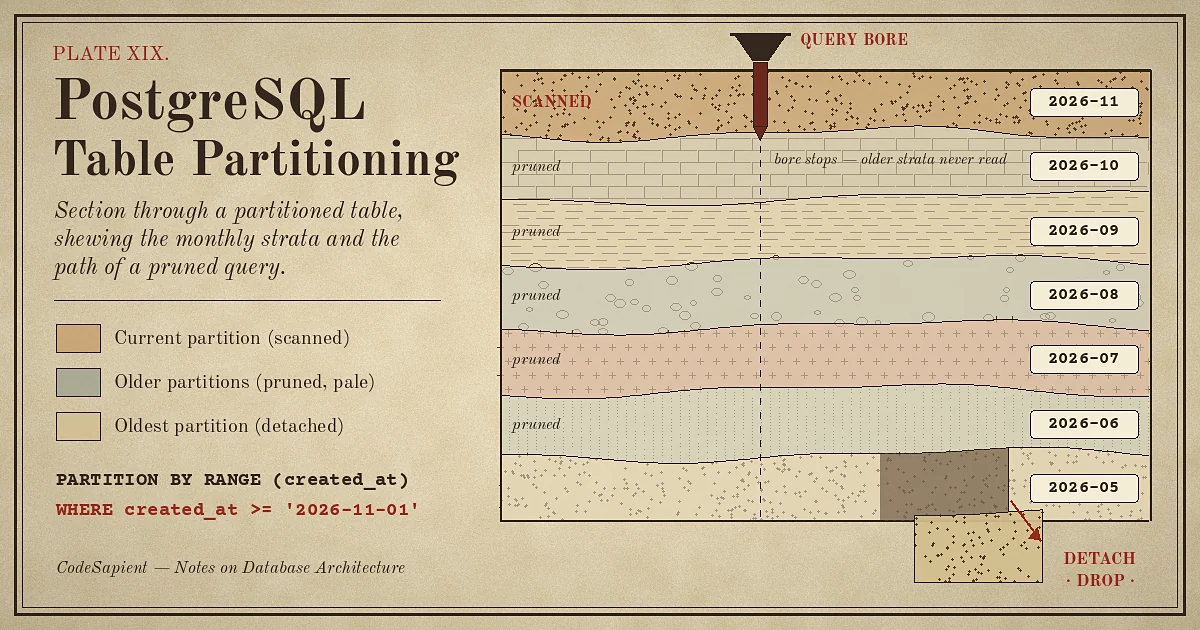
Your events table passed 400 million rows sometime last quarter. The nightly job that deletes anything older than a year now runs into the morning, autovacuum is permanently busy on that one table, and the indexes are bigger than the server's RAM. Someone suggests partitioning; someone else says it will slow every query down. Both can be right.
PostgreSQL table partitioning splits one logical table into smaller physical tables, called partitions, based on a key such as a timestamp. Done well, it turns retention into a metadata operation and lets the planner skip data a query can never match. Done badly, it adds planning overhead, breaks uniqueness assumptions and still scans everything.
This guide covers when partitioning is worth it, how to design the table, how to confirm pruning works, how to drop old data safely, and a tested migration path for an existing large table. Everything below matches the PostgreSQL documentation for version 19, released on 19 November 2026. Our lab ran on PostgreSQL 18.7, and the features used here behave the same in both.
When partitioning actually helps
Partitioning is not a general speed-up. It helps when your data and your queries line up with a partition key. The PostgreSQL partitioning documentation lists the main benefits, and in practice they come down to three cases:
- Time-based retention. You keep 12 or 24 months of events, logs, audit records or order history and delete the rest. Dropping a partition is close to instant and leaves no dead rows.
- Queries that filter on the key. Dashboards, exports and APIs that ask for "the last 7 days" or "October" only need to touch one or two partitions, and the indexes they use are smaller.
- Bulk loading and archiving. Load a month into a separate table and attach it, or detach an old month and archive it.
It rarely helps when most queries do not filter on the partition key, when the table is only a few gigabytes, or when the real problem is a missing index or an N+1 pattern in the application. The documentation's rule of thumb is that partitioning starts to pay off when the table would otherwise be larger than the server's memory. If you have not looked at the actual query plans yet, start with our guide to PostgreSQL slow query optimization.
Choosing a strategy and a partition key
PostgreSQL supports three kinds of declarative partitioning:
- Range, for example one partition per month on
created_at. This fits event, log, audit and order tables, and it is the one most teams need. - List, for example one partition per region, when a small, stable set of values divides the data.
- Hash, which spreads rows evenly across a fixed number of partitions. It gives you no cheap retention and only prunes on equality filters.
A good partition key is in the WHERE clause of your heaviest queries, matches how you expire data, and never changes after insert. Partitioning by tenant_id only makes sense if you move or delete a tenant's data as a unit. For most products a time key, with tenant_id as the leading column of the indexes, works better. Our multi-tenant SaaS architecture guide covers the isolation side of that decision.
Size the partitions so there are tens to low hundreds of them, not thousands. Planning time and per-session memory grow with every partition a query has to consider. Monthly partitions are a safe default; daily ones only make sense for very high write volumes with short retention.
Designing the partitioned table
Here is a monthly range-partitioned events table. This is the exact schema we used in the lab:
CREATE TABLE events (
    id          bigint GENERATED ALWAYS AS IDENTITY,
    tenant_id   bigint      NOT NULL,
    kind        text        NOT NULL,
    payload     jsonb       NOT NULL DEFAULT '{}',
    created_at  timestamptz NOT NULL DEFAULT now(),
    PRIMARY KEY (id, created_at)
) PARTITION BY RANGE (created_at);

CREATE INDEX events_tenant_created_idx ON events (tenant_id, created_at);
Three design rules are hiding in those few lines.
The primary key must include the partition key
A unique index on a partitioned table is really one index per partition, and each one can only enforce uniqueness inside its own partition. So PostgreSQL requires every primary key or unique constraint to include all partition key columns. That is why the key is (id, created_at) rather than id.
The consequence is easy to miss: the database no longer guarantees that id alone is unique across the whole table. It stays unique in practice because the values come from one sequence, but foreign keys from other tables have to change. Foreign keys that point at a partitioned table must reference the full key, so child tables need a created_at column as well. If you are still choosing ID types, our UUIDv7 in PostgreSQL article explains why time-ordered IDs pair well with time-based partitions.
Indexes are declared once on the parent
An index created on the partitioned table is created on every existing and future partition. The exception is building one with CONCURRENTLY, covered below.
Rows with no matching partition are rejected
If a row's created_at falls outside every partition, the insert fails. In the lab, inserting a 2020 timestamp returned:
ERROR:  no partition of relation "events" found for row
DETAIL:  Partition key of the failing row contains (created_at) = (2020-01-01 00:00:00+00).
A DEFAULT partition catches those rows, but it has costs. Every new partition you add later must be checked against the default partition's contents, and DETACH PARTITION ... CONCURRENTLY refuses to run while a default partition exists. For time-based tables it is usually better to create partitions ahead of time and alert on insert errors than to let stray rows pile up in a default partition.
Creating partitions ahead of time
A small idempotent function, run daily or weekly by your scheduler, keeps the next few months ready:
CREATE OR REPLACE FUNCTION ensure_monthly_partitions(
    parent regclass, months_ahead int DEFAULT 3
) RETURNS void
LANGUAGE plpgsql AS $$
DECLARE
    start_month date := date_trunc('month', now() AT TIME ZONE 'UTC')::date;
    from_d date;
    to_d   date;
    part   text;
BEGIN
    FOR i IN 0..months_ahead LOOP
        from_d := start_month + make_interval(months => i);
        to_d   := from_d + interval '1 month';
        part   := format('%s_%s', parent::text, to_char(from_d, 'YYYY_MM'));
        EXECUTE format(
            'CREATE TABLE IF NOT EXISTS %I PARTITION OF %s
               FOR VALUES FROM (%L) TO (%L)',
            part, parent, from_d::timestamptz, to_d::timestamptz);
    END LOOP;
END $$;
SELECT ensure_monthly_partitions('events', 3);We ran it twice in a row. The second call only logged NOTICE: relation "events_2026_12" already exists, skipping for each month, so it is safe to schedule. The function computes months in UTC and assumes the parent table is on the search_path. Adjust both if your setup differs.
One locking detail matters on busy systems. CREATE TABLE ... PARTITION OF takes an ACCESS EXCLUSIVE lock on the parent, which briefly blocks reads and writes on the whole table. Creating partitions weeks ahead, at a quiet time and with a short lock_timeout, keeps that harmless. If even a brief block is unacceptable, create a standalone table with CREATE TABLE ... (LIKE events INCLUDING ALL) and attach it. ATTACH PARTITION only needs SHARE UPDATE EXCLUSIVE on the parent.
If you would rather not maintain this yourself, pg_partman is the widely used extension for it. Version 5 works only with native declarative partitioning, creates future partitions, applies retention policies, and includes a background worker so you don't need an external cron job. On managed platforms, check that it is available first.
Confirming that partition pruning works
Partition pruning is the planner removing partitions that cannot contain matching rows. Check it with EXPLAIN instead of assuming it. In the lab we filled 13 monthly partitions with 4 million rows and tried the query shapes that appear in most applications.
Constant ranges prune at planning time
EXPLAIN (COSTS OFF)
SELECT count(*) FROM events
WHERE created_at >= '2026-10-01' AND created_at < '2026-11-01';

-- Finalize Aggregate
--   ->  Gather
--         ->  Partial Aggregate
--               ->  Parallel Seq Scan on events_2026_10 events
Only events_2026_10 appears in the plan. The other 15 partitions were never considered.
now() and bind parameters prune at execution time
EXPLAIN (ANALYZE, COSTS OFF, TIMING OFF, SUMMARY OFF)
SELECT count(*) FROM events WHERE created_at >= now() - interval '7 days';

-- Append
--   Subplans Removed: 12
--   ->  Index Only Scan using events_2026_11_pkey on events_2026_11
--   ->  Seq Scan on events_2026_12  ...  (empty future partitions)
The value of now() is not known when the plan is built, so pruning happens when the query starts. EXPLAIN shows this as Subplans Removed. A prepared statement with a timestamp parameter was pruned too. The empty future partitions remain in the plan but cost almost nothing.
Functions on the key and filters on other columns do not prune
-- No pruning: the key is wrapped in a function
SELECT count(*) FROM events WHERE date_trunc('day', created_at) = '2026-10-15';

-- No pruning: the filter does not mention the key at all
SELECT count(*) FROM events WHERE tenant_id = 42;
Both plans listed all 16 partitions. Rewrite the first as a half-open range, created_at >= '2026-10-15' AND created_at < '2026-10-16', and pruning comes back. The second is expected behaviour, and it is the main cost of partitioning: queries that do not mention the key now run once per partition. That is fine for 16 partitions but not for 2,000, so give hot tenant queries a date range, even a generous one. Make sure enable_partition_pruning is still on, as it is by default.
Retention: detach and drop instead of DELETE
This is often the strongest reason to partition. In the lab we compared removing the oldest month, about 324,000 rows, from a plain copy of the same data and from the partitioned table:
- Plain table:
DELETE ... WHERE created_at < '2025-12-01'took 222 ms. The table and its indexes stayed at 626 MB afterwards, because deleted rows only become reusable space after vacuum and the file does not shrink. - Partitioned table:
DETACH PARTITION ... CONCURRENTLYtook 2 ms andDROP TABLEtook 8 ms. The partition's 55 MB went straight back to the operating system, with no dead rows left behind.
These are small-lab timings, so treat them as directional. The gap grows with size: a large DELETE generates WAL, replication traffic and vacuum work, while a drop stays a metadata change.
-- Run each statement on its own, outside a transaction
ALTER TABLE events DETACH PARTITION events_2025_11 CONCURRENTLY;
-- optional: archive it first, e.g. COPY events_2025_11 TO ... or pg_dump -t
DROP TABLE events_2025_11;
The CONCURRENTLY form avoids blocking queries on the parent, but it has two restrictions we hit in the lab exactly as the ALTER TABLE documentation describes:
ERROR:  ALTER TABLE ... DETACH CONCURRENTLY cannot run inside a transaction block
ERROR:  cannot detach partitions concurrently when a default partition exists
The first one affects tooling. It can't run inside a PL/pgSQL function or a transactional migration. Django wraps migrations in a transaction on PostgreSQL unless you set atomic = False on the migration, and many job runners open a transaction by default. Send it as a standalone statement from your scheduler. If a concurrent detach is interrupted, ALTER TABLE ... DETACH PARTITION ... FINALIZE completes it.
Migrating an existing large table without downtime
Most teams don't start with partitioning. They have one big table and need to change it without a maintenance window. A faster approach is to make the existing table the first partition, covering everything before a cutoff, and partition only new data.
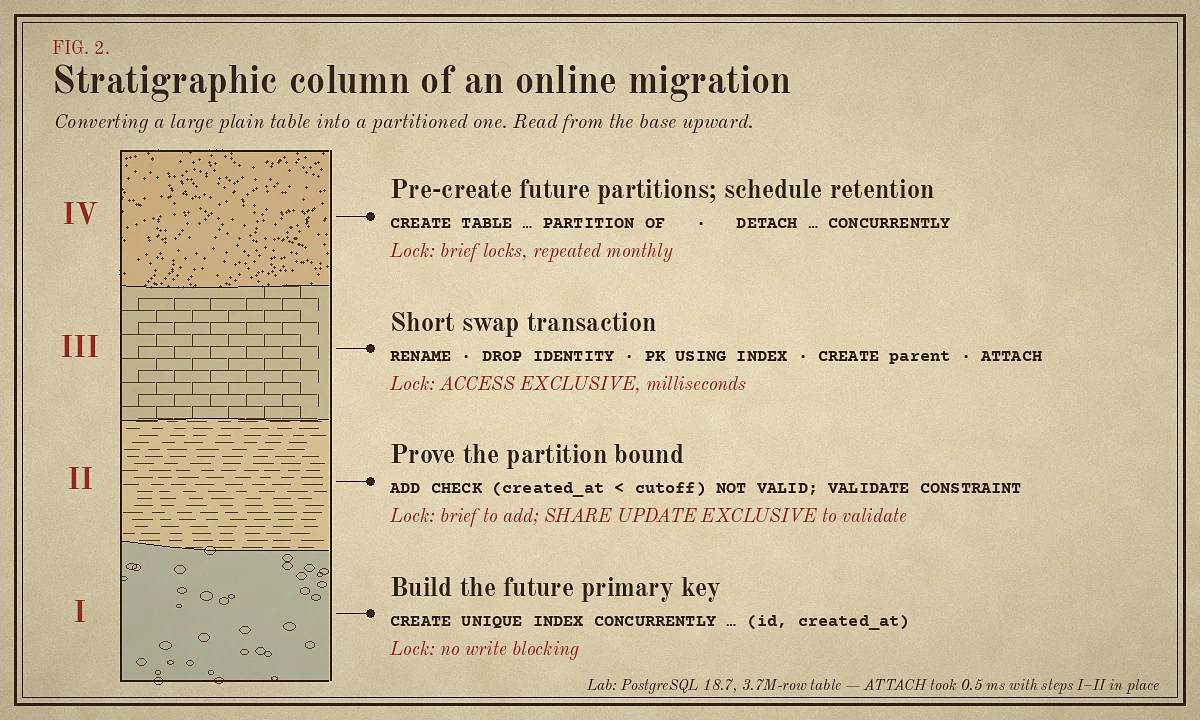
We tested this on a 3.7 million row audit_log table with a single-column identity primary key, the most common starting point.
Step 1 and 2: prepare while traffic runs
-- 1. Build the future primary key without blocking writes
CREATE UNIQUE INDEX CONCURRENTLY audit_log_id_created_key
    ON audit_log (id, created_at);

-- 2. Prove every existing row fits the future partition bound
ALTER TABLE audit_log ADD CONSTRAINT audit_log_legacy_bound
    CHECK (created_at < '2026-12-01') NOT VALID;
ALTER TABLE audit_log VALIDATE CONSTRAINT audit_log_legacy_bound;
Adding the constraint as NOT VALID needs only a brief ACCESS EXCLUSIVE lock. VALIDATE CONSTRAINT then scans the table under a SHARE UPDATE EXCLUSIVE lock, which does not block reads or writes. Choose a cutoff in the future, such as the start of next month, so new rows still satisfy it until the swap.
Step 3: the swap transaction
BEGIN;
SET LOCAL lock_timeout = '5s';
ALTER TABLE audit_log RENAME TO audit_log_legacy;
ALTER TABLE audit_log_legacy ALTER COLUMN id DROP IDENTITY;
ALTER TABLE audit_log_legacy DROP CONSTRAINT audit_log_pkey;
ALTER TABLE audit_log_legacy ADD CONSTRAINT audit_log_legacy_pkey
    PRIMARY KEY USING INDEX audit_log_id_created_key;

CREATE TABLE audit_log (
    id          bigint GENERATED BY DEFAULT AS IDENTITY,
    tenant_id   bigint      NOT NULL,
    kind        text        NOT NULL,
    payload     jsonb       NOT NULL DEFAULT '{}',
    created_at  timestamptz NOT NULL DEFAULT now(),
    PRIMARY KEY (id, created_at)
) PARTITION BY RANGE (created_at);
SELECT setval(pg_get_serial_sequence('audit_log', 'id'),
              (SELECT max(id) FROM audit_log_legacy));

ALTER TABLE audit_log ATTACH PARTITION audit_log_legacy
    FOR VALUES FROM (MINVALUE) TO ('2026-12-01');
CREATE TABLE audit_log_2026_12 PARTITION OF audit_log
    FOR VALUES FROM ('2026-12-01') TO ('2027-01-01');
CREATE INDEX audit_log_tenant_created_idx2 ON audit_log (tenant_id, created_at);
COMMIT;
The whole transaction took under 20 ms on our 3.7 million row table. With debug logging on, PostgreSQL reported partition constraint for table "audit_log_legacy" is implied by existing constraints, so the attach did not scan the data. The existing (tenant_id, created_at) index on the legacy table was matched and reused, not rebuilt. After commit, new IDs continued from 3,676,002, and December rows landed in audit_log_2026_12.
Our first two attempts did not go this smoothly, and both problems are worth knowing about:
- Keeping the old primary key fails. Attaching a table that still has its
PRIMARY KEY (id)returnedERROR: multiple primary keys for table "audit_log_legacy" are not allowed. The old key has to be dropped inside the transaction. Anything with a foreign key toaudit_log(id)blocks that drop, so deal with those references first. - A plain unique index is not enough. With the old key dropped but no
PRIMARY KEY USING INDEXstep, the attach ignored our prepared unique index and built a new primary key index while holding the lock. That took 936 ms here and would take minutes on a large production table. Promoting the prepared index withADD CONSTRAINT ... PRIMARY KEY USING INDEXis fast because the columns are alreadyNOT NULL, and it made the attach take 0.5 ms.
For comparison, we detached the legacy partition and attached it again without the CHECK constraint. PostgreSQL logged verifying table "audit_log_legacy" and spent 186 ms scanning it while holding an ACCESS EXCLUSIVE lock on that table. That scan grows with table size. After the swap, drop the redundant CHECK constraint.
Before running this in production, rehearse it on a restored copy, check what holds locks on the table with pg_locks, and apply the general rules from our zero-downtime database migrations guide, especially short lock timeouts with retries. Application queries that use the table name will hit the new parent, but views and foreign keys keep pointing at the renamed legacy table, and grants, triggers, publications and row-level security policies stay on it too. Recreate them on the new parent.
Adding indexes to a partitioned table later
CREATE INDEX CONCURRENTLY does not work on a partitioned parent, and a plain CREATE INDEX locks writes on every partition while it builds. The documented workaround creates an invalid index on the parent only, builds each partition's index concurrently, then attaches them:
CREATE INDEX events_kind_idx ON ONLY events (kind);   -- invalid until complete

CREATE INDEX CONCURRENTLY events_2026_10_kind_idx ON events_2026_10 (kind);
ALTER INDEX events_kind_idx ATTACH PARTITION events_2026_10_kind_idx;
-- ...repeat for every partition...

SELECT indisvalid FROM pg_index WHERE indexrelid = 'events_kind_idx'::regclass;
In the lab, indisvalid was false after the first statement and switched to true automatically once the last of the 16 partition indexes was attached. Generate the per-partition statements from pg_inherits.
What PostgreSQL 19 changes, and what it doesn't
If you were waiting for built-in commands to merge or split partitions, they are not in PostgreSQL 19. ALTER TABLE ... MERGE PARTITIONS and SPLIT PARTITION were committed during development but reverted in Beta 4 because of design issues. Changing partition boundaries still means creating new partitions, moving rows and detaching or attaching.
The PostgreSQL 19 release notes do include smaller improvements that help partitioned tables: COPY TO now works directly on a partitioned table instead of needing COPY (SELECT ...), and vacuumdb --analyze-only now analyzes partitioned parents. That second one matters because autovacuum does not analyze partitioned parents, so parent-level statistics can go stale unless you run ANALYZE on them yourself.
A pre-flight checklist
- Most heavy queries filter on the partition key, and you have checked their plans with
EXPLAIN. - Primary keys, unique constraints and foreign keys have been redesigned to include the key.
- Partitions are created well ahead of time by a scheduled, idempotent job or by pg_partman, and insert failures raise an alert.
- Retention uses
DETACH ... CONCURRENTLYrun outside transactions, with an archive step if you need one. - Partition count stays in the tens or low hundreds, with no
DEFAULTpartition unless you accept its costs. - ORM code doesn't wrap the key in functions, and date filters use half-open ranges.
- The migration has been rehearsed on production-sized data with lock timeouts.
How we tested this
All SQL in this article ran on PostgreSQL 18.7 on a single Linux machine: 4 million synthetic rows across 13 populated monthly partitions for the pruning and retention tests, and a 3.7 million row table for the migration. We did not test PostgreSQL 19 itself, replicas, pg_partman, managed cloud databases, or behaviour under concurrent production load. The timings show relative cost, not what your hardware will do.
Partitioning is one of those changes that is cheap to get right at the design stage and expensive to fix later. If you're planning it for a large PostgreSQL table, or your retention jobs and vacuum are already struggling, talk to our team about reviewing your schema and migration plan.