
PostgreSQL Slow Query Optimization: A Practical EXPLAIN ANALYZE Workflow
Find the PostgreSQL queries that cost the most with pg_stat_statements, read their plans with EXPLAIN ANALYZE, and fix them with the right index, query rewrite or statistics, with real before-and-after plans from a PostgreSQL 18 lab.
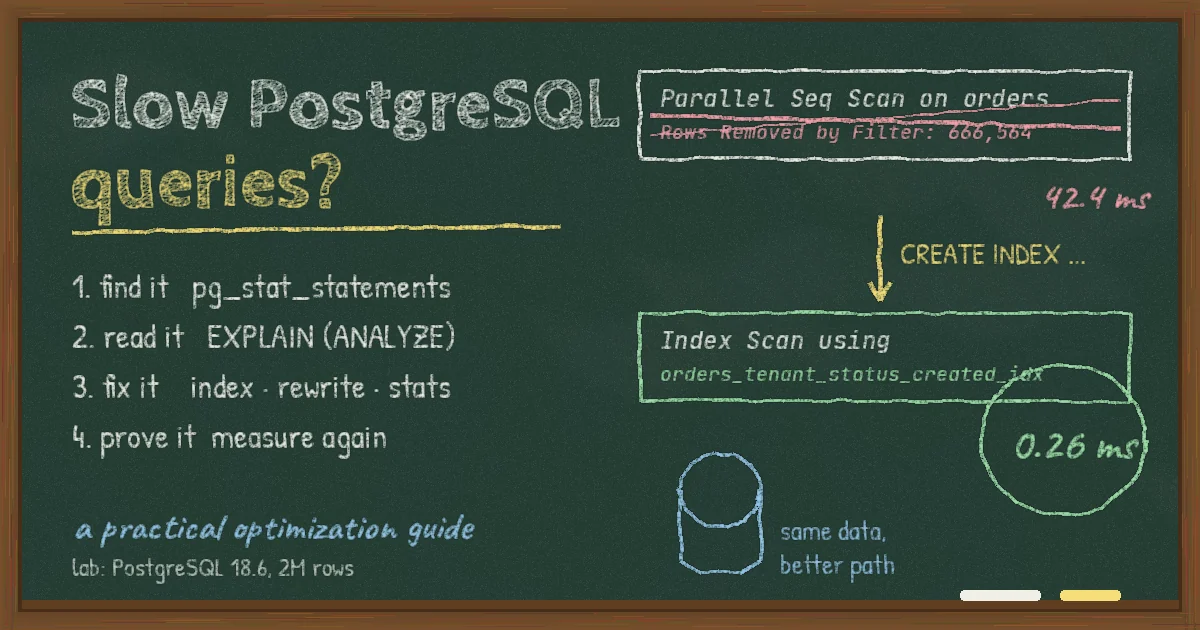
The dashboard that loaded instantly at launch now takes four seconds for your biggest customer. The API p95 creeps up every month. Someone suggests a bigger database instance, someone else suggests Redis, and nobody can say which query is actually responsible. Most PostgreSQL performance problems look like this: not one dramatic failure, but a handful of queries that quietly got worse as the data grew.
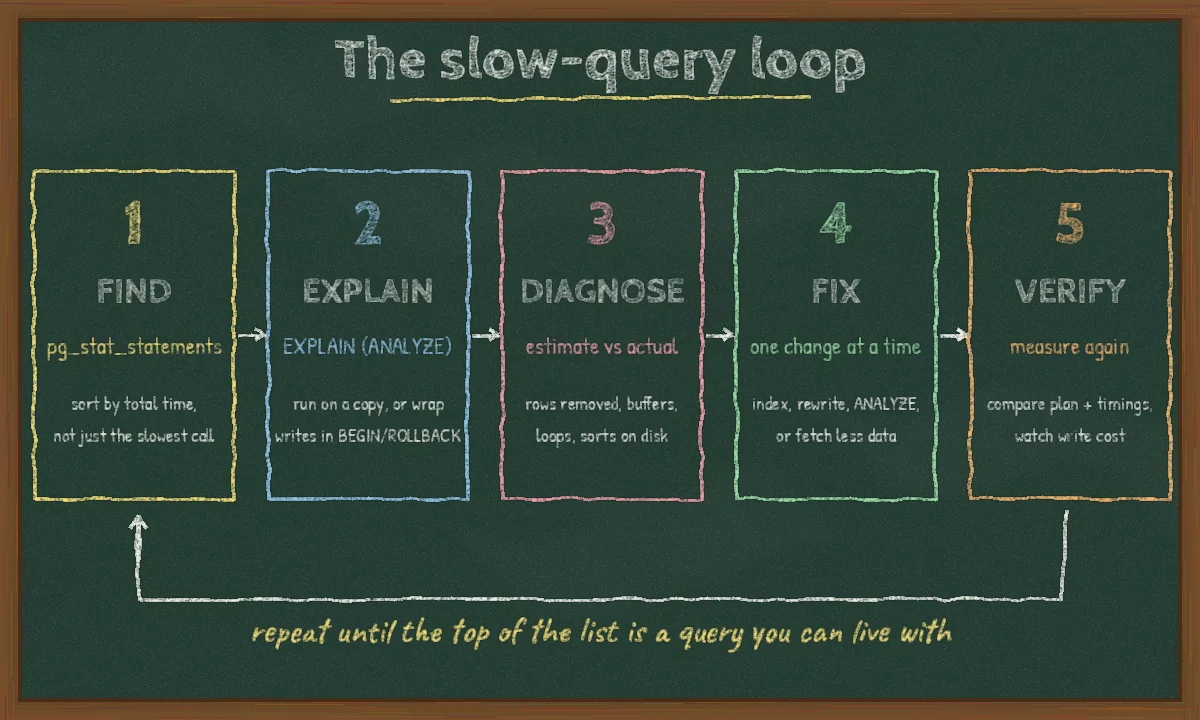
This guide is a repeatable workflow for PostgreSQL slow query optimization: find the queries that cost the most, read their plans with EXPLAIN (ANALYZE), apply the fix that matches the symptom, and prove the result. Every plan and timing below comes from a small lab we ran on PostgreSQL 18.6 with a 2-million-row orders table, so you can reproduce it. Your numbers will differ, but the reasoning carries over.
Step 1: Find the queries that actually cost you time
Do not start with the query someone complained about. Start with the queries that consume the most total database time, because a 5 ms query called 40,000 times an hour usually matters more than a 3-second report that runs twice a day.
Turn on pg_stat_statements
The pg_stat_statements extension ships with PostgreSQL and records planning and execution statistics per normalized query (literals replaced with $1, $2). It must be loaded at server start, so it needs a restart. On managed PostgreSQL services it is usually enabled through the provider's parameter group or database flags, and some providers preload it by default.
# postgresql.conf
shared_preload_libraries = 'pg_stat_statements'
track_io_timing = on   # adds I/O time to stats and EXPLAIN; check overhead with pg_test_timing
CREATE EXTENSION IF NOT EXISTS pg_stat_statements;

SELECT left(query, 80)                       AS query,
       calls,
       round(total_exec_time::numeric, 1)    AS total_ms,
       round(mean_exec_time::numeric, 2)     AS mean_ms,
       rows,
       shared_blks_read
FROM pg_stat_statements
ORDER BY total_exec_time DESC
LIMIT 15;
Read the result in three passes:
- Top by
total_exec_time: where the database spends its time overall. Fix these first. - Top by
mean_exec_time: the individually slow queries that hurt a specific page or job. - High
callswith tinyrows: often an N+1 pattern from an ORM loop. The fix is usually in application code (batching,select_related/prefetch_related, eager loading), not in an index.
Reset the counters with SELECT pg_stat_statements_reset(); after a deploy or fix, so you compare like with like.
Catch slow plans in production with auto_explain
Some queries are only slow with certain parameters, such as one tenant with ten times more data than the rest. The auto_explain module logs the plan of any statement that exceeds a threshold, so you see the plan that actually ran:
auto_explain.log_min_duration = '500ms'
auto_explain.log_analyze = on      # real row counts and timings; adds overhead
auto_explain.log_buffers = on
auto_explain.sample_rate = 0.1     # sample 10% of statements on busy systems
Pair it with log_min_duration_statement if you only need the query text and duration.
Step 2: Read the plan with EXPLAIN (ANALYZE)
Plain EXPLAIN shows what the planner intends to do and its cost estimates. EXPLAIN (ANALYZE) actually executes the query and adds real row counts and timings per node. Since PostgreSQL 18, ANALYZE output includes buffer statistics by default and index scans report an Index Searches count (see the PostgreSQL 18 release notes). On older versions, write EXPLAIN (ANALYZE, BUFFERS).
Careful:
EXPLAIN ANALYZEreally runs the statement. ForUPDATE,DELETEorINSERT, wrap it inBEGIN; ... ROLLBACK;or run it on a staging copy with production-like data.
Here is a typical multi-tenant dashboard query from our lab, before any tuning:
EXPLAIN (ANALYZE, COSTS OFF)
SELECT id, customer_id, total_cents, created_at
FROM orders
WHERE tenant_id = 42 AND status = 'pending'
ORDER BY created_at DESC
LIMIT 20;

 Limit (actual time=34.809..42.346 rows=20.00 loops=1)
   Buffers: shared hit=13735 read=4960
   ->  Sort (actual time=34.807..42.342 rows=20.00 loops=1)
         Sort Key: created_at DESC
         Sort Method: top-N heapsort  Memory: 27kB
         ->  Gather (actual time=1.181..42.240 rows=309.00 loops=1)
               Workers Planned: 2
               ->  Parallel Seq Scan on orders (actual time=0.685..31.653 rows=103.00 loops=3)
                     Filter: ((tenant_id = 42) AND (status = 'pending'::text))
                     Rows Removed by Filter: 666564
 Execution Time: 42.392 ms
What to look for, in order
- Where the time goes. Read the tree from the inside out. Each node's
actual timeincludes its children, and per-loop values must be multiplied byloops. Here almost all the time is in the sequential scan. - Rows removed vs rows returned. Three workers each threw away about 666,000 rows to keep 103. That ratio is the clearest sign a suitable index is missing.
- Buffers.
shared hitpages came from PostgreSQL's cache;readpages came from the OS or disk. About 18,700 pages (8 kB each, roughly 146 MB) were touched to return 20 rows. - Estimated vs actual rows. Run without
COSTS OFFto see estimates. When the planner expects 10 rows and gets 100,000, it picks the wrong join or scan type. That is a statistics problem, covered below. - Sorts and hashes spilling to disk.
Sort Method: external merge Disk: ...means the sort did not fit inwork_mem.
The official Using EXPLAIN chapter is worth reading once end to end; it explains every node type you will meet.
Step 3: Apply the fix that matches the symptom
Missing or wrong index: build a composite index in query order
The query filters on two equality columns and sorts by a third. A B-tree index with the equality columns first and the sort column last lets PostgreSQL jump to the right tenant and status and read rows already in order, stopping after 20:
CREATE INDEX CONCURRENTLY orders_tenant_status_created_idx
    ON orders (tenant_id, status, created_at DESC);
 Limit (actual time=0.047..0.239 rows=20.00 loops=1)
   Buffers: shared hit=13 read=10
   ->  Index Scan using orders_tenant_status_created_idx on orders
         Index Cond: ((tenant_id = 42) AND (status = 'pending'::text))
         Index Searches: 1
 Execution Time: 0.262 ms
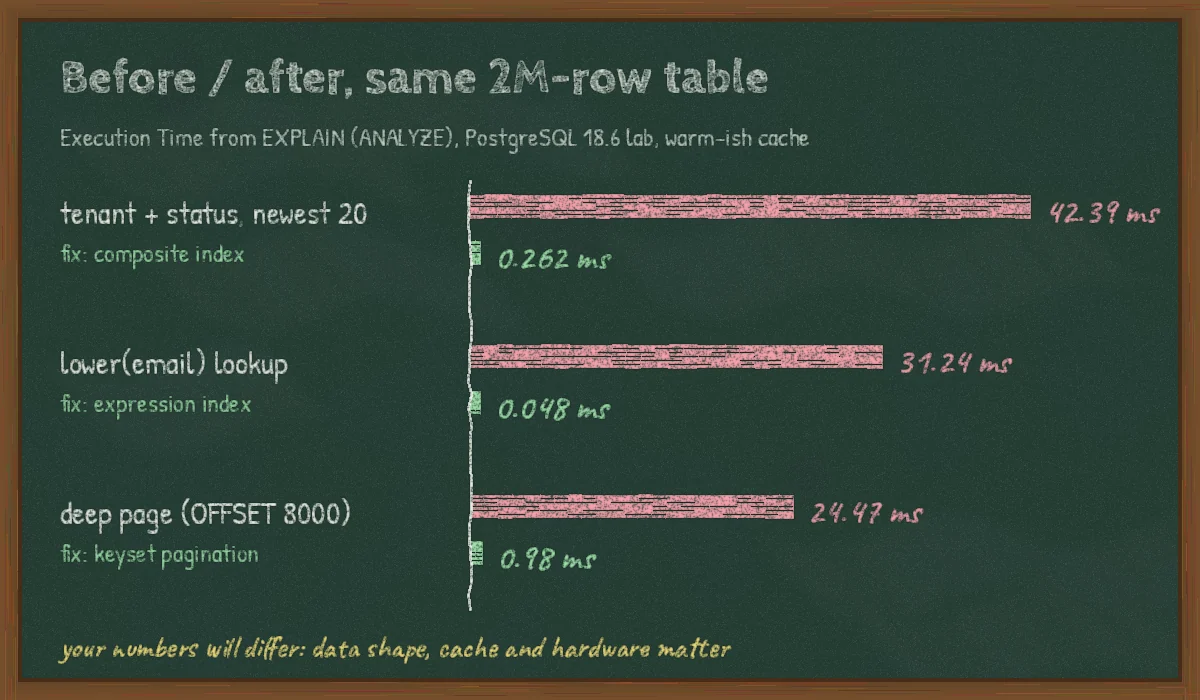
From 42.4 ms to 0.26 ms, and from about 18,700 buffers to 23. Use CONCURRENTLY on live tables so the build does not block writes. It cannot run inside a transaction block, and a failed build leaves an INVALID index you must drop and retry (see CREATE INDEX). If you ship schema changes through migrations, our guide to zero-downtime migrations in Django and PostgreSQL covers how to run this safely.
Column order matters. The PostgreSQL documentation on multicolumn indexes explains that conditions on the leading columns are what make a B-tree efficient. PostgreSQL 18 adds skip scan, which lets a multicolumn index help even when the leading column is not filtered. In our lab, a query on status and created_at alone used the same index with Index Searches: 202, roughly one probe per distinct tenant_id (the lab has 200 tenants), and finished in 2.3 ms. Skip scan works best when the skipped column has few distinct values. It does not replace an index designed for your hottest query.
Function on the column: use an expression index
A plain index on email cannot serve WHERE lower(email) = $1, because the indexed value is not the value being compared. In the lab, this lookup on 200,000 customers did a parallel sequential scan in 31.2 ms. An expression index fixed it:
CREATE INDEX CONCURRENTLY customers_email_lower_idx ON customers (lower(email));
ANALYZE customers;   -- gathers statistics for the new expression
-- Index Scan using customers_email_lower_idx ... Execution Time: 0.048 ms
The same trap shows up with created_at::date = ..., coalesce(...) and implicit casts when the parameter type does not match the column type. Either index the expression or rewrite the predicate as a range: created_at >= $1 AND created_at < $1 + interval '1 day'.
Hot subset: use a partial index
If most queries look at a small slice of the table, such as pending orders or unprocessed jobs, index only that slice. In our lab, a partial index on pending orders was 1.9 MB against 95 MB for the full composite index:
CREATE INDEX CONCURRENTLY orders_pending_idx
    ON orders (tenant_id, created_at)
    WHERE status = 'pending';
The query's WHERE clause must imply the index predicate, so write status = 'pending' as a literal. A bind parameter can stop the planner from proving the match, for example when a prepared statement uses a generic plan.
Deep pagination: switch from OFFSET to keyset
OFFSET 8000 still makes PostgreSQL produce and discard 8,000 rows. In the lab that page took 24.5 ms with a bitmap scan and sort, and it gets slower with every page. Keyset (cursor) pagination remembers the last row of the previous page and continues from there:
CREATE INDEX CONCURRENTLY orders_tenant_status_created_id_idx
    ON orders (tenant_id, status, created_at DESC, id DESC);

SELECT id, created_at, total_cents
FROM orders
WHERE tenant_id = $1 AND status = 'paid'
  AND (created_at, id) < ($2, $3)      -- last row of the previous page
ORDER BY created_at DESC, id DESC
LIMIT 20;
The row comparison (created_at, id) < ($2, $3) becomes an index condition, and id breaks ties between equal timestamps. In our lab this ran in 0.18 ms. Even when we computed the cursor for page 401 inside the query, it took 0.98 ms against 24.5 ms for OFFSET. The trade-off is that users cannot jump straight to page 400, which most APIs and infinite-scroll UIs never need.
Bad estimates: fix statistics before adding hints
When estimated and actual rows differ by orders of magnitude, the planner is working with stale or too-coarse statistics. In order of effort:
- Run
ANALYZE table_name;after bulk loads. Autovacuum may not have caught up. - Raise the sample for skewed columns:
ALTER TABLE orders ALTER COLUMN tenant_id SET STATISTICS 1000;, thenANALYZE. - Create extended statistics when columns are correlated (for example
countryandcity):CREATE STATISTICS ... (dependencies, ndistinct) ON col_a, col_b FROM t;. - Check
pg_stat_user_tablesfor tables with many dead tuples and oldlast_autoanalyzetimes, and tune autovacuum per table if needed.
PostgreSQL 19, now at release candidate with general availability planned for 19 November 2026 per the RC 1 announcement, adds a pg_plan_advice extension for steering planner decisions. Treat that as a last resort after statistics, indexes and query shape, not a first move.
Fetching too much: change the query, not the database
- Select the columns you need instead of
SELECT *. Narrow selects can become index-only scans, and you move less data over the network. - Replace
count(*)on large tables for UI badges with cached or approximate counts. - Move heavy reports to a read replica or a pre-aggregated table refreshed on a schedule.
- Cache results that are read far more often than they change. Our guide to Redis caching for SaaS APIs covers invalidation, which is the hard part.
Step 4: Verify, and watch the write side
Re-run EXPLAIN (ANALYZE) several times to see warm-cache numbers, then compare pg_stat_statements before and after under real traffic. A plan that is fast in isolation can still be slow when the application sends a different parameter type or when one tenant's data is much larger.
Every index costs something on INSERT and UPDATE and takes disk and memory. Review unused indexes now and then:
SELECT s.relname AS table_name, s.indexrelname AS index_name, s.idx_scan,
       pg_size_pretty(pg_relation_size(s.indexrelid)) AS index_size
FROM pg_stat_user_indexes s
JOIN pg_index i ON i.indexrelid = s.indexrelid
WHERE s.idx_scan = 0 AND NOT i.indisunique
ORDER BY pg_relation_size(s.indexrelid) DESC;
Check every replica before dropping anything. Index usage counters are tracked per server, so an index unused on the primary may be serving reports on a replica.
Common mistakes
- Testing on a tiny dev database. On 1,000 rows a sequential scan is the right plan. Test with production-sized, production-shaped data.
- Indexing every column separately. Five single-column indexes rarely beat one composite index built for the actual query.
- Running
EXPLAIN ANALYZEon a destructive statement without a transaction. It executes. - Raising
work_memglobally to fix one sort. It applies per sort or hash operation, per connection. Set it per session or per role for the report that needs it. - Blaming PostgreSQL for connection problems. If latency spikes line up with connection counts, the issue may be pooling, not plans. See PostgreSQL connection pooling for SaaS APIs.
- Ignoring the version. PostgreSQL 14 reaches end of life on 12 November 2026 according to the versioning policy. Upgrading also brings planner, I/O and
EXPLAINimprovements, such as PostgreSQL 18's asynchronous I/O and skip scan.
A short checklist
- Enable
pg_stat_statementsandtrack_io_timing; sort by total time. - Capture real plans with
EXPLAIN (ANALYZE)orauto_explain. - Check rows removed, buffers, estimate vs actual, loops and disk sorts.
- Fix one thing: composite, expression or partial index; query rewrite; statistics; or less data.
- Build indexes with
CONCURRENTLYand measure again under real traffic. - Review unused indexes and keep PostgreSQL on a supported major version.
FAQ
How do I find slow queries in PostgreSQL?
Enable the pg_stat_statements extension and sort by total_exec_time to find the queries that use the most database time overall. Add log_min_duration_statement or auto_explain to capture individual slow executions and their plans.
What is the difference between EXPLAIN and EXPLAIN ANALYZE?
EXPLAIN shows the planned strategy and estimated costs without running the query. EXPLAIN ANALYZE runs it and reports actual rows, timings and (on PostgreSQL 18 and later, by default) buffer usage for each plan node.
Why is PostgreSQL not using my index?
The usual causes are a function or cast on the indexed column, column order that does not match the filters, a query that returns a large share of the table (where a sequential scan really is cheaper), or stale statistics. Compare estimated and actual rows in the plan to tell which one it is.
Should I add more indexes or more hardware?
Fix plans first. In our lab the right index cut a query from about 18,700 buffer reads to 23. Extra hardware does not change that ratio. Scale up once the top queries in pg_stat_statements are reasonable and you are limited by real workload.
Conclusion
PostgreSQL slow query optimization is mostly a habit: measure what costs the most, read the plan, change one thing, and measure again. The fixes are rarely exotic. A composite index in the right order, an expression index, keyset pagination or a fresh ANALYZE handle a large share of real-world cases. The hard part is keeping the loop running as data, tenants and features grow, especially in multi-tenant SaaS where one large customer can change which plan is best.
If your team needs help profiling a slow PostgreSQL workload, planning a major version upgrade or redesigning the queries behind a growing product, take a look at our development services or get in touch to talk it through.