
LLM Prompt Caching: Why Your Agent Misses the Cache and How to Fix It
Why LLM prompt caching silently misses in agents and RAG apps, how OpenAI, Anthropic and Gemini differ, and a tested Python helper to keep your prompt prefix stable and measure savings.
The bill for your support agent keeps climbing, and the usage dashboard says almost none of the input is cached. Yet every request starts with the same 6,000 tokens of instructions, tool schemas and policy text. You turned prompt caching on, or assumed it was on by default, so why are you still paying full price for the same tokens on every call?
Usually the cause is something small in how the request is put together: a timestamp at the top of the system prompt, tools sent in a different order each time, or a history that gets re-rendered every turn. LLM prompt caching only reuses work when the start of the prompt is byte-for-byte identical, so any of these quietly turns a would-be cache hit into a full-price miss. Nothing errors. You just pay more and wait longer.
This guide is for engineers building chatbots, RAG systems and agents on the OpenAI, Anthropic or Gemini APIs. It explains what is actually cached, how the three providers differ, the mistakes that break caching, and a small, tested Python helper that keeps your prefix stable and measures what you save. Provider details are taken from each vendor's documentation as of November 2026. Pricing and limits change, so check the linked pages before you rely on a number.
What prompt caching actually stores
When a model reads your input it computes intermediate key/value (KV) states for every token. Prompt caching saves those states for a prefix, the unchanged beginning of the prompt. If a later request starts with exactly the same prefix and lands where the cached entry lives, the provider skips recomputing it. You pay a discounted rate for those tokens and the response starts sooner.
Three consequences follow, and most caching bugs come from forgetting one of them:
- It is a prefix match. The cache is read from the first token forward. Change one token early and everything after it is a miss, even if the remaining 10,000 tokens are identical.
- It does not cache answers. The model still generates a fresh response. If you want to skip identical calls entirely, that's application-level response caching, a different technique we cover in our guide to Redis caching and invalidation for SaaS APIs.
- It expires. Entries live for minutes to hours depending on provider and settings, so the gap between requests matters as much as their content.
How OpenAI, Anthropic and Gemini differ
The idea is the same everywhere, but the controls are different. A quick summary, with links to the source documentation:
OpenAI
Caching is enabled by default on supported models. For GPT-5.6 and later the documented minimum cacheable prefix is 1,024 tokens. Cache writes are billed at 1.25× the normal input rate for the default 30-minute lifetime, with an optional 12-hour lifetime in the Responses API at 2.5×. Reads cost 0.1× on most of those models. You can let OpenAI place cache breakpoints implicitly or set them explicitly. On older models, prompt_cache_retention controls lifetime, and a stable prompt_cache_key helps route related requests to the same cache machine. Usage reports input_tokens_details.cached_tokens and cache_write_tokens. Cached tokens still count toward your tokens-per-minute rate limit.
Anthropic (Claude)
On the Messages API you opt in with cache_control, either once at the top level (automatic mode moves the breakpoint forward as the conversation grows) or on up to four individual blocks. The prefix covers tools, then system, then messages, in that order, and a change at one level invalidates that level and everything after it. The default lifetime is 5 minutes, refreshed free each time the entry is read, and there is a 1-hour option. Writes cost 1.25× (5 minutes) or 2× (1 hour), and reads 0.1×. Minimum cacheable lengths range from 512 to 4,096 tokens depending on the model. Below the minimum, the request simply isn't cached and no error is returned. Usage reports cache_creation_input_tokens and cache_read_input_tokens.
Google Gemini
The Gemini API applies implicit caching by default on Gemini 2.5 and newer models, with minimums of 2,048 or 4,096 tokens depending on the model. Hits are discounted automatically, and Google's Cloud context caching documentation describes the implicit-hit discount as 90%. Explicit caching, where you create a cache object and refer to it, is available on some models through generateContent and adds storage charges for as long as the cache exists. The cached token count appears in the response's usage metadata.
The practical takeaway: with OpenAI and Gemini you mostly need to avoid breaking caching, which happens by default. With Anthropic you also need to enable it and put the breakpoint in the right place.
The one rule: stable first, volatile last
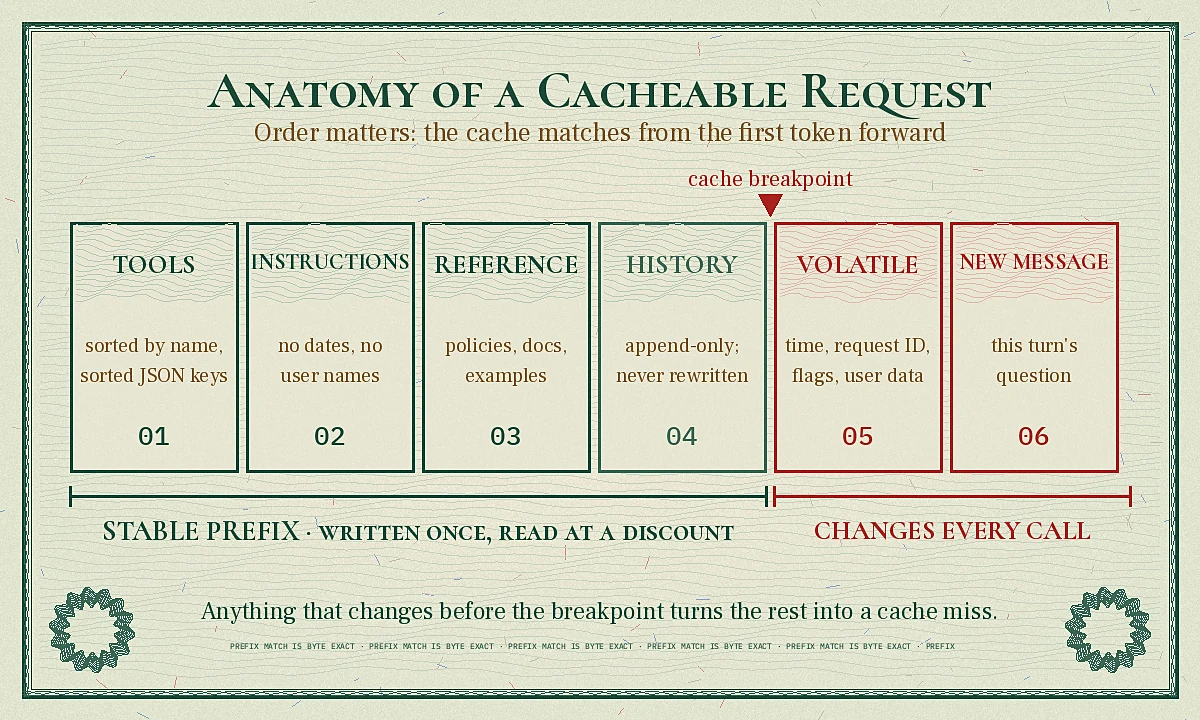
Order your request from most stable to least stable:
- Tool definitions, in a deterministic order with deterministic JSON.
- Core instructions that are the same for every user and every turn.
- Shared reference material: policies, product docs, few-shot examples.
- Conversation history, appended to and never rewritten.
- Volatile context: current time, request ID, feature flags, the user's plan, retrieved chunks for this query.
- The new user message.
The cache breakpoint, explicit or implicit, should sit at the end of the last block that stays identical across the requests you want to share a cache. With Anthropic this is literal: the docs explain that cache writes happen only at breakpoints, and that the lookback for earlier entries checks at most 20 blocks. If the block carrying cache_control contains today's date, the hash never matches and every request pays for a fresh write.
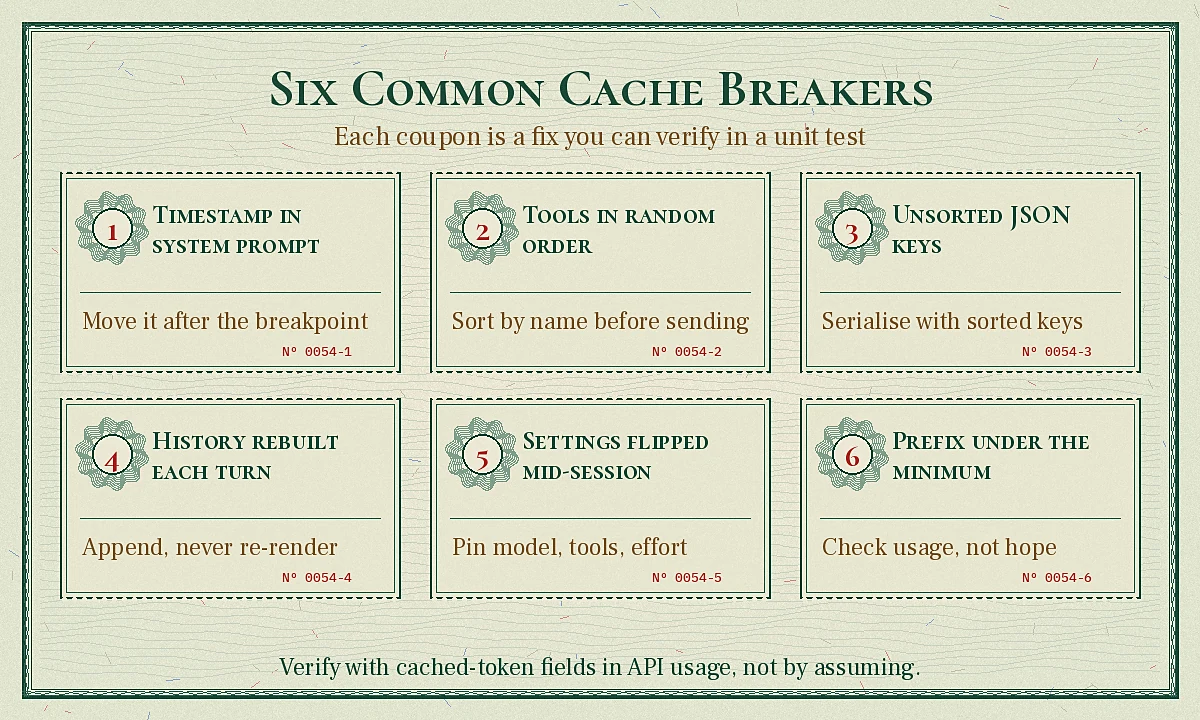
Six common cache breakers
These aren't hypothetical. Datadog published a write-up of investigating its own cache misses that found the current time and feature flags mixed into system instructions, and a tool list built by iterating a Go map, whose order isn't guaranteed. A 2026 research paper, Silent and Costly, classified 120 prompt-caching defects in open-source agents. Unstable prefixes (volatile values, reassembled prompts, nondeterministic serialization, misplaced markers) accounted for about a third, and provider-compatibility problems such as hard-coded model-name checks for a bit more.
- Timestamps and IDs in the system prompt. "Today is 25 November, 10:42" at the top invalidates everything after it each minute. Put the time in the volatile block near the end. If the model only needs the date, a date that changes daily is far cheaper than a minute-level clock.
- Tools in a different order. Tools come first in the prefix, so a reordered list breaks the whole cache. Sort tools by name. If a tool is unavailable for one turn, OpenAI's cache diagnostics guide suggests restricting which tools may run (for example with
allowed_toolsortool_choice) instead of removing it from the list. - Nondeterministic JSON. The same schema serialized with keys in a different order is different bytes. Anthropic's docs specifically warn that some languages, such as Swift and Go, can randomize key order. Serialize with sorted keys.
- Re-rendering history. Frameworks that rebuild the whole message list from a database each turn can change whitespace, trim old tool output, or reformat timestamps. Store the exact blocks you sent and append to them.
- Changing settings mid-session. Switching models, changing tools, flipping reasoning effort or, on Anthropic, changing
tool_choiceor adding the first image can invalidate part or all of the cache. Decide these per session where you can. - A prefix under the minimum. A 700-token system prompt won't cache on a model with a 1,024-token minimum. Both OpenAI and Anthropic note that adding useful, stable material to reach the minimum can work out cheaper than staying just below it.
There's also a subtler one with agents that fan out. Anthropic documents that a cache entry only becomes available once the first response starts. If you launch ten parallel sub-agent calls with the same large prefix at the same moment, you can pay for ten writes. Send one first, wait for it to start streaming, then send the rest.
A prefix-stable request builder (tested)
The safest approach is to make prefix stability a property of one function you can unit test, rather than something every call site has to remember. The helper below is provider-neutral: it produces an ordered list of blocks, which you then map to your SDK's tools, system/instructions and messages fields.
import hashlib, json

def canonical(obj) -> str:
    """Same content -> same bytes, every time."""
    return json.dumps(obj, sort_keys=True, separators=(",", ":"), ensure_ascii=False)

def stable_tools(tools):
    return [json.loads(canonical(t)) for t in sorted(tools, key=lambda t: t["name"])]

def build_request(instructions, tools, reference, history, volatile, user_msg):
    """Stable parts first, per-request values last."""
    return {
        "tools": stable_tools(tools),
        "messages": [
            {"role": "system", "content": instructions},   # no dates, no user data
            {"role": "system", "content": reference},      # policies, docs, examples
            *history,                                      # append-only
            {"role": "user",
             "content": f"Context: {canonical(volatile)}\n\n{user_msg}"},
        ],
    }

def segments(req):
    return [canonical(req["tools"])] + [canonical(m) for m in req["messages"]]

def first_divergence(a, b):
    """Index of the first block that differs between two requests, or None."""
    sa, sb = segments(a), segments(b)
    for i, (x, y) in enumerate(zip(sa, sb)):
        if x != y:
            return i
    return None if len(sa) == len(sb) else min(len(sa), len(sb))
first_divergence is the useful debugging tool. Log a hash of the prefix with each call, and when the hit rate drops, compare two consecutive requests from the same session. The index tells you which block changed. Then turn it into a regression test:
def test_volatile_values_only_change_last_block():
    a = build_request(INSTR, TOOLS, REF, [], {"ts": "10:00", "request_id": "r1"}, "Where is my order?")
    b = build_request(INSTR, TOOLS, REF, [], {"ts": "10:05", "request_id": "r2"}, "Where is my order?")
    assert first_divergence(a, b) == len(segments(a)) - 1

def test_tool_order_does_not_change_prefix():
    a = build_request(INSTR, TOOLS, REF, [], {}, "hi")
    b = build_request(INSTR, list(reversed(TOOLS)), REF, [], {}, "hi")
    assert first_divergence(a, b) is None
What we tested: the full module (builder, divergence check, usage normaliser and break-even helper below) passes 9 unit tests locally on Python 3.13. These cover reordered tools and JSON keys, volatile values, a timestamp placed in the system prompt, append-only history, and usage examples shaped like the ones in the OpenAI and Anthropic docs. What we didn't test: we made no live API calls for this article, so actual hit rates on your traffic must be confirmed from the providers' usage fields. Request-level fields such as cache_control, prompt_cache_key or explicit breakpoint options still have to be added in your SDK call.
Measure the hit rate and what you save
Don't judge caching by latency feel or by whether the setting is on. Read the usage object on every response and export three numbers per route: uncached input tokens, cache-read tokens and cache-write tokens. The providers count them differently. OpenAI's input_tokens is the total, with cached and written tokens as parts of it. Anthropic's input_tokens excludes both. Normalise before you aggregate:
def normalise_usage(usage: dict) -> dict:
    if "input_tokens_details" in usage:            # OpenAI Responses API
        d = usage["input_tokens_details"]
        read, write = d.get("cached_tokens", 0), d.get("cache_write_tokens", 0)
        return {"uncached": usage["input_tokens"] - read - write, "read": read, "write": write}
    read = usage.get("cache_read_input_tokens", 0)  # Anthropic Messages API
    write = usage.get("cache_creation_input_tokens", 0)
    return {"uncached": usage.get("input_tokens", 0), "read": read, "write": write}

def input_cost(usage, price_per_mtok, read_mult=0.1, write_mult=1.25):
    u = normalise_usage(usage)
    return (u["uncached"] + u["read"] * read_mult + u["write"] * write_mult) * price_per_mtok / 1e6

def reuses_to_break_even(write_mult, read_mult):
    n = 0
    while write_mult + n * read_mult >= 1 + n:
        n += 1
    return n
Hit rate is read tokens divided by total input tokens. Put it on a dashboard per route and per model, and alert when it drops after a deploy. That's usually the first sign someone added a timestamp to a prompt. OpenAI and Anthropic both now offer cache diagnostics that report why a request missed (for example, tools changed or messages changed). Use them alongside your own numbers.
The break-even arithmetic
Because writes cost more than ordinary input, caching only pays off if the prefix is reused. With the documented multipliers, a 1.25× write plus 0.1× reads beats no caching after a single reuse (1.35× versus 2×), which matches the example in OpenAI's guide. A 2× one-hour write or a 2.5× twelve-hour write needs two reuses within the lifetime. Choose the longer lifetime only when traffic to that prefix is too sparse for the short one, such as an internal tool used a few times an hour, and confirm with real usage data.
Applying it to RAG and agents
- RAG. Retrieved chunks differ per question, so they belong after the breakpoint. If you have a fixed corpus every request needs (a returns policy, a product glossary), place it in the stable reference block instead. Our guide to RAG for business knowledge bases covers the retrieval side.
- Tool-heavy agents. Large tool schemas are often the biggest stable chunk. Sort them, and version tool changes so that a deploy doesn't scatter different tool lists across live sessions.
- Structured outputs. Changing the response schema can affect the cached prefix on some models. Keep one schema per route where possible. See LLM structured outputs for schema design.
- Long conversations. Compaction or summarisation changes the prefix, so the first request after it reuses less. That's often still worth it because there are fewer tokens overall. Compare total input cost, not hit rate alone.
- Evaluation. Add hit rate and cost per task to your agent test suite, so a prompt edit that breaks caching is caught before release. Our post on AI agent evaluation shows how to structure those tests.
When prompt caching won't help much
- Prompts that are short or mostly unique per request, such as one-off classification of different documents with a tiny instruction.
- Low, bursty traffic where the gap between requests regularly exceeds the cache lifetime.
- Per-tenant prompts that differ from the first token. Here, put shared content first and the tenant-specific part afterwards so tenants at least share the common prefix.
- Rate-limit problems. Cached tokens still count toward OpenAI's tokens-per-minute limit, so caching reduces cost and latency but doesn't free up throughput.
Checklist
- Order every request: tools, instructions, shared reference, history, volatile context, new message.
- Sort tools by name and serialise all JSON with sorted keys.
- Remove clocks, IDs, user names and flags from anything before the breakpoint.
- Store sent messages verbatim and append. Never re-render history.
- On Anthropic, enable
cache_controland place breakpoints on the last stable block. On older OpenAI models, set a stableprompt_cache_key. - Check the prefix exceeds the model's minimum cacheable length.
- Warm the cache with one request before fanning out parallel calls.
- Log normalised usage per route, chart the hit rate, and alert on drops after deploys.
- Unit-test prefix stability with a divergence check like the one above.
FAQ
Is prompt caching the same as caching LLM responses?
No. Prompt caching reuses the model's computation for a repeated prefix, and the model still generates a new answer. Response caching stores the final output in your own store and returns it without calling the model, which is only safe for identical, non-personalised requests.
Why is cached_tokens zero on every request?
The most common reasons are a prefix below the model's minimum length, something volatile near the start of the prompt, tools or JSON keys in an unstable order, requests spaced further apart than the cache lifetime, or (on Anthropic) no cache_control at all. Compare two consecutive requests block by block to find the first difference.
Does prompt caching change the model's answers?
No. OpenAI's documentation states that caching doesn't affect output generation. You get a freshly generated response either way.
Should I use the longer cache lifetime?
Only if the same prefix is reused at least twice within the longer window but often misses the shorter one. Longer lifetimes cost more to write, so measure the gap between requests first.
Is cached data shared with other customers?
OpenAI says caches aren't shared across organisations. Anthropic says the same, and on its own platform also isolates caches between workspaces. For any provider, including Google, check the data-retention and zero-data-retention terms against your compliance needs.
Conclusion
LLM prompt caching is one of the cheapest optimisations available for agents and RAG systems, but it depends entirely on your prompt starting with exactly the same bytes every time. Put stable content first and volatile content last, make serialisation deterministic, treat history as append-only, and measure cache reads from the usage fields instead of assuming. Fix those and the savings come from requests you were already making.
If you're building an AI agent, chatbot or MCP-based integration and want a review of its prompt structure, cost and reliability, talk to our team.