
LLM Structured Outputs: Reliable JSON for AI Automation
How LLM structured outputs turn model replies into schema-valid JSON, how OpenAI, Claude, and Gemini differ, and the validation you still need before AI-extracted data reaches Shopify or your ERP.
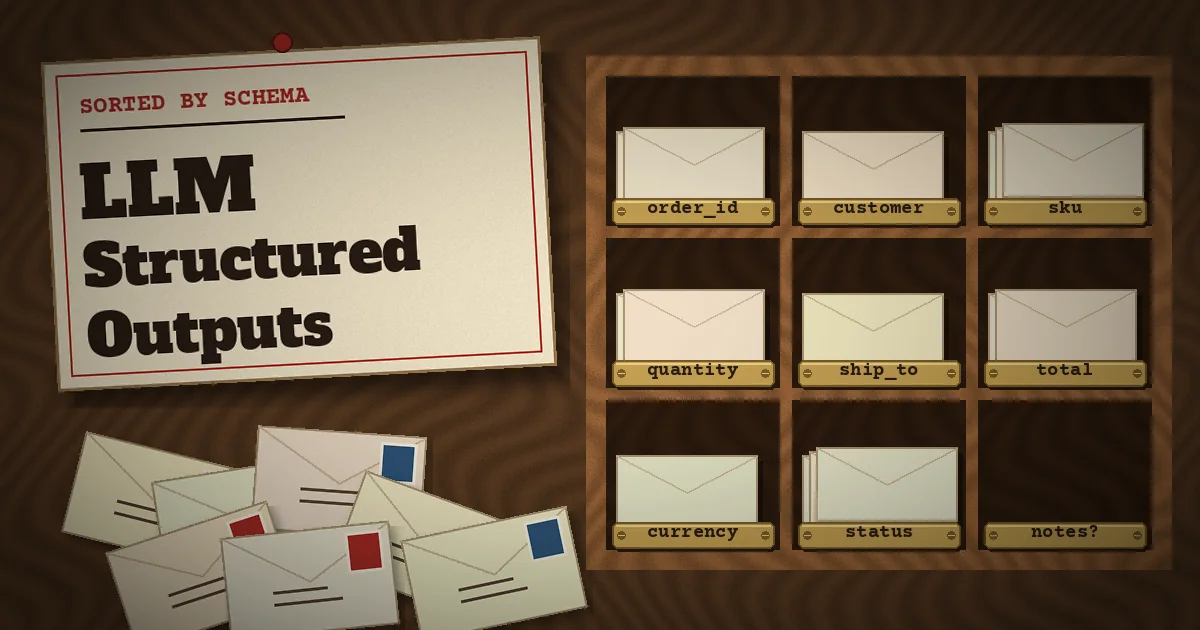
The first version of almost every AI automation looks the same: you paste an email, a PDF, or a chat transcript into a prompt, ask the model to "return JSON", and it works in the demo. Then it reaches production. One reply wraps the JSON in a Markdown code fence. Another calls the field qty instead of quantity. A third returns "twelve" where your code expects a number, and the job that was supposed to create a Shopify draft order throws an exception at 2 a.m.
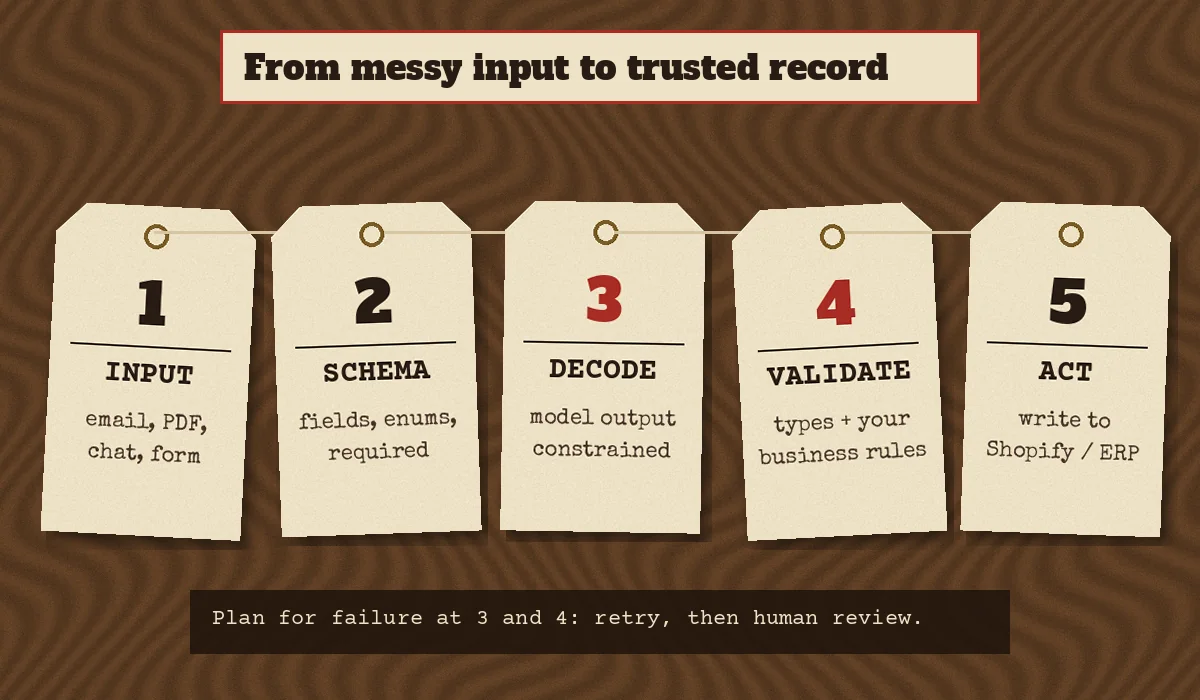
LLM structured outputs fix the format half of that problem. Instead of asking nicely for JSON, you hand the model a JSON Schema and the API constrains generation so the reply follows it. This guide explains what structured outputs actually guarantee, how the major providers implement them, how to design schemas that hold up with real business data, and which checks you still need on your side before an AI-extracted record touches your store, ERP, or CRM.
What LLM structured outputs are (and how they differ from JSON mode)
There are three levels of "give me JSON" you will run into:
- Prompt-only JSON. You describe the format in the prompt. The model usually complies, but nothing enforces it. Missing keys, extra prose, and wrong types are all possible.
- JSON mode. The API guarantees syntactically valid JSON, but not that it matches your shape. OpenAI's documentation describes structured outputs as "the evolution of JSON mode": both produce valid JSON, only structured outputs ensure schema adherence.
- Structured outputs (schema-constrained decoding). You send a JSON Schema with the request. While the model generates tokens, the provider restricts which tokens are allowed so the output fits the schema: required keys present, correct types, enum values only, no unexpected properties.
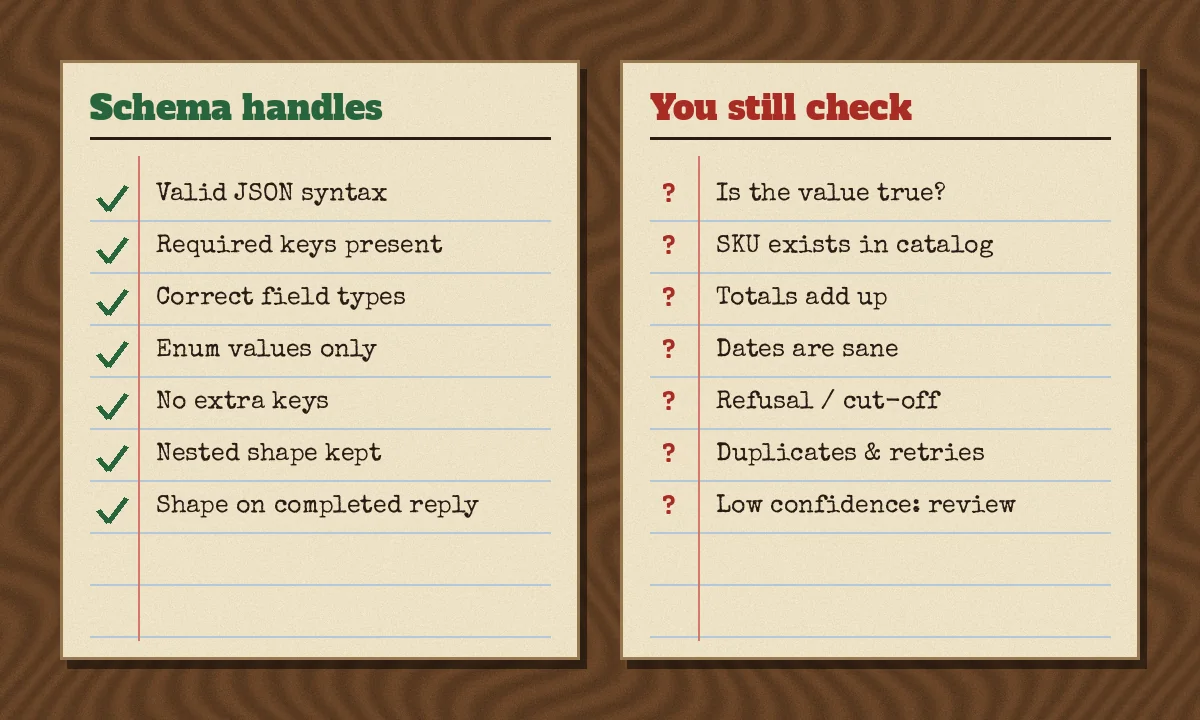
The practical difference is where failures show up. With prompt-only JSON, failures appear in your parser. With structured outputs, the shape is handled by the API, and your remaining failures move to two places: responses that did not complete (refusals and token-limit cut-offs) and values that are well-formed but wrong.
Structured outputs vs function calling
Both use JSON Schema, but they answer different questions. Function calling (tool use) is how a model asks your system to do something, such as "look up order 1042". A structured response format is how the model hands you its final answer in a fixed shape. OpenAI's guide puts it simply: use function calling when you connect the model to tools and data in your system, and use a structured response format when you want the model's reply itself to follow a schema. Anthropic exposes the same split as JSON outputs (output_config.format) and strict tool use (strict: true on a tool definition), and both can be used in the same request.
In an AI agent built for ecommerce workflows, you will usually want both: strict tool inputs so the agent cannot call create_refund with a malformed amount, and a structured final result your application can store.
Why structured outputs matter for business automation
Most valuable AI automation in a commerce or SaaS business is not chat. It is turning unstructured input into a record another system can act on:
- Purchase orders and wholesale emails converted into draft orders with SKUs, quantities, and ship-to addresses. We covered the full workflow in AI purchase order processing for Shopify B2B.
- Support tickets classified by intent (return, damaged item, address change, where-is-my-order) and routed to the right queue.
- Supplier invoices parsed into line items for reconciliation in an ERP.
- Product data normalized from supplier spreadsheets into consistent attributes and metafields.
- Lead forms and sales emails turned into CRM fields with company, budget range, and requested service.
In each case, a downstream system expects exact field names and types. A schema is the contract between the model and that system. Without it, you write defensive parsing code, retry loops, and "repair the JSON" prompts. With it, you can spend that effort on the checks that matter: is the data correct?
How the major providers implement structured outputs
All three major model APIs now support schema-constrained responses, but the request fields, supported JSON Schema subset, and failure signals differ. Check the current documentation before you build, because these details change.
OpenAI
In the Responses API you pass text.format with type: "json_schema", a schema name, the schema, and strict: true. The Python and JavaScript SDKs accept a Pydantic model or Zod object and return a parsed object. Points worth knowing from the OpenAI structured outputs guide:
- Only a subset of JSON Schema is supported. Objects need
additionalProperties: false, and in strict mode every property is listed as required; you represent an optional value as a union withnull. - The first request with a new schema has extra latency while the schema is processed; later requests with the same schema do not.
- A safety refusal arrives as a separate
refusalcontent item, which will not match your schema. - If the response hits the output token limit, its status is
incompleteand the JSON may be cut off.
Anthropic (Claude)
Claude takes the schema in output_config.format with type: "json_schema"; the older beta output_format parameter is deprecated. The Claude structured outputs documentation lists several limits worth designing around:
- Numeric constraints (
minimum,maximum,multipleOf), string length constraints, and recursive schemas are not supported, andadditionalPropertiesmust befalse. The SDK helpers can move unsupported constraints into field descriptions and validate them on the response instead. - Compiled schemas are cached for 24 hours from last use, so the first request with a new schema is slower.
- Explicit complexity limits apply per request: up to 20 strict tools, 24 optional parameters, and 16 parameters using union types across all strict schemas.
- A refusal returns
stop_reason: "refusal"and a token-limit stop returnsstop_reason: "max_tokens"; in both cases the output may not match the schema. - The docs note that capitalization of string enum values is not guaranteed, so compare enums case-insensitively.
- JSON outputs are incompatible with citations and with message prefilling.
Google Gemini
Gemini accepts a JSON Schema with the response MIME type set to application/json. It supports a subset of JSON Schema (including nullable types via a ["string", "null"] type array), may reject very large or deeply nested schemas, and its structured output guide explicitly tells you to validate values in your application.
The portable takeaway
If your system might switch providers, or route between them, write schemas to the intersection of what they support: plain objects with additionalProperties: false, all fields required, nullable unions for "may be missing", simple enums, and no numeric or length constraints in the wire schema. Enforce everything else in your own validator, which you need anyway.
Designing a schema that survives real data
A schema is not just a type definition. The field names and descriptions are part of the prompt, and they shape what the model extracts. Good schemas for business data tend to follow a few rules.
1. Make "unknown" a valid answer
If a field is required and must be a string, the model has to put something there. When the source document does not contain a PO number, a strict non-nullable field invites a plausible-looking invention. Use ["string", "null"] and say in the description: "null if not stated in the document." Missing data you can see is far better than invented data you cannot.
2. Prefer enums for anything you route on
If your workflow branches on ticket intent or order type, define those values as an enum. Free-text categories drift ("Return", "returns", "refund request") and break routing rules. Keep enum values distinct, lower-case, and normalize case before comparing.
3. Extract raw values, then normalize in code
Ask the model for what the document says, such as the quantity and the unit as written, rather than asking it to convert cases to units or currencies to your base currency. Deterministic code is better at arithmetic and unit conversion, and it leaves an audit trail.
4. Keep evidence next to the value
For high-stakes fields, add a short source_text field containing the snippet the value came from. Reviewers can check it in seconds, and you can test whether the evidence actually contains the value. Avoid asking for long step-by-step reasoning inside the JSON; a brief explanation field is enough, and some providers treat requests to expose internal reasoning differently.
5. Keep it flat and small
Every optional field and union type adds compilation cost and room for error. Split very large documents into sections or separate calls rather than building one giant schema.
A worked example: purchase-order email to draft order
Here is a compact Python pattern using Pydantic. The schema handles the shape; the validation function handles the facts your store cares about.
from typing import Literal
from pydantic import BaseModel, ConfigDict

class LineItem(BaseModel):
    model_config = ConfigDict(extra="forbid")
    sku: str | None          # null if the email gives only a product name
    product_name: str
    quantity: int
    source_text: str         # the line this item was read from

class PurchaseOrder(BaseModel):
    model_config = ConfigDict(extra="forbid")
    po_number: str | None
    customer_email: str | None
    ship_to_postcode: str | None
    requested_ship_date: str | None   # ISO 8601 date or null
    order_type: Literal["new_order", "amendment", "cancellation", "other"]
    line_items: list[LineItem]

response = client.responses.parse(
    model=MODEL,
    input=[
        {"role": "system", "content": "Extract the purchase order. Use null for anything not stated."},
        {"role": "user", "content": email_body},
    ],
    text_format=PurchaseOrder,
)
Before using response.output_parsed, check that the response completed and did not contain a refusal. Then run business validation:
def validate_po(po: PurchaseOrder, catalog: dict[str, dict]) -> list[str]:
    problems = []
    if not po.line_items:
        problems.append("no line items")
    for item in po.line_items:
        if item.quantity <= 0:
            problems.append(f"bad quantity for {item.product_name}")
        if item.sku and item.sku not in catalog:
            problems.append(f"unknown SKU {item.sku}")
        if str(item.quantity) not in item.source_text:
            problems.append(f"quantity not found in source for {item.product_name}")
    return problems
If validate_po returns problems, the order goes to a review queue instead of straight into Shopify. If it returns nothing, your integration can create the draft order. That split, automatic for clean records and human review for the rest, is what makes AI extraction safe to run unattended.
What structured outputs do not guarantee
This is the section most teams learn the hard way. A response can match your schema perfectly and still be wrong.
- Correctness. A valid integer in
quantityis not necessarily the right integer. Hallucinated values are still possible, especially for fields the source does not contain. - Completion. Refusals and token-limit stops can return output that does not match the schema. Always check the response status or stop reason before parsing.
- Constraints the provider does not enforce. If a provider drops
minimumorpatternfrom the wire schema, nothing stops a negative quantity or a malformed postcode. Validate those yourself. - Idempotency. If a job retries after a timeout, you can create the same order twice. Use a deterministic key, such as a hash of the message ID, and check it before writing, the same way you would handle Shopify webhook retries and idempotency.
- Safety of the input. Text inside an email or document can contain instructions aimed at the model. A schema limits the shape of the answer, not who influenced it. Our guide to prompt injection prevention for AI agents covers how to keep extraction steps away from privileged actions.
Common mistakes
- Treating schema-valid as verified. Writing extracted data straight to production because it parsed.
- Non-nullable fields for optional data. Forcing the model to fill a field the document does not contain.
- Changing the schema without re-testing. Renaming a field or adding an enum value changes behavior. Keep a set of real, anonymized example documents and re-run them on every schema change; our article on AI agent evaluation explains how to build that test set.
- Ignoring first-request latency. New schemas are compiled or processed on first use. Warm them up after deploys if latency matters.
- One schema for everything. A single schema covering orders, returns, and invoices becomes large, slow, and vague. Classify first, then extract with a focused schema per type.
- Logging sensitive values carelessly. Extracted records often include names, addresses, and emails. Treat them like any other customer data.
Practical recommendations
- Use the provider's native structured outputs instead of prompt-only JSON for any workflow that writes to another system.
- Define the schema once in code (Pydantic, Zod, or a JSON Schema file) and generate the provider format from it.
- Write portable schemas: closed objects, all fields required, nullable for unknown, short enums.
- Check completion status and refusals before parsing.
- Run business validation against your real catalog, customer records, and totals.
- Route anything that fails validation to a human review queue with the source text attached.
- Make writes idempotent and keep an audit log of the input, the extracted record, and the decision.
- Maintain an evaluation set and re-run it whenever you change models, prompts, or schemas.
FAQ
Do structured outputs eliminate the need for validation?
No. They remove most format errors on completed responses. Every major provider's documentation still recommends handling refusals and incomplete responses, and values can be well-formed but wrong.
Should I use JSON mode or structured outputs?
Use structured outputs whenever the model and API support them. JSON mode only guarantees valid JSON, not your fields and types.
Can I use structured outputs with tool calling?
Yes. OpenAI supports strict schemas in function calling, and Anthropic supports strict tool use alongside JSON outputs in the same request. Use strict tool inputs for actions and a structured response format for the final result.
Which JSON Schema features are safe across providers?
Basic types, nested objects, arrays, enums, required fields, additionalProperties: false, and nullable type unions are the safest common ground. Numeric ranges, string lengths, regex patterns, and recursion vary by provider, so enforce them in your own code.
Are structured outputs slower?
The first request with a new schema can be slower while the provider processes or compiles it. Subsequent requests with the same schema avoid that cost while it is cached.
Turning AI extraction into a dependable workflow
Structured outputs turn "the model usually returns JSON" into a contract your code can rely on. The rest of the reliability comes from ordinary engineering: completion checks, business validation, idempotent writes, review queues, and regression tests. That combination is what lets an AI step sit inside an order, support, or finance workflow without someone watching it.
If you are planning an AI automation that reads emails, documents, or chats and writes to Shopify, an ERP, or your own SaaS, talk to CodeSapient about designing the extraction, validation, and integration layers. You can also see our wider AI, SaaS, and Shopify development services.