
Django N+1 Queries: How to Find and Fix Them (Including Django 6.1 Fetch Modes)
Find and fix Django N+1 queries: detect them with Debug Toolbar, tests and query budgets, fix them with select_related, prefetch_related and annotate, and use Django 6.1 fetch modes safely.
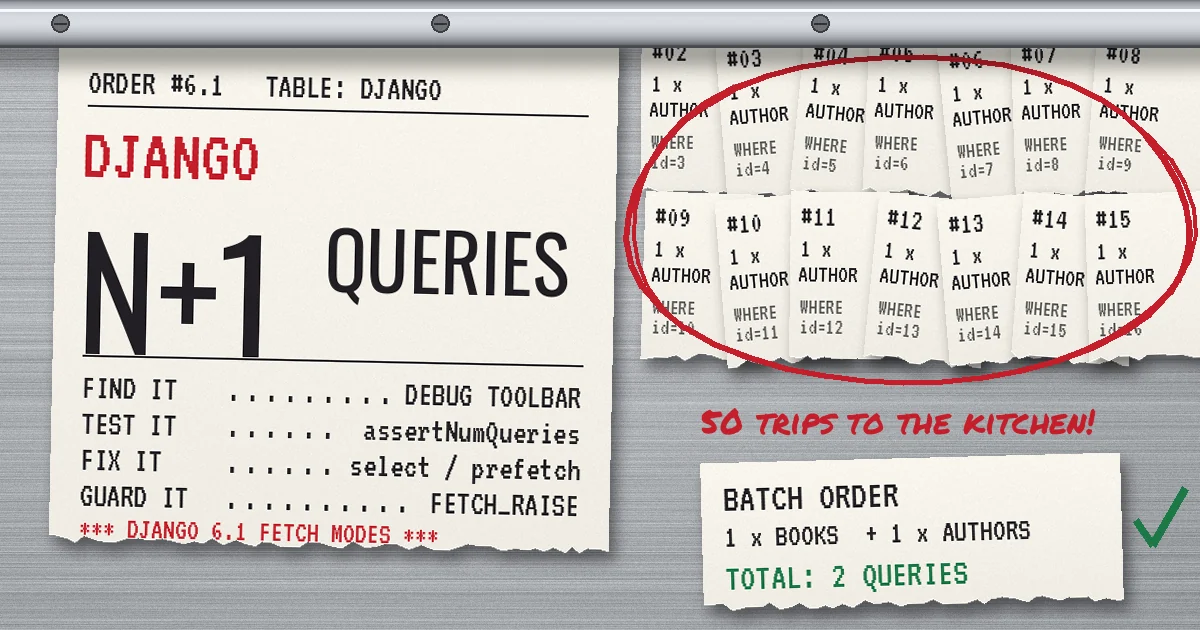
An order list page feels instant on a laptop with a dozen rows in the database. In production, with a few hundred orders per page and a template that prints the customer name, the shipping method and the number of line items for each one, the same page takes seconds and the database graph shows a wall of tiny identical queries. Nothing in the view looks wrong. The view runs one query. The template and serializer run the rest.
That is the Django N+1 queries problem: one query to load a list, then one more query for every row when code touches a related object that was not loaded. It is one of the most common ORM performance problems in Django codebases, and it rarely shows up in code review because the queries are triggered by innocent-looking attribute access such as order.customer.name.
This guide shows how to find N+1 queries in development, tests and production, how to fix each kind with the right tool (select_related, prefetch_related, Prefetch and annotate), and how the new model field fetch modes in Django 6.1, released on August 5, 2026, change the picture. Every query count in this article comes from a small lab we ran on Django 6.1.3 with SQLite, so you can see the numbers rather than take them on trust.
What an N+1 query looks like in Django
Take three ordinary models:
class Author(models.Model):
    name = models.CharField(max_length=100)
    publisher = models.ForeignKey("Publisher", on_delete=models.CASCADE)

class Book(models.Model):
    title = models.CharField(max_length=200)
    author = models.ForeignKey(Author, on_delete=models.CASCADE)
    tags = models.ManyToManyField("Tag")

class Review(models.Model):
    book = models.ForeignKey(Book, on_delete=models.CASCADE, related_name="reviews")
    stars = models.IntegerField()
And a loop that any template, serializer or CSV export might contain:
for book in Book.objects.all():
    print(book.title, book.author.name)
Django runs one query for the books. The first time each book.author is accessed, the author was not loaded, so Django fetches it with a separate SELECT ... WHERE id = %s. With 50 books that is 51 queries. Add book.author.publisher.name and it becomes 101. Each query is fast on its own, which is why the problem hides: the cost is in the round trips, connection time and ORM overhead multiplied by the page size, and it grows with your data instead of staying flat.
The common sources are predictable:
- Templates that walk relations, such as
{{ order.customer.email }}inside a{% for %}loop. - Django REST Framework serializers with nested serializers or
source="author.name"fields, where the viewset queryset was never optimised. - Admin list pages with
list_displaycallables that reach into related models. - Model properties and methods like
def total(self): return sum(i.price for i in self.items.all()), called once per row. - Background jobs and exports that iterate over large querysets without thinking about relations.
How to find N+1 queries before your users do
You cannot fix what you cannot see. Use a different tool at each stage.
In development: Debug Toolbar and query logging
Django Debug Toolbar shows every SQL query for a request in its SQL panel and groups similar and duplicated queries, which makes an N+1 pattern obvious: the same statement with a different parameter repeated dozens of times. For API views without HTML, enable the django.db.backends logger at DEBUG level while DEBUG = True and watch the console.
In tests: lock in a query budget
The most durable protection is a test that fails when the query count grows. Django's assertNumQueries does exactly that:
from django.test import TestCase
from django.urls import reverse

class BookListQueryTests(TestCase):
    def test_book_list_query_count_is_constant(self):
        make_books(count=30)  # your factory
        with self.assertNumQueries(3):
            self.client.get(reverse("book-list"))
Create enough rows that an N+1 would be unmistakable, and pin the number you expect after optimising. If a future change adds book.author.publisher to a serializer without a matching select_related, this test fails in CI instead of in production. For code paths outside the test client, django.test.utils.CaptureQueriesContext gives you the captured list so you can assert on counts or inspect the SQL.
In staging and production: query budgets and traces
Django's database instrumentation lets you wrap every query executed on a connection. That is enough to build a lightweight middleware that warns when a request runs too many queries or repeats the same statement:
from collections import Counter
from django.db import connection
import logging

logger = logging.getLogger("query_budget")

class QueryCounter:
    def __init__(self):
        self.total = 0
        self.shapes = Counter()

    def __call__(self, execute, sql, params, many, context):
        self.total += 1
        self.shapes[sql] += 1  # same SQL text, different params
        return execute(sql, params, many, context)

def query_budget_middleware(get_response, budget=20):
    def middleware(request):
        counter = QueryCounter()
        with connection.execute_wrapper(counter):
            response = get_response(request)
        repeated = [(sql, n) for sql, n in counter.shapes.items() if n > 5]
        if counter.total > budget or repeated:
            logger.warning("query budget exceeded path=%s total=%s repeated=%s",
                           request.path, counter.total, repeated[:3])
        return response
    return middleware
Because the counter keys on the SQL text before parameters are bound, the 50 author lookups collapse into one entry with a count of 50. In our lab, the naive loop over 30 books triggered the warning with 31 queries and one repeated statement; the optimised version stayed silent. Log a sample of requests rather than all of them on very busy services, and never log query parameters if they can contain personal data.
If you already use an APM, check whether it detects the pattern for you. Sentry, for example, raises an N+1 Queries performance issue when it sees repeated database spans in a loop within a transaction.
Fix each N+1 with the right tool
The correct fix depends on which direction the relationship goes and what you need from it. Picking the wrong tool either leaves the N+1 in place or replaces it with a heavier query.
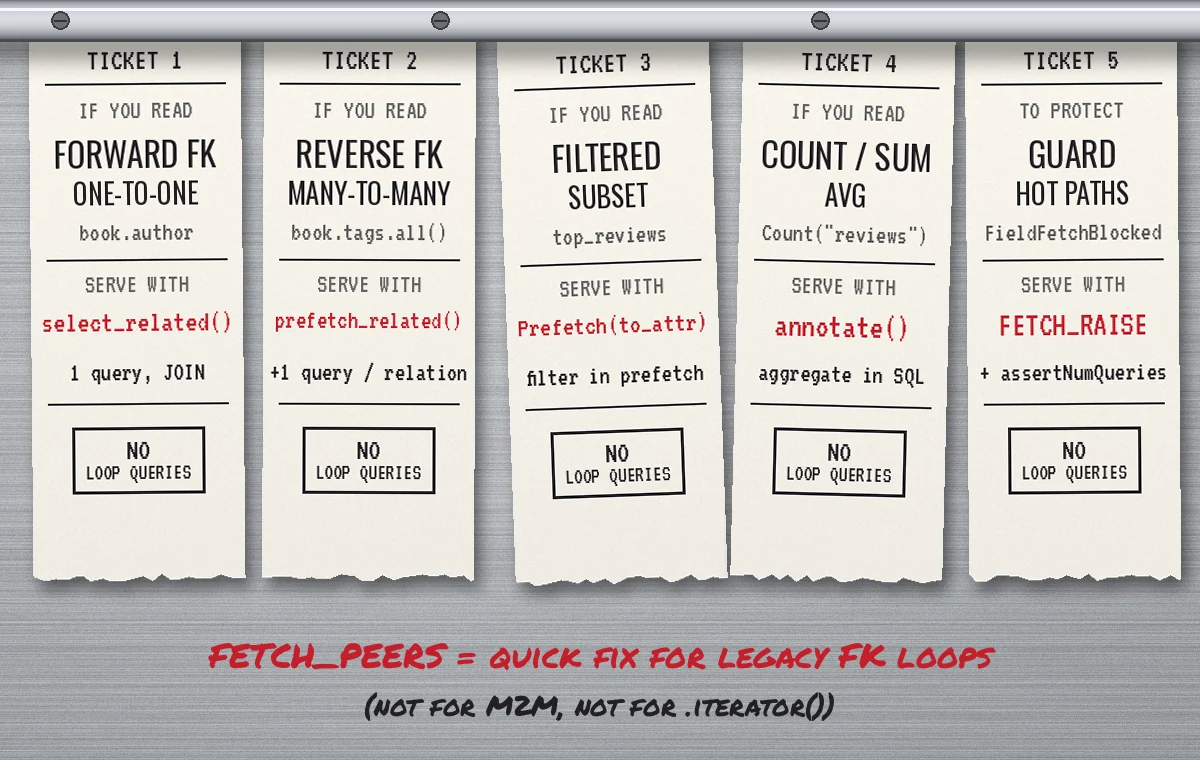
Forward ForeignKey and OneToOne: select_related
select_related() adds a SQL JOIN and builds the related objects from the same rows. It works for relations that point to a single object: a forward ForeignKey, a OneToOneField, and the reverse side of a one-to-one. You can follow chains with double underscores.
books = Book.objects.select_related("author__publisher")
for book in books:
    print(book.author.name, book.author.publisher.name)  # 1 query total
In our lab, this loop over 50 books went from 101 queries to 1. Keep the joins intentional: every relation you add widens each row, and joining a large table to read one column is wasteful. Combine with only() when you need a few fields from wide tables, but make sure you include every field the loop reads (more on that trap below).
Reverse ForeignKey and ManyToMany: prefetch_related
Relations that return many objects, such as book.tags.all() or book.reviews.all(), cannot be joined without multiplying rows. prefetch_related() runs one extra query per relation using WHERE ... IN (...) and stitches the results together in Python.
books = Book.objects.prefetch_related("tags", "reviews")
for book in books:
    tag_names = [t.name for t in book.tags.all()]   # uses the prefetch cache
    review_count = len(book.reviews.all())            # uses the prefetch cache
Our M2M loop went from 51 queries to 2. Calling .count() on a prefetched relation also used the cache in our test. The trap is chaining: book.reviews.filter(stars=5) or .order_by() on a prefetched manager is a new query, so Django ignores the cache and you are back to N+1. Push the filter into the prefetch instead.
Filtered or reshaped relations: Prefetch objects
A Prefetch object lets you control the queryset used for the prefetch and store the result on an attribute:
from django.db.models import Prefetch

books = Book.objects.select_related("author").prefetch_related(
    Prefetch(
        "reviews",
        queryset=Review.objects.filter(stars=5).order_by("-id"),
        to_attr="top_reviews",
    )
)
for book in books:
    print(book.author.name, len(book.top_reviews))  # 2 queries total
to_attr stores a plain list, which makes it clear in templates and serializers that you are reading prefetched data rather than calling the manager. The inner queryset can carry its own select_related when the prefetched objects have relations of their own.
Counts and totals: annotate in the database
If the loop only needs a number, do not load related rows at all. Aggregate in SQL:
from django.db.models import Count, Avg

books = Book.objects.annotate(
    review_count=Count("reviews"),
    avg_stars=Avg("reviews__stars"),
)
Our book.reviews.count() loop ran 51 queries; the annotated version ran 1. Be careful when you combine several Count annotations across different multi-valued relations in one query, because the joins multiply rows and inflate the counts. Use Count(..., distinct=True) or subqueries in that case, and check the SQL plan on real data. Our guide to PostgreSQL slow query optimization covers reading EXPLAIN ANALYZE output for exactly this kind of query.
The deferred field trap with only() and defer()
only() and defer() are useful for wide tables, but any field you leave out is loaded lazily when accessed. In our lab, Book.objects.only("title") followed by reading book.author_id in the loop ran 51 queries: it quietly recreated the N+1 that the optimisation was meant to prevent. List every field the code path reads, or drop only() where the savings are small.
Django 6.1 fetch modes: FETCH_PEERS and FETCH_RAISE
Until Django 6.1, the ORM had one behaviour for unloaded fields: fetch the value for this instance only. Django 6.1 makes that behaviour configurable with fetch modes, set per queryset with QuerySet.fetch_mode():
FETCH_ONEis the default and matches previous behaviour, so upgrading changes nothing on its own.FETCH_PEERSfetches the missing field for the current instance and for its peers, meaning the other instances loaded by the same queryset. It behaves like an on-demandprefetch_related().FETCH_RAISEraisesFieldFetchBlocked(fromdjango.core.exceptions) instead of running the query.
from django.db import models

books = Book.objects.fetch_mode(models.FETCH_PEERS)
for book in books:
    print(book.author.name, book.author.publisher.name)  # 3 queries, not 101
The Django docs state that fetch modes apply to ForeignKey and OneToOneField fields (including reverse one-to-one accessors), to fields deferred with only() or defer(), and to generic relations, and that the mode is copied to related objects, so it covers a whole tree. That is why the chained publisher lookup above took 3 queries: books, then authors, then publishers. The deferred author_id case from the previous section dropped from 51 queries to 2 under FETCH_PEERS.
To make a mode the default for a model, override the manager:
class BookManager(models.Manager):
    def get_queryset(self):
        return super().get_queryset().fetch_mode(models.FETCH_PEERS)

class Book(models.Model):
    ...
    objects = BookManager()
What fetch modes do not fix
Fetch modes are not a replacement for the tools above. Three limits showed up clearly in our lab:
- Related managers are not covered. The docs say fetch modes do not affect related managers' queries. Looping over
book.tags.all()ran 51 queries underFETCH_PEERS, andFETCH_RAISEdid not raise for it either. Many-to-many and reverse foreign key access still needsprefetch_related(). - Peers only exist once they are loaded. With
.iterator(chunk_size=10), theFETCH_PEERSloop ran 51 queries, because rows are turned into instances one at a time and the first access has no peers to batch with. By contrast,prefetch_related("author")with.iterator(chunk_size=10)ran 6 queries (one per chunk plus the main query), andselect_relatedstayed at 1. For large exports and batch jobs, keep explicit optimisation. - It is still two or more queries.
FETCH_PEERSmatchedprefetch_related("author")at 2 queries, whileselect_related("author")did it in 1. When you know the access pattern, saying so explicitly is still the cheapest option and documents intent.
Use FETCH_RAISE as a guard on hot paths
FETCH_RAISE is the more interesting mode for teams. Apply it to the queryset behind a high-traffic endpoint after you have optimised it, and any future access to an unloaded foreign key or deferred field becomes a loud error in tests instead of a silent slowdown in production:
def get_queryset(self):
    return (
        Book.objects.select_related("author__publisher")
        .prefetch_related("tags")
        .fetch_mode(models.FETCH_RAISE)
    )
In our lab, FETCH_RAISE combined with select_related("author") ran 1 query without error, while the same loop without the join raised FieldFetchBlocked: Fetching of Book.author blocked. Because it does not cover related managers, pair it with an assertNumQueries test so that M2M and reverse lookups are guarded too. Roll it out endpoint by endpoint with good test coverage; enabling it globally on an existing codebase will surface every lazy access at once, including harmless ones.
Our lab results
We seeded 50 books, 20 authors, 5 publishers, 6 tags and 150 reviews in an in-memory SQLite database on Django 6.1.3 and counted queries with CaptureQueriesContext. Absolute timings on SQLite are meaningless, so we report query counts only; on a networked PostgreSQL server each extra query adds a round trip.
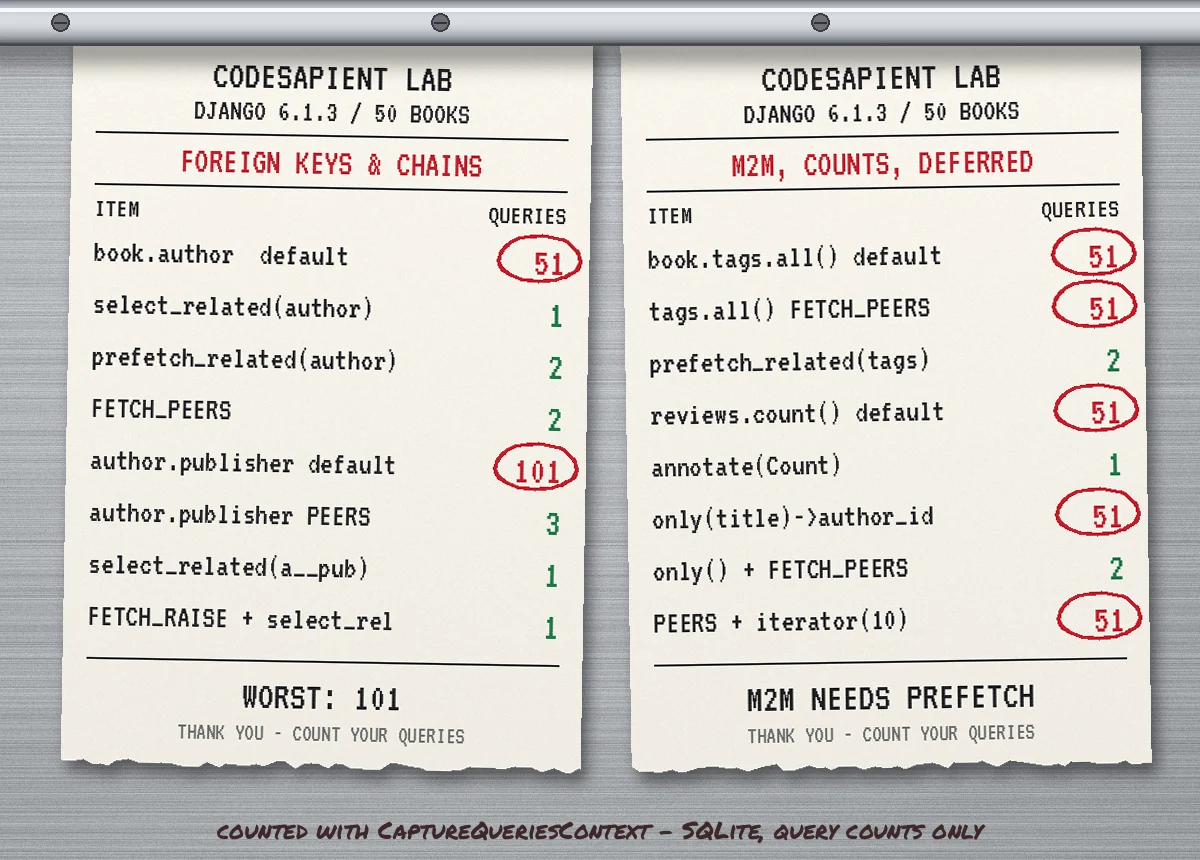
Pattern (50 books)                               Queries
book.author, default                                  51
book.author, select_related("author")                  1
book.author, prefetch_related("author")                2
book.author, fetch_mode(FETCH_PEERS)                   2
book.author.publisher, default                       101
book.author.publisher, FETCH_PEERS                     3
book.author.publisher, select_related(...)             1
book.tags.all(), default                              51
book.tags.all(), FETCH_PEERS                          51
book.tags.all(), prefetch_related("tags")              2
book.reviews.count(), default                         51
annotate(Count("reviews"))                             1
only("title") then author_id, default                 51
only("title") then author_id, FETCH_PEERS              2
FETCH_PEERS + iterator(chunk_size=10)                 51
prefetch_related("author") + iterator(chunk_size=10)   6
N+1 queries in Django REST Framework
DRF makes N+1 queries easy to introduce because serializers read attributes per object. A nested AuthorSerializer inside a BookSerializer, a source="author.name" field, or a related field that renders tags all trigger lazy loads. The fix belongs in the view, not the serializer: optimise get_queryset() on the viewset so it matches what the serializer reads, and keep the two next to each other in code review. A query-count test per list endpoint, with enough rows to expose loops, is the cheapest insurance. Remember that pagination limits the damage but does not remove it: 51 queries for a page of 50 is still far more than the two or three the page needs.
Caching is not a fix either. Caching a slow, chatty endpoint hides the problem until the cache misses under load, and then every miss is expensive. Fix the queries first, then cache where it helps; our article on Redis caching for SaaS APIs covers the invalidation side.
Common mistakes when fixing N+1 queries
- Using
prefetch_relatedfor a forward foreign key when a join would do it in one query. It works, but costs an extra round trip. - Using
select_relatedon a many-to-many. Django raises an error for invalid relations, so this one is easy to spot, but the intent behind it usually needsprefetch_related. - Filtering a prefetched manager in the loop (
book.reviews.filter(...)), which bypasses the cache. UsePrefetch(..., queryset=..., to_attr=...). - Prefetching everything "just in case". Each prefetch is a query and loads rows into memory. Load what the code path reads.
- Optimising the view but not the template or serializer that changed later. Query-count tests catch drift.
- Treating
FETCH_PEERSas a global fix and then discovering that M2M loops and iterator-based jobs are still slow. - Moving the loop into a Celery task without fixing it. Background work still holds database connections; see our guide to Celery and Redis background jobs in Django for structuring those jobs.
A practical rollout plan
- Measure. Add the query budget middleware or APM detection in staging and list the endpoints with the highest query counts per request.
- Write the failing test first. Seed 20 to 50 related rows and add
assertNumQuerieswith the current number, then lower it as you fix. - Fix by relationship type.
select_relatedfor single-object relations,prefetch_relatedorPrefetchfor collections,annotatefor numbers. - Upgrade to Django 6.1 and use fetch modes deliberately.
FETCH_PEERSon legacy code paths you cannot refactor yet,FETCH_RAISEon optimised hot paths. - Check the SQL that remains. Fewer queries can still be slow queries. Look at indexes and plans, and at connection usage under load, because chatty endpoints are usually the first to exhaust a connection pool.
The Django docs on database access optimization are worth a full read alongside this checklist; most of their advice comes down to the same principle: know what queries your code runs, and make the database do the work in as few round trips as practical.
Need a second pair of eyes on a slow Django app?
CodeSapient builds and maintains Django, PostgreSQL and Celery systems for SaaS and eCommerce teams. If your list pages, admin or APIs slow down as data grows, we can profile the hot paths, fix the query patterns and add the tests that keep them fixed. See our development services or get in touch to talk it through.