
Shopify UCP: How to Build an AI Shopping Agent With Catalog, Cart and Checkout MCP
Shopify UCP lets AI agents search Shopify catalogs, build carts and hand buyers to checkout. How profiles and trust tiers work, what a live storefront returned, and the mistakes to avoid.
A product team wants its assistant to find a product in a real Shopify store, check price and stock, build a cart and get the buyer to checkout. The first prototype usually scrapes product pages or uses one store's Storefront API token. That stops working when you need hundreds of merchants, current prices and no contact with payment details you should never hold.
Shopify UCP is Shopify's answer to that problem. UCP is the Universal Commerce Protocol, an open standard that Shopify co-developed with Google. Shopify exposes it through MCP servers for catalog search, carts, checkout and orders. Since the Spring '26 Edition, any developer can register an agent profile and call these endpoints without applying for access first. This guide explains how the pieces fit together, what each trust tier can do, what we saw when we called a live storefront's UCP endpoint, and the mistakes that cause problems in production.
What Shopify UCP is (and what it isn't)
UCP defines how an agent (the platform) and a merchant (the business) agree on what they can do together and then exchange carts, checkouts and orders in a predictable format. Shopify implements it as JSON-RPC 2.0 MCP tools. That means one integration works across any Shopify store that serves the endpoint, without a separate setup for each store.
The parts you will use:
- Global Catalog at
https://catalog.shopify.com/api/ucp/mcp: product search across Shopify merchants. - Storefront Catalog, Cart, Checkout and Order MCP at
https://{shop-domain}/api/ucp/mcp: one endpoint per merchant. It servessearch_catalog,get_product,create_cart,create_checkout,complete_checkout,get_orderand, for stores with physical retail locations, location lookup. - Order webhooks: UCP-shaped order updates pushed to your endpoint for orders placed through your agent.
- Tooling:
@shopify/ucp-cliand theucpskill in Shopify's AI Toolkit, for exploring live schemas.
What UCP is not: a way for any agent to take payment. Completing checkout from inside your agent is a separate permission that Shopify grants case by case. With general access, your agent builds the cart and checkout, and the buyer pays on the merchant's own checkout page. Plan your product around that from the start.
Shop MCP or UCP directly: choose first
Shopify's agent documentation now recommends Shop MCP as the default for most agents. Shop MCP is a hosted server at https://mcp.shop.com/. It needs no API key and no UCP profile of your own. It also adds Shop sign-in, so a signed-in buyer can pay with Shop Pay and track orders. Shop MCP requires an MCP client that supports the 2026-07-28 MCP specification, or you can use the Shop CLI or plain HTTP.
Building directly with UCP makes sense when:
- You want buyers to use your platform's accounts without connecting a Shop account.
- You need your own product ranking on top of Shopify product data, not Shopify's ranking.
- You're building a storefront assistant for a single merchant and want direct control over requests, caching and error handling.
The trade-off is ownership: calling UCP directly means your platform manages buyer identity, consent, ranking and order reconciliation. If none of these reasons applies, start with Shop MCP.
How a UCP request works on Shopify
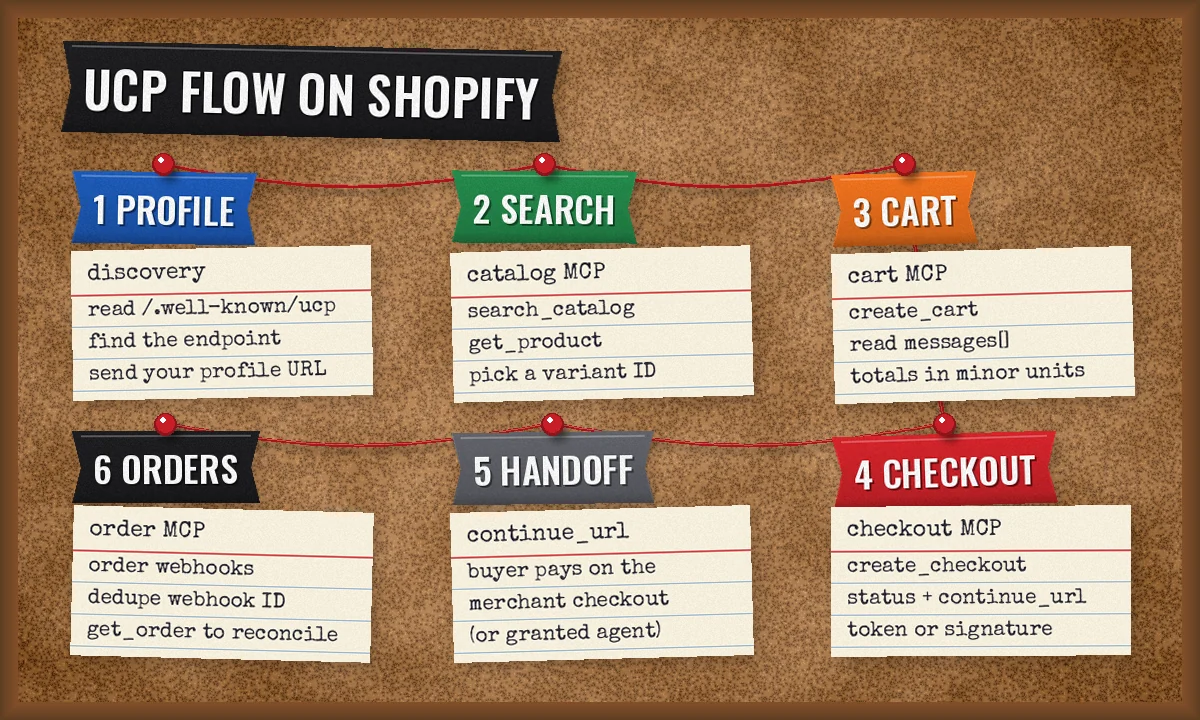
1. Discover the business profile, then send your agent profile
Every Shopify store publishes a business profile at /.well-known/ucp. It lists the UCP version, its services, its capabilities and the MCP endpoint to call. Your agent publishes its own platform profile at an HTTPS URL. You reference that URL in meta["ucp-agent"].profile on every request. Shopify fetches the profile, checks the protocol version and keeps only the capabilities both sides support. Extensions whose parent capability drops out are removed too. The agent profiles guide includes hosted test profiles, including deliberately broken ones, so you can test your error handling.
Read the endpoint from the business profile instead of building the URL yourself. In our test, the storefront's custom domain and its myshopify.com domain returned the same profile, and the profile pointed to the myshopify.com endpoint. A headless storefront domain we tried returned 404 for both /.well-known/ucp and /api/ucp/mcp, because that domain isn't served by Shopify.
2. Search the catalog
Use the Global Catalog for questions that span merchants ("waterproof trail shoes under $150"). Use a store's Storefront Catalog when the conversation is about one merchant. Arguments go inside a catalog object (query, context, filters and a pagination cursor). Responses return prices as integers in minor units with a currency code, so {"amount": 7700, "currency": "USD"} means $77.00. Convert prices before you show them to a buyer. Zero-decimal currencies such as JPY are already whole units.
3. Build a cart
Cart MCP is where the conversation happens. Carts have a long lifetime (our test cart's expiry was set 30 days out). Cart tools accept unauthenticated calls and return a continue_url the buyer can open on the merchant's storefront. Use context (country, region, postal code) for pricing and availability estimates. Don't treat it as a shipping quote. Shopify only commits to a shipping cost once a checkout has a real address.
4. Convert to checkout
Checkout MCP creates a short-lived checkout session from a cart (checkout.cart_id) or from line items. Checkout is rate-limited more strictly than cart at every tier. Create a checkout only when the buyer says they're ready. complete_checkout and cancel_checkout require meta["idempotency-key"]. If you retry after a 429 or a timeout, reuse the same key.
5. Hand off, or complete with permission
With general access, the next step is to show the buyer the checkout's continue_url. Even agents with completion permission must hand off when a checkout returns requires_escalation, for example for 3-D Secure or a checkout extension that needs the buyer's input.
6. Track the order
Order webhooks send the full current state of an order whenever it changes. That includes fulfillment progress, refunds, returns, edits and cancellations. Use get_order when a buyer asks about an order or when you need to recover from a missed delivery, not for polling.
Trust tiers: what each level of identification unlocks
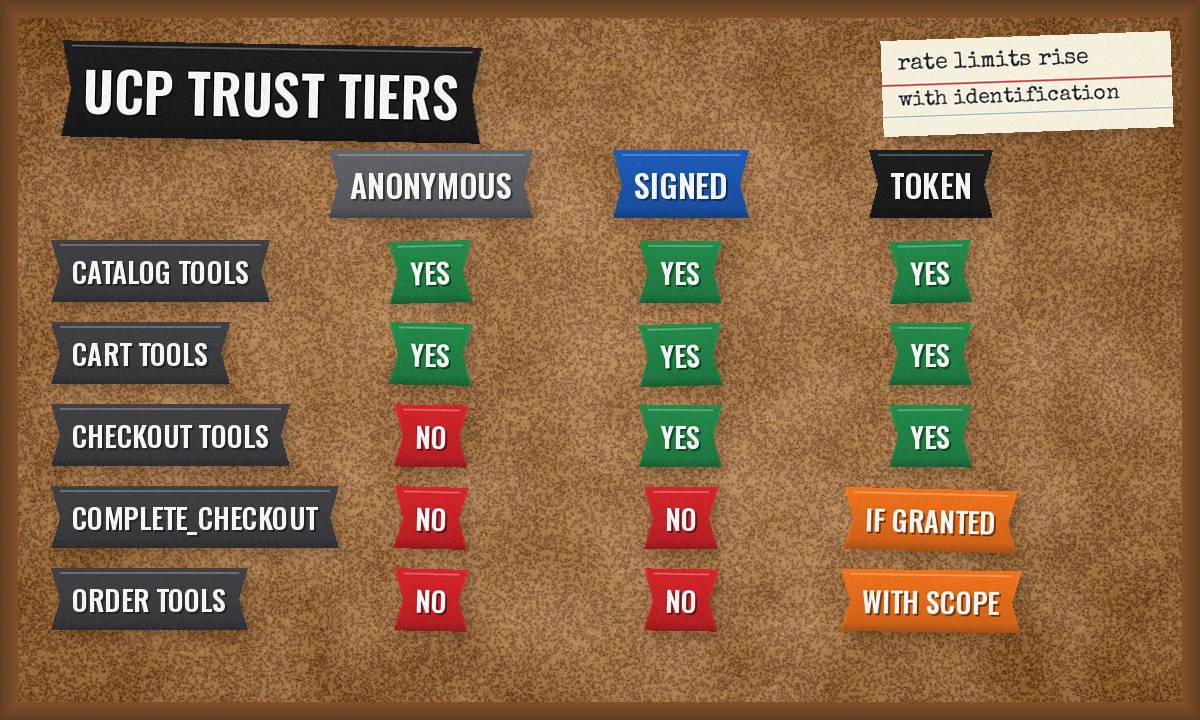
Shopify sorts UCP traffic into three tiers based on how your agent identifies itself. The table below summarizes the auth and rate limiting reference:
- Anonymous: no credentials. Catalog and cart tools only, at the lowest limits. Unauthenticated Global Catalog traffic shares one limit with all other unauthenticated traffic, so Shopify says not to use it in production.
- Signed: no API key, but requests are signed with HTTP Message Signatures (RFC 9421, ECDSA P-256). Shopify checks them against the public key in your profile. Adds checkout tools. No
complete_checkoutand no order tools. - Token: a JWT minted from Dev Dashboard client credentials (it expires after 60 minutes, so fetch it at runtime). Highest limits.
get_orderworks with theread_global_api_ordersscope, and only for orders placed through your agent.complete_checkoutworks only if Shopify has granted that permission.
Two Token-tier details cause problems in real integrations. First, every Token-tier tools/call to a merchant endpoint must include a Shopify-Buyer-IP header with the buyer's IP address. That includes read-only calls such as get_cart. There's no placeholder value, and Shopify won't use your server's IP instead, so a scheduled job with no buyer present gets an HTTP 422. Second, the authenticated Global Catalog limit defaults to 5 requests per second per API client, shared across search_catalog, get_product and lookup_catalog. Merchant-endpoint limits vary by tier and tool and can change, so read Retry-After from each 429 instead of hard-coding a request budget.
Completion permission is the item most often misunderstood. In a Shopify developer forum thread from September 2026, Shopify staff said there is no public application or waitlist for complete_checkout. They also said it needs two things: the permission on your client's token, and the merchant having your agent's channel enabled. If either is missing, the call fails with checkout_completion_ineligible. A checkout status of ready_for_complete describes the checkout's data, not whether your client may complete it.
What we saw calling a live storefront
On 23 November 2026 we sent anonymous JSON-RPC requests from a small Python script to one large public Shopify storefront. We used Shopify's hosted example agent profile and kept to read-only catalog calls plus a few carts and checkouts that were never paid for. What we saw:
tools/listreturned 15 tools on one endpoint: the cart, checkout, catalog, order and location tools. A tool appearing in the list doesn't mean your tier can call it.get_orderwas listed, but an anonymous call returned HTTP 403AuthenticationRequired.- Leaving out the profile is a hard error. Without
meta["ucp-agent"], the server returned HTTP 422 withUCP discovery failed/invalid_profile_url. - Quantity limits come back as a warning, not an error. We asked for 500 units of an in-stock variant. The call succeeded, the cart held 52, and
messagescontainedmerchandise_not_enough_stock. An agent that ignoresmessageswill tell the buyer the wrong quantity. - Unknown variants return a successful JSON-RPC result. A made-up variant ID produced
isError: trueand a message withseverity: requires_buyer_inputand a JSON path. It did not produce a JSON-RPCerror. - Check the live schema. On that store,
create_checkoutwith onlycart_idfailed schema validation asking forline_items, so read each store's input schema rather than copying examples. - Checkouts list every missing piece. A checkout created without buyer details returned
status: requires_escalationwith acontinue_urland separate messages for the missing contact method, the missing delivery address and a checkout extension that needed buyer input. Each message had a severity of eitherrecoverableorrequires_buyer_input.
One observation doesn't match the documentation. That storefront accepted an anonymous create_checkout, while Shopify's tier table says anonymous traffic can't use checkout tools. Don't build on this. Behaviour may differ by store or change without notice, and your production agent should sign its requests or use a token in any case.
A minimal, defensive client
The core loop is small. Most of the effort goes into handling the result envelope correctly. This Python sketch shows the request shape and the checks we'd keep in production. Replace the profile URL with your own hosted profile.
import json, urllib.request

PROFILE = "https://agent.example.com/.well-known/ucp"   # your hosted platform profile

def ucp_endpoint(shop_origin: str) -> str:
    """Read the MCP endpoint from the business profile instead of guessing it."""
    with urllib.request.urlopen(f"{shop_origin}/.well-known/ucp", timeout=10) as r:
        profile = json.load(r)
    for svc in profile["ucp"]["services"]["dev.ucp.shopping"]:
        if svc.get("transport") == "mcp":
            return svc["endpoint"]
    raise RuntimeError("store does not advertise a UCP MCP endpoint")

def call(endpoint: str, tool: str, args: dict, headers: dict | None = None) -> dict:
    args = {**args, "meta": {**args.get("meta", {}), "ucp-agent": {"profile": PROFILE}}}
    body = {"jsonrpc": "2.0", "id": 1, "method": "tools/call",
            "params": {"name": tool, "arguments": args}}
    req = urllib.request.Request(endpoint, data=json.dumps(body).encode(),
                                 headers={"Content-Type": "application/json", **(headers or {})})
    with urllib.request.urlopen(req, timeout=20) as r:   # 422/403/429 raise HTTPError
        msg = json.load(r)
    if "error" in msg:                                      # protocol-level failure
        raise RuntimeError(msg["error"])
    result = msg["result"]
    content = result.get("structuredContent") or json.loads(result["content"][0]["text"])
    return {"is_error": result.get("isError", False), "data": content}

def blocking_messages(obj: dict) -> list[dict]:
    """Business outcomes live in messages[], even on a successful call."""
    return [m for m in obj.get("messages", []) if m.get("type") == "error"]
The rules behind it: treat isError and messages as normal results, not exceptions. Show messages marked requires_buyer_input to the buyer. Fix recoverable ones yourself by collecting an email or address and calling update_checkout. Always reread the cart or checkout totals before you quote a price.
Real business use cases
- Storefront assistant for one merchant. A brand adds a conversational shopping assistant to its site or app. It uses that store's Storefront Catalog and Cart MCP and hands off to checkout. The brand keeps its own checkout, discounts and extensions.
- Vertical comparison or gift-finding product. A niche platform searches across many merchants through the Global Catalog, applies its own ranking and sends buyers to each merchant's checkout. Each checkout belongs to one merchant, so a basket from three stores needs three checkouts.
If you also want to expose your own SaaS to agents, the server-side concerns are different. Our guide to building stateless remote MCP servers for SaaS covers that side. For a wider look at where agents fit in commerce operations, see AI agents for eCommerce and agentic workflows.
Common mistakes and limitations
- Planning a product around in-agent payment. General access ends at
continue_url. Design the handoff as the normal path, not an error state. - Using anonymous traffic in production. It has the lowest limits, no checkout tools, and unauthenticated Global Catalog traffic has no guaranteed throughput.
- Calling Token-tier tools from background jobs. Without a real
Shopify-Buyer-IP, the call fails. Use order webhooks for updates that happen without a buyer present. - Letting the model invent prices or stock. Quote only what the latest cart or checkout response returned. Convert minor units in code, not in a prompt.
- Replaying webhook topics as events. Each order webhook carries the full order state. Keep the latest, deduplicate on
X-Shopify-Webhook-Id, verifyX-Shopify-Hmac-SHA256against the raw body and return 2xx fast (Shopify retries up to 8 times over 4 hours). Order webhook subscriptions aren't self-serve yet: Shopify registers them server-side through your partner contact. - Passing catalog text straight into the agent's instructions. Product descriptions are third-party content. Keep them out of the instruction channel. Our article on prompt injection prevention for AI agents explains the architecture.
If you already run a verified, deduplicated pipeline for Admin API webhooks, you can reuse it for UCP order webhooks.
Recommendations before you build
- Decide between Shop MCP and UCP directly in writing, with a reason. Most teams should start with Shop MCP.
- Prototype with
@shopify/ucp-cliand--input-schemaagainst the stores you care about. The schema can differ by store, and the CLI shows it before you write code. - Host your own platform profile early, and test your error paths with Shopify's malformed and oversized fixture profiles.
- Move to Signed or Token traffic before launch. Build the auth module so the 60-minute JWT is refreshed automatically.
- Write evaluation cases for the message codes you will see: stock adjustment, unknown variant, missing address, extension interaction. Run them on every prompt or model change.
FAQ
Do I need approval to use Shopify UCP?
No application is needed for general access. You register in the Dev Dashboard (for a token), or sign your requests, and call the public endpoints. Completing checkout inside your agent is different: Shopify grants that permission case by case.
Is UCP the same as MCP?
No. MCP is the transport and tool-calling protocol. UCP defines the commerce capabilities and data shapes (catalog, cart, checkout, order) that Shopify serves over MCP. The specification lives at ucp.dev.
Can my agent take payment from the buyer?
Only if your token has the completion permission and the merchant has your agent's channel enabled. Otherwise the buyer completes payment on the merchant's checkout through continue_url. With Shop MCP, a buyer signed in with Shop can let the agent complete checkout after confirming the total and payment method.
Conclusion
Shopify UCP gives AI agents a standard path from product search to checkout across Shopify merchants. The protocol calls are simple. The engineering work is in choosing the right tier, reading messages instead of trusting HTTP status, keeping the model away from prices it hasn't been given, and treating the checkout handoff as the normal path.
If you're scoping a shopping agent, a storefront assistant or a Shopify integration that needs to work with UCP, CodeSapient builds custom Shopify apps, AI automation and API integrations. Tell us what you are planning and we'll help you choose the simplest path that works.