
Remote MCP Servers for SaaS: Build on the Stateless 2026-07-28 Spec
The MCP 2026-07-28 spec makes remote MCP servers stateless. Learn what changed, how to design tools and OAuth authorization for a SaaS product, and how to migrate an existing server.
Your customers are starting to ask a new question: "Can I use your product from my AI assistant?" They want to look up an order, create a ticket, or pull a report from Claude, ChatGPT, Cursor, or an internal agent without opening your dashboard. The standard way to answer that is a remote MCP server: an HTTPS endpoint that exposes your product's capabilities to AI clients through the Model Context Protocol.
Until recently, running one in production was awkward. Earlier MCP revisions were stateful. A connection began with an initialize handshake, the server could hand out an Mcp-Session-Id, and server-initiated messages needed a held-open stream. That pushed teams toward sticky sessions, shared session stores, and load balancer workarounds that a normal SaaS API never needs.
The MCP 2026-07-28 specification, released on July 28, 2026, removes most of that friction. MCP now has a stateless request/response core, so a remote MCP server can run like any other HTTP service. This guide explains what changed, how to design a remote MCP server for a SaaS product, how authorization works, and which mistakes to avoid.
What a remote MCP server is, and when your SaaS needs one
MCP defines three roles. The host is the AI application (a chat assistant, an IDE, an agent runtime). Inside it, an MCP client connects to an MCP server, which offers tools (actions the model can call), resources (data the model or user can read), and prompts (reusable templates). Messages are JSON-RPC 2.0.
There are two standard transports:
- stdio: the host launches the server as a local subprocess. Good for developer tools that need local files, but every user has to install and update it.
- Streamable HTTP: the server is a hosted endpoint such as
https://mcp.example.com/mcp. This is what "remote MCP server" means, and it is the right fit for a SaaS product because you deploy it once, authenticate users with OAuth, and update it like the rest of your platform.
MCP server or REST API?
A remote MCP server does not replace your public API. Your REST or GraphQL API is designed for developers who write code against it. An MCP server is designed for a language model that reads tool descriptions at runtime and decides what to call. In practice, the MCP server is a thin, agent-friendly layer over the same service code and permission checks your API already uses.
It is worth building when:
- Customers already copy data between your product and AI assistants by hand.
- Your product has clear, bounded actions (look up, create, update, summarize) that make sense in a conversation.
- You want to control how AI tools access your product, instead of leaving it to unofficial scripts or screen scraping.
- Internal teams want agents that work across several systems, including yours.
If your API or permission model is still unsettled, fix that first; an MCP server will expose those weaknesses quickly. For a wider view of where agents fit in commerce products, see our guide to AI agents for eCommerce and agentic workflows with MCP.
What the 2026-07-28 spec changes for remote MCP servers
The official changelog lists the details. These are the changes that matter most when you host a server.
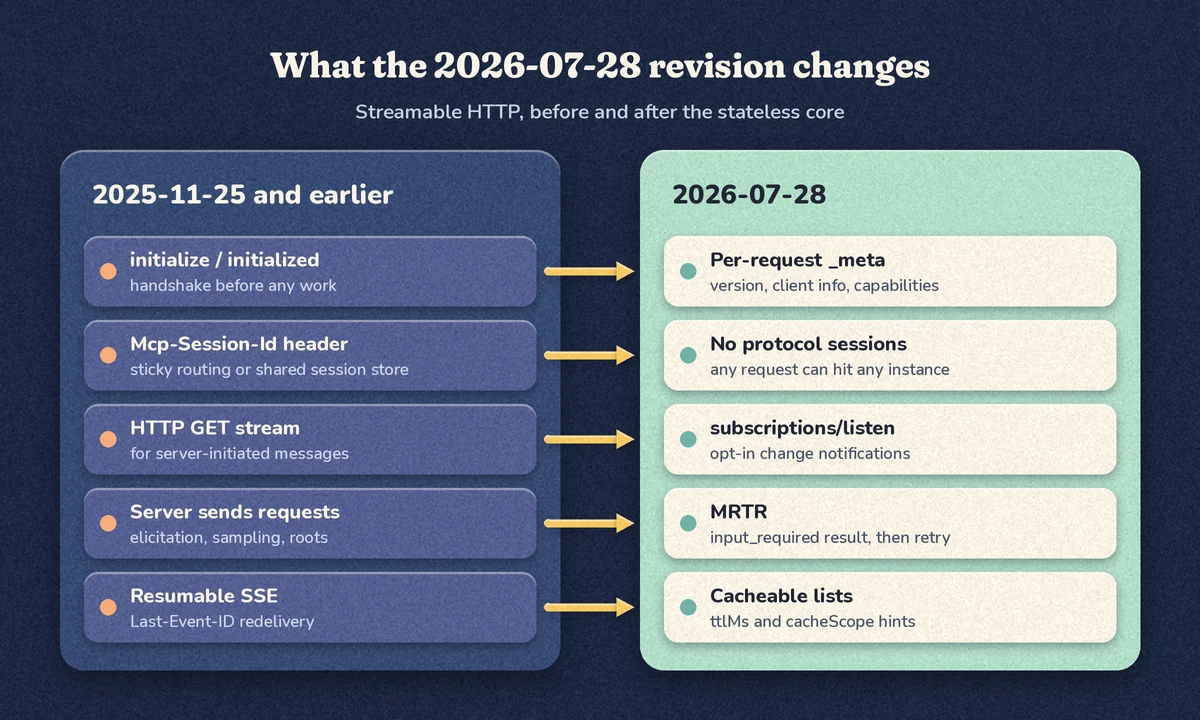
No handshake and no protocol sessions
The initialize/notifications/initialized exchange and the Mcp-Session-Id header are gone. Every request carries its protocol version, client capabilities, and (recommended) client identity in _meta. Servers must implement a new server/discover method that returns supported versions and capabilities, but clients are not required to call it first. The result is that any request can land on any server instance behind a plain round-robin load balancer.
Routing headers on every request
On Streamable HTTP, each POST must include MCP-Protocol-Version, Mcp-Method, and, for tools/call, resources/read, and prompts/get, an Mcp-Name header. Gateways and WAFs can route, meter, and authorize on headers without parsing JSON. Because the body remains the source of truth, servers must reject requests where headers and body disagree, with HTTP 400 and JSON-RPC error -32020 (HeaderMismatch).
POST /mcp HTTP/1.1
Content-Type: application/json
Accept: application/json, text/event-stream
Authorization: Bearer <access-token>
MCP-Protocol-Version: 2026-07-28
Mcp-Method: tools/call
Mcp-Name: get_order_status

{"jsonrpc":"2.0","id":1,"method":"tools/call",
 "params":{"name":"get_order_status","arguments":{"order_id":"A-1001"},
  "_meta":{"io.modelcontextprotocol/protocolVersion":"2026-07-28",
           "io.modelcontextprotocol/clientInfo":{"name":"example-client","version":"1.0.0"},
           "io.modelcontextprotocol/clientCapabilities":{}}}}
Multi Round-Trip Requests replace server-initiated requests
Servers no longer send their own JSON-RPC requests to the client. When a tool needs something mid-call, such as a user confirmation, the server returns a result with resultType: "input_required" and an inputRequests map (for example an elicitation/create form). The client collects the answer and retries the original call with inputResponses. The MRTR pattern also lets the server pass an opaque requestState string so it can continue without server-side session storage.
Cacheable lists, subscriptions, and extensions
Results from tools/list, prompts/list, resources/list, and resources/read now carry ttlMs and cacheScope hints, and servers should return tools in a deterministic order. Change notifications move to an opt-in subscriptions/listen stream. Long-running work moves to the official Tasks extension (io.modelcontextprotocol/tasks), where clients poll with tasks/get.
Deprecations to plan for
Roots, Sampling, and Logging are deprecated, as is the legacy HTTP+SSE transport. Dynamic Client Registration is deprecated in favor of Client ID Metadata Documents. The project now has a formal deprecation policy with a minimum twelve-month window, so deprecated features keep working for at least a year. New servers should simply not adopt them.
A reference architecture for a SaaS remote MCP server
Because the protocol is stateless, the architecture looks like a normal API deployment with a few MCP-specific pieces.
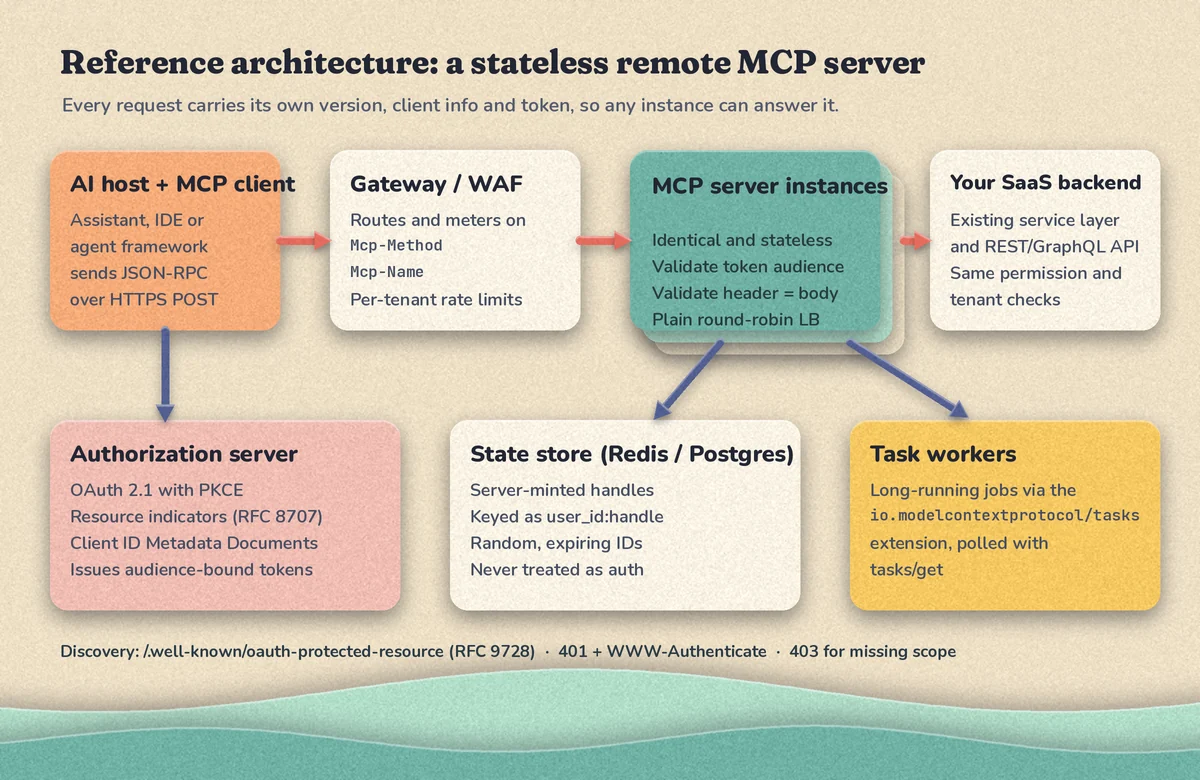
- Gateway or WAF: terminates TLS, applies per-tenant rate limits using the routing headers, and enforces request size limits.
- MCP server instances: identical containers or functions. Each request is validated on its own: token, protocol version, header/body match, and arguments.
- Your SaaS backend: tools call the same service layer and authorization checks as your API. Do not create a second, looser permission path for AI clients.
- Authorization server: your existing identity provider, if it supports the required OAuth features, or a dedicated one.
- State store: Redis or Postgres for any server-minted handles (draft carts, report jobs, multi-step workflows).
- Task workers: long-running exports or imports run in your existing job system. If you already use Django, our guide on Celery and Redis background jobs covers the worker side.
State without sessions: use explicit handles
Dropping protocol sessions does not mean your application can't have state. The spec's guidance is to mint an explicit handle from a tool (for example report_id or cart_id) and have the model pass it back as a normal argument. The security guidance is specific: generate handles with a secure random generator, expire them, bind them server-side to the authenticated user (for example by storing state under <user_id>:<handle>, with the user ID taken from the verified token), and never treat possession of a handle as authentication.
Authorization: OAuth 2.1 the MCP way
The MCP maintainers note that authorization is where implementers spend most of their integration time. Under the MCP authorization spec, your remote MCP server is an OAuth 2.1 resource server. In practice:
- Publish Protected Resource Metadata. MCP servers must implement RFC 9728. An unauthenticated request gets
401with aWWW-Authenticateheader pointing to/.well-known/oauth-protected-resource, which tells the client which authorization server to use. - Let clients register without manual setup. Clients and authorization servers should support Client ID Metadata Documents, where the client's
client_idis an HTTPS URL to a metadata document. Dynamic Client Registration still works but is deprecated. - Validate the audience. Clients must send the
resourceparameter (RFC 8707) with your server's canonical URI, and your server must accept only tokens issued for it. - Never pass tokens through. If a tool calls your internal API or a third-party service, use credentials meant for that service. Forwarding the client's token downstream is explicitly forbidden because it creates a confused deputy problem.
- Use scopes and step-up. Keep the default scopes minimal, and return
403witherror="insufficient_scope"and the required scopes when a tool needs more, so the client can ask the user for additional consent.
Every token should resolve to a user and a tenant before any tool runs. If your product is multi-tenant, the MCP layer must enforce the same boundaries as your web app. Our article on multi-tenant SaaS architecture and tenant isolation covers the patterns that carry over directly.
Designing tools that agents use well
Protocol compliance gets you connected. Tool design decides whether the model actually does the right thing.
Model tools on user tasks, not endpoints
Mirroring every REST endpoint as a tool gives the model dozens of similar options and several calls per task. Start with the handful of jobs customers actually ask for, such as "find an order and its shipping status" or "create a support ticket", and build one tool per job, combining lookups server-side where it saves the model a chain of calls.
Write descriptions and schemas for a model reader
- Use clear names with allowed characters (letters, digits, underscore, hyphen, dot), for example
get_order_status. - Say what the tool does, when to use it, and what it returns. Mention the ID format users will see.
- Use enums, formats, and required fields in
inputSchemaso invalid calls fail early. - Declare an
outputSchemaand returnstructuredContentso clients get typed data, not just text. - Paginate and trim results. Returning thousands of rows wastes the model's context and your bandwidth.
Annotate behavior, then enforce it yourself
Tool annotations such as readOnlyHint, destructiveHint, idempotentHint, and openWorldHint help hosts decide when to ask the user for approval. Clients must treat annotations as untrusted unless the server is trusted, so they are hints, not security controls. Permission checks still belong in your backend.
Here is a minimal read-only tool using the official Python SDK (v2, which implements 2026-07-28), served over Streamable HTTP:
from pydantic import BaseModel
from mcp.server import MCPServer
from mcp.types import ToolAnnotations

mcp = MCPServer("acme-orders", version="1.0.0")


class OrderStatus(BaseModel):
    order_id: str
    status: str
    carrier: str | None = None


@mcp.tool(annotations=ToolAnnotations(read_only_hint=True, open_world_hint=False))
def get_order_status(order_id: str) -> OrderStatus:
    """Return the fulfillment status of one order. Use the order ID shown
    to the customer, for example A-1001. Read-only."""
    # Call your existing service layer here, with the caller's tenant
    # and permissions resolved from the verified access token.
    return OrderStatus(order_id=order_id, status="shipped", carrier="UPS")


app = mcp.streamable_http_app(json_response=True)  # run with: uvicorn server:app
The SDK generates inputSchema and outputSchema from the type hints, returns structuredContent, and rejects a request whose Mcp-Name header doesn't match the tool named in the body. Before production you would add token verification, tenant resolution, and real data access. The Python SDK documentation covers authentication options and the v1-to-v2 migration.
Confirm destructive actions with MRTR
For tools that delete data, spend money, or message customers, return an input_required result with an elicitation form that summarizes exactly what will happen, and only act when the retried call carries an accepted response. Make write tools idempotent where possible, because clients must re-issue a request as a new call if a response stream breaks. Never use form elicitation to collect passwords, API keys, or payment details. The spec requires URL mode for sensitive interactions.
Operating a remote MCP server in production
- Validate
Originon incoming requests and return 403 when it is present and invalid, to block DNS rebinding. - Rate limit per tenant and per tool using
Mcp-MethodandMcp-Name. The spec advises intermediaries that enforce policy on mirrored headers to reject requests whose version doesn't require header/body validation. - Trace requests. MCP documents conventions for passing OpenTelemetry
traceparentin_meta, so a tool call can be followed into your backend. - Disable proxy buffering for streams. Send
X-Accel-Buffering: noon SSE responses so progress notifications aren't held by nginx-style proxies. - Log tool usage by tenant, tool, outcome, and latency to see where descriptions confuse the model.
- Version your tool catalog. Renaming a tool or changing a required argument can break agents and saved prompts. Treat tool names and schemas like a public API.
Migrating an existing MCP server from 2025-11-25
- Upgrade to an SDK release that supports 2026-07-28. The TypeScript, Python, Go, and C# Tier 1 SDKs all do.
- Remove any dependence on
Mcp-Session-Id. Move per-session data into explicit, user-bound handles. - Replace server-initiated elicitation or sampling with MRTR. For model calls, the changelog suggests calling your LLM provider's API directly instead of Sampling.
- Replace the GET notification stream with
subscriptions/listenif you send change notifications. - Implement
server/discover, header validation, and cache hints on list results (most SDKs handle these). - Decide how long you will support older clients; the transport spec describes how to serve both eras.
- Test with the SDK migration notes and at least two real MCP hosts your customers use.
Common mistakes
- Exposing the whole API as tools. More tools means more wrong choices and higher token use per request.
- Accepting any valid-looking token. Without audience validation, a token issued for another service may be accepted.
- Trusting the model with authorization. Tool descriptions saying "only for admins" protect nothing. Check permissions in code.
- Treating handles as secrets. A guessable or unbound
cart_idlets one user act on another user's state. - Returning unbounded results. Large payloads slow every call and push useful context out of the model's window.
- Building on deprecated features. Sampling, Roots, Logging, HTTP+SSE, and Dynamic Client Registration still work, but new code shouldn't depend on them.
Recommendations for SaaS teams
Start with a read-only server: a few well-described lookup tools behind OAuth with minimal scopes. That gives customers real value and shows you how models use your product, with little risk. Add write tools one at a time, each with idempotency, confirmation for destructive actions, and audit logging. Run the server as its own service on your existing CI/CD and monitoring, and target 2026-07-28 from day one so you never build session infrastructure you'll later remove.
FAQ
Does a remote MCP server still need sticky sessions?
Not at the protocol level. Under 2026-07-28 each request carries its own version, capabilities, and token, so any instance can handle it. You only need shared storage for application state you choose to keep, such as handles for multi-step workflows.
Can older MCP clients connect to a 2026-07-28 server?
Only if you support both eras. The spec defines a backward-compatibility path where clients detect the server's era and fall back to the initialize handshake. A server that supports only 2026-07-28 should answer legacy GET and DELETE requests with 405 and ignore session headers.
How do users sign in to my remote MCP server?
Through OAuth 2.1 with PKCE. The client discovers your authorization server from Protected Resource Metadata, sends the user to sign in and consent, and then sends the access token in the Authorization header on every request.
Should I build a remote MCP server or a local stdio server?
For a SaaS product, remote is usually the better default: one deployment, central updates, and standard OAuth. Local stdio servers make sense when the tool must read the user's local files or run local commands.
Conclusion
A remote MCP server is becoming the expected way for AI assistants and agents to work with a SaaS product, and the 2026-07-28 revision makes it much easier to run: no sessions, routable headers, a clean pattern for mid-call user input, and clearer OAuth rules. The protocol work is now the easy part. The real effort is in choosing the right tools, enforcing tenant-aware authorization, and operating the server like any other production API.
If you're planning an MCP server for your product or migrating one to the new spec, CodeSapient can help design the tool catalog, the OAuth setup, and the backend integration. Explore our web application and API development services, or contact our team to talk through your use case.