
Laravel Horizon in Production: Auto-Scaling, Routing and Timeouts
A practical guide to running Laravel Horizon in production on Laravel 13: latency-based queues, separate supervisors, the new log auto-scaling strategy, Queue::route() and a timeout order that prevents jobs running twice.
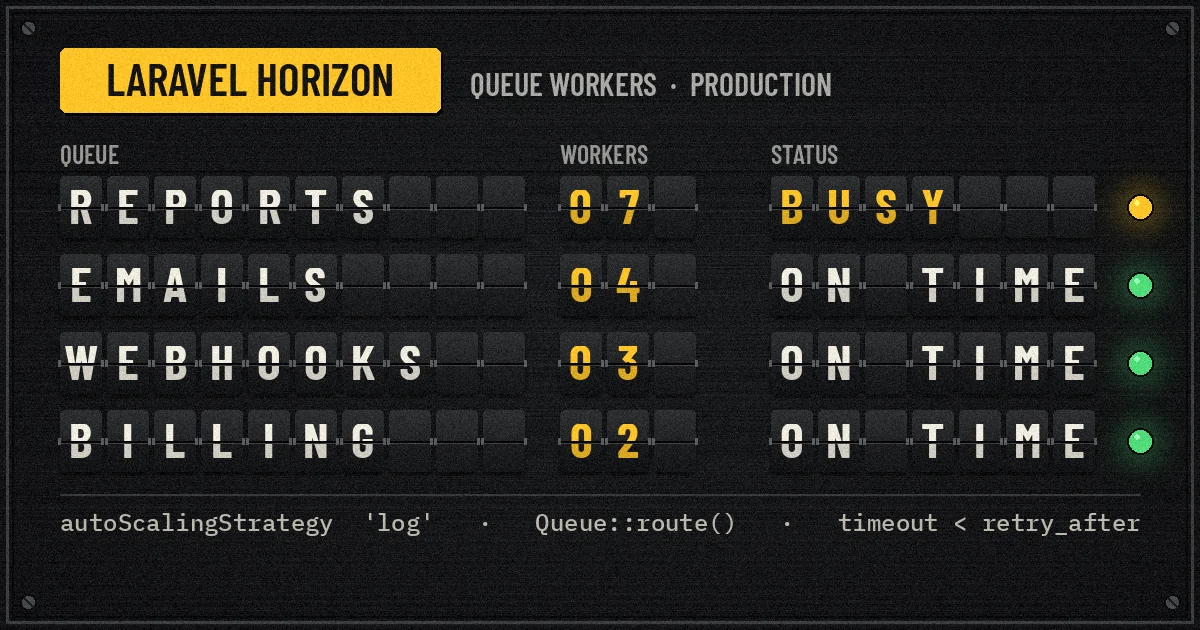
Horizon looks finished the moment the dashboard turns green. Then the first month-end report run lands 20,000 jobs on one queue, password-reset emails sit behind it for six minutes, and a deploy kills a half-written invoice export because Supervisor gave up waiting. None of that is a Horizon bug. It is configuration that was fine for local development and never revisited.
This guide covers running Laravel Horizon in production on Laravel 13 and Horizon 5.x as they stand in November 2026: how to split supervisors, which auto-scaling strategy to pick (including the log strategy added in September), how Queue::route() and Queue::forward() change queue topology, the timeout order that prevents double processing, and the deploy and monitoring steps that keep workers healthy.
What Horizon manages, and what it does not
Horizon is a dashboard and a code-driven configuration layer for Laravel's Redis queue. Instead of starting queue:work processes by hand, you describe supervisors in config/horizon.php. Each supervisor owns a pool of worker processes for one or more queues and can rebalance those processes as load changes. One php artisan horizon command starts every supervisor for the current environment.
Horizon does not make jobs idempotent, decide what belongs on which queue, or keep itself running. You still need a process monitor, sensible timeouts and jobs that can safely run twice. It also only works with the redis queue driver; if your production queues live on SQS or a database, Horizon is not the tool for those connections.
Design queues around latency, not around features
The most common production problem is one queue doing everything. A queue named after a feature (reports, emails) says what a job does. What matters for scheduling is how long the job may wait before someone notices. A practical starting split for a SaaS or commerce backend:
- critical: work a user or partner is waiting on, such as payment confirmations, inbound webhook processing and password resets. Target wait: seconds.
- default: ordinary background work such as notifications, search index updates and cache warming. Target wait: under a minute.
- bulk: exports, imports, report generation and backfills. These are long, CPU or I/O heavy, and nobody minds if they take ten minutes.
Inbound webhooks deserve special care because the sender times out quickly and retries. Acknowledge fast, queue the work and make the handler idempotent; our guide to SaaS webhook reliability patterns covers the receiving side in detail.
Route jobs centrally with Queue::route()
Before Laravel 13, queue choice was scattered across job constructors, $queue properties and onQueue() calls. Laravel 13, released on 17 March 2026, added queue routing by class: you register default queues and connections in one service provider, and they apply to queued jobs as well as queued listeners and broadcast events. Routes can target a class, a parent class, an interface or a trait.
// app/Providers/AppServiceProvider.php
use App\Contracts\CriticalJob;
use App\Contracts\BulkJob;
use Illuminate\Contracts\Broadcasting\ShouldBroadcast;
use Illuminate\Support\Facades\Queue;

public function boot(): void
{
    Queue::route(CriticalJob::class, connection: 'redis', queue: 'critical');
    Queue::route(BulkJob::class, connection: 'redis', queue: 'bulk');
    Queue::route(ShouldBroadcast::class, queue: 'default');
}
A job that implements the empty CriticalJob marker interface now lands on critical wherever it is dispatched from. An explicit ->onQueue() at the dispatch site still wins, so you can fast-track an individual dispatch without changing the rule. Since June 2026 the queue and connection can also be enums, which avoids typos in queue names.
Queue::forward() for migrations between queues
Laravel 13.26 (August 2026) added Queue::forward(), which rewrites a queue name, a connection or both at dispatch time, without touching job classes:
Queue::forward('reports', 'bulk');                 // rename on the same connection
Queue::forward('exports', connection: 'redis-heavy'); // move to a bigger Redis instance
This is useful when you consolidate legacy queue names into the latency tiers above, or move one noisy queue to its own Redis instance. Forwarding only affects jobs dispatched after the change. Jobs already waiting on the old queue stay there, so keep a worker on the old name until it drains, then remove it. Running workers on both names indefinitely invites confusion about where a job went.
Split supervisors by workload
A single supervisor with balance => 'auto' does not enforce priority between its queues. The Horizon documentation is explicit: the order of queues in a supervisor makes no difference to auto balancing. If critical must never starve behind bulk, give them separate supervisors with separate process budgets.
// config/horizon.php
'defaults' => [
    'supervisor-fast' => [
        'connection' => 'redis',
        'queue' => ['critical', 'default'],
        'balance' => 'auto',
        'autoScalingStrategy' => 'log',
        'minProcesses' => 1,
        'maxProcesses' => 12,
        'balanceMaxShift' => 2,
        'balanceCooldown' => 3,
        'tries' => 3,
        'timeout' => 60,
        'memory' => 128,
        'maxJobs' => 1000,
        'maxTime' => 3600,
    ],
    'supervisor-bulk' => [
        'connection' => 'redis',
        'queue' => ['bulk'],
        'balance' => 'simple',
        'maxProcesses' => 2,
        'tries' => 2,
        'timeout' => 900,
        'memory' => 512,
        'nice' => 10,
    ],
],

'environments' => [
    'production' => [
        'supervisor-fast' => ['maxProcesses' => 12],
        'supervisor-bulk' => ['maxProcesses' => 2],
    ],
    'local' => [
        'supervisor-fast' => ['maxProcesses' => 3],
        'supervisor-bulk' => ['maxProcesses' => 1],
    ],
],
A few choices in that file are worth explaining:
- The bulk supervisor is capped at two processes. The documentation recommends a dedicated queue with a low
maxProcessesfor resource-heavy jobs, so they cannot take over the machine.nice => 10lowers their CPU scheduling priority as well. - Different timeouts per supervisor. A 15-minute export and a 2-second webhook handler should not share a timeout. Splitting supervisors lets each have a realistic limit.
- Worker recycling.
memory,maxJobsandmaxTimerestart workers periodically, which guards against memory leaks in long-running PHP processes. Horizon's defaults are 128 MB memory and no job or time limit. triesis set deliberately. If neither the supervisor nor the job sets it, Horizon allows a single attempt. Middleware such asWithoutOverlappingandRateLimitedconsume attempts when they release a job, so jobs using them need a higher value.
Choosing an auto-scaling strategy: time, size or log
With balance => 'auto', Horizon periodically divides a supervisor's maxProcesses between its queues. The autoScalingStrategy option decides how that share is calculated:
time(the default) weights each queue by the estimated time to clear it: waiting jobs multiplied by the average runtime Horizon has recorded.sizeweights by the number of waiting jobs.log, added in Horizon v5.50.0 on 15 September 2026, weights by the logarithm of waiting jobs, so one very large queue cannot take a disproportionate share.
To see the difference concretely, we ported the allocation formula from Horizon's AutoScaler class to a short Python script and fed it one burst: 20,000 report jobs averaging 400 ms, 300 email jobs at 150 ms and 40 webhook jobs at 80 ms, all in one supervisor with maxProcesses 12 and minProcesses 1.
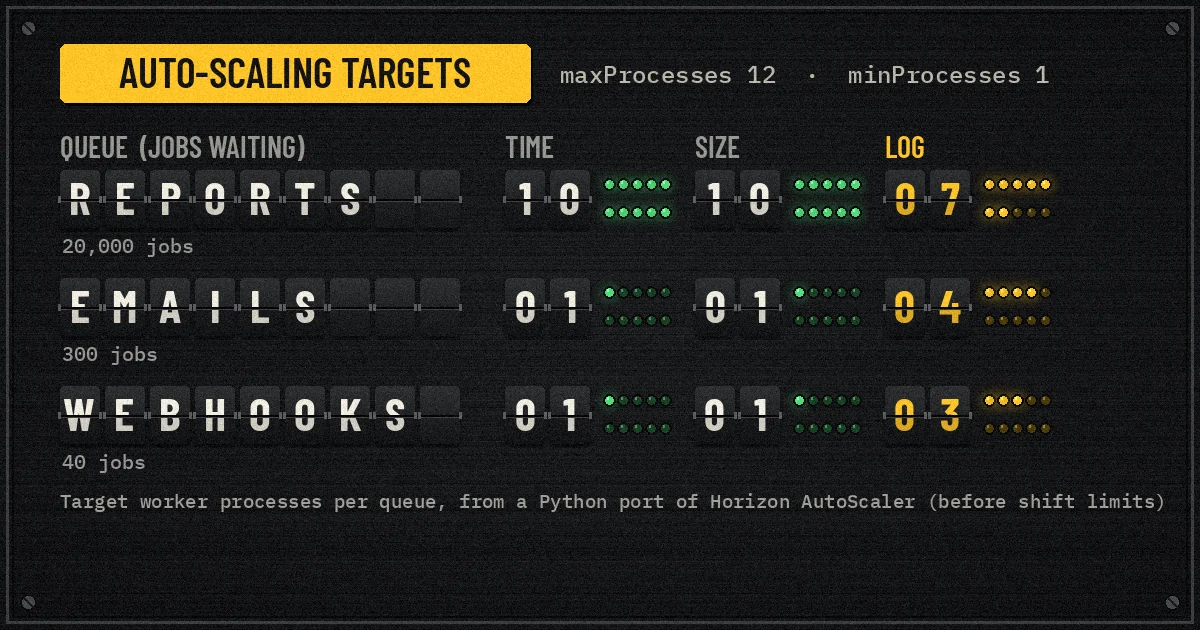
Under time and size, the report queue's target is the per-queue ceiling of 10 (12 processes minus one reserved for each other queue), and emails and webhooks keep their single minimum worker. Under log, the targets become 7, 4 and 3. Those add up to 14, so Horizon's 12-process ceiling still applies, but the small queues get several workers each while reports keep the largest share.
The trade-off is throughput for the big queue. If report jobs are the most valuable work in that supervisor, log slows them down. If the small queues are latency-sensitive, it protects them. That is why our example uses log only in the fast supervisor and isolates bulk work completely. Treat this as an illustration of the formula, not a benchmark: real allocation also depends on balanceMaxShift, balanceCooldown and how many processes are already running.
When to use simple or false instead
balance => 'simple' splits processes evenly between the supervisor's queues and is predictable for a single-queue supervisor like supervisor-bulk. balance => false processes queues strictly in the order listed, like the default Laravel worker, while still scaling the total process count between minProcesses and maxProcesses when jobs pile up. Use it when you need strict priority inside one supervisor and accept that lower queues can wait.
Get the timeout order right
Double-processed jobs in production usually trace back to four numbers that were set independently. They must increase in this order:
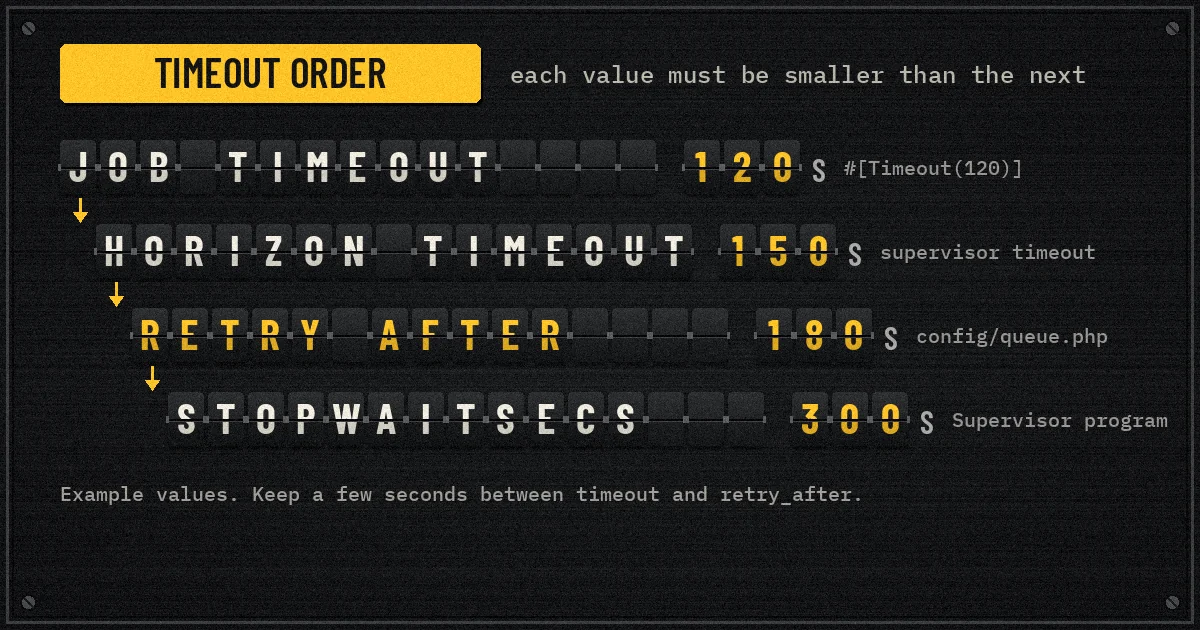
- Job timeout. Set per job with Laravel 13's
#[Timeout(120)]attribute (the PCNTL extension is required for timeouts to work). - Horizon supervisor
timeout. The documentation says it must be greater than any job-level timeout, because during scale-down underautobalancing Horizon treats busy workers as hanging and force-kills them after this value. retry_afteron the Redis connection inconfig/queue.php. If a job is still reserved after this many seconds, Redis makes it available again. The queue documentation says the worker timeout should be at least several seconds shorter, otherwise the job may run twice.- Supervisor's
stopwaitsecs, which must exceed your longest-running job so a deploy or restart does not kill it mid-flight.
Because retry_after is per connection, one connection cannot serve both 2-second webhooks and 15-minute exports well. Define a second Redis queue connection (for example redis-long with a larger retry_after), point supervisor-bulk at it and route bulk jobs there with Queue::route().
Also remember that PHP timeouts do not interrupt every blocking call cleanly. Set connect and request timeouts on HTTP clients and database calls inside the job as well.
Make the job itself tolerate retries
use Illuminate\Queue\Attributes\Backoff;
use Illuminate\Queue\Attributes\FailOnTimeout;
use Illuminate\Queue\Attributes\Timeout;
use Illuminate\Queue\Attributes\Tries;
use Illuminate\Queue\Middleware\WithoutOverlapping;

#[Tries(5)]
#[Backoff([10, 30, 60])]
#[Timeout(120)]
#[FailOnTimeout]
class SyncOrderToErp implements ShouldQueue, CriticalJob
{
    use Queueable;

    public function __construct(public Order $order) {}

    public function middleware(): array
    {
        return [(new WithoutOverlapping($this->order->id))->expireAfter(180)];
    }

    public function handle(ErpClient $erp): void
    {
        $erp->upsertOrder($this->order); // idempotent by external order ID
    }
}
WithoutOverlapping stops two workers updating the same order at once, and expireAfter releases the lock if a worker dies. #[FailOnTimeout] marks the job failed on timeout instead of retrying a call that will probably hang again. Make the external write idempotent too. If the job also needs to reach the database and a second system together, the transactional outbox pattern is safer than dispatching inside the transaction; at minimum set after_commit => true on the connection so jobs are not dispatched for rows that were rolled back.
Debounce noisy jobs
Laravel 13.6 added #[DebounceFor]: when the same job is dispatched repeatedly inside a window, only the latest dispatch runs. A product edited ten times in a minute then triggers one search index update instead of ten. Debounced jobs must not also implement ShouldBeUnique, and every server must share the same cache store for debounce tracking.
Run Horizon under a process monitor and restart it on deploy
Horizon is a long-running PHP process. In production something must start it at boot and restart it if it exits. On a VM, the documentation's example uses Supervisor:
[program:horizon]
process_name=%(program_name)s
command=php /var/www/app/artisan horizon
autostart=true
autorestart=true
user=deploy
redirect_stderr=true
stdout_logfile=/var/www/app/storage/logs/horizon.log
stopwaitsecs=3600
Set stopwaitsecs above your longest job, which is the fourth step of the timeout order. In your deploy script, run php artisan horizon:terminate after the new code is in place. Horizon finishes in-progress jobs and exits, and Supervisor starts it again on the new release. Without that step, workers keep running old code until something else restarts them.
In containers, run Horizon as its own process or service with the same graceful-stop window, and remember that each Horizon instance starts its own supervisors, so running it on two servers doubles the configured process counts. Laravel Cloud can also manage background processes if you would rather not maintain Supervisor yourself.
Redis for queues in production
Horizon stores its own metadata in Redis alongside your queues, so treat that Redis as production infrastructure:
- Separate it from cache. Use a different Redis database, or better a separate instance, for queues. An eviction policy suited to a cache can silently delete queued jobs. Our article on Redis caching for SaaS APIs covers the cache side.
- Leave the
horizonconnection name alone. Horizon reserves a Redis connection calledhorizoninternally; do not assign that name to another connection. - Redis Cluster. Horizon v5.46.0 (April 2026) added Redis Cluster support by wrapping its key prefix in a hash tag so all Horizon keys land in one slot. The Horizon page in the Laravel 13 docs still carries an older warning that Cluster is not supported, so test it in staging with your exact Redis service before relying on it.
Monitoring: wait times, failures and metrics
- Long-wait notifications. The
waitsoption sets per-queue thresholds in seconds (60 by default). Route alerts withHorizon::routeMailNotificationsTo(),routeSlackNotificationsTo()orrouteSmsNotificationsTo(). Giveredis:criticala tight threshold such as 30 andredis:bulka loose one, or set it to 0 to disable. - Metrics snapshots. The metrics graphs only fill if you schedule
horizon:snapshotevery five minutes. - Tags. Horizon tags jobs with the Eloquent models they carry, for example
App\Models\Order:1042, so support can find every job that touched an order. Add atags()method for custom tags such as a tenant ID. - Silence routine jobs. Add high-volume, low-value jobs to
silencedso the completed jobs list stays readable. - Retention. By default recent jobs are trimmed after 60 minutes and failed jobs after 10,080 minutes (one week). Export failures to your error tracker if you need them longer.
- Protect the dashboard. Outside the local environment, access is controlled by the
viewHorizongate inHorizonServiceProvider. Restrict it to staff accounts, because job payloads can contain customer data. For sensitive payloads, implementShouldBeEncryptedon the job.
Production checklist
- Queues named by latency tier, with routing defined in one place via
Queue::route(). - Separate supervisors for latency-sensitive and heavy work, each with its own
maxProcesses,timeoutandmemory. - An auto-scaling strategy chosen on purpose:
logwhere small queues must not starve,timewhere total throughput matters most. - Job timeout < Horizon timeout <
retry_after<stopwaitsecs, with a separate connection for long jobs. tries, backoff and idempotent handlers for every job that calls an external system.horizon:terminatein every deploy and a process monitor that restarts Horizon.- Long-wait alerts, scheduled snapshots and a locked-down dashboard.
- Queue Redis isolated from cache Redis.
FAQ
Do I need Horizon, or is queue:work enough?
Plain queue:work processes under Supervisor work well for small, steady workloads. Horizon is worth adding when you have several queues with different priorities, need auto-scaling within a process budget, or want a dashboard for failures, throughput and wait times. It requires the Redis queue driver.
How many maxProcesses should I set?
Start from the server's memory and CPU, not the queue length. Multiply the worker memory limit by maxProcesses across all supervisors and leave headroom for PHP-FPM and the operating system. Increase gradually while watching wait times and CPU.
Why did a job run twice?
Usually because a worker took longer than retry_after, so Redis released the job to another worker while the first was still running. Fix the timeout order, give long jobs their own connection with a larger retry_after, and make the handler idempotent.
Does the order of queues in a supervisor set their priority?
Only when balance is false. With auto, workers are allocated by the scaling strategy and order is ignored. Use separate supervisors when you need a guaranteed minimum for a queue.
Conclusion
Running Laravel Horizon in production is less about Horizon and more about decisions it makes visible: which work is urgent, how much CPU each kind of work may use, and how long a job may run before the system assumes it died. Laravel 13's routing and forwarding APIs, the job attributes and Horizon's new log strategy make those decisions easier to express in one place. Get the supervisor split and timeout order right first; most queue incidents stop there.
If you are scaling a Laravel or PHP application and want a second pair of eyes on queue architecture, Redis or worker capacity, our web application development team works on this kind of backend reliability. Tell us about your setup and we will suggest where to start.