
Django Content Security Policy: Nonces, Reports and Safe Rollout
How to set up Django's built-in Content Security Policy: report-only rollout, a strict nonce-based policy, a violation report endpoint, per-view overrides and the caching mistake that breaks nonces.
A support agent pastes a customer's message into an internal dashboard. The message contains a <script> tag, and one template somewhere renders it with |safe because the field "sometimes has formatting". Django's auto-escaping would have stopped it, but someone turned it off for that one field. Now the script runs with the agent's session.
A Django Content Security Policy is the layer that still helps when that happens. It tells the browser which scripts, styles and other resources a page may load, so an injected script that isn't on the list doesn't run. Since Django 6.0 this is built into the framework: no third-party package, just a middleware, two settings and a template variable.
This guide shows how to switch it on, roll it out in report-only mode first, write a strict nonce-based policy, collect violation reports, and avoid the caching mistake that can either break every script on a page or quietly cancel the protection. Everything here was run on Django 6.1.3 and checked in a real browser. The details of what we did and didn't test are at the end.
What CSP protects against, and what it doesn't
A Content Security Policy is an HTTP response header. The browser reads it and refuses to run or load anything the policy doesn't allow. For most Django apps the part that matters is script-src: if an attacker manages to inject <script>, an onclick="..." attribute or a javascript: link, a good policy stops it from executing.
It is a second line of defence, not a replacement for the first. You still need auto-escaping, careful use of mark_safe and |safe, sanitising of user-supplied HTML, and the rest of the basics in Django's security overview. CSP also does nothing about server-side bugs such as SQL injection or broken access control. If you're doing a wider security review, our article on fixing common web vulnerabilities covers several of those, and most of it applies outside PHP too.
Turning on Django's built-in CSP
You need Django 6.0 or newer, which means Python 3.12 or newer. Django 6.1 added a few CSP improvements covered below, so use 6.1 if you can. Setup has three parts: the middleware, a policy setting and, if you use nonces, a context processor.
# settings.py
from django.utils.csp import CSP

MIDDLEWARE = [
    "django.middleware.security.SecurityMiddleware",
    # ... your other middleware ...
    "django.middleware.csp.ContentSecurityPolicyMiddleware",
]

TEMPLATES = [
    {
        "BACKEND": "django.template.backends.django.DjangoTemplates",
        "APP_DIRS": True,
        "OPTIONS": {
            "context_processors": [
                "django.template.context_processors.request",
                "django.contrib.auth.context_processors.auth",
                "django.contrib.messages.context_processors.messages",
                "django.template.context_processors.csp",
            ],
        },
    },
]
There are two policy settings, and you can use either or both:
SECURE_CSPsends aContent-Security-Policyheader. The browser blocks anything that violates it.SECURE_CSP_REPORT_ONLYsendsContent-Security-Policy-Report-Only. The browser runs everything as normal but reports what would have been blocked.
Both settings are dictionaries that map a directive name to a list of sources. Use the CSP constants for keywords such as 'self' and 'none', because they include the single quotes the header needs. Writing "self" without the inner quotes is a common mistake: the browser reads it as a host name, not the keyword. Django builds the header from the dictionary but does not check that your directives are valid, so a typo in a directive name is silently sent to the browser.
If an empty dictionary is set (the default), no header is sent. The middleware also leaves a header alone if something earlier, such as your view or another middleware, has already set it.
Start in report-only mode
Switching on an enforced policy across an existing site usually breaks something: an analytics snippet, an inline onclick in an old template, a chat widget that loads scripts from three domains. The safe order is to report first and enforce later.
# settings.py: week one, observe only
SECURE_CSP_REPORT_ONLY = {
    "default-src": [CSP.SELF],
    "script-src": [CSP.NONCE, CSP.STRICT_DYNAMIC],
    "object-src": [CSP.NONE],
    "base-uri": [CSP.NONE],
    "report-uri": "/csp-report/",
}
Leave this running in production long enough to cover your real traffic: logged-in and anonymous pages, checkout, the admin, any pages built by other teams. Fix each violation by changing the template, not by loosening the policy. When the reports stop showing anything except noise, copy the policy into SECURE_CSP.
You can also run both settings together. Keep a policy you know works in SECURE_CSP and try a stricter one in SECURE_CSP_REPORT_ONLY. In our lab, when both were set, Django sent both headers with the same nonce, so the same template worked under both.
Collecting violation reports
Django builds the headers but doesn't receive the reports. The CSP reference says so directly: you write the endpoint or use a monitoring service. A small view is enough to start with:
# views.py
import json
import logging

from django.http import HttpResponse
from django.views.decorators.csrf import csrf_exempt
from django.views.decorators.http import require_POST

logger = logging.getLogger("csp")
MAX_REPORT_BYTES = 16 * 1024


@csrf_exempt
@require_POST
def csp_report(request):
    if len(request.body) > MAX_REPORT_BYTES:
        return HttpResponse(status=413)
    try:
        payload = json.loads(request.body)
    except ValueError:
        return HttpResponse(status=400)

    # report-uri sends {"csp-report": {...}};
    # report-to sends a list of {"type": "csp-violation", "body": {...}}.
    if isinstance(payload, dict) and "csp-report" in payload:
        reports = [payload["csp-report"]]
    elif isinstance(payload, list):
        reports = [r.get("body", {}) for r in payload if r.get("type") == "csp-violation"]
    else:
        reports = []

    for r in reports:
        logger.warning(
            "CSP violation: directive=%s blocked=%s page=%s",
            r.get("effective-directive") or r.get("effectiveDirective"),
            r.get("blocked-uri") or r.get("blockedURL"),
            r.get("document-uri") or r.get("documentURL"),
        )
    return HttpResponse(status=204)
A few points about this endpoint:
- It has to be CSRF-exempt. Browsers send reports without your CSRF token.
- Treat reports as untrusted input. Anyone can POST to this URL. Cap the size, log only the fields you need, and escape them if you ever show them in a dashboard. Add rate limiting in front of it if you get heavy traffic.
- Expect noise. Browser extensions inject scripts into pages, and those injections show up as violations. Group reports by directive and blocked URL before you act on them.
MDN marks report-uri as deprecated in favour of report-to, but also recommends sending both until report-to is supported everywhere. report-to refers to a named endpoint that you declare in a separate Reporting-Endpoints header, which Django's CSP middleware does not set for you. The view above accepts both formats. In our browser test, Chrome sent report-uri reports to it for a blocked inline script, an inline onclick handler and an external script without a nonce.
A strict, nonce-based policy
The old way to write a CSP was a list of trusted domains: your own site, your CDN, Google Analytics and so on. Those lists tend to grow until they include a domain that hosts something an attacker can use, such as a JSONP endpoint or an old library. Google's strict CSP guide recommends nonces instead, and Django's implementation is built around them.
A nonce is a random value generated for each response. Django puts it in the header as 'nonce-...' and you put the same value on each <script> tag you trust. An injected script doesn't know the value, so it doesn't run.
# settings.py: the policy we enforced in the lab
SECURE_CSP = {
    "default-src": [CSP.SELF],
    "script-src": [CSP.NONCE, CSP.STRICT_DYNAMIC],
    "style-src": [CSP.SELF, CSP.NONCE],
    "img-src": [CSP.SELF, "data:", "https:"],
    "object-src": [CSP.NONE],
    "base-uri": [CSP.NONE],
    "frame-ancestors": [CSP.SELF],
    "form-action": [CSP.SELF],
}
What each part does:
script-srcwithCSP.NONCEallows only scripts that carry this response's nonce.CSP.STRICT_DYNAMIClets those trusted scripts load further scripts, which is how tag managers and payment widgets work. With'strict-dynamic', browsers ignore host lists and'self'inscript-src, so your own external scripts need the nonce too.object-src 'none'blocks plugins, andbase-uri 'none'stops an injected<base>tag from redirecting your relative script URLs.frame-ancestorscontrols who can embed your pages in a frame, similar toX-Frame-Options.style-srchere allows your own stylesheets plus nonced inline styles. Many sites start withCSP.UNSAFE_INLINEfor styles because inline styles are everywhere and the risk is lower than with scripts. Tighten it later if you can.
Putting the nonce in templates
The csp context processor adds a csp_nonce variable. Use it directly on inline tags. For external scripts and stylesheets, Django 6.1 added the built-in {% csp_nonce_attr %} tag, which renders the whole nonce="..." attribute and needs no {% load %}:
<link rel="stylesheet" href="{% static 'site.css' %}" {% csp_nonce_attr %}>
<style nonce="{{ csp_nonce }}">body { font-family: system-ui; }</style>

<script src="{% static 'app.js' %}" {% csp_nonce_attr %}></script>
<script nonce="{{ csp_nonce }}">
  document.getElementById("buy").addEventListener("click", () => {
    // ...
  });
</script>

{# Django 6.1: applies the nonce to every asset in a form's Media #}
{% csp_nonce_attr form.media %}
The nonce is generated lazily. If a template never reads csp_nonce, Django leaves the nonce out of the header. We confirmed this in the lab: a page with no nonce in its template got script-src 'strict-dynamic' and nothing else, which means no scripts can run on that page. That's correct behaviour, but it surprises people when a template forgets the nonce on its only script tag.
Django 6.1 also adds a system check, security.W027, that warns if a policy uses CSP.NONCE but the csp context processor isn't configured. We triggered it by removing the processor, and it went away when we added it back. The 6.1 release notes also say the admin and other built-in templates now add nonces to their script, style and link tags. On the admin login page in our lab, seven tags carried the nonce and it matched the header.
What the browser actually did
We loaded a test page in headless Chrome 156 with the strict policy enforced. The page had one example of each common pattern:
- Inline script with the nonce: ran.
- External script with
{% csp_nonce_attr %}: ran, and a script it inserted withdocument.createElementalso ran, because of'strict-dynamic'. - Inline script without the nonce: blocked.
- External script from our own origin without the nonce: blocked, even though it was same-origin.
onclick="..."attribute: blocked when clicked.
With the same policy in report-only mode, all five ran, and the report endpoint received a report for each one the enforced policy would have blocked.
Inline event handlers have to go
Nonces can't be attached to onclick, onchange or href="javascript:...". These are usually the biggest part of the clean-up in an older Django project. Move each handler into a nonced script or a static file:
{# Before: blocked by a strict policy #}
<button onclick="deleteItem({{ item.pk }})">Delete</button>

{# After #}
<button type="button" class="js-delete" data-item-id="{{ item.pk }}">Delete</button>
<script nonce="{{ csp_nonce }}">
  document.querySelectorAll(".js-delete").forEach((btn) => {
    btn.addEventListener("click", () => deleteItem(btn.dataset.itemId));
  });
</script>
CSP.UNSAFE_HASHES exists for handlers you can't change, but it means listing a hash for every handler. Refactoring is usually less work over time.
Different policies for different views
Some pages need more than the site-wide policy, such as a page that embeds a video. Django provides two decorators, csp_override and csp_report_only_override:
from django.utils.csp import CSP
from django.views.decorators.csp import csp_override


@csp_override({
    "default-src": [CSP.SELF],
    "script-src": [CSP.NONCE, CSP.STRICT_DYNAMIC],
    "frame-src": ["https://www.youtube-nocookie.com"],
    "object-src": [CSP.NONE],
    "base-uri": [CSP.NONE],
})
def product_video(request):
    ...


@csp_override({})  # no enforced CSP header for this view
def legacy_widget(request):
    ...
The override replaces the whole policy. It doesn't merge with SECURE_CSP. If you only add frame-src, you lose script-src and everything else, so repeat the parts you still need. An empty dictionary removes the header for that view. The Django docs warn that a weak policy on one page affects the whole origin, because a script running there can reach your other same-origin pages, so use {} rarely.
Caching can break nonces
This is the problem most likely to reach production unnoticed. A nonce has to be different on every response. Full-page caching gives every visitor the same response. Django's documentation says to avoid caching full responses that contain a nonce. Our lab showed what actually happens in the two common caching setups:
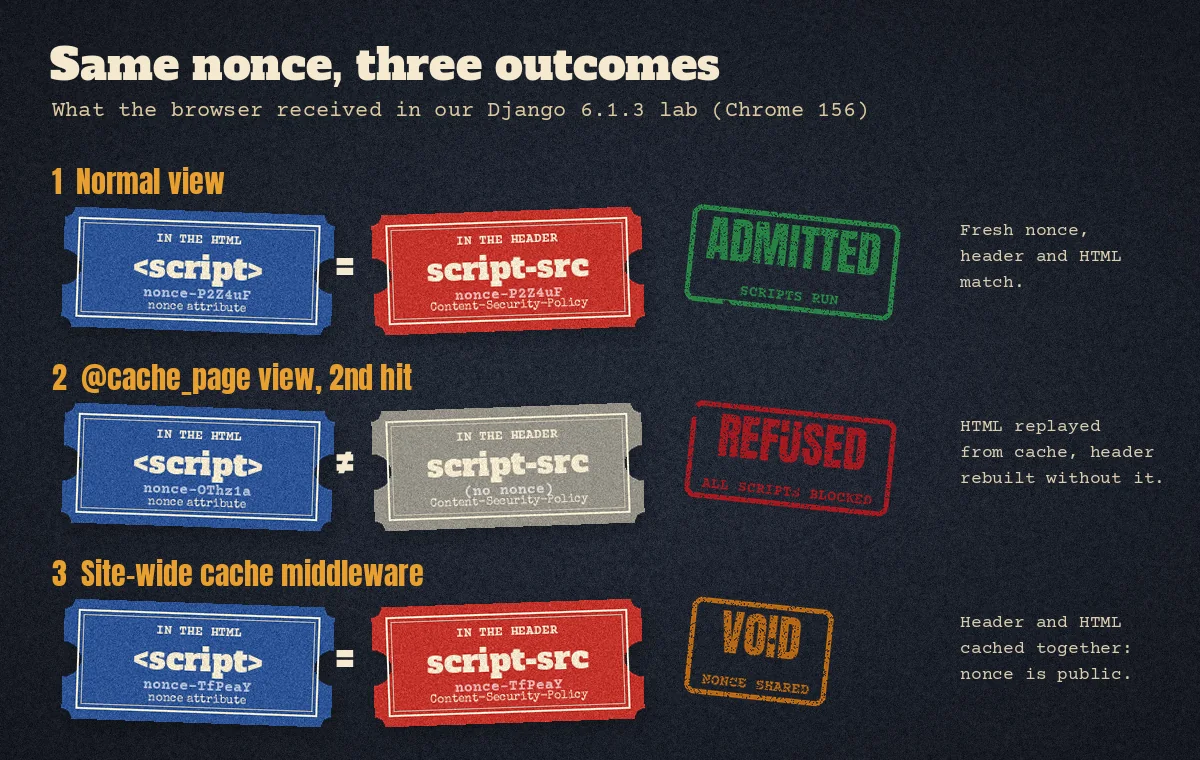
@cache_pageon a view: the first request worked. On the second request, the HTML came from the cache with the old nonce, but the CSP middleware built a new header. The template hadn't been rendered, so the header had no nonce at all. In Chrome, every script on the page was blocked.- Site-wide cache middleware (
UpdateCacheMiddlewarefirst inMIDDLEWARE): the header and HTML were cached together, so two separate visitors received the same nonce. The page worked, but anyone can read that nonce and use it in an injected script, so the protection is gone.
The same applies to a CDN or reverse proxy that caches HTML. You have three options:
- Don't cache full pages that render a nonce. Cache the expensive parts instead: querysets, template fragments without scripts, or API data. Our guide to Redis caching and invalidation covers that approach.
- Give cached pages a policy without nonces. If a marketing page must be fully cached, remove all inline scripts from it and use a
'self'-based policy for that view only. Putcsp_overrideoutsidecache_pageso it applies to cache hits too. - Insert a fresh nonce at the edge. Some CDNs can rewrite the nonce in both the HTML and the header on each request. It works, but it adds another component you have to maintain.
@csp_override({
    "default-src": [CSP.SELF],
    "script-src": [CSP.SELF],
    "style-src": [CSP.SELF],
    "object-src": [CSP.NONE],
    "base-uri": [CSP.NONE],
})
@cache_page(60 * 15)
def pricing(request):
    # template uses only external files, no inline <script> or <style>
    return render(request, "pricing.html")
In the lab, this view returned the same nonce-free policy on the first request and on the cached one. There is an open Django ticket, #37280, proposing that the middleware mark responses with a rendered nonce as Cache-Control: private. It hasn't been merged, and the ticket notes it wouldn't help @cache_page anyway, so plan your caching yourself.
Moving from django-csp
Many projects already use the django-csp package. The built-in version covers the same basics, but it isn't a direct replacement:
CONTENT_SECURITY_POLICY["DIRECTIVES"]becomesSECURE_CSP, and the report-only setting becomesSECURE_CSP_REPORT_ONLY. The middleware isdjango.middleware.csp.ContentSecurityPolicyMiddleware.- Templates that use
{{ request.csp_nonce }}change to{{ csp_nonce }}or{% csp_nonce_attr %}. - django-csp's
csp_updatedecorator merges extra sources into the policy. Django has no merge decorator, onlycsp_override, which replaces the whole policy. Rewrite those views with the full policy. - django-csp's
EXCLUDE_URL_PREFIXEShas no setting in Django. Usecsp_override({})on the views, or a small middleware of your own.
Don't run both middlewares. Each one skips the header if it's already set, so which policy wins depends on middleware order. Remove django-csp in the same deploy. Its migration guide is useful if you're also upgrading from an older django-csp version first.
Test the policy in CI
A policy can be weakened by a later change to settings or a template without anyone noticing. A few tests catch most of that:
import re

from django.test import TestCase


class ContentSecurityPolicyTests(TestCase):
    def test_policy_header_and_nonce_match(self):
        response = self.client.get("/")
        header = response.headers["Content-Security-Policy"]

        self.assertIn("object-src 'none'", header)
        self.assertIn("base-uri 'none'", header)
        script_src = header.split("script-src", 1)[1].split(";", 1)[0]
        self.assertNotIn("'unsafe-inline'", script_src)

        header_nonces = set(re.findall(r"'nonce-([^']+)'", header))
        html_nonces = set(re.findall(r'nonce="([^"]+)"', response.content.decode()))
        self.assertEqual(len(header_nonces), 1)
        self.assertEqual(html_nonces, header_nonces)

    def test_nonce_changes_per_request(self):
        first = self.client.get("/").headers["Content-Security-Policy"]
        second = self.client.get("/").headers["Content-Security-Policy"]
        self.assertNotEqual(first, second)

    def test_templates_have_no_inline_event_handlers(self):
        html = self.client.get("/").content.decode()
        self.assertIsNone(re.search(r"\son[a-z]+\s*=", html))
Point these at your most important pages (home, login, checkout) and run manage.py check --fail-level WARNING in the same pipeline so a security.W027 warning fails the build. The event-handler regex is deliberately simple. It can match ordinary text such as one= inside a <pre> block, so adjust it for your own pages. If you deploy with containers, add these to the same stage as your other release checks. Our Django Docker production guide shows one way to set that up.
Rollout checklist
- Upgrade to Django 6.1 if you can, so you get
csp_nonce_attr, admin nonces and the W027 check. - Add the middleware and the
cspcontext processor. - Deploy a strict policy in
SECURE_CSP_REPORT_ONLYwith a report endpoint. - Add nonces to every script and style tag, and move inline event handlers and
javascript:links into scripts. - Check every cached page and CDN rule for HTML that contains a nonce.
- When reports are down to extension noise, copy the policy to
SECURE_CSPand keep the report-only header for monitoring. - Add CI tests for the header, nonce matching and missing handlers.
How we tested this
We ran everything on Django 6.1.3 with Python 3.13 on Linux: a small project with the settings, views and templates shown above. Using Django's test client, we checked the headers, nonce matching, per-request nonces, lazy nonce omission, both override decorators, both settings together, the W027 check, admin nonces and the two caching setups. We then used headless Chrome 156 through Playwright against runserver to confirm which scripts ran under the enforced policy, that @cache_page blocked every script on the second load, and that report-only mode sent reports to the endpoint. The report view was also tested with sample report-to payloads, oversized bodies, invalid JSON and GET requests. The three CI tests above pass.
We did not test Firefox or Safari, a CDN or reverse-proxy cache, Reporting-Endpoints with report-to in a real browser, Jinja2 templates, or specific third-party widgets such as payment or analytics scripts. Test those against your own stack before you enforce.
CSP is easy to switch on and hard to get right on a large, older codebase full of inline scripts and cached pages. If you want help auditing your Django templates, planning the report-only phase or tightening your app's wider security, talk to our team.