
API Rate Limiting for SaaS: Algorithms, Headers, and Redis Patterns
A practical guide to API rate limiting for SaaS teams: what to limit by, token bucket vs sliding window, an atomic Redis limiter, good 429 responses with Retry-After and RateLimit headers, and common mistakes.

One customer runs a badly written sync script on Monday morning. It loops on a list endpoint with no pause, your API workers fill up, database connections run out, and every other customer sees timeouts. Nobody attacked you; one integration took more than its share and nothing said no.
API rate limiting is the control that says no, early and cheaply, before the expensive work starts. Done well, it protects shared infrastructure, keeps one tenant from degrading the experience for the rest, caps runaway costs from paid third-party calls, and tells well-behaved clients exactly how to slow down. Done badly, it blocks your best customers while a scraper rotates IP addresses and walks past it.
This guide is for teams building or running a SaaS API. It covers what to limit, which algorithm to choose, how to implement a shared limiter with Redis, what a good 429 response looks like in 2026, and the mistakes we see most often when reviewing production APIs.
What API rate limiting actually protects
Rate limiting is usually framed as security, but in a SaaS product it protects four different things, and each one shapes the limits you choose:
- Availability. Workers, database connections, and queues are finite. A limit keeps a burst from one client from starving everyone else.
- Fairness between tenants. In a multi-tenant system, customers share the same pools. Limits per tenant stop a noisy neighbour from becoming everyone's problem.
- Cost. Some endpoints trigger paid work: SMS, email, LLM calls, image processing, or third-party APIs that bill per request. OWASP lists this under API4:2023 Unrestricted Resource Consumption, including the advice to set spending limits with providers.
- Abuse resistance. Login, OTP verification, password reset, and signup endpoints need much tighter limits than read endpoints, because each attempt has security value to an attacker.
Rate limits, quotas, concurrency limits, and load shedding
These terms get mixed up, and the difference matters:
- Rate limit: how many requests (or units of work) a client can make in a short window, such as 20 per second. It smooths traffic.
- Quota: a larger allowance over a long period, such as 1 million calls per month. It is usually tied to a pricing plan.
- Concurrency limit: how many requests a client can have in progress at the same time. It protects against slow, expensive calls more than against fast ones.
- Load shedding: rejecting lower-priority traffic based on the state of the whole system, not on who the caller is.
Stripe's engineering write-up, Scaling your API with rate limiters, is still one of the clearest explanations of this split. It describes a request rate limiter, a concurrent requests limiter, and two load shedders that reserve capacity for critical traffic. Its current rate limit documentation shows the same ideas: global and per-endpoint limits, a separate concurrency limit, and a header naming the limit that was hit.
Choosing a rate limiting algorithm
Five algorithms cover almost every case. They differ in burst behaviour and memory use.

Fixed window counter
Count requests per key in a window such as "this minute", and reset when the window changes. It is simple and cheap: one counter per key. The weakness is the boundary. A client can send a full window's worth at 10:00:59 and another full window at 10:01:00, so it briefly gets double the intended rate.
Sliding window log
Store a timestamp for every request and count the ones inside the last N seconds. It is exact, but memory grows with traffic, so it is best kept for low-volume, high-value limits such as login attempts.
Sliding window counter
Keep the counter for the current and previous fixed windows, and weight the previous one by how much of it still overlaps the sliding window. It removes most of the boundary problem for the cost of two counters. Cloudflare described this approach in How we built rate limiting capable of scaling to millions of domains, and reported that in their analysis only 0.003% of requests were wrongly allowed or limited.
Token bucket
Each key has a bucket with a maximum capacity. Tokens refill at a steady rate, and each request spends one or more tokens. Capacity sets the allowed burst; refill rate sets the sustained rate. This is the best default for most SaaS APIs because real clients are bursty: a dashboard load fires ten calls at once and then goes quiet. It also supports cost-based limits naturally, because an expensive request can spend more tokens.
Leaky bucket
Requests go into a queue that drains at a fixed rate. Output is perfectly smooth, which suits calls to a fragile downstream system, but queued requests add latency and the queue itself needs a limit. Shopify's GraphQL Admin API uses a leaky-bucket model with calculated query costs; we covered how clients should handle it in Shopify GraphQL API rate limits.
Our recommendation: use a token bucket for general per-key and per-tenant limits, a sliding window log for authentication and OTP endpoints, and a concurrency limit for slow endpoints such as exports, reports, and search.
Decide what you are limiting by
The key you count against matters more than the algorithm. Common options, from weakest to strongest:
- IP address. Useful at the edge for unauthenticated traffic, but unreliable on its own. Many users share one IP, and attackers rotate through many.
- API key or access token. The natural key for authenticated APIs.
- Tenant or account. In a SaaS product, a customer may have many keys and users. A tenant-level limit stops someone bypassing the per-key limit by creating ten keys.
- Endpoint or operation. Write and export endpoints usually deserve lower limits than reads.
- Specific resource. Some limits belong on the object, not the caller, for example a cap on updates to a single order per minute.
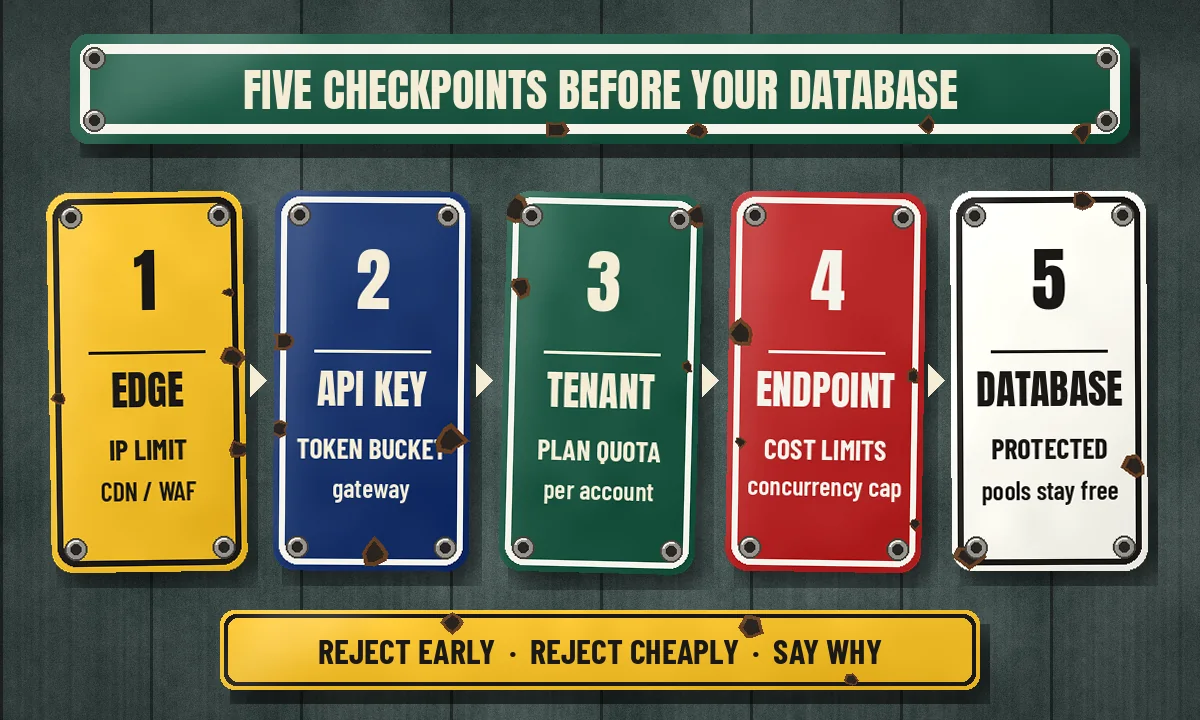
Most production APIs combine several. A request might pass an IP limit at the CDN, then a per-key token bucket, then a per-tenant quota, then a per-endpoint concurrency cap. If you are still designing tenant boundaries, our guide to multi-tenant SaaS architecture and tenant isolation covers where these limits sit in the wider design.
Implementing a distributed token bucket with Redis
An in-memory limiter inside each app instance breaks as soon as you run more than one instance: with four instances, every client effectively gets four times the limit, and the number changes whenever you autoscale. You need shared state. Redis is the usual choice because it is fast, already present in many stacks, and can run a small Lua script atomically.
The important word is atomically. A read-then-write from application code has a race: two requests read the same token count, both see one token left, and both are allowed. Running the whole check as one script avoids that, because Redis executes a script as a single unit.
-- KEYS[1] = bucket key, ARGV[1] = capacity,
-- ARGV[2] = refill tokens per second, ARGV[3] = cost of this request
local capacity = tonumber(ARGV[1])
local rate     = tonumber(ARGV[2])
local cost     = tonumber(ARGV[3])

local t   = redis.call('TIME')
local now = tonumber(t[1]) + tonumber(t[2]) / 1000000

local state  = redis.call('HMGET', KEYS[1], 'tokens', 'ts')
local tokens = tonumber(state[1]) or capacity
local ts     = tonumber(state[2]) or now

tokens = math.min(capacity, tokens + (now - ts) * rate)

local allowed, retry_after = 0, 0
if tokens >= cost then
  tokens = tokens - cost
  allowed = 1
else
  retry_after = math.ceil((cost - tokens) / rate)
end

redis.call('HSET', KEYS[1], 'tokens', tokens, 'ts', now)
redis.call('EXPIRE', KEYS[1], math.ceil(capacity / rate) * 2)

return { allowed, math.floor(tokens), retry_after }
A few details in that script are deliberate:
- Time comes from Redis, not the app server. If each app instance passes its own clock, small clock differences between servers become free tokens or false rejections.
- The key expires. Idle buckets disappear on their own, so memory tracks active clients rather than every key ever seen.
- Cost is a parameter. A simple read can cost 1, a bulk export 10, an LLM-backed endpoint more. One bucket then covers mixed workloads fairly.
We ran this script against an in-process Redis emulator with a capacity of 10 and a refill rate of 5 per second. Twelve immediate requests produced ten allows and two rejections with a one-second retry hint; after a one-second pause, five more requests were allowed and the sixth was rejected, as expected. A second tenant's bucket was unaffected, and a cost-8 request succeeded once and was then rejected with a two-second hint. It is a sanity check, not a load test.
What to do when Redis is unavailable
Decide this before the incident. Failing open (allowing requests when the limiter cannot answer) keeps your API up but removes protection at the worst moment. Failing closed protects the backend but turns a Redis blip into a full outage. A common middle ground is to fail open for normal endpoints with a short timeout on the limiter call, fall back to a conservative per-instance in-memory limit, and fail closed for sensitive endpoints such as login and OTP. Whatever you choose, alert on it. If you already run Redis for caching, keep limiter keys on a separate logical database or instance with an eviction policy that will not silently drop them; our Redis caching guide for SaaS APIs explains why eviction settings matter.
Where to enforce limits
Most teams enforce in more than one place:
- CDN or WAF: best for coarse IP limits and obvious abuse, before traffic reaches your servers. It cannot see tenants or plans.
- API gateway: good for per-key limits and plan quotas if the gateway knows your keys. Keeps limiter logic out of application code.
- Application middleware: the only place that knows the tenant, the operation, and its real cost. Use it for cost-based and business limits.
- Background workers: limit calls out to third-party APIs such as Shopify, Stripe, or an ERP, rather than retrying into a wall.
Put the limiter check before database-heavy work. A limiter that runs after the expensive query only protects your logs.
Designing a good 429 response
The status code for "too many requests" is 429, defined in RFC 6585. A useful response gives the client enough information to recover without guessing.
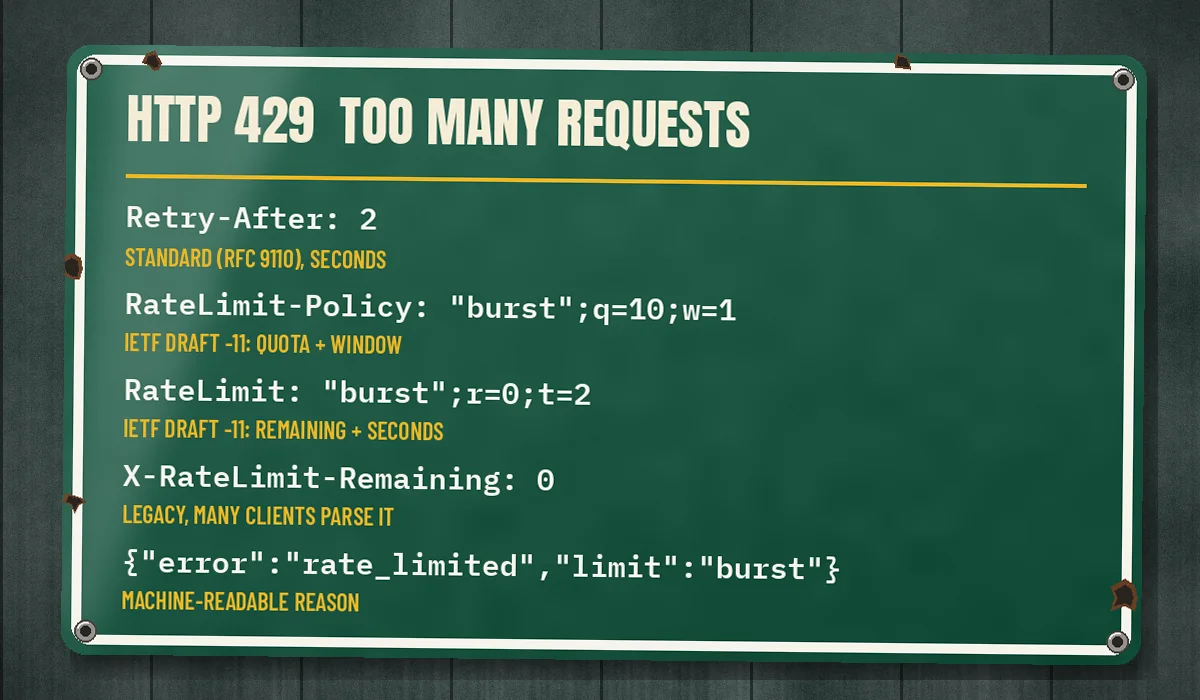
HTTP/1.1 429 Too Many Requests
Content-Type: application/json
Retry-After: 2
RateLimit-Policy: "burst";q=10;w=1, "daily";q=50000;w=86400
RateLimit: "burst";r=0;t=2

{
  "error": "rate_limited",
  "limit": "burst",
  "message": "Too many requests for this API key. Retry after 2 seconds.",
  "docs": "https://example.com/docs/rate-limits"
}Retry-Afteris the established, standard header (RFC 9110). Send it on every 429, as delay seconds.RateLimit-PolicyandRateLimitcome from the IETF HTTPAPI working group's RateLimit header fields draft. As of November 2026 it is still an Internet-Draft (revision 11, May 2026), not an RFC. In this draft,qis the quota,wthe window in seconds,rthe remaining quota, andta number of seconds, not a timestamp. The syntax has changed between revisions, so if you adopt it, document which revision you follow.- Legacy
X-RateLimit-*headers are what many clients already parse. GitHub's REST API, for example, documentsx-ratelimit-limit,x-ratelimit-remaining, andx-ratelimit-resetin its rate limit guide. Keeping them alongside the newer fields avoids breaking existing integrations. - A machine-readable reason in the body (or a header, as Stripe does) tells the client whether to slow down overall, slow down one endpoint, or reduce concurrency.
Send the budget headers on successful responses too, so clients can pace themselves before they hit the limit.
Common API rate limiting mistakes
- Per-instance counters behind a load balancer. The real limit changes every time you scale.
- Limiting only by IP. You block an office behind one NAT while a distributed scraper passes freely.
- One limit for every endpoint. A health check and a CSV export do not cost the same.
- No concurrency limit. Ten slow report requests can do more damage than a thousand fast reads.
- Returning 500 or 403 instead of 429. Clients treat those as bugs or permission errors and give up or retry blindly.
- No
Retry-After. Clients guess "immediately", and synchronized retries become a thundering herd. - Ignoring your own traffic. Retry jobs and webhook redeliveries can flood your API too.
- Undocumented limits enforced on day one. Every 429 becomes a support ticket, and you block customers you did not know about.
Rolling out limits safely
Changing a limit is a product change. Measure per-key, per-tenant, and per-endpoint rates first, looking at your heaviest legitimate clients rather than the average. Then run the limiter in shadow mode, logging what it would have rejected without rejecting anything. Offer high-volume customers a higher plan limit or a bulk endpoint, enforce generous limits first, and track 429s by key, tenant, and endpoint like any other error. A sudden jump usually means an abusive client or a customer whose integration just broke, and both deserve attention.
Rate limiting AI and agent traffic
AI features put a paid model call behind your endpoint, so a request can cost real money and take seconds. A request count alone is the wrong unit; limit on estimated cost or tokens as well, and set spending caps with your model provider. Agents and MCP clients also call APIs in loops. An agent that misreads an error may retry the same tool call many times in a minute. Clear 429s with Retry-After help good agents back off; per-tenant budgets contain the rest.
Recommendations
- Use a Redis-backed token bucket per API key plus a broader quota per tenant.
- Add strict sliding-window limits on login, OTP, password reset, and signup.
- Add concurrency limits on exports, reports, search, and AI-backed endpoints, and weight expensive operations with higher token costs.
- Return
429withRetry-Afterand a clear reason, and send remaining-budget headers on every response. - Decide fail-open versus fail-closed per endpoint, and alert when the limiter is degraded.
FAQ
What is a good default API rate limit?
There is no universal number. Measure what your heaviest legitimate customers send today and set limits comfortably above that, then tighten for sensitive or expensive endpoints. Public examples vary widely: Stripe documents 100 requests per second per account in live mode, while GitHub documents 5,000 requests per hour for authenticated users.
Should I use 429 or 503 when I reject traffic?
Use 429 when a specific client exceeded its own limit. Use 503 when you are shedding load because the whole system is under pressure, regardless of who is calling. Both should carry Retry-After.
Should clients implement rate limiting too?
Yes. A client that calls third-party APIs should pace itself with its own token bucket, retry with exponential backoff and jitter, and honour Retry-After. Stripe recommends exactly this for its own API.
Conclusion
API rate limiting is not one setting. It is a small set of decisions: what you limit by, which algorithm fits each endpoint, where the shared state lives, what happens when that state is unavailable, and how clearly you tell clients what went wrong. Get those right and a runaway script becomes a few logged 429s instead of an incident that every customer notices.
If you are designing a new SaaS API, adding tenant-aware limits to an existing one, or untangling an integration that keeps hitting someone else's limits, CodeSapient can help. We build and harden APIs, Redis-backed infrastructure, and third-party integrations for SaaS and eCommerce teams. See our services or get in touch to talk through your API.