
Keep New and Updated Shopify Products in the Right Shipping Profiles Automatically
New Shopify products often stick on the General delivery profile and break checkout rates. Learn how shipping profile rules, preview, and ongoing evaluation keep catalogs assigned correctly.
Every growing Shopify catalog eventually hits the same operational snag: a new product lands in the store, checkout shows the wrong rate—or no rate at all—and someone has to dig through Shopify shipping profiles to find which delivery profile that variant should live on. The product was tagged correctly. The vendor field was filled in. The weight was set. The catalog data was fine. The shipping assignment was not.
That gap between product data and delivery-profile membership is where catalogs quietly break. Imports, print-on-demand (POD) apps, multi-vendor feeds, and bulk edits all create or update products faster than a human can reassign them. Shopify’s delivery profiles are still the control surface for product-driven shipping configuration for most merchants today, so if a variant sits on the wrong profile, buyers see the wrong options.
This article explains how to keep new and updated products in the correct shipping (delivery) profiles automatically: what goes wrong, how rules map to attributes you already maintain, where native workarounds help or fall short, and how continuous evaluation closes the loop—without confusing shipping-profile assignment with warehouse routing or ZIP-based order routing.
What Shopify shipping (delivery) profiles actually control
In Shopify Admin, shipping profiles (also called delivery profiles in the API) define which products and variants share a set of shipping zones and rates. Variants associated with a profile inherit that profile’s location groups, zones, and rate definitions. Variants that never leave the default General profile use whatever rates you configured there.
That model is product-driven: you group products by how they ship, then configure rates inside each profile. Shopify has also documented a shift toward market-driven shipping—where merchant-owned configuration moves toward Markets—with feature preview and stable APIs called out for mid-2026 and broader merchant rollout later. App and catalog workflows that depend on associating variants with merchant-owned delivery profiles should track that roadmap. For most live stores still on classic delivery profiles, the day-to-day problem remains the same: assign products to shipping profiles correctly and keep them there as the catalog changes.
Shipping profiles answer “which rate card applies to this variant?” They do not assign orders to warehouses by postcode, pick a fulfillment location for you, or replace multi-location inventory routing. Keep those concerns separate when you design automation.
Why new and updated products drift off the right profile
Catalog growth is rarely a single “create product” click. Common sources of drift:
- Imports and CSV uploads — New SKUs appear with tags and vendors populated, but profile membership is not part of the import file.
- POD and customization apps — Generated products often land on General until someone notices at checkout.
- Multi-vendor or dropship feeds — Each supplier may need different rate structures (economy vs. oversized, domestic-only vs. international).
- Bulk edits and metafield/tag cleanups — Attribute changes that should move a product to another profile do not move it by themselves.
- Variant-level differences — Heavy vs. light sizes, hazmat-adjacent options, or “ships separately” requirements often belong on different profiles even under one product.
The operational symptom is familiar: a buyer cannot complete checkout, shipping looks too cheap or too expensive, or support discovers that last week’s import never left General. Spreadsheet audits fix yesterday’s mistakes; they do not keep tomorrow’s SKUs aligned.
Shopify catalog shipping setup: design profiles before you automate
Automation amplifies a clear model. Before writing rules, sketch the profiles your business actually needs:
- General / default — Everyday light goods with your standard rate card.
- Oversized / freight-like — Heavy or bulky items with restricted zones or higher rates.
- Supplier- or program-specific — Profiles that mirror vendor SLAs (for example, a POD partner that only ships domestically).
- Special handling — Items that require different packaging assumptions or shipping requirements flags.
Name profiles after shipping behavior, not marketing campaigns. Then decide which product attributes are the source of truth for membership: vendor, product type, tags, collections, weight bands, SKU prefixes, inventory thresholds, or variant options. Those attributes are what shipping profile rules should evaluate.
Native options: useful, but incomplete for continuous catalogs
Merchants often ask whether Shopify Flow or a one-off Admin GraphQL script can solve this. Partially.
Shopify’s Admin API exposes deliveryProfileUpdate, which can associate variants with a delivery profile via fields such as variantsToAssociate. Community Flow recipes use “Send Admin API request” on product creation, filtered by tag, vendor, or type, to push new variants onto a known profile ID. That pattern works for narrow, well-instrumented cases.
Where it frays:
- Many profiles and many rules — Flow graphs become brittle as soon as you need weight bands, collections, SKU patterns, and conflict resolution.
- Updates, not only creates — A tag change three weeks later should re-evaluate membership; a create-only workflow will not.
- Preview and conflicts — Native mutations apply changes; they do not give ops a review queue of “what would move, and what clashes.”
- Platform evolution — As market-driven shipping lands for merchant-owned configuration, anything hard-coded solely against legacy merchant delivery-profile assumptions needs a maintenance plan.
Use Flow for a single critical path if that is all you need. Plan for a rule engine when the catalog is multi-vendor, multi-weight, or constantly imported.
A rule-based approach to automate Shopify shipping profiles
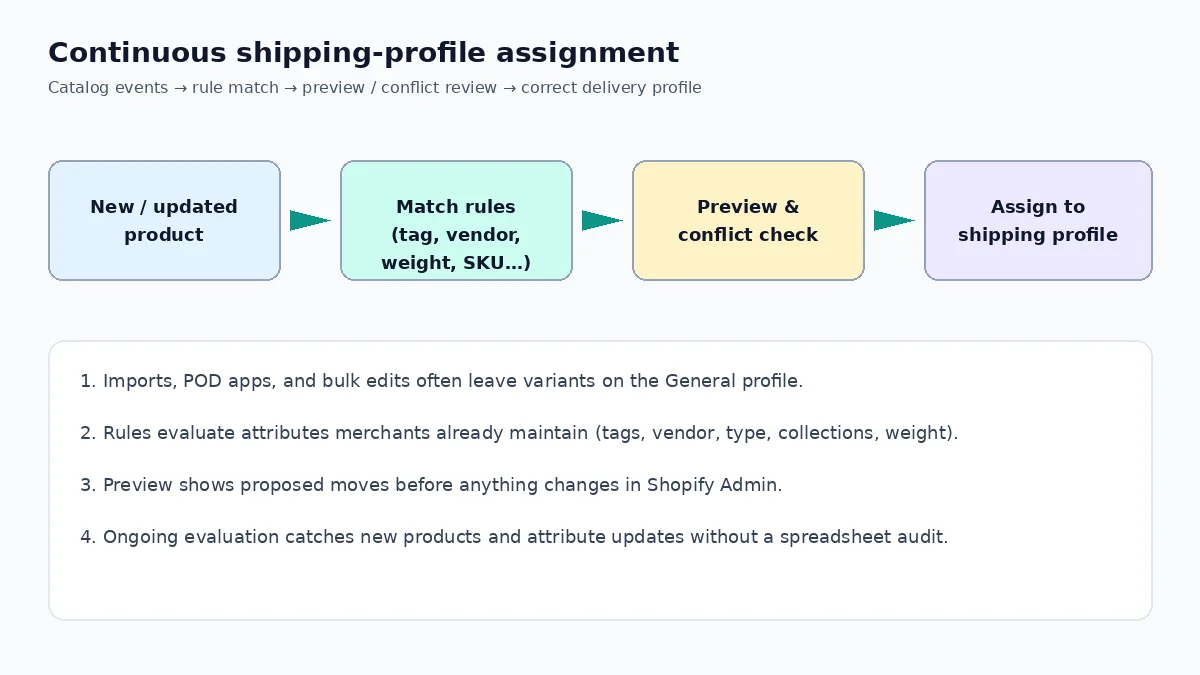
The durable pattern looks like this:
- Define profiles that match real shipping economics.
- Encode membership as rules against attributes you already maintain in the catalog.
- Preview proposed assignments before writing anything to Shopify.
- Resolve conflicts when two rules claim the same variant, or when a product is intentionally excluded.
- Keep evaluating as products are created or updated so the catalog does not rot.
Good rule inputs for Shopify delivery profiles include:
- Product tags and collections (program, channel, or shipping class)
- Vendor and product type / category
- Title or SKU patterns (prefix conventions from ERPs)
- Weight and shipping-requirement flags
- Inventory quantity thresholds (for example, bulky overstock SKUs)
- Variant options (size, material, “ships separately”)
Keep rules deterministic: order them, document precedence, and prefer attributes that purchasing and merchandising already own. If marketing changes a seasonal tag weekly, do not make that tag the only key to a freight profile.
Product shipping profile mistakes that show up in the wild
These failure modes are common enough to treat as a checklist:
- Assuming General is fine — It is only fine until an oversized SKU inherits underpriced rates.
- Profile sprawl — Twenty nearly identical profiles make automation and audits harder than four clear ones.
- Tag-only logic without hygiene — Missing or duplicate tags silently strand products.
- Product-level thinking for variant-level problems — One size ships in an envelope; another needs a box. Assign at the variant when rates differ.
- One-time bulk fix, no ongoing evaluation — The audit spreadsheet is obsolete the next morning.
- Confusing profile assignment with fulfillment routing — Fixing who gets which rate card will not fix which warehouse picks the order. Different systems, different owners.
How ShipAssign fits (accurately)
ShipAssign, built by CodeSapient Labs, is a Shopify app focused on this exact problem: automatically assigning products and variants to the correct shipping profiles using flexible rules. Merchants can build rules from tags, vendor, product type, product category, title, collections, weight, SKU, inventory quantity, shipping requirements, and variant options. The app supports previewing proposed changes before applying them, reviewing conflicts and exclusions, and continuing to evaluate new and updated products so the catalog stays aligned with active rules.
What ShipAssign is not: it is not ZIP/postcode order routing, warehouse assignment, or multi-location fulfillment orchestration. Those are separate Shopify and logistics concerns. ShipAssign’s job is catalog-to-profile membership—so checkout rates match how you intended each SKU to ship.
For product details and pricing tiers on the Shopify App Store, see ShipAssign: Profile Rules. For context on how CodeSapient positions the product, see codesapient.com/shipassign.
Implementation playbook for ops teams
Whether you use an app, Flow, or a custom Admin API integration, the rollout sequence matters:
1. Inventory the current mess
Export variants with their current profile membership. Sample checkout for representative SKUs from each vendor and weight band. Note every “why is this on General?” surprise.
2. Collapse and rename profiles
Merge profiles that share identical zones and rates. Rename survivors after shipping behavior. Delete unused profiles once membership is empty.
3. Pick stable attributes
Prefer vendor + weight + shipping requirements over ephemeral campaign tags. Document the convention in your merchandising SOPs so imports populate the fields rules need.
4. Dry-run before write
Preview assignments for a slice of the catalog. Resolve conflicts explicitly (priority order, exclusions). Only then apply.
5. Turn on continuous evaluation
New POD products, overnight feeds, and attribute edits should re-enter the same rule engine. Without this step, you have a project—not a system.
6. Monitor the boring metrics
Track: variants still on General that match a specific rule, conflict count per week, and support tickets tagged “shipping rate wrong.” Those numbers tell you if the rules still match reality.
When to choose custom Shopify work instead
Rule engines cover most catalog-to-profile cases. You may still need custom development when:
- Membership depends on external ERP fields that never land in Shopify product attributes
- You need deep integration with internal approval workflows or ticket systems
- You are preparing for market-driven shipping migrations and need an integration strategy across Admin APIs and Markets
CodeSapient builds Shopify apps and integrations for merchants who have outgrown one-off scripts. Browse services, see related work on the portfolio, or contact the team with your catalog constraints.
Key takeaways
- Shopify shipping profiles (delivery profiles) decide which rate card a variant uses—not which warehouse fulfills the order.
- New and updated products drift because imports and apps create catalog data without profile membership.
- Native Flow +
deliveryProfileUpdatecan cover narrow create-time cases; continuous, multi-rule catalogs need preview, conflict handling, and ongoing evaluation. - Design profiles around shipping behavior, then automate from stable attributes (vendor, weight, tags, SKU, collections, and related fields).
- ShipAssign automates profile assignment with rules, preview, conflict review, and ongoing evaluation—without claiming fulfillment routing.
If your team spends more time fixing shipping profiles than merchandising products, start with a profile inventory this week, encode the first two rules against your cleanest attributes, and require a preview before any bulk apply. The goal is simple: every new and updated SKU lands on the right delivery profile before the first customer tries to check out.
More from CodeSapient: the blog and the homepage for company context.